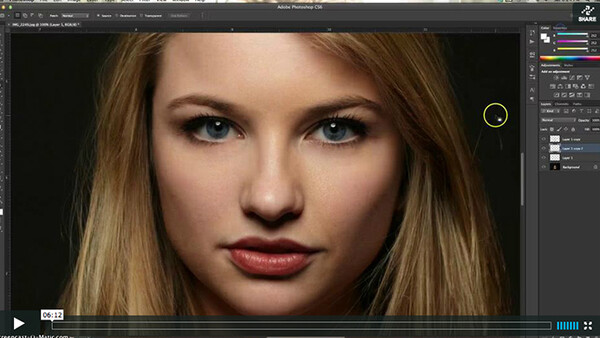
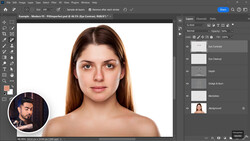
I have had quite a few people ask about my skin smoothing ways. Its really, really simple. I use Imaginomics Portraiture 2 and have figured out how to get it so it smooths the tones instead of all the texture. So if you use Portraiture, follow along and stop killing your textures!
For a quick look at the settings, they go in this order:

Also, make sure you check layer mask, and make sure it creates a new layer for each smoothing process!
Thanks and feel free to check out more on my facebook page or website!
Related Articles

Join the Fstoppers community for free
-
Post comments and join in the discussions
-
Browse the site ad-free
-
Share your work and get featured in the community
-
Compete in the photo contests for fun and prizes
44 Comments
Your phone dinged.
HRMMM KERMIT THE FROG HERE
Stupid comments aside, this is what I come to FS to see! Tips, Tricks, and insight. keep 'em coming
Thank you Steven!
This is Sean Armenta technique
What exactly do you do to retain texture? Your technique, so I full understand, is to make two skin softening layers via Portraiture 2. One for the highlights and one for the shadows? You thanked Lindsay, did she show you this? I was hoping to see somthing that retains all texture like a frequency separation but with portraiture.
Thomas, this does the same thing as frequency separation. Not quite as well though as its obviously not FS, but it does a pretty close job. No, Lindsay is the girl I shot in the image as I stated in the video.
Please rename to '' Sean Armenta technique'' ;-)
Had not heard of him till you mentioned this. Seems as though they are quite the same. Great minds think alike.
modest, much?
:-)
Jakub,did this sean dude create the software ? if not its not his technique either.this was simply a tutorial on how one could use it..
Beauty Retouch Part 3 - Detail Enhancement: An FS PPT by Sean Armenta
http://www.youtube.com/watch?v=UDwExw1Fr_A
I love Sean's works. He is by far my favorite photographer (Karl Taylor is amazing too) His photos are super clean.
I completely agree with you!
I am a hobby photographer (amateur) but thanks to these two photographers I've managed to learn a lot of good things about photography and processing
Quick Suggestion. When you reference a product, get the name right Imagenomic
Don't worry about it.
Google will still find it for anyone looking for it. And if someone can't find it that way, they probably aren't smart enough to work Photoshop either.
Seriously you guys, grow up - he posted a great retouching video for everyone to enjoy and you rip him off about it ? Go troll elsewhere if youre going to be negative - I dont see any of you providing videos and features like he did. FFS this is where people need to grow up on the internet - this is a creative community yet you bag him out on the sound of his voice? Seriously what are we grade 4's ? Great video dude keep them coming I sure learned something from it!
Firstly, I did not wrote anything negative. I was expecting to learn
something new. Instead I saw a tutorial that already exists by Sean Armenta on FstoppersPPT's channel
"I dont see any of you providing videos and features like he did"
link for you If you like illustrator (My humble tutorial)http://www.youtube.com/watch?feature=player_embedded&v=h9puWXWKeo0
Don't get me wrong. I love Sean and everything that he did for FS... but that was awhile ago. I think Chris is in his right to post his own version here.
And btw... you're still a troll.
Whatever Rebbeca...
Excellent tip. Thank you for that!
Thanks, but why post this on Vimeo and have us pay for the pro account to access HD ? :(
Thanks for the tip. This is actually a real time saver for me. My last portrait shoot had images I retouched using this technique for proofs, and then the images that were purchased got the polished Photoshop treatment. Wonderful tip Chris!
Glad I could help Nicholas!
Good tip, that product is pretty damn cool. I actually use Portraiture for my 'Blur' layer combined with the frequency separation technique, it works pretty well.
"Had not heard of him till you mentioned this. Seems as though they are quite the same. Great minds think alike."What? Not heard of him? He has collaborated with this website. Come on!
Well done FS. Wish I'd known about those Imagineomics tutorials a while ago- would have saved a bit of software money there- been using a combo of various softwares to get what I want. Cheers. Mark
I am guessing you really can't do this layering if you have the Lightroom version of Portraiture 2.
Awesome tutorial Chris!
This sucked. The guy not only ripped off Armenta's tut, but he stumbled all over it. Either be an informative site for serious photographers, or cram in all the junk that you can for hacks. This is probably the worst vid that I've ever seen on your site.
Thanks Phillip! :) I didn't realize that learning a program on your own and then sharing it was ripping people off. I guess exposing pictures properly is ripping the first photographer off too, and using photoshop to edit pictures and using portraiture to edit pictures. I guess everyone rips everyone off. I'll keep that in mind.
Take care!
You ripped off that sarcasm :)
You are so right Chris. There are always going to be comments from the peanut gallery. Ignore them.
Lindsay Adler uses the same exact technique but I never heard anyone saying she ripped off Armenta (whom I actually have never heard of)
My opinion, it's not terrible if someone improve someone else's technique (adding something new, fix something that is wrong original author, etc. ..) Ok is that people who have not seen a tutorial by Sean Armenta see this tutorial, but note that your tutorial inspired by his tutorial.
I think there is some misunderstanding. This is a common technique that anyone who has extensive experience uses. After a while, it is just accepted as the way to do it. I think it is great that you linked to Sean Armenta's video (his fstoppers videos covered a lot of basics about two years ago), but this technique cannot really be credited to him or anyone else. It just is the way things are done.
Cool post, thanks for sharing...
thanks! this helps a lot :)
(why is everyone being an ass?)
I would like to thank Chris Lambeth for making this interesting video, and the commenters for mentioning Sean Armenta who I didn't know. Let's keep a positive attitude :)
thanks Chris.very informative video !
Hadn't seen the layer output function before.. thanks.. BTW - on future tutorials try to keep your mouse movements less eratic.. as a viewer that's where my eyes follow and your mouse just about made me ill ;) Good info though.
I had a bit to much coffee. ;) Glad you enjoyed it!
Amenta's brief spell on Fstoppers produced some of the best videos around and still readily available on youtube under FstoppersPPT. I think it was obvious he wouldn't be sticking around here too long with that kind of talent. Good luck to him, i also believe he is now on the TV panel of Next top model Philippines, as well as a very accomplished professional photographer working out of LA.
One could do a lot worse than absorb his videos if fashion and portraiture is your thing. High end and well edited.
The video is down!
Where are the video? :P