Frequency separation is an amazing technique used to retouch skin. It separates the color from the texture and allows you to work on them separately. In this tutorial, Elena Jasic goes over how she uses frequency separation in her retouching workflow. Elena's retouching work is absolutely gorgeous, so when she did this video on how to do frequency separation I was ecstatic, and right after watching it I knew I wanted to share it, including some other advice she gave me.
You will notice that the brush shape she uses for the texture layer looks like a small diagonal line. I asked her if it was a special brush and she said she just modified the normal round brush to be slanted a little. She said she feels like it helps her more with accurate retouching on the texture layers.
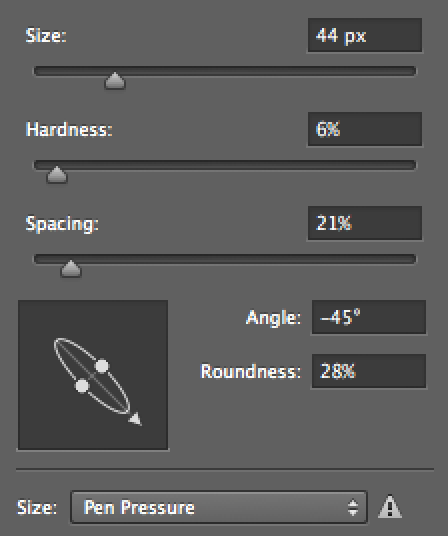
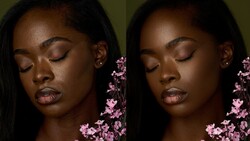
Here is a screen shot she sent me of her brush settings. I can tell you that after watching her tutorial and trying it out with this brush, it does seem to make a significant difference in my retouching workflow as well.


28 Comments
I saw Lindsay Adler teach this on her Creative Live course. It's magical voodoo stuff and blows my mind every time I do it to an image and/or show someone. It's crazy awesome.
yeah this is magic.... unbeliveable.. much more magic then a robot on mars or graphene.... get a life.
Actually I would argue that being able to change color and texture so easily and independently is in fact more magical than putting a robot on Mars. It's easy enough to understand building a robot, taking what you have built, putting that into space, then putting it on a different planet. It's more beyond understanding how to separate texture from color and modify each independently of the other... the result is in fact more "magical", exactly because the end result is harder to comprehend how it might be done.
Putting a robot on Mars is more "amazing" (because of the effort involved) than "magical".
I wrote up a walk through for doing this in GIMP as well using multiple layer frequency decompositions:
http://blog.patdavid.net/2011/12/getting-around-in-gimp-skin-retouching…
This is a nice way to get multiple frequencies all in one go to work on (very flexible).
I was under the impression that apply image settings are different for 16-bit files (blend mode: add, scale=2, offset=0) but her results here look great. Is this an overhyped difference?
You are correct. If you're using an 8 bit file, you do the same process except in the blend mode its what she described in the video. But if you are using a 16 bit file, you do the Add, Scale 2, Offset 0. Same thing, just different images. Lindsay Adler goes a bit more in depth with it on her creative photoshop on creativelive.
I saw that trick for the tilted brush in a Framed episode and I love it.
The only thing I do not like about this technique is that you cannot use a layer mask for the tone or the texture-layers separately. I really like to use the mask tool so that if I make a mistake on either I just have to erase it. With this technique I have to be really sure of what I'm doing. If I made a mistake in fixing the tones (like overdoing it) and I later I decide I need to change -just- the tones, I basically have to redo the tone layer.
Actually you can. Duplicate the high layer, clip it, set blend mode to normal and add a layer mask. Then do your modifications there and mask away. For the low layer there is no magic, just duplicate and add a mask.
Thank you, Conny! :)
Conny, I can duplicate the layer but how do I clip it?
Love this technique but is it just me that does a WTF?!?!? whenever I see tutorials where people open up the brush details panel and use the slider to adjust their brush size??? Seriously.. [[[ or ]]]. So very odd of a workflow where everything else is so streamlined. LOL odd complaint I know but I just had to say something. Everything else, perfection. Thank you.
The brackets aren't so readily available on Non-US keyboards. Just sayin' - :)
Change the shortcut then.
Tobias, you can change the shortcuts in a second. I actually always re-programmed mine to Q (increase brush size) and A (decrease brush size). That way my right hand is holding the stylus and my left hand is always on the left side of the keyboard ready to push any of the hot keys I use.
Again you are such great help, Julia. Thank you. :)
No problem, Tobias :) It's my pleasure.
That way it is more obvious to the viewer what is happening. If they just used the bracket keys on their keyboard, the viewer might miss the step.
Better than using the bracket keys; hold down Control & Option keys, then just slide your brush horizontally to adjust size, or vertically to adjust the hardness of the brush.
Incredible tutorial. Well done and very helpful.
Much simpler nowadays to work with color and luminosity settings on layers to do this stuff. The HF layer however can be used in a similar fashion to high pass for sharpening, but without the ringing effects associated with high pass. You have to be careful 'cause color can shift, and contrast can skyrocket, but it's still an interesting way to sharpen without ringing artifacts.
I noticed the same thing on her Apply Image settings she used the settings for an 8-bit image but her image is 16-bit so I'm a bit confused with that.
I am missing something. In CS5 when I get to the "Apply Image" step- there is not a place to set scale and offset. Please advise!
You won't get those fields until after you select "Add" or "Subtract".
I've watched other FS tutorials where they don't make a bit of sense. You made a nice and easy to follow tutorial. Thank you for sharing.
The brush that is pictured above I can not find in CS5. Any one know if it's available or if I'm overlooking it? I also love this tutorial. I saw another one and there was no way I could follow it. This is much simpler.
I'm so tired of this! 'Frequency separation' Is just very basic Color Math. It's nothing special. It's the subtraction of a blured version of the image. Clever but Overstated.
I sure appreciate this tutorial and the knowledge. I wonder, can anyone direct me to a how-to video of Freq Sep being used on normal people, and not just 19 year old models, people with deep wrinkles and creases under their eyes and elsewhere, people with the money to pay for a good headshot, people over 40? Much obliged - thank you so much!