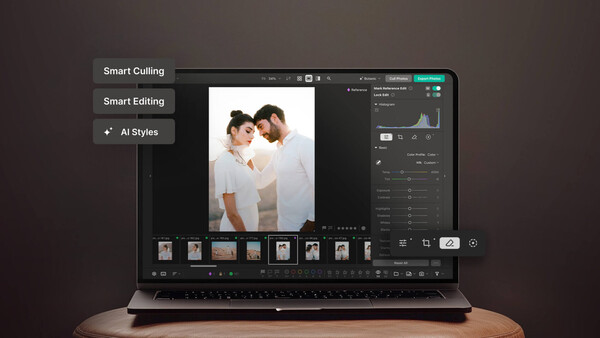
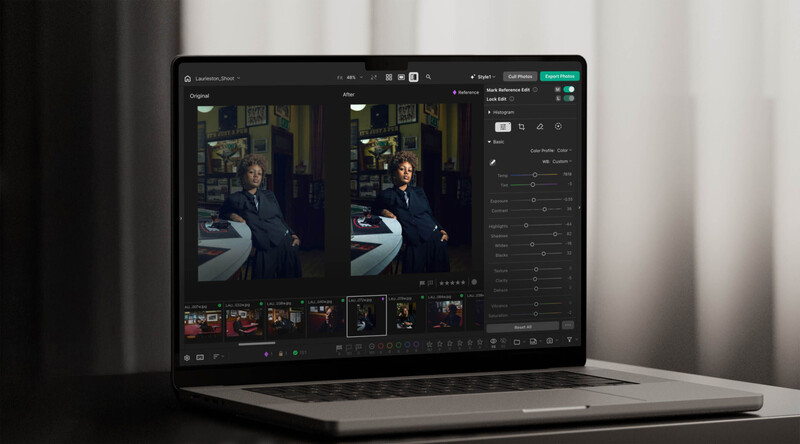
For over a decade, Pixieset has built its name on gallery hosting and then expanded into photography business management with Studio Manager. Now it turns its head to tackling what happens in the gap between the shoot and the delivered gallery. Pixieset Photo Editor is an AI-assisted culling and raw editing app for photographers that brings culling, editing, and gallery delivery into one workflow. Photographers can cull large shoots, batch edit in their own style, make advanced raw adjustments, and publish finished photos directly to a Pixieset gallery.
Its Studio Manager already solved much of the admin side of running a photography business, from booking sessions and sending contracts to collecting payments, alongside hosting client galleries. The process of editing, from importing raw files to culling thousands of frames to applying a consistent style across a gallery, previously happened outside of Pixieset, for example, in Lightroom or a similar dedicated editor. Photo Editor closes that gap, letting photographers move from upload to bulk culling to editing to publishing without leaving the platform or exporting and reimporting between apps.
Having tested Photo Editor myself, I found that bringing those stages together is one of its more useful and streamlined additions.
What Is AI-Assisted Culling in Pixieset Photo Editor?
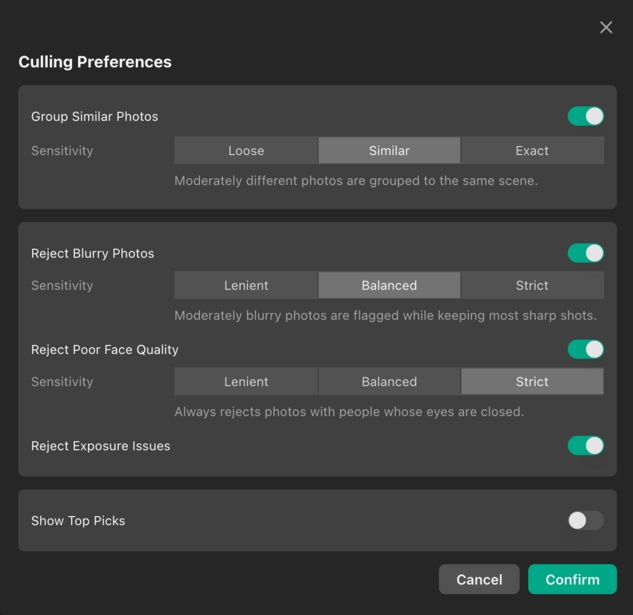
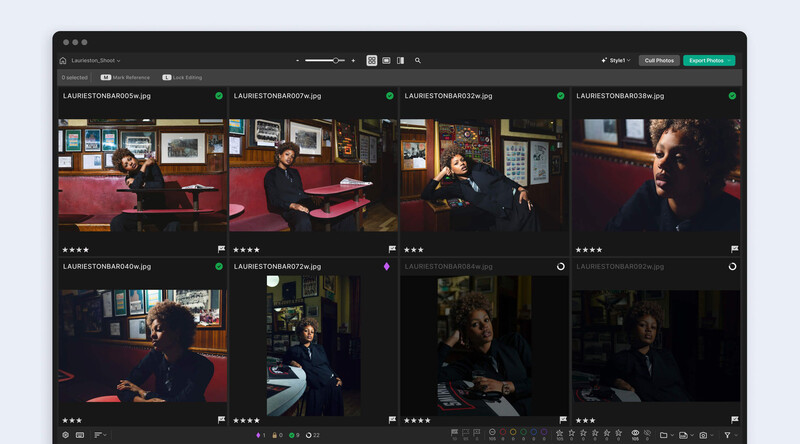
Pixieset Photo Editor uses AI-assisted culling to handle the initial sorting on a large shoot, helping photographers identify their strongest images, skip the rejects, and reduce the time spent culling through thousands of photos.
While bulk culling streamlines a workflow that's traditionally one of the more tedious parts of the job, it isn't built to replace a trained eye. Abstract and documentary work in particular rely on a kind of judgment that a sorting algorithm isn't designed to catch — the image that "shouldn't" work on paper but tells the story anyway. In practice, Pixieset Photo Editor blends the two to create a stronger workflow. First, bulk culling handles the initial pass on a large shoot, filtering photos based on blurriness, closed eyes, composition, and other criteria. Then, you go back in manually where the story matters more than the technical checklist and make your final selection. Overall, it can help cut back the time spent on culling, but reviewing the final list and deciding which photos make the cut is still on you, as it should be.
I found the customization of preferences during culling in Pixieset Photo Editor helpful, with the ability to guide the filtering process to be as strict or flexible as needed. This allowed me to prioritize elements such as ensuring the final selected images were sharp, with little repetition in posing and facial expression.
How Does Pixieset Photo Editor Learn Your Editing Style?
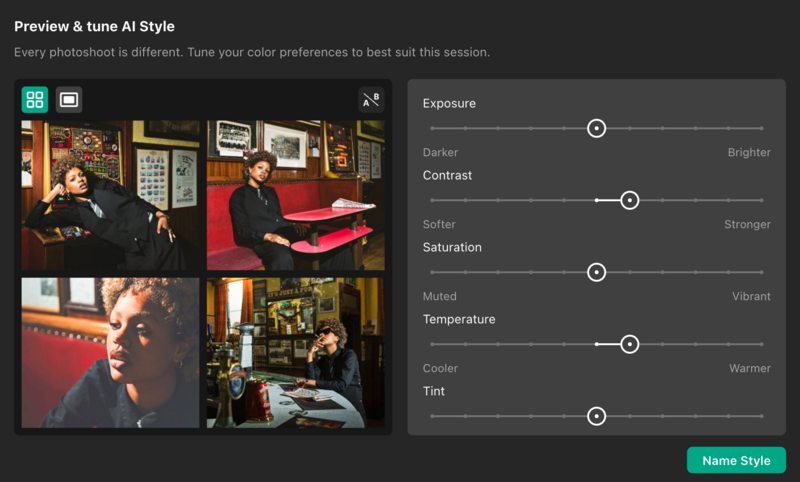
Photo Editor can learn from the galleries you've previously edited and delivered through Pixieset to create Personal AI Styles based on your existing editing signature. These styles give you a strong starting point for batch editing new shoots, helping you achieve your desired look faster.
Where Pixieset’s Photo Editor stands apart from simple one-click AI editing tools is in how it builds its editing styles. Rather than applying a generic preset, it can learn the editing choices already baked into your previous work — from tone, color, and contrast to the specific look you've built your reputation on. Creating a style takes a few minutes: you choose an existing gallery in Pixieset, and Photo Editor analyzes it, with no need to dig through a hard drive and manually import hundreds of reference photos first.
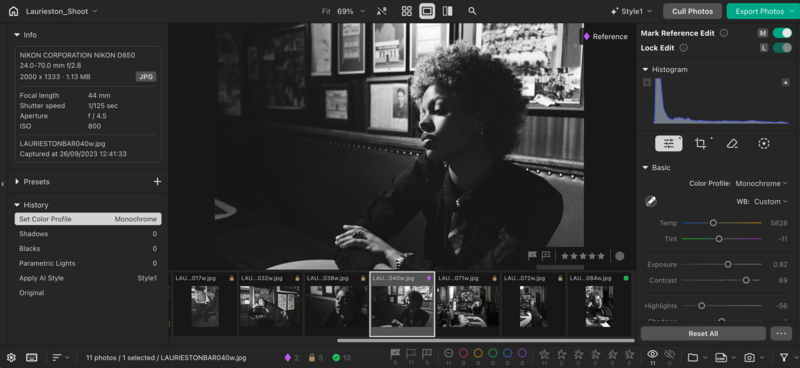
Once a style is applied across a gallery, photographers keep a full raw editing toolkit on top of it: curves, AI masking, straightening and perspective correction, healing and erasing tools, and other advanced adjustments. There's also the ability to mark a photo as a reference so similar images in the gallery pick up the same final touches. This stands as a full editing suite rather than just presets. The AI handles the time-consuming first pass, but every adjustment afterward is still under the photographer's control.
That accuracy grows and improves even more over time. Photo Editor doesn't just apply a style once and stop learning; the more you cull and edit within it, the better it understands your preferences on an ongoing basis. For anyone running high volumes of shoots, that means each new gallery should require slightly less manual correction than the last, rather than the tool staying static after the initial style is built.
Does Pixieset Photo Editor Replace Lightroom?
Pixieset Photo Editor can replace Lightroom for photographers who want to cull, edit, and deliver their photos all in a single app. It includes professional raw editing tools, AI-assisted culling, batch editing, advanced adjustments, and direct delivery to Pixieset Client Gallery.
Like Lightroom, Pixieset Photo Editor gives you full creative control over your images, with tools to adjust exposure, white balance, color, tone curves, cropping, masking, and more. You can edit photos individually or apply edits across an entire set to speed up your workflow.
A key difference is how Pixieset Photo Editor approaches batch editing. It can learn from galleries you've previously edited and delivered through Pixieset to create Personal AI Styles that match your editing signature. You can then apply these styles across new photos, helping you get closer to the look you want while still having full control to fine-tune any individual image.
The other advantage is one that won't be new to anyone already running their business through Pixieset: nothing here requires leaving the platform. Raw and JPEG files can be uploaded directly into Photo Editor, and finished photos are published straight back to a Pixieset gallery for client delivery — no exporting, reimporting, or switching between separate apps. The proofing workflow benefits from this addition too; when a client builds a Favorites List inside their gallery, photographers can copy those filenames into Photo Editor, retouch just the selected images, and publish the final set back for client download.
How Is Pixieset Photo Editor Different From Other Photo Editing Tools?
The biggest difference is that Pixieset Photo Editor combines culling, batch editing, professional raw editing, and gallery publishing, rather than addressing only one part of post-production. Compared with cloud-based AI editing tools, Photo Editor processes the photos and editing styles locally on the photographer's computer during culling and editing, then connects directly to Pixieset Client Gallery for photo delivery.
Rather than being a standalone editing app competing for a slot in an already crowded market, Pixieset Photo Editor is one more piece of a system that handles gallery hosting, print sales, client booking, contracts, payments, and email communication, all from a single dashboard. If you're a photographer already using Pixieset, adding an editing tool that plugs directly into your existing workflow creates a strong case for consolidating your entire business onto one platform.
Is Pixieset Photo Editor Private? How Is Your Data Used by Its AI?
Photo Editor processes everything locally on the photographer's own computer — photos and editing styles aren't uploaded to the cloud during culling and editing, so your work remains private to you. That matters beyond just protecting a signature editing style. Client work often includes images people are understandably cautious about, family and children's photos being a common example, and knowing those files stay local while you're working on them gives both the photographer and the client some reassurance. Once a gallery is finished, publishing moves the images into a password-protected gallery for delivery, but the editing process itself stays desktop-based.
How Much Does Pixieset Photo Editor Cost?
Pixieset Photo Editor is free to use for culling and editing. Anyone with a Pixieset account can get started with 100 export credits included and no limit on how long the culling and editing tools themselves can be used.
For unlimited exports, the upgrade costs $12/month billed annually, or $18/month paid monthly, on top of an existing Pixieset Suite or Client Gallery subscription. This is notably cheaper than most Adobe subscriptions, while adding a tool that's already wired into the rest of a photographer's delivery pipeline rather than sitting apart from it.
Final Thoughts
Photo Editor is the logical next step for Pixieset users. Having already built out the business side of a photographer's workflow with Pixieset galleries, website hosting, and Studio Manager, Photo Editor now addresses the creative side too, without the need to leave the platform to complete that part of the work. This is great for focus and time management, as I personally have found myself taking fewer breaks between each step of the process due to remaining in one system. Testing the bulk culling feature against my own tastes, I agreed with the vast majority of selections, which pleasantly surprised me. I’m sure this will only continue to improve with continued use.
For portrait sessions, weddings, and event photography, this is of particular value. An editing style that's learned from a photographer's own delivered work, rather than a generic preset, is a different pitch from most AI editing tools on the market, which makes this useful for users already in the Pixieset ecosystem but also an enticing draw for new users. It's certainly worth trying out with the free credits included with a free account to see if this could be the right fit for your workflow.
FAQ
1. Can I Use Pixieset Photo Editor for Free?
Yes. Culling and editing are free to use, and every Pixieset account includes 100 export credits. Unlimited exports are available for $12/month billed annually, with no per-image fees.
2. Does Pixieset Photo Editor Support Raw Files?
Yes. Pixieset Photo Editor supports raw files and provides a full editing panel for making manual and advanced adjustments to your photos.
3. Does Pixieset Photo Editor's AI Run Locally?
Yes, Pixieset Photo Editor’s AI culling and editing features run locally on your own device. Your photos are never uploaded to cloud servers for processing, and the computing power comes directly from your computer only. Your photos, your creative process, and your editing style are all private to you.
4. Can Pixieset Photo Editor Learn From My Existing Galleries?
Yes. Pixieset Photo Editor can use previously edited and delivered Pixieset galleries to create Personal AI Styles based on your editing signature, which can then be applied as a starting point when batch editing new photos.
5. Do I Need a Pixieset Suite Subscription to Use Pixieset Photo Editor?
No, Pixieset Photo Editor is a standalone product and is not included in a Pixieset Suite subscription. You can cull and edit photos for free for as long as you'd like. If you want unlimited photo exports, you can upgrade to a flat-rate subscription for $12/month, billed annually.
6. Is Pixieset Photo Editor a Lightroom Alternative?
Yes. Pixieset Photo Editor offers professional raw editing, batch editing, retouching, and advanced adjustments similar to the core tools photographers use Lightroom for. It also adds AI-assisted culling, Personal AI Styles based on existing Pixieset galleries, and direct publishing to Pixieset Client Gallery.
7. How Is Pixieset Photo Editor Different From Lightroom and Other Editing Software?
Pixieset Photo Editor combines AI-assisted culling, personalized batch editing, professional raw editing, local processing, and Pixieset gallery publishing in one workflow. Its main differentiator is the connection between post-production and the wider Pixieset ecosystem rather than treating photo culling and editing as a separate step.






Join the Fstoppers community for free
-
Post comments and join in the discussions
-
Browse the site ad-free
-
Share your work and get featured in the community
-
Compete in the photo contests for fun and prizes
No comments yet