Every photographer eventually meets the same afternoon. A drive stops mounting, a card corrupts, or a laptop walks out of a coffee shop, and the only question that matters is whether a second copy of the work exists somewhere you cannot touch. The cloud is how most of us answer that now, and the market has quietly split into two things that share a name and behave nothing alike. Backup services mirror your machine automatically and get out of the way. Storage services hand you a drive in the sky that you fill by hand, and they copy your deletions up as faithfully as your files. Buy the wrong one and you can pay for years before finding out it was never protecting what you assumed it was.
Three axes decide this. How much data you actually have, because a wedding shooter adding 2 TB a year and a hobbyist with 300 GB of exports should not buy the same product. Whether you want the service to run itself or you want per-folder control over cost. And how fast you need the data back, because the cheapest storage on earth is also the slowest.
Underneath all of it sits the 3-2-1 rule: three copies of every file, on two kinds of media, one offsite. Cloud is the "1." It is not a replacement for the drive on your desk, and nothing here should be your only copy. For every pick we weigh the honest cost per terabyte per year rather than the headline monthly fee, and we say plainly which services we have not used ourselves.
At a Glance
- Best Overall: Backblaze Computer Backup
- Best Unlimited Value: Amazon Photos
- Best for Large Libraries: IDrive Personal
- Best for Automatic NAS Backup: Backblaze B2 Cloud Storage
- Best Budget: Google One
- Best for Sync and Client Handoff: Dropbox Plus
- Best Free Tier: MEGA
- Best for Privacy: Proton Drive
- Best Cold Storage and Archive: Amazon S3 Glacier Deep Archive
- Best Without a Subscription: pCloud Lifetime
Best Overall: Backblaze Computer Backup
- Storage model: unlimited automatic backup of one computer
- Capacity: unlimited, including directly attached external drives
- Version history: 30 days by default, one-year extension free, paid Forever Version History add-on
- Encryption: encrypted in transit and at rest, optional private key
- Platforms: macOS and Windows client, web and mobile restore
- Restore options: web download or a physical hard drive mailed to you
- Best suited to: anyone who wants offsite backup to happen without being managed
- Price: See vendor pricing
The best backup is the one you never think about, and Backblaze Computer Backup has been winning that argument for over a decade. You install a client, it finds your data, and it starts uploading. There is no bucket to configure, no folder tree to babysit, no meter running as your library grows. A photographer with 800 GB and one with 12 TB spread across a desk of USB drives pay the same flat annual fee for one machine, which is the single most important fact about the product.
Two features earn it the top slot. Restores are not limited to a slow web download: Backblaze will ship you a physical hard drive with your data on it, which is the difference between recovering 6 TB in two days and in three weeks. The other is version history. The default 30-day window is short enough to bite a working photographer, but Backblaze lets you extend it to one year at no extra charge, and that setting is buried in your account rather than switched on for you, so turn it on the day you sign up. Beyond a year, Forever Version History is a paid add-on billed per gigabyte on files older than 12 months, which is how you retrieve the untouched raw two edits and three years later. Now the part the marketing does not lead with: this is a mirror of your computer, not a storage locker.
Unplug an external drive, leave it disconnected for more than 30 days, and Backblaze treats the data as deleted and removes it from your backup, which is exactly what happens to archive drives that live in a closet. It also refuses to back up network drives and NAS devices at all, so if your library sits on a Synology or TerraMaster, the B2 pick below is your answer instead. Our NAS guide covers the on-premises half of that setup.
We have not run a formal Fstoppers review of this one, so the case rests on the published terms and a consistent independent record. For anyone working from internal and regularly connected drives who wants one price and no maintenance, check the current pricing of Backblaze Computer Backup at Backblaze.
What We Like
- Genuinely unlimited capacity for one flat annual fee
- Physical hard drive restore for large recoveries
- One-year version history available free, with a paid forever option above that
What Could Be Better
- Deletes backups of external drives left disconnected for 30 days
- Will not back up a NAS or any network drive
- Version history defaults to 30 days, and the free one-year extension is opt-in
Best Unlimited Value: Amazon Photos
- Storage model: photo library storage included with an Amazon Prime membership
- Capacity: unlimited full-resolution photos, plus 5 GB of video
- Version history: none
- Encryption: encrypted in transit and at rest, no zero-knowledge option
- Platforms: macOS, Windows, iOS, Android, web, Fire devices
- Restore options: web and app download only
- Best suited to: Prime members with a large raw archive and little video
- Price: See vendor pricing
A startling number of photographers pay for Prime and have never switched on the best storage deal in the industry. Amazon Photos gives Prime members unlimited full-resolution photo storage, and unlimited means unlimited: a 90 MB medium format raw counts against your quota exactly as much as a phone snapshot, which is to say not at all. Amazon's supported-format list covers the major manufacturer raw types, so a decade of NEF, CR3, and ARW files can go up without hitting a cap. No other mainstream service folds raw files into an unlimited photo allowance, and for most photographers the marginal cost is zero on top of a membership they already hold. Search understands natural language, which makes finding one frame in a 100,000-image archive genuinely fast, and the desktop uploader will walk a folder tree and push the whole thing.
Read the fine print before you lean on it. Video is capped at 5 GB, so a hybrid shooter needs a second service anyway. There is no version history, so an overwritten file is simply overwritten. The benefit is welded to Prime, meaning the day you cancel is the day a countdown starts on your library, and Amazon has changed ancillary Prime perks before.
We have not tested this against a multi-terabyte archive in-house, and the caveat photographers raise most often is that the first upload takes weeks on a residential line. Treat it as a superb second offsite copy rather than your backup layer, and check the current pricing of Amazon Photos at Amazon.
What We Like
- Unlimited full-resolution photo storage, raw files included
- Effectively free with a Prime membership you may already have
- Excellent natural-language search across huge libraries
What Could Be Better
- Only 5 GB of video storage
- No version history at all
- The storage benefit disappears if you drop Prime
Best for Large Libraries: IDrive Personal
- Storage model: quota-based backup, many devices into one account
- Capacity: tiers from 5 TB to 100 TB
- Version history: up to 30 previous versions of every file
- Encryption: 256-bit AES with an optional private key IDrive does not hold
- Platforms: Windows, macOS, Linux, iOS, Android, Synology and QNAP NAS
- Restore options: web, app, or a free IDrive Express physical shipment once a year
- Best suited to: photographers with several machines, a NAS, and terabytes of archive
- Price: See vendor pricing
Once a library outgrows a single computer, cost per terabyte becomes the whole game, and IDrive Personal wins it decisively. Tiers run from 5 TB to 100 TB, and the effective annual cost per terabyte at the larger tiers undercuts every other quota-based service here by a wide margin, including the object storage photographers normally reach for when they want cheap bulk. Only two things beat it: Backblaze's flat unlimited fee, if all your data hangs off one computer, and cold archive storage, if you are willing to wait a day or two for it back. Divide the annual fee by the terabytes before comparing anything.
What you get is more than a bucket. One account backs up every machine you own instead of charging per computer, and it will pull in external drives, mapped drives, and Synology or QNAP boxes, closing the exact hole Backblaze's consumer product leaves open. It keeps up to 30 previous versions of each file, offers a private encryption key the company does not store, and takes point-in-time snapshots, which is the practical defense when ransomware encrypts a library and the damage starts syncing upward.
The friction is real. The desktop client is dense and dated next to Backblaze's, with more settings than most photographers want to reason about. Pricing is heavily discounted in the first year and renews higher, so the number you sign up at is not the number you keep paying. Enable the private key, lose it, and your data is unrecoverable, which IDrive means literally.
This is a terms-and-arithmetic pick rather than one we have lived with. For a photographer with a NAS, two computers, and a decade of raw files, it is the only service here covering all of it on one bill, so check the current pricing of IDrive Personal at IDrive.
What We Like
- Lowest cost per terabyte of any quota-based service here
- One account covers unlimited computers, phones, and NAS devices
- Up to 30 file versions plus point-in-time snapshots
What Could Be Better
- Cluttered, dated desktop client
- First-year pricing is discounted and renews higher
- Lose the private key and the data is gone permanently
Best for Automatic NAS Backup: Backblaze B2 Cloud Storage
- Storage model: pay-as-you-go object storage billed per terabyte per month
- Capacity: none bundled, first 10 GB free
- Version history: configurable per bucket, unlimited versions if you want them
- Encryption: server-side, plus client-side via the app you pair with it
- Platforms: S3-compatible, works with Arq, Synology Hyper Backup, QNAP, rclone
- Restore options: download, or a physical drive shipped by Backblaze
- Best suited to: photographers backing up a NAS or wanting rule-by-rule control
- Price: See vendor pricing
Where the consumer product refuses to touch a NAS, Backblaze B2 Cloud Storage is the destination that NAS was built to talk to. It is plain object storage sold by the terabyte per month with an S3-compatible API, so Synology Hyper Backup, QNAP's backup app, Arq, and rclone all point at it out of the box. B2 automates nothing on its own. The software on your end does, and once that nightly job is scheduled it runs without a person in the loop.
Egress is what makes it interesting. Most object storage charges to get your data out, and pulling a 10 TB library back is where a pleasant monthly bill turns into a real one. Backblaze includes free egress up to three times your average monthly stored volume, which for a photographer doing occasional restores is effectively free retrieval, and there are no minimum retention charges, so deleting a bucket the week after you fill it costs nothing extra. That combination is why B2 became the default cloud target in the NAS community.
It is not a set-and-forget product and does not pretend to be. You configure buckets, application keys, lifecycle rules, and a client, and a misconfigured client announces itself during a restore, which is the worst possible moment to find out. The bill scales linearly, so a 20 TB archive costs roughly twenty times what 1 TB costs, and past a certain size IDrive's flat tiers are simply cheaper.
We have not benchmarked B2 in an Fstoppers review, and the rates and egress terms come from Backblaze's published pricing. If your library lives on a NAS and you want an automated offsite copy of it, check the current pricing of Backblaze B2 Cloud Storage at Backblaze. Also consider pairing it with Arq for encrypted, versioned backups from a desktop instead.
What We Like
- Backs up a NAS, which the consumer Backblaze product will not
- Free egress up to three times your average stored volume
- No minimum retention period or deletion penalties
What Could Be Better
- Needs configuration and a third-party client to be useful
- Costs scale linearly, so very large libraries get expensive
- A misconfigured job fails silently until you need it
Best Budget: Google One
- Storage model: sync and storage pooled across Drive, Gmail, and Photos
- Capacity: 15 GB free, 100 GB on Basic, 2 TB on Google AI Plus, 5 TB on Google AI Pro
- Version history: 30 days in Google Drive
- Encryption: encrypted in transit and at rest, no zero-knowledge option
- Platforms: macOS, Windows, iOS, Android, web
- Restore options: web and app download, Drive for Desktop sync
- Best suited to: photographers with modest libraries who want one cheap drive for everything
- Price: See vendor pricing
Plenty of photographers do not have 10 TB of raw files. They have a few hundred gigabytes of exports, a phone that keeps filling up, and a nagging sense that none of it is backed up, and for that person Google One is the cheapest sensible answer. Storage now rides along with Google's AI tiers: 100 GB on Basic, 2 TB on the AI Plus plan, and 5 TB on AI Pro, which went up from 2 TB on April 1, 2026 with no change to its price. The 2 TB tier covers most enthusiast libraries with headroom, and if you were already paying for AI Pro, you now have more cloud storage than most working photographers rent anywhere.
The reason to pick it over an identically priced rival is the front end. Google Photos is still the best library interface any cloud service ships, with search that will find a specific dog on a specific beach across 60,000 images, and Drive for Desktop mounts your storage as a volume Lightroom can read. What it is not is a backup service. Drive for Desktop syncs, and sync propagates deletion: remove a folder on your laptop and it leaves the cloud too, with 30 days of trash standing between you and permanent loss.
The shared quota also means a decade of email attachments eats into your photo storage, raw support inside Google Photos has always been inconsistent across formats, and there is no zero-knowledge encryption.
No Fstoppers review exists, and the plan structure comes from Google's published pages. For anyone who needs one affordable place for photos, documents, and a phone backup, check the current pricing of Google One at Google.
What We Like
- Inexpensive route to 2 TB, with 5 TB on the AI Pro tier
- Natural-language search that finds specific frames in a huge library
- Drive for Desktop mounts as a volume Lightroom can read
What Could Be Better
- Sync, not backup, so local deletions propagate upward
- Inconsistent raw handling inside Google Photos
- No zero-knowledge encryption
Best for Sync and Client Handoff: Dropbox Plus
- Storage model: sync and share, with a separate Backup feature
- Capacity: 2 TB on Plus, 2 GB on the free Basic tier
- Version history: 30 days of file recovery on Plus
- Encryption: encrypted in transit and at rest, no zero-knowledge on individual plans
- Platforms: macOS, Windows, Linux, iOS, Android, web
- Restore options: web download, selective sync, folder rewind
- Best suited to: photographers moving large files to clients, retouchers, and editors
- Price: See vendor pricing
Dropbox is expensive for what it stores and hard to replace for what it does. Working photographers keep paying for Dropbox Plus not because of the 2 TB, which Google sells for the same money, but because every retoucher, art director, and picture editor they will ever work with already has an account, and a shared link opens without a plugin or a support conversation. Plus allows file transfers up to 50 GB, so a full wedding delivery goes out as one link. The sync engine still works at block level, uploading only the parts of a file that changed rather than the whole thing, which is the difference between resaving a 3 GB layered PSD and re-uploading it. Dropbox Backup now mirrors directories without requiring you to move them into the Dropbox folder, and folder rewind rolls a whole directory back to a point in time.
The weaknesses have not changed in years. It is the priciest per terabyte of the mainstream options, individual plans have no zero-knowledge encryption (that is reserved for the Advanced team tier), and 30-day recovery is short if you only spot a problem at the end of a busy season. This is a collaboration tool with backup features bolted on, and treating it as your only offsite copy is the classic way photographers lose a year of work.
We have not reviewed the current version at Fstoppers, and the plan details come from Dropbox's live pricing page. If your real problem is getting 40 GB of finished work into a client's hands today, check the current pricing of Dropbox Plus at Dropbox. Also consider SmugMug if you need a portfolio site with proofing and print sales attached, though its unlimited storage covers JPEGs and video only and bills raw files separately.
What We Like
- Every client and collaborator already uses it
- Block-level sync uploads only the changed part of a large file
- Dropbox Backup mirrors folders outside the Dropbox directory
What Could Be Better
- Priciest per terabyte of the mainstream options
- No zero-knowledge encryption on individual plans
- Only 30 days of file recovery
Best Free Tier: MEGA
- Storage model: zero-knowledge encrypted sync and storage
- Capacity: 20 GB free, Pro tiers at 3 TB, 10 TB, and 20 TB, with Pro Flexi above that
- Version history: 30 days on Pro I, 60 days and up to 100 versions on Pro II and Pro III
- Encryption: client-side end-to-end encryption on every plan, free included
- Platforms: macOS, Windows, Linux, iOS, Android, web
- Restore options: web and desktop download, versioned file restore
- Best suited to: free encrypted space, or private storage of sensitive commercial work
- Price: See vendor pricing
Free tiers in this category are mostly an insult. Dropbox gives you 2 GB, a single raw burst, and Amazon gives non-Prime users 5 GB. MEGA hands out 20 GB and end-to-end encrypts it, which makes it the only free offer here a photographer can actually use. Twenty gigabytes holds a wedding's selects, a portfolio, or the working files for a shoot you want mirrored while traveling, and encryption happens on your device before upload, so MEGA cannot read any of it.
That zero-knowledge architecture is the whole argument, and it applies to every tier rather than being sold as an extra the way pCloud does it. For anyone shooting under an NDA, handling boudoir sessions, or sitting on an unreleased campaign, the gap between "encrypted at rest by a company that holds the keys" and "encrypted before it leaves your laptop" is not academic. The Pro tiers scale to 20 TB if you want to stay inside that encrypted world, and Pro Flexi goes further for anyone who does.
Two cautions. MEGA's paid pricing is not competitive per terabyte against IDrive's larger tiers, so it is a poor choice for a bulk archive on cost alone. And zero-knowledge means exactly what it says: lose your password and your recovery key and MEGA cannot help you, because the company has no mechanism to decrypt your files. Export the recovery key and keep it somewhere other than the cloud drive it unlocks.
We have not tested MEGA in-house, and the free allowance and encryption model come from its published terms. As a free encrypted staging area, or a private vault beside a cheaper bulk archive, it earns the slot, so check the current pricing of MEGA if you outgrow the free 20 GB.
What We Like
- 20 GB free, the only genuinely useful free tier here
- Client-side end-to-end encryption on every plan
- Pro tiers scale to 20 TB inside the same encrypted system
What Could Be Better
- Paid pricing per terabyte is uncompetitive for bulk archives
- Lose the recovery key and your data is unrecoverable
- Not a true backup client, so it will not mirror a whole machine
Best for Privacy: Proton Drive
- Storage model: end-to-end encrypted cloud storage and sync
- Capacity: 5 GB free, 200 GB on Drive Plus, 500 GB on Proton Unlimited, 2 TB on the two-person Proton Duo
- Encryption: zero-access end-to-end applied to files, filenames, and metadata on-device; apps open-source and independently audited
- Jurisdiction: Switzerland, outside US and UK reach
- Version history: up to 10 years of previous versions on Drive Plus
- Sharing: password-protected links with expiry dates
- Platforms: web, Windows, macOS, iOS, Android
- Best suited to: photographers handling NDA, unreleased, or otherwise sensitive work
- Price: See vendor pricing
Proton Drive builds its entire product around encryption rather than treating it as an add-on. Your files, their names, and their metadata are encrypted on your device before they leave it, the apps are open-source and independently audited, and the company sits in Switzerland, beyond the reach of US and UK data demands and under some of the strictest privacy law anywhere. For a photographer holding a client's unreleased campaign, shooting under an NDA, or simply unwilling to let a storage provider read a single frame, that stack is the entire argument.
Privacy does cost capacity here. The free tier is 5 GB, Drive Plus lifts you to 200 GB, and only Proton Unlimited at 500 GB or the two-person Proton Duo at 2 TB come near a working archive, both of which fold in Proton's mail, VPN, password manager, and calendar whether you need them or not. Drive Plus keeps ten years of file versions, and shared links take passwords and expiry dates, so a gallery you hand off does not live forever. If you are counting terabytes per dollar, look higher up this list. If you want to know that nobody, Proton included, can open your files, check current pricing on Proton Drive.
What We Like
- Zero-access end-to-end encryption covering files, names, and metadata
- Open-source apps that are independently audited
- Swiss jurisdiction, outside US and UK reach
- Up to 10 years of version history on Drive Plus
What Could Be Better
- Only 5 GB free, so real capacity means a paid plan
Best Cold Storage and Archive: Amazon S3 Glacier Deep Archive
- Storage model: cold object storage for data you almost never touch
- Capacity: none bundled, billed per gigabyte stored
- Version history: configurable object versioning
- Encryption: server-side, with client-side available through the tool you use
- Platforms: S3 API, reached through Arq, rclone, Synology, or the AWS console
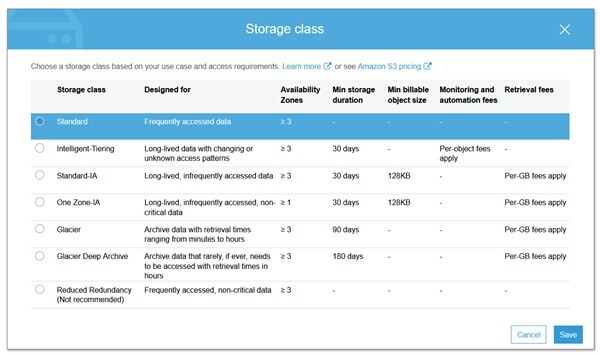
- Restore options: retrieval takes 12 to 48 hours, plus per-gigabyte egress charges
- Best suited to: vaulting finished, delivered work you may never open again
- Price: See vendor pricing
Most of an archive is dead weight, in the best sense. The 2018 weddings, the delivered commercial jobs, the raw files behind images already licensed and paid for: you will almost certainly never open them and you cannot throw them away. Paying consumer storage rates to keep that material online is a permanent tax, and Amazon S3 Glacier Deep Archive is how you stop paying it. It is the cheapest storage class Amazon sells, engineered for data touched less than once a year, and it costs a small fraction per terabyte of anything else here, at eleven nines of designed durability.
You reach it with tools you already run: Arq from a Mac or PC, rclone from the command line, Synology's backup app from a NAS. Set an S3 lifecycle rule and objects age out of ordinary storage into Deep Archive on whatever schedule you pick, 90 days after upload being a sane default, so the vault fills itself while you shoot.
You pay for the price with time and rigidity, and you need all of it before you commit a library. Retrieval takes 12 to 48 hours, so this is not storage you touch mid-job. A 180-day minimum storage duration means data you delete early is billed as though you kept it for six months. Every archived object also carries 40 KB of billable metadata overhead on top of its own size, so upload bundled archives rather than thousands of loose sidecar files. Above all, pulling data out of AWS carries a per-gigabyte egress charge that turns nasty on a multi-terabyte restore, and that line item is what ambushes people who costed Glacier on storage price alone. This is a vault, not a drive.
We have not run this configuration through an Fstoppers review, and the retrieval windows and minimums come from Amazon's published documentation. As the last, cheapest, most permanent copy in a 3-2-1 setup it has no rival, so check the current pricing of Amazon S3 Glacier Deep Archive at AWS and model a full restore first.
What We Like
- By far the lowest storage cost per terabyte in this guide
- Eleven nines of designed durability
- Works with Arq, rclone, and NAS backup apps
What Could Be Better
- Retrieval takes 12 to 48 hours
- Egress charges make a full restore genuinely expensive
- 180-day minimum storage duration, plus 40 KB of billable metadata per object
Best Without a Subscription: pCloud Lifetime
- Storage model: sync and storage, available as a one-time lifetime purchase
- Capacity: lifetime tiers at 500 GB (Premium), 2 TB (Premium Plus), and 10 TB (Ultra)
- Version history: 30 days on standard plans, extendable
- Encryption: AES at rest, with zero-knowledge pCloud Encryption sold separately
- Platforms: macOS, Windows, Linux, iOS, Android, web
- Restore options: web and desktop download, account-wide rewind, trash recovery
- Best suited to: photographers who want to stop renting storage and pay once
- Price: See vendor pricing
Photographers pay for enough subscriptions. pCloud is the established name still willing to sell you storage outright, with lifetime tiers at 500 GB, 2 TB, and 10 TB for a single payment, and the break-even against an equivalent annual plan lands around the three-to-four-year mark. The company is Swiss, which brings its data protection regime along, and it has sold these deals long enough that the going-concern worry, never quite zero, has been tested by time. The product itself is a good virtual drive rather than a backup engine: pCloud Drive mounts as a network volume without consuming local disk, so a 2 TB library stays browsable from a MacBook with a 512 GB SSD.
Weigh two things honestly. Zero-knowledge encryption is not included: pCloud Encryption is a separate purchase stacked on top of the storage, and without it the company holds the keys to your files. And the lifetime plans are capacity-capped, so a shooter adding 2 TB a year will outgrow even the 10 TB tier eventually and be buying again. "Lifetime" also refers to the service's lifetime rather than yours, which is worth reading twice before making a large one-time payment.
We have not tested pCloud in-house, and its plan structure and add-on pricing come from its published pages. For a photographer with a stable library who wants out of monthly billing, it is the only pick here offering an exit, so check the current pricing of pCloud and run the break-even first.
What We Like
- One-time payment instead of a subscription, with a real break-even
- pCloud Drive mounts as a virtual volume without eating local disk
- Account-wide rewind to an earlier state
What Could Be Better
- Zero-knowledge encryption costs extra
- Lifetime capacity is capped, so growing libraries outgrow it
- "Lifetime" means the service's lifetime, not yours
How to Choose Cloud Storage and Backup
Separate the three jobs first, because most bad purchases here come from asking one product to do all of them. Backup is an automatic mirror of your working machine, built to survive a dead drive or a stolen laptop without you lifting a finger. Storage is a drive in the sky you manage by hand, built to hold a library that no longer fits on your desk. Archive is a vault, cheap and slow, holding work you will probably never open again. A photographer with a serious workflow pays for at least two of the three, and that is normal rather than a shopping failure.
Then do the arithmetic nobody wants to do: divide the annual price by the terabytes you actually get, and compare that number instead of monthly fees. It reorders the market immediately. Flat-rate unlimited backup looks expensive at 500 GB and absurdly cheap at 12 TB. A 2 TB consumer sync plan looks reasonable until you set it beside a multi-terabyte backup tier and see you are paying several times as much per unit. Cold archive storage looks close to free, right up until you add the egress charge for pulling the data back.
The spec that matters more than people think is version history. Ransomware and human error do not delete your files, they change them, and a sync service copies that change to the cloud within seconds. Thirty days of retention sounds generous until you find a corrupted batch in February that was fine in December. Thirty stored versions, a snapshot system, or a forever-history option is insurance against the failure that actually happens to people. Ignore upload-speed claims on the marketing pages, incidentally: your home connection is the bottleneck, and what matters instead is whether the service will mail your data back on a physical drive, which Backblaze and IDrive both will.
Finally, respect the 3-2-1 rule rather than looking for a way around it. The cloud is the offsite copy, not the strategy, and any of these services can be lost to a billing error, a policy change, or a mistake you make at 1 a.m. Keep a local drive, keep a second one, and let the cloud be the copy you hope you never need. If your local half of that equation is currently a shoebox of USB drives, our NAS guide and our portable SSD guide cover the hardware that makes the other two copies painless.
What We're Looking For
Our picks weigh the real cost per terabyte per year rather than the advertised monthly fee, the honesty of the storage model (what "unlimited" quietly excludes), version history and ransomware resistance, whether the service reaches a NAS and external drives, who holds the encryption keys, and how fast and how expensively you can get your data back out. Every plan structure, capacity, retention window, and policy detail was verified against the provider's current published pages at the time of writing. On testing, we are being straight with you: none of these services has come through Fstoppers for a formal hands-on review, and we say so in each entry rather than implying a testing history we do not have. Most picks across our buying guides come from gear our writers have used hands-on. Where we have not, as here, we say so.
Frequently Asked Questions
What Is the 3-2-1 Backup Rule?
Keep three copies of every file, on two types of storage, with one copy offsite. In practice that is the drive in your computer, a local backup drive or NAS, and a cloud copy. The rule exists because the failures that destroy photographers are correlated: a surge, a flood, or a burglary takes out everything in one room at once.
Is Cloud Storage the Same as Cloud Backup?
No, and confusing the two is the most common mistake in this category. Backup services like Backblaze and IDrive mirror your machine automatically and retain old versions of files. Storage services like Dropbox and Google Drive sync, so a deletion on your laptop is copied to the cloud within seconds. Sync protects you from a dead drive, not from yourself.
Can I Back Up My Raw Files to Amazon Photos for Free?
Yes, if you have Amazon Prime. Amazon Photos gives Prime members unlimited full-resolution photo storage that includes the major manufacturer raw formats. Video is the catch, limited to 5 GB, and the benefit ends the moment your Prime membership does, so it should never be your only copy.
How Much Cloud Storage Do I Actually Need?
Measure your current library, add a year of shooting at your present rate, and double it. Most enthusiasts land between 1 and 2 TB. A working wedding or commercial photographer shooting 40 MB raw files adds 1 to 3 TB a year, which is where flat-rate unlimited backup stops being a luxury.
Which Cloud Storage Is Cheapest per Terabyte?
For live, accessible storage sold by the terabyte, IDrive's larger tiers undercut everything else here, though Backblaze's flat unlimited fee beats it outright if all your data lives on one computer. For archives you rarely touch, Amazon S3 Glacier Deep Archive is cheaper by an order of magnitude, though the 12-to-48-hour retrieval delay and egress charges mean it is only cheap if you never pull the data back.
Fstoppers may earn a commission from purchases made through links in this article. Our picks are made independently by our editorial team.