
Red lights blinking on my NAS. Drive failure. Double drive failure. I'm on RAID 6, so the data's still there, but my heart rate has increased. My day is reprioritized — time to work on this.
So I did what we all do now — I asked the internet, specifically Google's AI, how to fix it. The advice was tactically good, but it missed the real problem, and a thought stuck with me: the same AI tech I was leaning on for answers is the reason storage just got so expensive.
When storage costs this much, having good discipline with your data management practice beats blind redundancy.
Storage Got Expensive, Fast
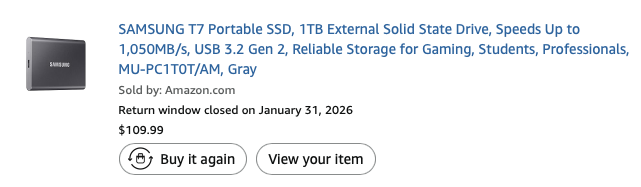
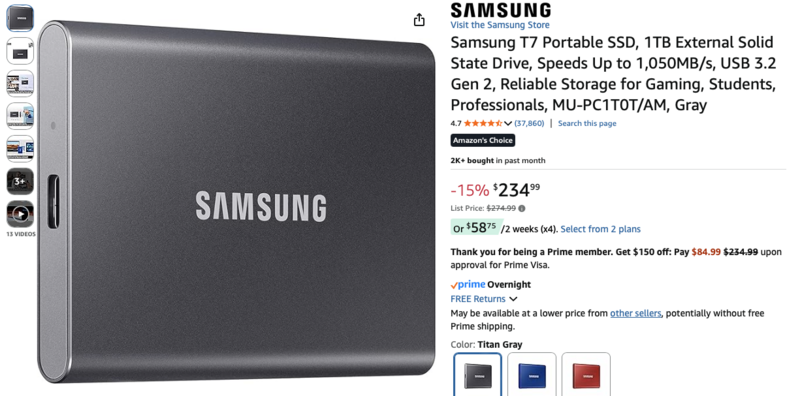
Here's a receipt for an SSD I bought last year ($109). Here's the current price ($235) — more than double! This is crazy!
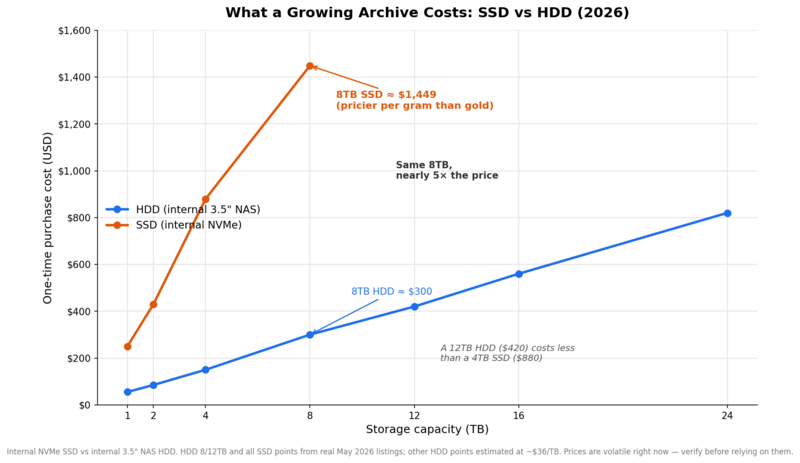
Data management costs are skyrocketing right now. HDD prices have surged roughly 46 to 50% since September 2025, and it's not a cycle we've seen before. AI data centers are essentially buying up the entire global hard drive supply. Western Digital and Seagate have reportedly sold out their entire 2026 production capacity. Prices may not normalize until 2028!
The shelves at Micro Center are practically empty. (I actually think part of that is so you grab a sales attendant who then puts their little sticker on your sale.)
We can't act like this isn't going to affect our businesses — time to act accordingly.
Routine Advice Misses
If you chat with AI, you're going to get recommendations such as 3-2-1 or other storage methods. Many answers are, in my opinion, distant from the real photographer's struggle and psyche.
Allow me to provide some thoughts — things I understand better now that I've been through a near data-loss event. Hopefully it gives perspective you can take back to design and build your own solution, one that fits your process.
Be Ruthless With Your Archive
Do you really need your entire library of old projects from years back? Take the time to grab the best images from each project and pare it down. Your work means nothing if you're dragging the weight of a massive data monster behind you for your entire career.
When I finally cleared my old files after my drives failed, my real archive went from nearly 12 TB to 3 TB. Having 3 TB to manage versus 12 TB dramatically changes the calculus: it gives you more options with your data storage and saves time, resources that can go into making more and better images. Consider which images have portfolio value (the ability to remaster and pull into your portfolio) and which have commercial value (prints, art, licensing).
Be Realistic About 3-2-1
While I appreciate the security of three copies, two locations, one offsite, our data management strategy means nothing if we're spending so much on the security of our data that we have to turn down contracts and pile up costs in the business. The cost of data is something to weigh when managing photography contracts, but it can't control everything we do. Some data loss we have to accept — whether it's theft, drive failure, or something else. Our goal is to make it as minimal as possible without prohibiting our work. Just as we accept risk driving our cars, we have to accept some risk with our data.
Hard Disk Drives Are Scary
When you turn hard drives on, they clunk and make noises. For me, knowing the downside that's possible, these noises are not calming notes of confidence. I've had three hard drives fail during my time as a photographer managing files. I am expecting things to fail!
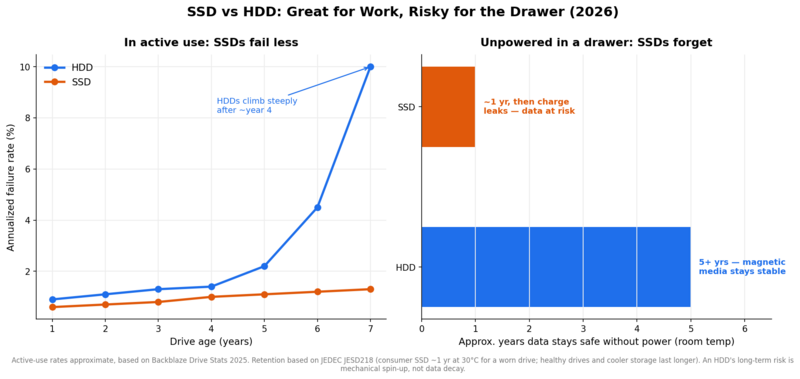
Modern HDDs spin on a fluid dynamic bearing, which uses a layer of fluid to suspend a rotating shaft. In old or hot drives, this fluid can gum up, or a drop can cause it to seize up. Every time we plug and unplug our HDDs, they go through a cold boot, which is the hardest point in an HDD's life. While they are rated for thousands of start/stop cycles, we should understand it's a finite resource, and power cycling a drive is harder on it than leaving it running.
We can spend time creating hard drive RAIDs and redundancy, but ideally we avoid the chaos of a drive failure in the first place. SSDs provide meaningful value in my business. SSDs are great as working drives — quiet, reliable, low failure rate. HDDs are great for archival — but don't rely on an SSD for cold storage longer than a year, as unpowered SSD data can degrade around those time frames.
How It Actually Ended
I spent days moving files off my NAS onto an HDD because I didn't have the time to pare down data or order solutions online — I needed to move it quickly. Once I stabilized my data, I was able to uncover significant amounts of waste: old projects and files I no longer needed. My final storage needs surprised me, but they ultimately made all of my future storage decisions easier.
Bawls Soda Is Also a Thing?
Standing in line at Micro Center, waiting to buy my new overpriced hard drive for an emergency data offload, I watched a guy walk up to the fridge and grab every flavor of Bawls soda they had left. He said he couldn't decide on a flavor, so he wanted all of them. That's often how we feel about our files, too — and we shouldn't.




Join the Fstoppers community for free
-
Post comments and join in the discussions
-
Browse the site ad-free
-
Share your work and get featured in the community
-
Compete in the photo contests for fun and prizes
13 Comments
Use drives for local storage and a backup copy, but also use a cloud-based backup like Backblaze. Things fail. It's inevitable.
A couple other file management strategies to consider...
In addition to the shear quantity of redundant files that some photographers keep, they also save Photoshop adjustment layers like it's a badge of honor. Realistically though, how often do you go back to a file that's five years old and tweak any of those layers? I can't remember the last time I needed to do that. I don't even keep the RAW files that everyone thinks are so important. I edit my photos, and if I think there's a chance I might put the image for sale as a print on my website, I'll keep it as a 16-bit file. Otherwise, I save it as a 8-bit TIF or a maximum quality JPG. Practically speaking, I can print 16-bit TIF images on my Canon printer, but when transferring files to a lab for printing, an 8-bit JPG works fine. The difference in file size is huge. So you have to ask why we're keeping such large multi-layer files on our hard drive?
Another situation that calls file storage into question is with retaining customer files. I've had customers in the past who would call me a couple years later asking for old photos, to the point that it became a nuisance. So I started telling clients that their headshots or whatever would be on Dropbox for three months, after which I would be deleting them from my system. They have to recognize that logistically I can't be a storage facility for all their old images.
For what it's worth, I have all my working files on one internal hard drive and I rotate two backups on WD Passport for Mac HDD drives. I keep one at home and the other in a safe deposit box in the bank.
100% my taste changes so fast. If I go back to a file after months I'm changing the edits anyways.
I've had good luck when it comes to backing up images and paperwork, I use to burn CD and DVD along with HDD but transitioned to redundant SSD's. Over the past fifteen years or so, I've had just one drive failure and simply replaced it and copied from the matching drive. I got a great deal on four SSD's (GTech Mini drives) to match the stack on my desk and in the safe, so I feel like I'm covered for a while.
I ran a full service ad agency at the dawn of digital (think: iomega drives for backup). I've lived catastrophic HD failures. Very expensive, but recoverable. The only problem I see with SSDs is that if they fail (as I understand, which might not be correct), if an SSD fails, the data is gone, for good. I currently back up to both kinds of media (and multiple drives for each).
My first backup system was the ZIP Drive, we've come so far haven't we?
I had those things all over the place. Used them also to transport Pagemaker files to my commercial printing supplier. My first external hard drive for the Apple Macintosh Plus computer was an Apple Hard Disk 20SC. It was 20 megabytes for about $800. The SCSI interface was a real adventure when daisy-chaining devices.
Click of death!!
Fstoppers should open a tech section that is more like a wiki where experts can write/update/advise on the definitive storage options for amateur/hobby -> pro/studio -> company/agency. this gets mentioned every few months and sometimes the info is ok, sometimes god awful and sometimes their are pure gold nuggets to be had. couple of years i wrote a long answer with my setup only to have it deleted the next day. since then i comment but will never invest time again in laying out what i use from camera all the way to archiving even though i spent years in the storage/nas industry (www.netapp.com). If for some weird reason someone does want to chat about storage/backup/HA etc. then message me on instagram at @lightaffaire.
oof that's rough. Yeah I think the space moves quick and also each business is quite unique. But agree more resources from neutral sources is valuable.
Over the past 10 years, I've had two 8TB HDDs and one 1TB SSD fail. TechTool Pro's S.M.A.R.T. monitoring tool warned me of the HDDs' declining health well in advance, giving me time to replace them in my RAID before they failed. The SSD gave me no such warning before failing completely.
RAID is good but you will still get bitrot - something I learned the hard way. Data on a drive, even with RAID, gradually degrades because little magnetic bits can just randomly flip from a 0 to 1 (or vice-versa).
That bitrot gets copied to backups, too.
You ABSOLUTELY NEED tech that automatically, regularly, scans your entire drive for corruption and fixes it with parity. I use a Synology NAS and BTRFS, Advanced Data Integrity, and Data Scrubbing. I haven't found any corrupt files since.
But great article and very relevant to me because my NAS is filling up and I went to order another 20TB drive and they are now $720!! Twice what they used to be! I decided just to delete some stuff.
Carbon Copy Cloner can "verify" files during backup. This can take about a day with my 20TB RAID 6, so I schedule it once every quarter (with regular backups daily). Do you know if this is a true bit-rot solution?
Maybe I should ask CCC...