
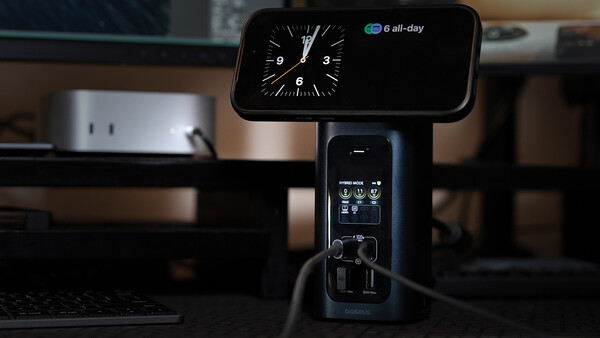
If a docking station can support or charge everything you use on your desk, this might be it. This 15-in-1 docking station powers all your devices safely and efficiently while keeping your desk neat.
Sometimes getting things done can be heavily burdened by a cluttered desk or by having to plug in so many things just to get started. Photographers often edit images at their workstation with an external monitor, plugged into a charger, with external storage, and often alongside their phones. The goal of the Baseus RD1 Pro is simple: to minimize what one would have to plug in and to optimize the user's workflow.
The Baseus Spacemate RD1 Pro
This docking station takes the form of a small, tower-like structure that has input and output ports strategically placed on the front and back panels, along with LED indicator lights for charging output and status. Overall, it is capable of 160 W PD output divided into different ports for simultaneous charging as well as data transfer and display.
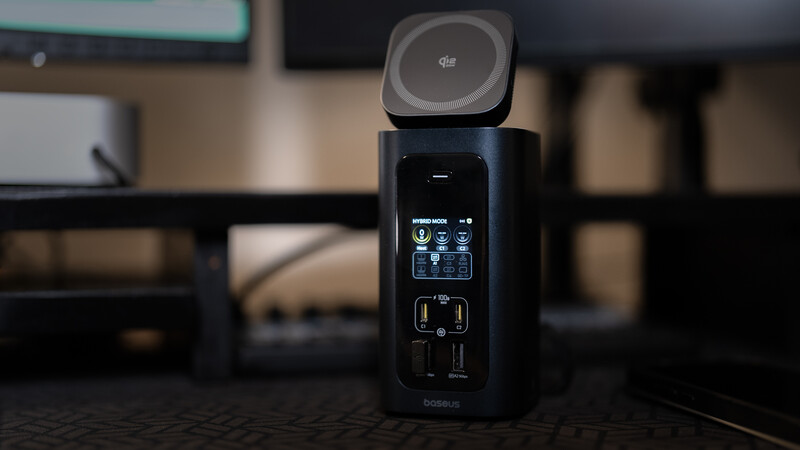
In front is a pair of USB-C ports with up to 100 W max (when running solo) and a pair of 5 Gbps USB-A ports for use with data transfer or other USB-A accessories. Above the ports is a set of indicators that reflect the power output of each USB-C slot, including the host cable at the back. It also has individual icons for each of the ports at the back to reflect which ones are in use and connected. Above it is a single button that can be used to switch between what is called "hybrid mode," which shows the port status, and "charging mode," which focuses on the power output of all the ports.
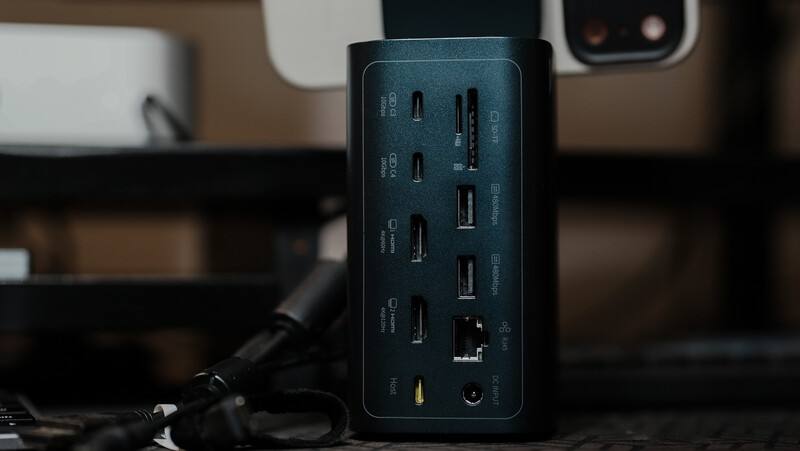
At the back is a pair of USB-C 10 Gbps ports ideal for use with external storage, an SD and TF v3.0 card slot for use with memory cards, and another pair of USB-A ports (480 Mbps) best for low-power, low-speed accessories. It also comes with a pair of HDMI ports, one capable of 4K 120Hz and another capable of 4K 60Hz. In addition, there is a single gigabit ethernet port and, of course, the single host USB-C cable that brings together all the capabilities of each port. At the very bottom is a DC-in port for the adapter that powers all the plugged-in and charging devices.
Display Output
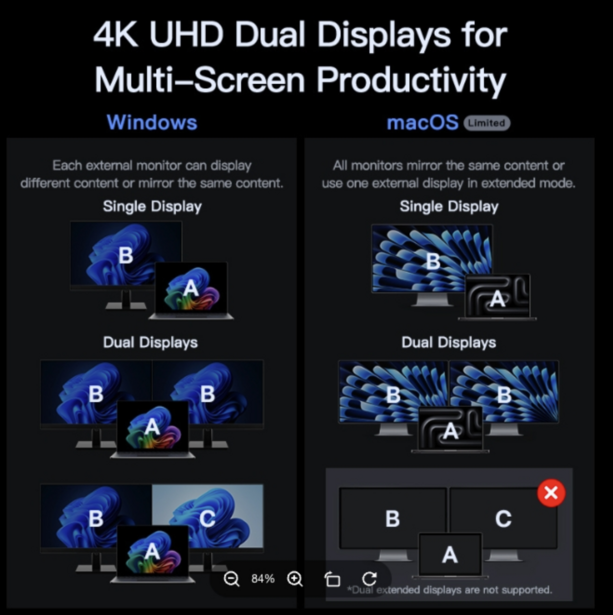
One thing to take note of is that compatibility with multiple displays may vary depending on the operating system. For Windows devices, the RD1 Pro can work with either mirrored or extended displays of up to three individual screens (two monitors and a laptop), as compared with Mac, where it can only have two unique displays. This means that a plugged-in laptop can have two external monitors that display the same screen and cannot have more than one extension.
Wireless Charging
As icing on the cake, the top panel is a 25 W Qi2 MagSafe-compatible wireless charger that allows for charging a smartphone regardless of whether a host computer is running. This reduces the need for plugging in a charging cable for your phone if it runs out of juice, and at the same time it functions as a stand that allows you to use your phone as another small screen if necessary in the workflow.
User Experience and Application
It is without a doubt that docking stations provide so much convenience to any user, especially those who work with multiple displays and plug in multiple accessories, whether they use a laptop or a dedicated CPU. The Baseus RD1 Pro conveniently converges all input and output ports into one hub that merges everything into a single host cable, making it so much easier to set up. With the total power output of 160 W that can be distributed to multiple ports, the user can efficiently charge while using devices without having to compromise on charging and/or transfer speed. At the same time, charging a mobile phone while working on your computer, regardless of whether the phone is being used, is such a convenient offering. Perhaps a function that could further improve the efficiency of this docking station would be one or two NVMe M.2 SSD slots that could give it its own storage in addition to what can be plugged into the ports.
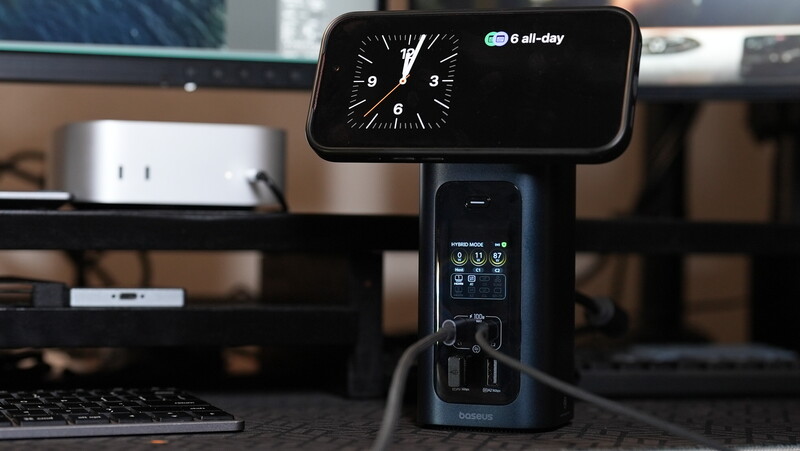
That being said, this docking station not only offers efficiency and ergonomics but also looks really neat on your desk, with the indicator display telling you what you need to know about your devices and accessories. The Baseus RD1 Pro is a thoughtfully designed, multi-functional hub that can cut down the amount of time spent setting up a multi-device workstation.
What I Liked:
- 160 W charging output
- 10 Gbps data transfer
- Neat display for output monitoring
What Can Be Improved:
- Limited multi-display options with Mac
- No 3.5mm audio port
- Could probably be more ergonomic and neat if ports were on the side instead of the front





Join the Fstoppers community for free
-
Post comments and join in the discussions
-
Browse the site ad-free
-
Share your work and get featured in the community
-
Compete in the photo contests for fun and prizes
1 Comment
Interesting set of features, but they are definitely charging a high price premium for the extra features it offers, mainly the display and qi charger. Beyond that, from a design standpoint, it definitely looks better than many first party docks.
From a feature standpoint, typically in the $275-$300 range, docks would typically offer 2.5GbE, 1-2 thunderbolt 4 ports, 2-3 display outputs, and 4+ of USB 3.2 gen 2 ports.