
We all know the feeling when a shoot is going perfectly, your model is nailing the poses, and then something goes wrong. Maybe a light fails, a cable gets unplugged, or your tether connection drops mid-shoot. Suddenly, the creative flow evaporates, and you’re scrambling to regroup.
My creative partner, David, and I build wild, surreal sets for every shoot, and my posing is pretty unconventional. On an average shoot, when I’m directing my model, you’ll probably catch me saying things like, “Okay, now can you bend backwards and raise a foot up?” or “Okay, now scream at the top of your lungs and act like you’re losing control.”
When your models are doing emotional and physically challenging poses, the last thing you want is a tech issue derailing everything. Over the years, I’ve learned that behind-the-scenes workflow matters just as much as creative ideas. Here are the five workflow mistakes that most often derail shoots and how I personally avoid them.
1. Ignoring Safety and Set Stability
The Mistake: Skipping safety checks for your set.
When your set isn’t secure, models cannot fully commit to poses. That hesitation instantly kills energy and creativity.
How I Avoid It: We treat safety as the foundation of creativity. Props, structures, and backdrops are always checked and reinforced with jacks, sandbags, or stable freestanding structures.
Even something as simple as neatly taping down a seamless paper backdrop makes a big difference. It prevents trips and keeps the set looking sharp.
Knowing our models can move freely without fear keeps the energy high and the shoot flowing.
2. Overcomplicating Your Lighting
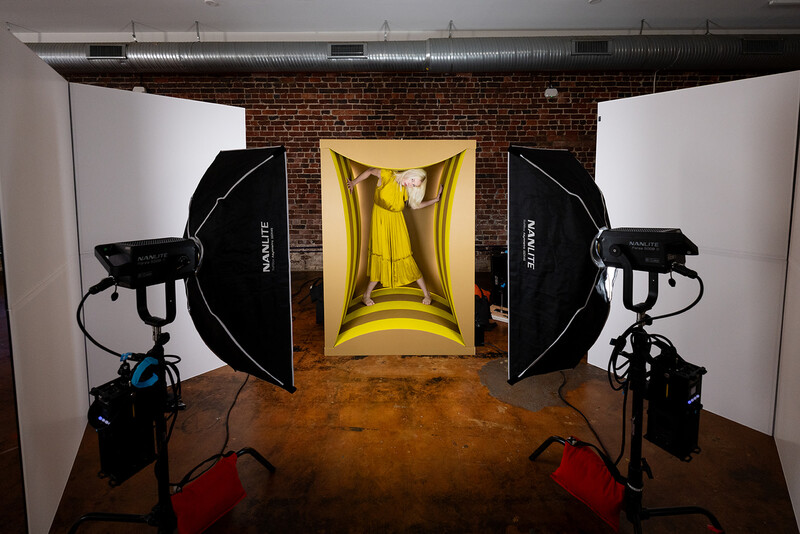
The Mistake: Using too many lights or leaving cords messy.
How I Avoid It: With lighting, our motto is definitely “less is more.” We stick to the minimum number of lights to get the look we want. Plus, with fewer lights to manage, there’s less chance of something malfunctioning mid-shoot.
Continuous lights have become a favorite for us because they keep the set fully lit, which looks great in behind-the-scenes video and reduces the risk of mid-shoot lighting issues. Lately, we have been using Nanlite a lot because we love how consistent the quality of light is and how easy they are to set up.
Cords are organized with Velcro ties, and we always position the long leg of light stands forward with a sandbag for extra stability. Simple steps like these protect our gear and, more importantly, keep everyone safe.
3. Neglecting Real-Time Feedback (Tethering)
The Mistake: Shooting blind without seeing your images on a large monitor.
How I Avoid It: I shoot tethered for every session. This lets David monitor every shot—including posing, focus, exposure, and lighting—on a bigger screen in real time. Small mistakes are caught immediately instead of waiting until post.
We still keep an SD card in the camera, but the tethered setup also saves every image to an external hard drive, giving us an instant backup, which also reduces stress.
We use the LeverLock by Tether Tools to hold our tether in place. It secures the tethering cable to the camera so it can’t accidentally unplug mid-shoot. That’s huge because nothing derails a session faster than losing your tether connection. It also reduces strain on your camera port, keeping your gear safe.
The LeverLock doubles as a tripod mount. I often switch between handheld and tripod shots during a shoot, and having the tether stay secure while moving the camera around is a lifesaver.
4. A Disorganized Workstation
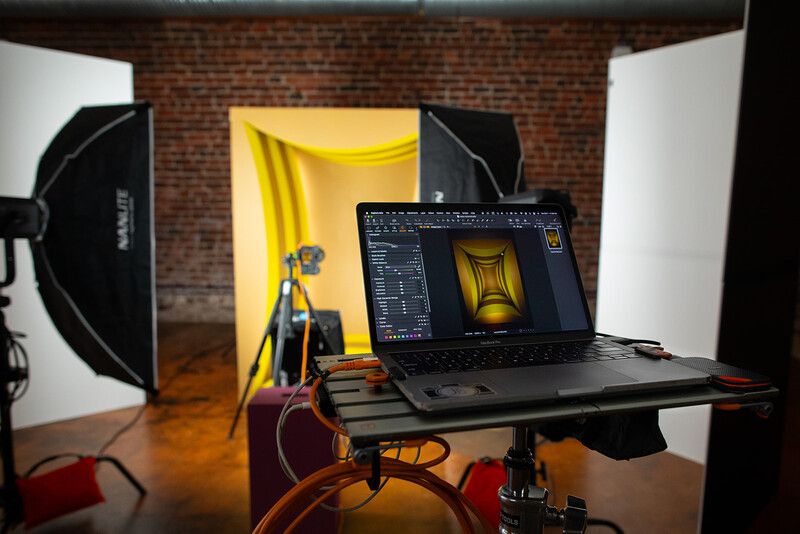
Mistake: Cluttered laptops, cables, and gear scattered around make it hard to manage the session efficiently.
An inefficient workstation slows down adjustments, breaks communication between team members or clients, and can even risk gear damage.
How to Avoid It: Use a dedicated, organized workstation. The workstation is where David lives during a shoot. And if we have clients in the studio, we set up a second viewing monitor for them off the workstation.
Lately, we’ve been loving the AeroTrac Workstation from Tether Tools. It’s portable, easy to set up, customizable, and, most importantly, it keeps us organized.
The workstation is built around cold shoes, and you can add different accessories to make it your own. We mount our laptop on it and use the Tech Clamps to lock it in place so if something bumps the workstation, the laptop stays secure. Underneath, there’s a spot to attach an external backup battery that we use to power the laptop so there are no extra cords hanging off.
We mount our workstation to a low-boy roller so we can move it around the studio, but you can also mount it to a tripod, light stand, or even use its built-in feet to place it on a table.
During a shoot, David monitors exposure, focus, and tons of small details from the workstation because all those little things add up to make a great photo.
5. Underestimating the Power of Presentation
Mistake: Treating behind-the-scenes as an afterthought.
When your behind-the-scenes setup looks sloppy or chaotic, it sends the wrong message to clients and models. Even if the final photo is stunning, a messy workspace undermines confidence and disrupts trust.
How to Avoid It: Treat your setup as part of your craft. Keep everything clean, professional, and safe. Pay attention to detail. A tidy space communicates control, care, and credibility. Your models will feel more confident, your clients will be impressed, and you’ll stay in the creative zone longer.
Takeaway
Creative flow doesn’t just come from having good ideas. It comes from preparation, structure, and foresight. By avoiding these five mistakes, I keep clients and models comfortable, maintain energy on set, and make every shoot run smoothly.
Want to see the full process? Check out our YouTube video breaking down an entire shoot from start to finish.
What’s your go-to gear or workflow tip that keeps shoots running smoothly? Drop it in the comments—I’d love to hear what works for you.




Join the Fstoppers community for free
-
Post comments and join in the discussions
-
Browse the site ad-free
-
Share your work and get featured in the community
-
Compete in the photo contests for fun and prizes
No comments yet