
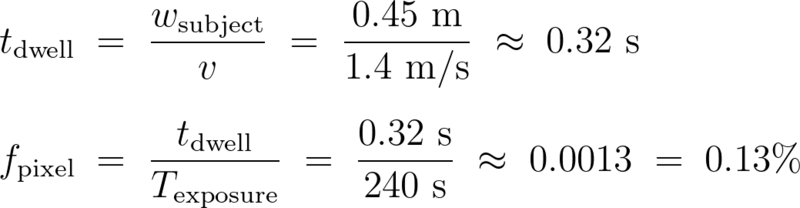
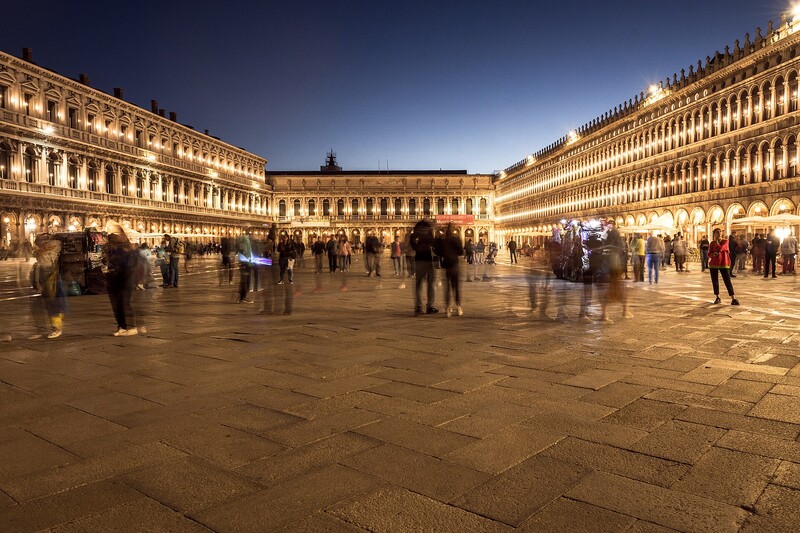
Put a 35mm lens on a full frame camera, stand about 20 m back from a plaza, and each pixel in the file covers roughly 3.4 mm of the ground at that distance. A person walking across that view at an ordinary pace clears their own shoulder width in about a third of a second, so across a four-minute exposure they sit over any single pixel for about 0.13 percent of the time. That fraction is the whole mechanism, and once you can compute it, and then combine the occupancy of everyone walking the same line, you can predict which people will vanish and which ones will ruin the frame.
Dwell Time Is the Whole Game
A sensor pixel does one thing during an exposure: it counts photons and adds them up. It has no memory of when they arrived. So if something covers that pixel for time t out of a total exposure T, it contributes roughly t/T of the pixel's final value, weighted by how far it sits from whatever was behind it. Two quantities decide the outcome and nothing else does: the fraction of the exposure they cover that spot, and how far they sit from the background in each recorded color channel. Luminance is the obvious half of that, so a dark coat on bright pavement leaves the most signal. Color is the half people forget. A red coat and gray stone can meter almost identically and still leave a colored stain, because the camera samples red, green, and blue separately and the difference survives in the channels even when the overall brightness matches. Size enters only through those terms, setting how many pixels a person touches and how long they take to clear one.
Run the numbers on that plaza. A 35mm lens on a full frame body covers about 20.6 m of width at 20 m, and a 6,000-pixel-wide file divides that into 3.4 mm per pixel at that distance. Perspective means the figure only holds on a plane that far away and parallel to the sensor: pavement in the near foreground resolves finer, and the far side of the square coarser. A person is roughly 0.45 m across the shoulders, so they occupy about 130 pixels of width. At a normal walking pace of about 1.4 m/s, they need 0.32 seconds to clear their own width. During a 240-second exposure, that is 0.13 percent of the total. A completely black silhouette blocking a pixel for that sliver of the exposure removes about 0.13 percent of the light that pixel would otherwise have collected. In a well-exposed midtone the pixel's own shot noise runs several times larger than that, so the walker's contribution is buried in it. One walker does not come out faint. In an ordinary print or screen view they do not come out at all. Be careful how hard you push that, though. A walker does not deposit a body-shaped silhouette, because they keep moving. At 1.4 m/s they clear a 20.6 m frame in under 15 seconds and are gone for the remaining three and three quarter minutes, so what they leave is a faint band smeared along the line they walked. That trail is still structure rather than random noise, and integrating along it recovers detectability roughly as the square root of the number of pixels involved, so a per-pixel change well under the noise can still be dragged up by an aggressive tone curve, heavy local contrast, or a denoiser. The defensible claim is that a single pass is normally imperceptible under ordinary viewing and processing, not that the file has no record of it.
Now take the same person and have them stop to check a map for 90 seconds. That is 37.5 percent of the exposure, so they remove roughly 37 percent of the light those pixels would otherwise have gathered. You get a translucent human being standing in your empty plaza, sharp enough to be recognizable and soft enough to look like a mistake. This is one of two failure modes. People who stop are the obvious one: a tourist posing for a photo, someone eating lunch on a step, a vendor who works from one spot, a couple who picks your foreground to have a conversation in.
The second is the one the single-person arithmetic hides, and it is the reason a busy square is harder than the math above suggests. Occupancy accumulates across everybody. What governs a pixel is the total time during which somebody, anybody, is covering it, so what you want is not one person's dwell but the union of all of them. Individual crossings add only when they do not overlap: two people passing the same spot together count once, not twice, which is why a tight group costs you less than the same number of people spread out. Strictly, the union tells you how long the background was hidden, not what the pixel ends up reading, since each person contributes their own color for their own share of the time. A dark coat and a white jacket push that pixel in opposite directions and can partly cancel. Treating occupancy alone as the answer is exact only for the black-silhouette case used here, and a good approximation whenever the crowd is generally darker than the ground. Take fifty separate, non-overlapping crossings and that spot is occupied for about 16 seconds, which is 6.7 percent of a four-minute exposure and comfortably visible. Treat that as the ceiling rather than the expected value. At the one percent threshold, roughly seven or eight clean crossings of the same pixel is the budget. That is nothing on a quiet morning and it is a couple of minutes on a busy walkway.
Which is why the honest advice is about traffic patterns rather than shutter speeds. A steady, diffuse flow spreads the cost thinly, and if the total occupancy of any one spot stays under a percent or so it averages to nothing. Keep the flow up long enough, though, and even a scattered crowd lays down a faint veil. A queue, a doorway, a crosswalk, or a photo spot in front of the landmark concentrates dozens of separate people onto the same few hundred pixels, and that concentration will haunt the frame even though not one of them ever stopped walking.
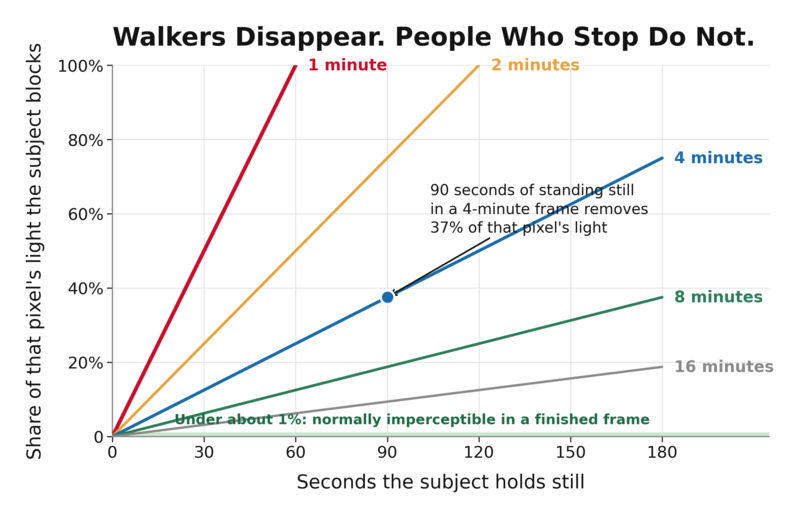
The practical threshold sits somewhere around one percent of the exposure, and it is worth being precise about what that number is. It is not the sensor's noise floor. Shot noise falls as the square root of the signal, so a well-exposed midtone holding perhaps 30,000 electrons carries relative noise nearer 0.6 percent, and a one percent change sits comfortably above it. One percent is closer to the point where the difference stops mattering to a viewer, which is roughly where human luminance discrimination gives out anyway. It also depends heavily on what is behind the subject. Flat pavement, still water, and clear sky give up a ghost at a fraction of a percent because there is no texture to hide in. Cobblestone, foliage, and dappled shade will swallow two or three percent without complaint. When you are standing there deciding how long to run the exposure, the question is not "how slow is my shutter." It is "how long is the longest anyone in my frame is going to hold still, and what fraction of my total is that."
Method One: One Very Long Exposure
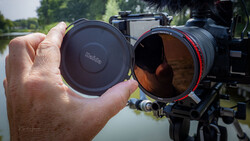
The classic approach is a single frame long enough that everybody averages out, which in bright light means a very strong neutral density filter. Each stop halves the light, so the math compounds fast: 10 stops multiplies your exposure time by 1,024, and 15 stops multiplies it by 32,768.

Those two numbers lead to very different afternoons. Say you are at f/11 and ISO 100 on a sunny midday street, which by the sunny 16 rule meters at about 1/200 s. A 10-stop filter takes you to 5.1 seconds, which is nowhere near enough to erase anyone. The same scene through a 15-stop filter lands at about 164 seconds, closer to three minutes, which is finally in useful territory. A 10-stop only gets you to four minutes when the ambient exposure has already dropped to around 1/4 s, which is roughly EV 9 at these settings, meaning deep shade or well into blue hour. Heavy overcast is not dark enough: it sits nearer EV 12, about 1/30 s at f/11, which a 10-stop turns into some 30 seconds rather than four minutes. Knowing that in advance saves you from standing in a square at noon wondering why the 5-second frame is full of smeared tourists.
For the filters themselves, Lee's stopper range is the reference point most people work from: the Little Stopper at 6 stops, the Big Stopper at 10, and the Super Stopper at 15. In screw-on form, the Breakthrough Photography X4 ND 3.0, the B+W Master 810 ND 3.0, the NiSi ND1000, and the Haida NanoPro ND1000 all sit at 10 stops. Any ND labeled 3.0 density, or 1000x, is a 10-stop filter, and the naming is inconsistent enough across brands that it pays to check the density number rather than the marketing name.
Then come the practical problems, which are real:
- Reciprocity failure is not one of them. That was a film characteristic. A digital sensor keeps accumulating charge linearly, so a metered four-minute exposure is a four-minute exposure. What you get instead is heat. Dark current rises with sensor temperature and exposure length, and multi-minute frames on a warm day produce hot pixels and low-level mottling that no amount of careful metering prevents.
- In-camera noise reduction costs you twice the time. The in-camera version shoots a matching dark frame with the shutter closed and subtracts it, which cleans up fixed-pattern noise beautifully and means a four-minute exposure ties up the camera for eight minutes.
- Focus before the filter goes on. Standard practice is to focus first, then switch to manual, then mount the filter, and not bump the ring. Some current mirrorless bodies will still autofocus through a 10-stop in full sun, since they only need to see a few stops of light to lock, and overcast is not the problem people assume: at roughly EV 12, a 10-stop still leaves the camera around EV 2, well inside the rated sensitivity of current mirrorless AF systems. It is deep dusk, low-contrast subjects, and slow lenses where the same filter starts hunting or failing outright. Focusing first costs nothing and removes the variable.
- Expect a color cast. Strong NDs rarely stay perfectly neutral. The Lee Big Stopper is well known for a blue cast, which Lee itself acknowledges, and other filters push magenta or green. Shoot raw, and either fix white balance in post or set a custom white balance through the filter before you start.
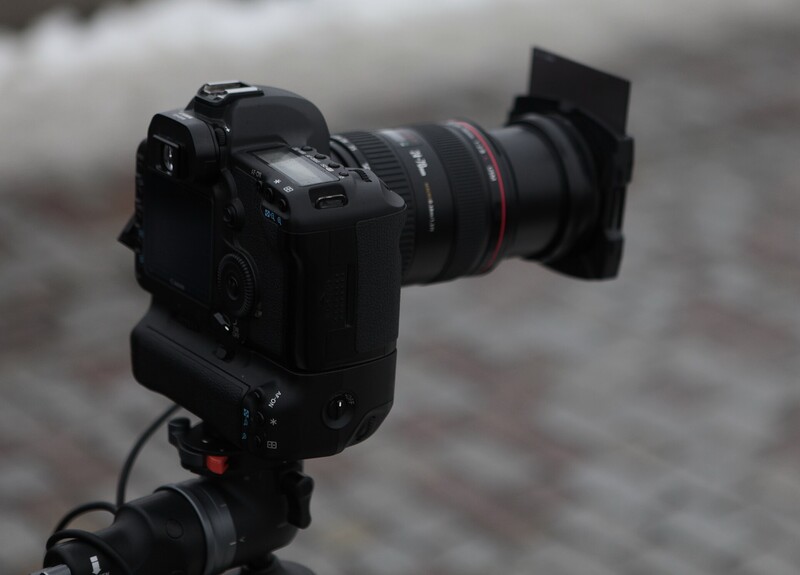
- Cover the viewfinder on a DSLR. Light entering through the eyepiece over four minutes can leak onto the sensor and produce a wash across the frame. Most DSLRs ship with an eyepiece cap or have a built-in blind. On a mirrorless body there is no light path to leak through, so the issue disappears entirely.
- Check your shutter ceiling. Most cameras cap at 30 seconds in manual, so anything longer means bulb mode plus a locking release or timer. Some recent bodies extend further on their own. Nikon's Z 8 and Z 9 reach shutter speeds as long as 900 seconds once you turn on extended shutter speeds in the custom settings menu.
Method Two: Median Stacking, and Why It Usually Wins
Most working photographers who need an empty plaza do not use ND at all. They shoot 15 to 30 frames of the same locked-off composition at a normal shutter speed, spaced a few seconds apart, and let software take the per-pixel median of the whole stack.
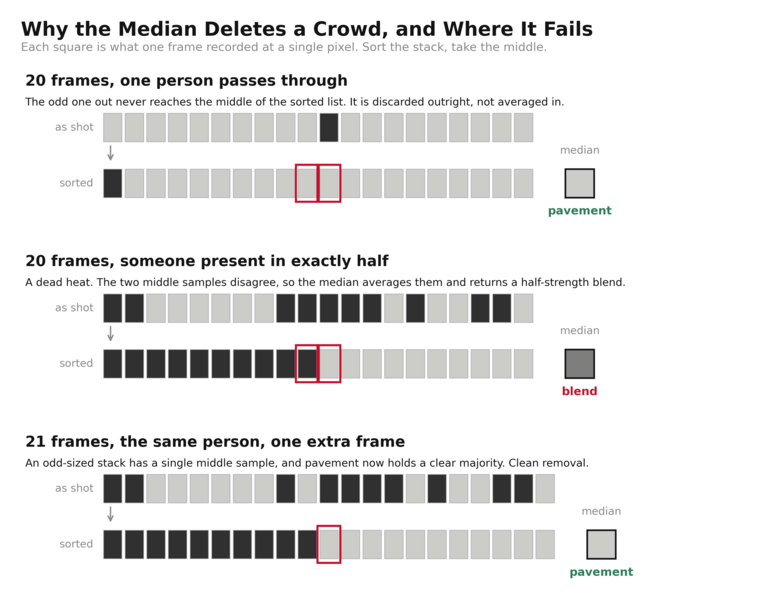
Here is why that works so cleanly. The median is the middle value once you sort the samples. For any given pixel, if 19 frames show pavement and one frame shows the back of someone's jacket, the sorted list is 19 pavement values and one dark outlier, and the middle of that list is pavement. The outlier is not reduced. It is discarded. Anything that fails to hold the same spot in more than half the frames simply does not appear in the output. That word "more" is not decoration. With an even-numbered stack the median is the average of the two middle values, so a subject sitting in exactly 10 of 20 frames does not vanish and does not survive either: you get a half-strength blend of person and pavement. Clean removal wants a clear majority, which is one more reason to shoot 21 frames rather than 20.
The mean does not do this. Averaging that same stack pulls the pixel down by one twentieth of the difference between the person and the background, which is small but not always invisible. On cobblestone you would never see it. On a smooth stone plaza or a still reflecting pool you absolutely will, as a faint gray smudge in the shape of a person. Mean is the right tool for noise, where you want to average many small random errors. Median is the right tool for outliers, where you want to throw away a few large ones.
In Photoshop the route is short. Choose File, Scripts, Load Files into Stack, add your frames, and tick "Create Smart Object after Loading Layers." Tick "Attempt to Automatically Align Source Images" too if your tripod was anything less than rock solid, accepting that alignment crops a little off the edges. The blending itself sits in the Layer menu, under Smart Objects, then Stack Mode, where you pick Median. Adobe's own documentation lists Median under both noise reduction and object removal, which is exactly the double duty it performs here. The stack renders, and the crowd is gone.
The advantages over a single long exposure are not subtle. You need no filter, so no color cast, no focusing in the dark, no light leaks. Your shutter speed stays short enough that flags, leaves, and fountain spray stay crisp instead of smearing into gray mush. Changing light is far less of a problem, because each frame is exposed normally and the median rejects a passing cloud shadow that only affects a minority of the stack. Sensor heat is far less of a problem, since you are integrating seconds rather than minutes, though live view, continuous shooting, and a hot day still warm the camera. And you keep every original frame, which matters enormously for the next part.
Cadence is the one thing people get wrong. Short gaps are the trap. At a two-second cadence a strolling pedestrian has covered only a few meters, and anyone browsing a market stall or drifting along a railing can easily hold the same patch of ground across twelve consecutive frames, which is all the median needs to keep them. At 1.4 m/s, a five-second gap moves a pedestrian about 7 m, which is enough to put anyone crossing your frame somewhere else entirely. Twenty frames at five-second intervals is a session of about a hundred seconds, and that is a reasonable default for a moderately busy square. Busier or slower-moving scenes want longer gaps, more frames, or both. The target is the same either way: clean background in the majority of frames at every pixel.
The Settings That Do the Quiet Work
Lock the tripod and then leave the camera alone. Not "be careful with it," leave it alone. Every median stack assumes that a given pixel is looking at the same speck of stone in all 20 frames, and a nudge of two or three pixels between frames means it is not. Auto-align can genuinely rescue that, since it repositions the frames before the median is taken, but it resamples every pixel to do so, and that interpolation costs a little fine detail and crops the edges where the frames no longer overlap. Use a remote or the self-timer, hang nothing off the center column, and if there is wind, drop the tripod lower rather than fighting it.
Shoot at base ISO, and use the real base, not the extended low setting. ISO 50 on most cameras is a pulled ISO 100, produced by overexposing a stop and darkening in processing, which throws away a full stop of highlight headroom. If you are chasing longer exposures, that is a bad trade for one stop.
Use f/8 to f/11 and resist the temptation to stop down further for exposure time. The diameter of the Airy disk scales directly with the f-number, so f/22 spreads every point of light over twice the diameter and four times the area that f/11 does, and it only buys you two stops. If you need less light, add density in front of the lens or wait for the sun to drop. Do not pay for it in resolution.
For the frame interval, most current mirrorless bodies have an interval timer buried in the shooting menu, and you should find it before you travel rather than in the square. Plenty of DSLRs have one too, including the Nikon D7500 and D850 and the Canon EOS 5D Mark IV, and some bodies add a bulb timer or a Time mode that starts and stops a long exposure on separate presses. Check yours before assuming you need hardware. If it genuinely lacks both, an external timer remote such as the Vello ShutterBoss II will fire a set count of frames at a set interval and hold bulb open for a programmed duration.
Pick your light deliberately. Overcast and blue hour both help, and for different reasons. Overcast holds the exposure steady across a five-minute session, so your frames match and no cloud sails through to change the whole scene halfway. Blue hour drops ambient light far enough that a 10-stop filter reaches multi-minute territory instead of single-digit seconds, and it thins the crowd on its own. Harsh midday sun is the worst case for every reason at once: moving shadows between frames, a huge brightness range, and the largest number of people standing around. If you are working landmarks on a schedule, an advanced cityscape workshop is largely a course in choosing which hour to be standing there.
The Person Who Will Not Move
Eventually someone parks in your frame for the whole session. A guard at a post, a busker mid-set, a group taking turns photographing each other on the same step. The single-exposure method has no answer for this. Someone who stays put for essentially the whole frame does not render as a ghost at all, they render solid, exactly as though you had shot them at 1/200 s. Your only option is to run the exposure again and hope, which at four minutes a try is an expensive kind of hoping.
The stack has two answers. The first is to keep shooting. Median only rejects what is absent from more than half the frames, so if someone occupies a pixel in 12 of your 20, extending the session to 40 frames while they eventually wander off restores the majority to clean pavement. The second is to clone, and this is where keeping the originals pays off. If anywhere in your stack there is a frame where that person had stepped aside, you can pull that patch of clean background straight out of it. Add it as a layer over the median result, mask in the region, and the geometry lines up perfectly because nothing moved. There is no cloning-tool guesswork, because you are not inventing background. You photographed it.
Everything else in motion gets treated exactly the same way, and you should decide in advance whether you want that. Clouds, flags, fountains, and water all lose their structure, and the two methods lose it differently. A single long exposure streaks clouds into directional smears and turns water into silk, which is often the reason people reach for ND in the first place. A median stack does something stranger. Because the median is taken independently for every channel of every pixel, moving water usually smooths out as its travelling highlights and shadows get rejected, though static texture can survive and broken reflections can leave irregular patches. Drifting clouds are stranger still: the output is a per-pixel composite that may match no cloud that was ever in the sky, which is what gives median skies their oddly synthetic look. If you want both silky water and an empty foreground, shoot both: one long exposure for the water and sky, a median stack of short frames for the ground, and blend the two with a mask along the shoreline.
The whole technique rewards you for thinking in fractions instead of shutter speeds. Before you set anything, look at the square and time the slowest thing in it. If the answer is "nobody stands still for more than ten seconds," a twenty-frame stack at a long enough interval will clear it, while a single two-minute exposure will not: ten seconds is over eight percent of that frame, enough to leave a visible ghost. Then count the foot traffic separately, because the stack does not care whether one person sat in a spot for ten frames or ten different people passed through it. Either way the background has lost its clear majority, and at that point the median stops returning clean pavement: with one consistent subject you get a blend of person and ground, and with ten different people you get a value that may match nobody who was ever standing there. If the answer is "that man has been sitting there since I arrived," no amount of shutter is going to help, and you should be planning your clone source instead.



.jpg)

_-_53002531387.jpg)
Join the Fstoppers community for free
-
Post comments and join in the discussions
-
Browse the site ad-free
-
Share your work and get featured in the community
-
Compete in the photo contests for fun and prizes
1 Comment
Fantastic article -- I never heard of Median Stacking as a technique, and this is well explained.