
After comparing the new MacBook Neo to Apple’s Air and Pro, a lot of people asked the obvious question: what about Windows?
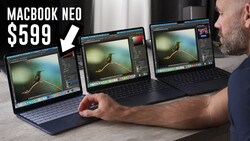
Yesterday I went to Walmart, bought a $659 Asus Vivobook, and tested it directly against the $600 MacBook Neo using the exact same real-world tasks.
Watch the video above to see the exact results of every test, but I'll summarize my findings below.
MacBook Neo ($600)
Apple’s cheapest laptop continues to punch way above its price.
Pros
- Best build quality by far
- Best keyboard
- Best trackpad
- Best display (resolution and color)
- Best Speakers
- Twice as fast USB-C speeds
- Nearly double the battery life
Cons
- Limited to 8GB of RAM
- Only 256GB storage on the cheapest model
- Limited ports (only 2 USB-C Ports)
- Not the fastest in heavy rendering tasks
This thing just feels like a premium laptop, which is shocking at this price.
Asus Vivobook ($659)
This is what a typical budget Windows laptop looks like right now.
Pros
- More ports (USB-A, HDMI, etc.)
- More storage (512GB)
- More RAM (16GB)
- Slightly faster processor, especially when plugged in.
Cons
- Feels cheap and flimsy by comparison
- Almost twice as thick
- Trackpad is noticeably worse
- Display colors are bad
- Much worse battery life
- Performance drops unless plugged in
Although the build quality of this laptop is lacking, my experience in Windows was actually quite good. The laptop was able to handle much more than I expected it to and gave me a very smooth, reliable experience.
Final Thoughts
This is one of those comparisons that looks simple on paper but gets complicated fast.
Yes, the Windows laptop is faster in certain tasks. But it’s also bigger, thicker, and clearly built to a lower standard.
The MacBook Neo, on the other hand, feels like a much more refined machine and delivers a better experience in almost every way; at least until you run out of storage.
Honestly, both laptops performed much better than I expected them to and I'm thrilled that you can get such great performance for such a low price for either operating system.



Join the Fstoppers community for free
-
Post comments and join in the discussions
-
Browse the site ad-free
-
Share your work and get featured in the community
-
Compete in the photo contests for fun and prizes
1 Comment
For that Asus laptop, by default windows 11 no longer offers a true max performance preset, as the advanced power settings will still lower the boost behavior, as well as the various other behaviors with the scheduler. Overall, you will either be stuck using the max performance preset while plugged in, or go into the advanced power settings and set the battery settings to match that of when plugged in, though it will also negatively impact your ability to use more power saving options.
Beyond that, they often have a lot of bloatware, which will negatively impact performance and it is one of the min area where Apple tends to do better, which is not flooding the OS with bloatware.
If I were buy that laptop, my first step would be a reformat and fresh install of windows 11. Then I would remove some of the microsoft made bloat such as onedrive, solitaire junk, and then do a selective install of just the main drivers. (performance would become better).
For the display, their budget laptops tend to have pretty bad calibration, thus you really need a colorimeter and software such as DisplayCAL and then calibrate the display using a high patch count (Ideally in the 3000+ range), and then let it spend 2-3 hours calibrating the display.
They also tend to have poor speaker calibration, though often you can get a decent EQ, and then all you need to do is use a decent that covers 20-20,000Hz, then record a frequency sweep and then use that to make a FFT plot and then use that to guide a new custom Eq. It still wouldn't sound as good as the macbook, but the sound will improve.
Something that apple is good at is at least making the most out of what hardware they provide.
For example, if you look at the measurements done by notebookcheck, you will see that they are using a lower quality display with more manufacturing variance, as well as a sub 100% sRGB coverage, which will negatively impact overall accuracy, but within those limitations, they did decent overall calibration this is why even though 97.9% sRGB coverage is in line with most entry level displays, including many sub $100 desktop monitors, decent calibration on the color channels makes for still a good display experience. The only area where they likely did not calibrate is the white balance, and instead are relying on the natural color temperature of the backlight, since if you use the IPS panel calibration to adjust the white balance, then it will come at the cost of reduced brightness depending on how far you need to adjust, thus making the display less power efficient. The uncalibrated white balance is common with lower end displays. The only downside is the slower than usual response time for modern IPS panels, which will not be good for gaming.
Overall, apple found many areas to cut costs, but they put a good amount of effort in compensating for it via good calibration.