
Shoot past frame 9,999, and the camera does not run out of numbers. It closes the folder it has been writing to, opens the next one, and starts again at 0001, which is how two shoots two years apart both end up holding a file called IMG_0473.CR2. The 0001 to 9999 numbering space, the DCIM folder those files live in, and the four-letters-plus-four-digits name itself all come from one short specification a Japanese trade group published in 1998. The rollover is the manufacturer's own choice, made inside the room that specification built.
What the Standard Actually Says
The document is called the Design rule for Camera File system, DCF for short, and version 1.0 arrived in 1998 as JEIDA-49-2-1998, from the Japan Electronic Industry Development Association. It is mostly a document about names.
A card gets one directory named DCIM sitting directly under the root, which the spec spells out as Digital Camera IMages. Under DCIM go the picture folders, and each folder name is exactly eight characters: a three-digit number from 100 to 999, then five free characters the manufacturer chooses. That is where 100CANON and Sony's 100MSDCF come from. Numbers 000 through 099 are forbidden, so a card tops out at 900 folders.
File names follow the same shape in reverse. Four free characters first, then a four-digit file number from 0001 to 9999, with 0000 explicitly banned. Only three kinds of characters are allowed anywhere in a DCF name: the digits 0 through 9, the uppercase letters A through Z, and the underscore. Lowercase is not a separate option, and any lowercase letters that show up have to be read as uppercase.
The four-digit file number does double duty. Files that share a number inside one folder are treated as a single DCF object, which is how a raw file and its JPEG, or a frame and its attached voice memo, get deleted, copied, and moved as one unit. It also sets the ceiling: the standard states outright that the upper limit on DCF objects in one folder is 9,999, the same as the number of file numbers. When you hit the top, the camera has nowhere left to put the next frame except a new folder. What the standard does not do is dictate the next step. In a folder holding no DCF names yet, it says, any initial file number may be used, and continuing from the largest existing number plus one is written as a recommendation rather than a rule. Restarting a fresh folder at 0001 is the convention the industry settled on inside that latitude, not a line in the document.
A 1998 Document Written for DOS
The scope section of DCF 1.0 limits the standard to products writing image files on removable memory formatted with the DOS FAT file system. Its glossary is more direct than that. A file name, it says, is an eight-character file name of the DOS/FAT file system, excluding the dot and the file extension, and a file extension is three identifying characters. That is 8.3, the MS-DOS naming convention, written into camera design as a requirement.
Long file names were not new in 1998. Microsoft had shipped them in Windows NT 3.5 in 1994 and put them in front of consumers with Windows 95. DCF ignored all of that on purpose. The stated aim was a world where you could combine products freely and swap media between them, and the weakest link in that world was never the camera. It was the drugstore print kiosk, the cheap card reader, the photo printer with a slot on the front, and the rival camera you handed your card to. Eight uppercase characters and a three-letter extension is the smallest common denominator that every one of those devices could parse.
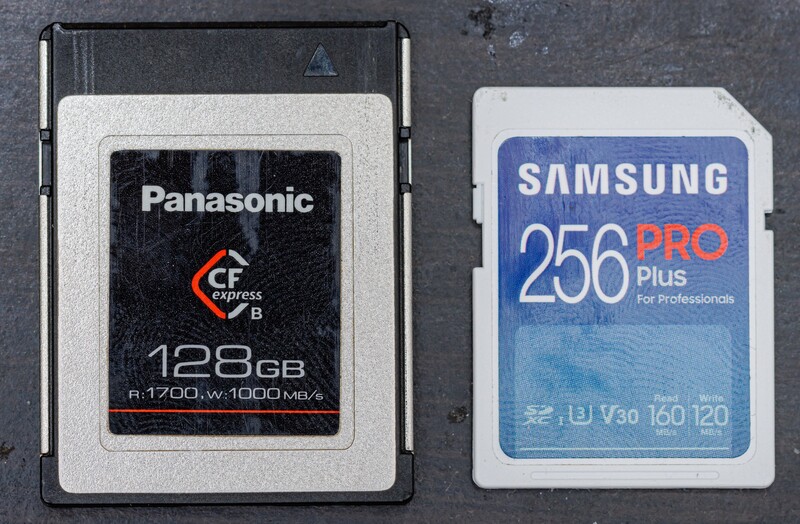
The constraint outlived its cause. The current edition, JEITA CP-3461B, was issued in April 2010 and is published jointly with the Camera and Imaging Products Association as CIPA DC-009-2010. It widens the supported file systems to FAT12, FAT16, FAT32, and exFAT, and it puts media larger than 2 GB on FAT32 or exFAT. It also keeps the old rule and closes the obvious loophole: even on a file system like exFAT that stores names in two-byte code, only the characters equivalent to that same short ASCII table may be used. Your 1 TB CFexpress card could hold a filename with 200 Unicode characters in it. DCF still wants ABCD0001.JPG.
The popular retelling compresses the version history. DCF 1.0 was a JEIDA standard, not a JEITA one; JEITA's CP-3461 numbering begins with the September 2003 revision that added the extended color space file, and JEITA's own catalog lists CP-3461 at 2003.09, CP-3461A at 2009.09, and CP-3461B at 2010.04. Reference pages that describe the 1998 first edition as JEITA CP-3461 are attaching a number that JEITA's catalog dates five years later.
That 2003 revision is also the reason for one filename quirk. A DCF optional file, meant for images headed into heavy processing and commercial print, must always begin with an underscore, which is why an Adobe RGB frame comes off a Nikon as _DSC0473 and off a Fujifilm body as _DSF0473. The standard never names Adobe RGB. It defines the color space with coordinates instead, giving a white point of 0.313, 0.329 and primaries of 0.64, 0.33 for red, 0.21, 0.71 for green, and 0.15, 0.06 for blue, with the Exif ColorSpace tag set to Uncalibrated. Those numbers are Adobe RGB (1998), described in longhand so the specification never has to point at a vendor.

Why Two Cards Hand You the Same Filename
The usual diagnosis, when a catalog turns up two files named IMG_0473, is that the importer did something wrong. People go hunting through Lightroom or Capture One preferences for the switch that makes names unique, decide the software is careless with duplicates, and file it under bad design.
DCF forbids duplicate file numbers in exactly one place: among the basic image files inside a single folder on a single card. It says the opposite about everything else. Basic files in different folders may carry the same number, and the standard's own illustration of a typical card notes that files may have the same name and number if they sit in different DCF folders. Nothing in the document reaches across two cards or two bodies, because nothing in it can. A camera writing to the card in its slot has no way to know what the other card in your bag already contains.
When duplicates do land in one folder, usually because someone dragged files around on a computer, the standard's response is to disown them. Files with duplicate numbers are all treated as no longer being DCF basic files, and a reader is instructed to stop displaying their folder and file numbers. The rule protects the filing system, not your archive.
Then the reset settings finish the job, and every brand ships one. Fujifilm's RENEW resets numbering to 0001 after a format or a new card. Sony's Reset restarts numbering for each folder. Canon's Auto reset restarts at 0001 whenever you swap cards or create a folder, and Nikon's Off behaves the same way. A body bought used or borrowed from a second shooter can arrive with one of those active, and most bodies from the same maker leave the factory with the same four free characters, so their output interleaves perfectly. The collision is not a bug in your software. It is the absence of a rule, in a document that only ever promised that one card would make sense to one reader.
The In-Camera Settings, Brand by Brand
Two changes on each body remove most of the problem before an import ever happens: turn numbering to continuous, and give each body a prefix nothing else uses.
- Canon: set File numbering to Continuous rather than Auto reset or Manual reset. Under File name, User setting 1 registers four characters of your choice, and User setting 2 registers three, with the camera appending a size code as the fourth. The one prohibition is leading with an underscore, which the camera reserves for its own color-space signaling. Recent bodies, including the Canon EOS R5, already ship with a four-character code unique to that individual camera, which quietly solves the two-body problem for anyone who never touches the menu.
- Nikon: the custom setting is File number sequence, and you want On. In the photo shooting menu, File naming replaces the DSC portion with three letters of your own, so a second Nikon Z8 can write ABC_0473 while the first writes DSC_0473.
- Sony: everything lives under File/Folder Settings. Set File Number to Series, which keeps numbering running across both card slots. Those first three characters are yours to assign under Set File Name. Folder Name switches between the Standard Form you already know, 100MSDCF, and a Date Form that writes the folder number followed by the last digit of the year and the month and day, so the folder on a card shot with a Sony a7 IV reads 10010405 instead.
- Fujifilm: under Save Data Set-Up, FRAME NO. set to CONTINUOUS keeps numbering from the last file number used or the first available number, whichever is higher. RENEW is the setting that starts you back at 0001 on every fresh card, and it is the one that puts a second DSCF0473 on a Fujifilm X-T5 card by the end of the month. EDIT FILE NAME, in the same menu, replaces the four-letter sRGB prefix that defaults to DSCF, along with the three-letter Adobe RGB prefix that sits behind the underscore.
Continuous numbering has an end, and manufacturers describe it plainly. Canon's manuals warn that once folder 999 reaches file number 9999, the camera will not take another picture, no matter how much room is left on the card. On Fujifilm bodies, the shutter stops responding when the counter arrives at 999-9999. Nikon's Z9 documentation is the most specific: the release is disabled when folder 999 holds either 5,000 pictures or one numbered 9999, and you resume by choosing Reset for the file number sequence and then formatting the card or inserting a new one. None of that is a malfunction, but the three brands are not all stopping for the same reason. Canon and Fujifilm run out when the folder and file numbers the 1998 document defined are exhausted. Nikon stops sooner, because 5,000 pictures to a folder is Nikon's own ceiling rather than the standard's, and the standard allows 9,999.
Rename Once, at Import
In-camera prefixes fix collisions between your own bodies. They do nothing about the client who sends you a card, the second shooter's files, or the images you shot in 2013 on a camera you no longer own. The permanent fix is a rename at import, built once, using a pattern where the date is doing the work.
Aim for something like 20260813_dockstreet_0001.CR3. The date makes the name unique to a single day forever, the short slug tells you what the shoot was without opening anything, and the counter orders the frames. A bare counter is what fails, because a bare counter is exactly what the camera already gave you.
In Lightroom Classic, the panel is File Renaming in the import dialog, and choosing Edit opens the Filename Template Editor, where tokens for date, custom text, and sequence assemble into a preset you can save and never think about again. Its three numbering tokens are not interchangeable: Import Number counts import operations, Image Number counts every photo added to the catalog, and Sequence Number restarts from a new start number each time you import. Sequence is the one you want in the template, because the date and the shoot name in front of it are carrying most of the load. It leaves one gap: import a second card from the same day and the same shoot with the start number back at 1, and you have rebuilt the collision you were trying to kill, so bring both cards in on one import or set the start number where the last card left off. If you like being able to trace a file back to the card it came off, add the token that preserves the original filename's number suffix, and the camera's own 0473 rides along at the end. If you have never opened the template editor, it is a fair excuse to work through an introduction to Lightroom and set the rest of your import defaults while you are in there.
Capture One does the same job with tokens, and its published list runs past 90 of them, covering capture date and time, folder and collection names, Exif and IPTC metadata, and counters. The three that matter here are an image date token, a destination folder name token that picks up the folder the images are landing in, and a counter token, offered in fixed digit widths so a 4 Digit Counter gives you 0001 rather than 1. Token labels move around a little between versions, so build the string from the token list rather than typing it.
Set the four characters, switch numbering to continuous, and save the import template once. Then the day a card finally fills the last slot in folder 999, the shutter goes dead with room left on the card, you format and keep shooting, and the archive behind you stops quietly stacking up another IMG_0473.
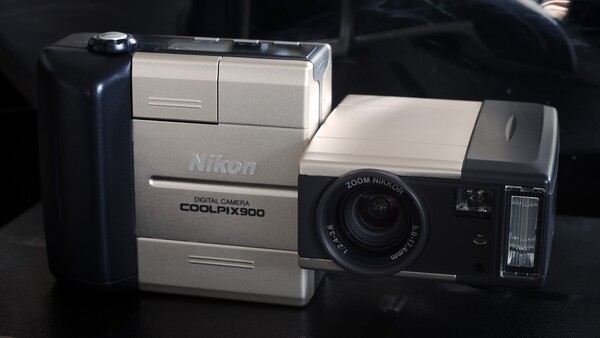
Lead image by Ashley Pomeroy, CC BY 3.0. Source.






Join the Fstoppers community for free
-
Post comments and join in the discussions
-
Browse the site ad-free
-
Share your work and get featured in the community
-
Compete in the photo contests for fun and prizes