
Adobe has introduced a powerful update to Photoshop 2026. The Generative Fill feature now supports reference images, allowing users to use a specific visual source to guide AI-generated edits. This allows photographers and retouchers to swap out or add objects, such as jewelry and accessories, to create new iterations of their images without reshooting. It can significantly reduce time spent on complex compositing and detailed Photoshop work that would have previously required manual editing. And this is only the beginning of what this new feature makes possible.
The feature was first introduced in Photoshop Beta, where early adopters were able to experiment with reference-driven generation ahead of its full release in Photoshop 2026. During its time in beta, users tested how reference images could shape AI outputs more precisely, helping refine the tool before it became part of the official update. Now that it has moved into the main release, the feature represents a more polished and integrated approach to AI-assisted editing inside Photoshop.
What the Reference Image Feature Actually Does
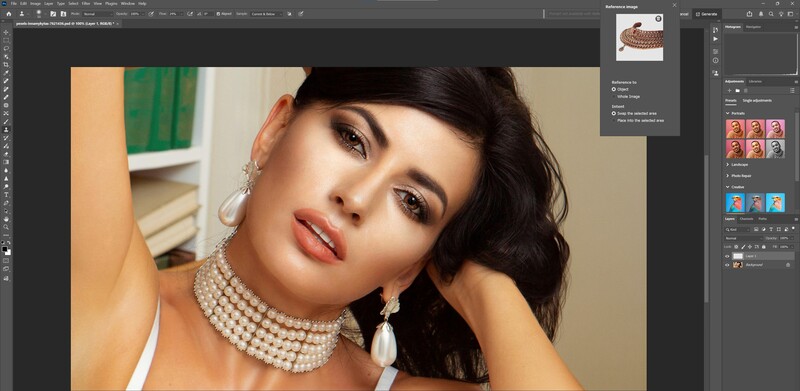
Until now, Generative Fill has relied primarily on text prompts to guide Photoshop's AI. With the new Reference Image option, users can upload an image directly into their active selection to guide how Photoshop generates new content within that selected area. This removes much of the randomness that previously defined the process, where users had to hope Adobe Firefly, Photoshop's AI engine, would interpret a written prompt correctly or make the right replacement when no text guidance was provided.
This is how it works: the AI analyzes the reference image and uses it to inform the generation of new pixels within the selected area. Rather than producing content in isolation, Photoshop pulls visual cues from the reference, including style, color palette, lighting direction, contrast, texture, and overall tonal balance. Highlights and shadows align more naturally, materials respond to light more convincingly, and the added element feels cohesive with the existing scene. This shifts Generative Fill from being largely interpretive to far more controlled and intentional. For Photoshop users, that added level of direction makes a meaningful difference in real-world workflows.
What This Means for Photographers
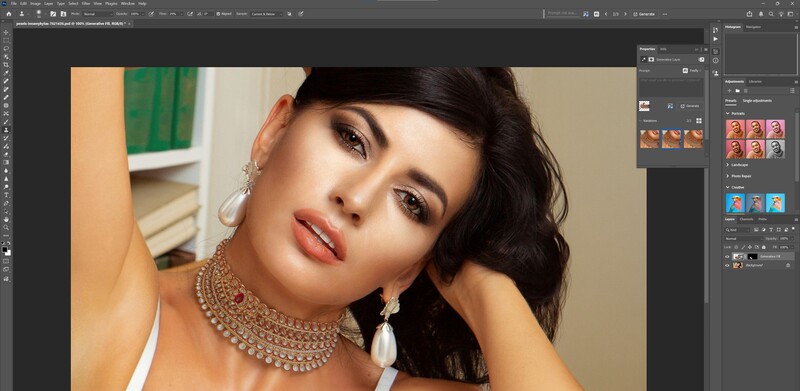
For photographers and retouchers, the biggest hurdle with generative tools hasn't been what they can do — it's how reliably they do it. Generative Fill has been capable from the start, but results often hinged on carefully written prompts, and even then, outcomes could be inconsistent.
Reference Image changes that. Instead of depending entirely on text descriptions, photographers can now guide the AI visually. That translates to stronger control over lighting consistency, color grading, campaign aesthetics, and overall compositing realism. When you're working on client projects where efficiency and repeatability matter, that added precision makes a real difference. It also reflects a broader shift in how Adobe is integrating AI into Photoshop. Rather than feeling like an experimental add-on, generative tools are evolving into practical components of everyday editing workflows.
The Bigger Picture
By bringing reference-driven generation from Photoshop Beta into the full Photoshop 2026 release, Adobe has made Generative Fill more controlled and predictable. The addition of Reference Image support reduces reliance on carefully crafted prompts and gives users clearer visual direction over the final result.
Instead of functioning as a loosely interpretive tool, Generative Fill now operates with greater consistency inside real editing workflows. For photographers and retouchers, that shift alone makes this update one of the more practical AI enhancements Photoshop has introduced to date.




Join the Fstoppers community for free
-
Post comments and join in the discussions
-
Browse the site ad-free
-
Share your work and get featured in the community
-
Compete in the photo contests for fun and prizes
No comments yet