
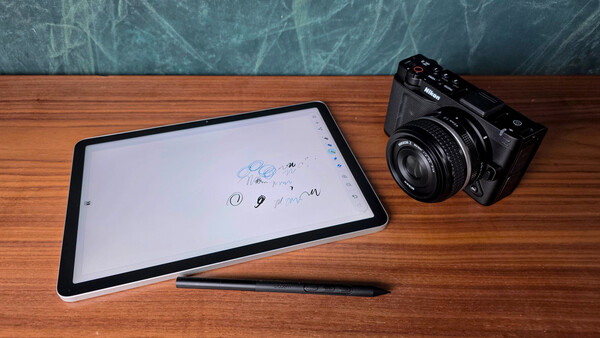
The Wacom MovinkPad 11 represents an interesting pivot for a company known primarily for professional-grade tethered displays. By moving into the standalone Android space, Wacom is targeting the "on-the-go" artist who wants the legendary Wacom pen feel without being chained to a desk. However, after spending time with the device, it becomes clear that while it excels in certain professional niches, it faces stiff competition from more versatile hardware.
Key Features and Selling Points
The MovinkPad 11 is built around a philosophy of "instant creativity." Its standout features include:
- Wacom Pro Pen 3: This is arguably the best pen on any mobile tablet. It is battery-free (EMR), incredibly lightweight, and provides a level of pressure sensitivity and tilt support that most consumer tablets struggle to match.
- Tactile Etched Glass: Unlike the slippery glass of a standard tablet, the MovinkPad 11 features a matte, etched surface. It provides a natural "tooth" that mimics the resistance of paper, which is a dream for artists who find standard screens too slick.
- Quick Draw (Wacom Canvas): A dedicated feature designed to let you start sketching the moment inspiration strikes. By tapping the pen on the screen during sleep mode, you instantly launch the Wacom Canvas app.
- Hard-Wired Connectivity: Unlike most Android tablets, this device is designed with the ability to be hard-wired to a PC or Mac, functioning as a dedicated pen display when you need the power of desktop software.
The Performance Gap: Can You Get This Elsewhere?
While the MovinkPad 11 has a "pro" pedigree, many of its benefits can be replicated — or even surpassed — by high-end Android tablets like the Samsung Galaxy Tab S9 or S10 series.
Screen Mirroring and Lag
One of the MovinkPad's major draws is using it as a secondary display. While this is a native feature for Wacom, Samsung tablets can achieve this through Second Screen or third-party apps like SuperDisplay.
However, there is a technical hurdle to consider: lag. In my testing of the MovinkPad 11, I experienced noticeable bits of lag when drawing or sketching quickly on the device itself. This is likely due to the mid-range processor (Helio G99) struggling to keep up with high-speed strokes. If this lag is present in native apps, it will almost certainly remain — or even worsen — when screen mirroring, as wireless data transmission naturally introduces latency. For a professional artist, even a few milliseconds of delay can break the "flow."
The 'Quick Draw' Bottleneck
Wacom pushes the Wacom Canvas app as a primary feature, but in practice, it feels like a tech demo rather than a tool. The app is severely limited:
- No color-changing features (stuck with basics: one black pencil, one blue pencil, one black brush, and erasers).
- No ability to change brush or pencil thickness.
- No access to layers, which is a dealbreaker for almost any serious digital workflow.
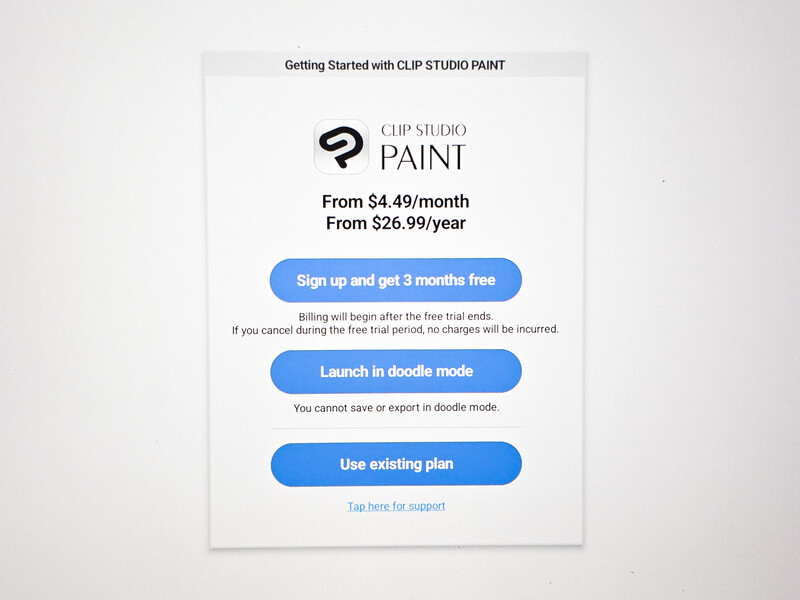
To get any real work done, you are forced into Clip Studio Paint. While powerful, this app requires a monthly or yearly membership fee. Wacom includes two free years with the purchase, but once that expires, you are hit with a recurring cost just to keep your primary tool functional.
What I Liked
- Reasonably priced
- Pen and screen feel nice
What I Didn't Like
- Higher-spec tablets are available in a similar price bracket
- The "free to use" Quick Draw app is severely limited
- The high-featured pre-installed app is pay-to-play (outside of the included two free years)
- The pen has no way to attach to or store with the tablet
The Conclusion: Specialist vs. Generalist
The Wacom MovinkPad 11 is a niche device that is a solid choice if:
- You absolutely require a dedicated drawing device that can also be hard-wired to a computer.
- You are a "pen purist" who needs a battery-free stylus paired with a tactile, matte screen.
However, for the average creator, the value proposition is tough. A high-end Samsung Galaxy tablet paired with a matte screen protector (like Paperlike or similar brands) often provides a better overall experience. You get a much faster processor, a more vibrant screen for media consumption, and a device that is useful for more than just drawing.
Furthermore, you aren't forced into a subscription model. There are amazing, free drawing apps available on Android — such as Krita, Sketchbook, or even the drawing tools within OneNote — that offer more features than Wacom's "Quick Draw" without the "pay-to-play" pressure of Clip Studio. You could also easily set these free apps to a type of quick app-launch feature to maintain that "quick draw" feel. For me, the versatility of a general-purpose tablet currently outweighs the specialized, but limited, nature of the MovinkPad 11.



Join the Fstoppers community for free
-
Post comments and join in the discussions
-
Browse the site ad-free
-
Share your work and get featured in the community
-
Compete in the photo contests for fun and prizes
No comments yet