
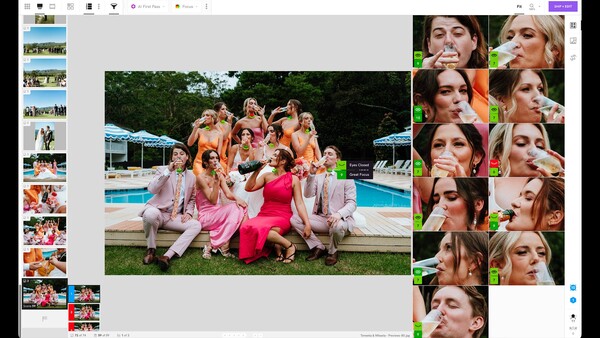
The best culling software is the one that gets you to your picks faster without deciding for you. Narrative sorts a shoot by scene, ranks every frame for focus and expression, and shows you why it ranked things the way it did, so the final call stays yours. That last part is what separates it from tools that hand you a finished selection and ask you to trust it.
Why Culling Is the Bottleneck
Culling is the least glamorous part of the job and the one that eats the most calendar. It is thousands of near-identical comparisons made in a row, and the quality of your decisions falls off a cliff somewhere around frame 800. The failure mode is not choosing a bad image. It is missing a good one because your attention was gone by the time you reached it.
Narrative was built by someone who hit that wall himself. Founder James Broadbent shoots weddings and elopements, and he described the ratio that pushed him into building software when Fstoppers covered the software in 2023: for every day behind the camera, four days behind the computer, one of them given entirely to culling. Narrative, aka Narrative Select, came out of trying to fix that arithmetic. The company puts the time it saves the average user at 253 hours a year.
Scenes View and AI First Pass: Triage Before You Commit
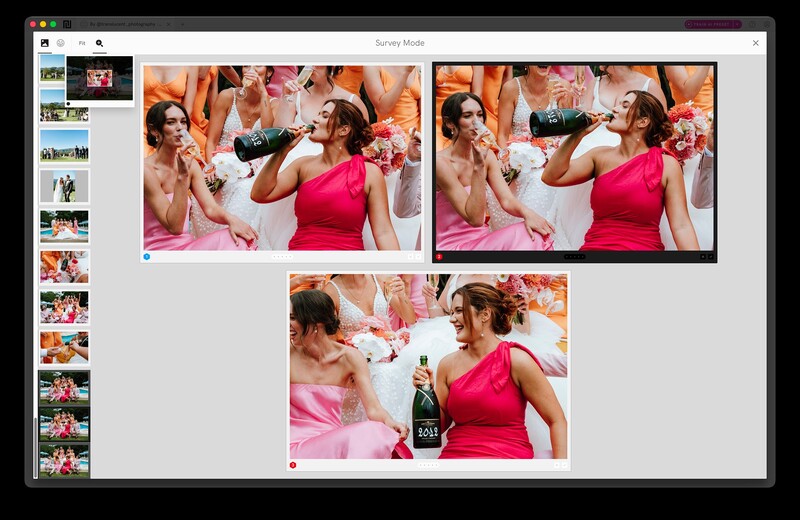
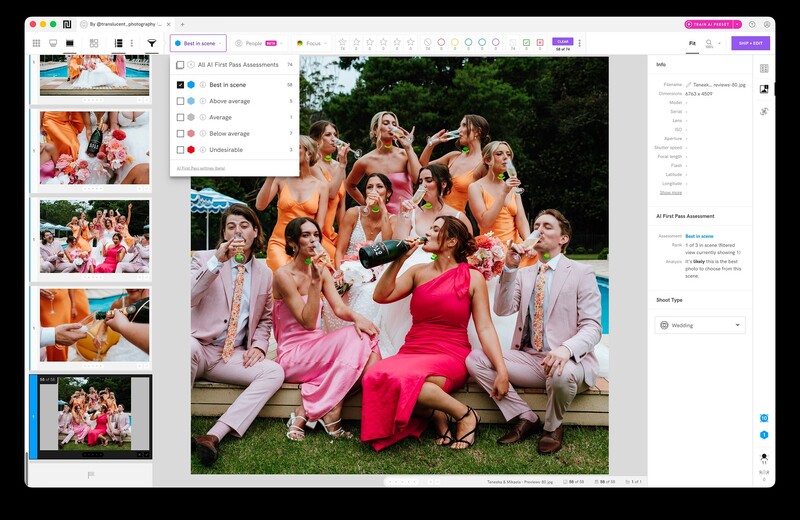
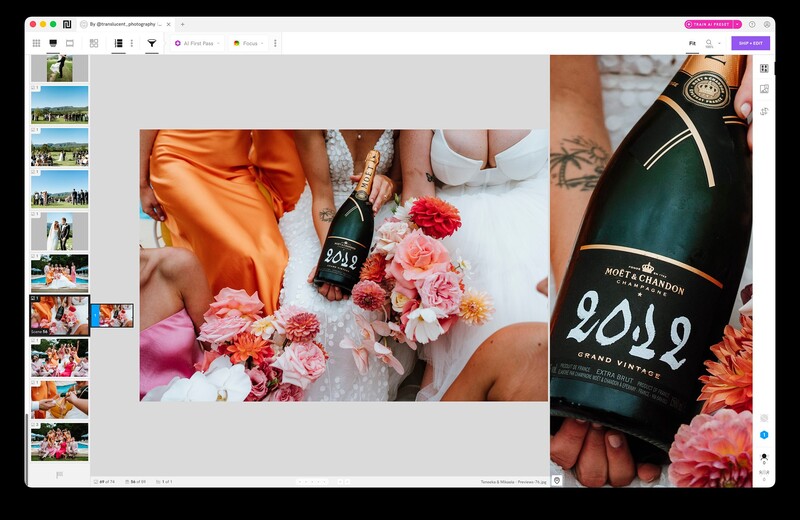
Narrative groups a shoot into scenes rather than presenting one long undifferentiated roll, so you browse in the order the day actually happened. Within each scene, AI First Pass sorts frames from Best in Scene down to Undesirable, surfacing the strongest shot first.
The combination is what makes it useful rather than either piece alone. You triage a scene, shortlist two or three candidates, then switch to Loupe View to zoom in and confirm the pick. High-volume shooters get the most out of this, because a wedding or event produces long bursts where thirty frames of the same moment differ by a blink and a hand position.
Face Assessments Do the Work You Cannot Do at Thumbnail Size
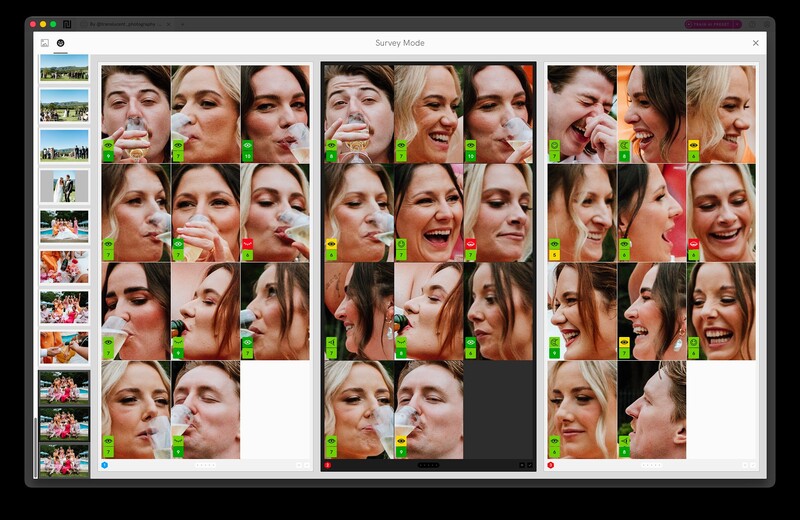
Narrative runs more than 17 assessments on every detected face, covering focus and eye state, including the mid-blink that looks fine in a thumbnail and ruins the frame at full size. Survey Mode puts near-identical frames side by side so you can zoom and pan across all of them at once without leaving the comparison.
Anyone who has delivered a group shot only to notice later that one person's eyes were half closed knows why this matters. Checking twelve faces across eight frames by eye is exactly the kind of task where human attention fails and software does not.
Key Element Detection Covers the Frames Without People
Face-based assessment is useless the moment there is no face, which is a real gap when a wedding day includes rings, invitations, florals, and table details, and when commercial and wildlife work may include no people at all.
The Close-Ups Panel zooms in on whichever element matters most in a shot, and Key Element Detection extends that to objects, animals, and partially obscured faces when no face is detected. A ring macro where the keeper and the discard differ by two millimeters of focus finally gets assessed the same way a portrait does.
People Filter Answers the Coverage Question
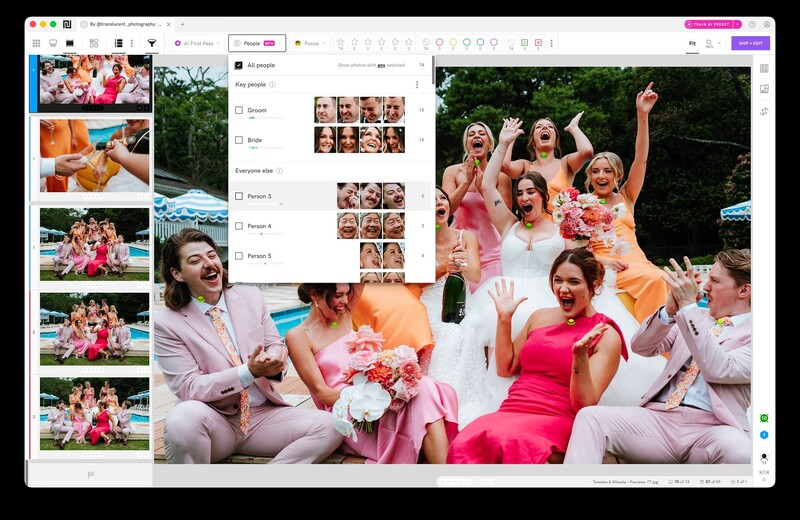
People Filter names every detected face in a shoot and filters the whole project by one person or any combination of them, showing exactly who has coverage and how many frames they appear in.
Paired with the Close-Ups Panel, it turns a question you used to answer by scrolling into one you answer by filtering. Do you have enough of the couple together? Did the groom's grandmother make it into more than two frames? Filter to the person, review their face across every group shot they appear in, and you know before you deliver rather than after.
It also makes the delivery requests easier. Parent albums and the inevitable "can you send everything with my sister in it" stop being a manual hunt through a finished gallery.
What Happens After the Cull
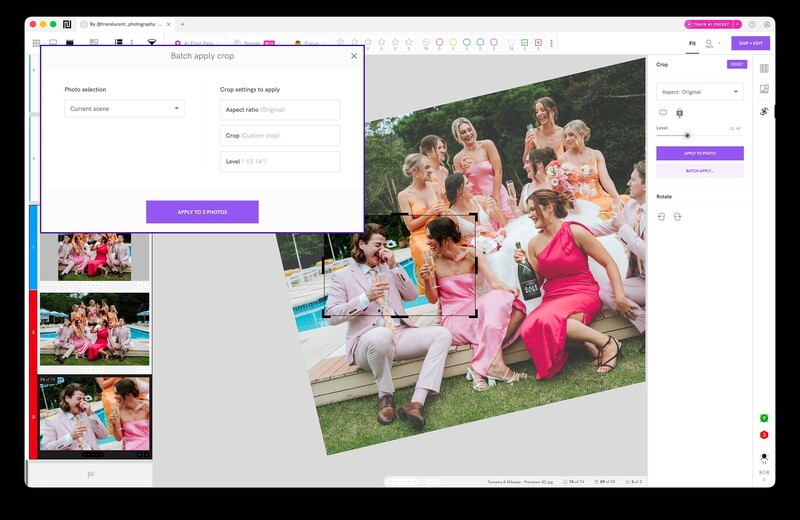
Narrative does not stop at selection. Personal AI Presets train on your own catalog, which requires at least 1,500 edited images, and continue to improve as you keep editing in Lightroom. Batch Apply Crop pushes a crop and rotation across an entire shoot, all landscapes, all portraits, or a single scene, with one click.
One-click import moves the shoot into Lightroom Classic on Mac and Windows, and into Lightroom CC, Photoshop, and Capture One on Mac, so the decisions travel into whatever you already edit in.
The Practical Details
Import is fast enough to matter, handling thousands of raw files in seconds so culling starts almost immediately. Supported formats cover the usual raw set alongside HEIC and HEIF, so iPhone files and newer camera formats import without a conversion step.
It runs and processes locally without an internet connection. That is a preference for some photographers and a contractual requirement for others, since plenty of commercial and wedding agreements make uploading a client's images to a third-party service a problem rather than a convenience.
It works on both Mac and Windows, though new features typically land on macOS first. Full system requirements are available here.
What It Costs
Every new account starts with a full free trial of Ultra with no credit card required, which is the sensible way to find out whether the ranking matches your eye before you commit.
Paid plans start at $15 per month, or $10 per month billed annually, for a single user. Premium runs $59 per month, or $40 annually, and adds unlimited editing with AI presets trained on your own edits, AI image straightening, and support for two users.
Who Should Use It
The photographers who get the most from this are the ones shooting volume where coverage matters: weddings, events, and commercial work where a shoot produces thousands of frames and a client expects specific people or specific details to appear. If you shoot fifty frames on a job and know every one of them by the time you get home, culling software solves a problem you do not have.
What Narrative is betting on is that photographers do not actually want the machine to choose. Ranking a scene, flagging a blink, and finding the sharp frame in a run of ring macros are all mechanical problems. Deciding which frame tells the story is not, and keeping that decision in the photographer's hands while removing the tedium around it is the argument the whole product rests on.
Try it on the gallery you have been putting off. Start with a free trial, and get 10% off your plan if you stay.
Screenshots courtesy of Narrative. Featured photographs by Translucent Photography.




Join the Fstoppers community for free
-
Post comments and join in the discussions
-
Browse the site ad-free
-
Share your work and get featured in the community
-
Compete in the photo contests for fun and prizes
1 Comment
In my view culling software is a complete waste of money and also removes the opportunity to you to learn from your mistakes. Also I've been in situations where I've slightly missed a shot in a certain situation couple of times at a wedding or you've just missed a certain moment. It's a tiny bit soft guess what? You can actually still get that to be a reasonable image and my clients generally still loved the photo. I think culling software is the biggest waste of time and money that you'll ever spend in photography because it doesn't teach you anything... I downloaded a couple of trial versions and had to play but honestly it also picked up mistake mistakes that weren't mistakes as well in photos because the AI that was picking it up was faulty as well. There were photos that were in focus and saying it was blurry because of the artistic creation that I created ... I would be very very careful using any of this software if I was a professional photographer. If you're that busy that you need this software, then I would suspect that you're cramming too much into your calendar. And again, my opinion will not be popular, but guess what? I don't care that's my view.