Clients stopped asking whether you shoot video some time around 2019. Now they assume it, and the photographer who says no watches the budget walk down the hall. Your camera almost certainly already records footage that would have passed for broadcast a decade ago, which means the camera was never the problem. Video punishes the three things stills photography let you ignore: sound, continuous light, and motion that looks deliberate. A kit that solves those three costs less than one good lens.
This guide is built as a kit, not a shopping list. Each slot answers a specific failure that catches stills photographers in their first year, and the picks are ordered roughly by how much pain they remove per dollar. If you buy one thing, buy the microphone.
One ground rule. Every number below was checked against the manufacturer's current published specification and a live retailer listing, not against a spec sheet from launch week. Every item is currently shipping, and where a product sits late in its cycle, the entry says so.
At a Glance
- Best Starter Camera for Video: Panasonic Lumix S5 II
- Best Lens: Sigma 24-70mm f/2.8 DG DN II Art
- Best Microphone: DJI Mic 3
- Best Light: amaran Halo 100x
- Best Tripod and Fluid Head: Manfrotto Befree Live Aluminum Lever-Lock Tripod Kit
- Best Gimbal: DJI RS 4 Mini
- Best Monitor: Atomos Shinobi II
- Best Variable ND Filter: PolarPro Peter McKinnon Signature Edition II Variable ND Filter
- Best Cards and Storage: Lexar ARMOR GOLD SDXC UHS-II
Best Starter Camera for Video: Panasonic Lumix S5 II
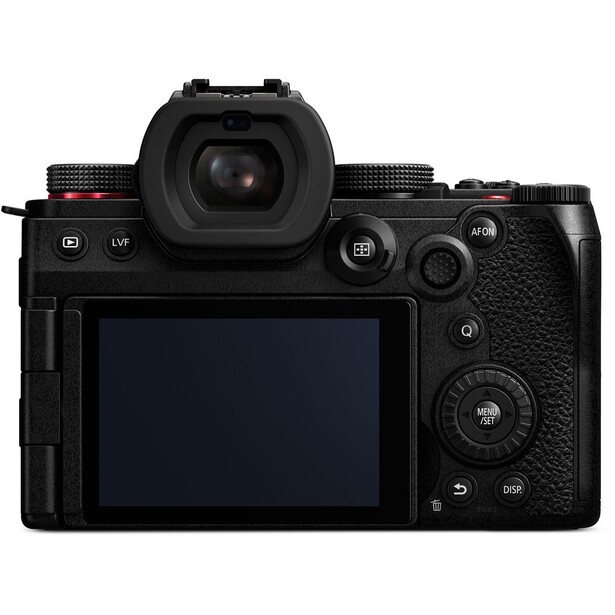
- Sensor: 24.2 MP full frame CMOS with phase detection
- Video: 6K/30p open gate (5,952 x 3,968, 3:2), 4K/30p oversampled at full width, 4K/60p with an APS-C crop, 10-bit 4:2:2
- Autofocus: 779-point hybrid phase and contrast detection
- Stabilization: 5-axis in body, rated 5 stops, 6.5 stops with Dual I.S. 2
- Storage: dual SD UHS-II slots
- Weight: 740 g with battery and one card
- Works with: L-mount lenses from Panasonic, Sigma, and Leica
- Price: $1,697.99 (B&H)
Start here only if you genuinely need a body. A photographer with any recent Canon, Sony, Nikon, or Fujifilm camera already owns something that records 10-bit 4K, and the money is better spent on the eight items below. If video is the camera's primary job, the Lumix S5 II is still the most video knowledge you can buy for the least money.
The reason is a set of tools Panasonic ships as standard and its rivals mostly charge for. There is a real waveform on the screen, so you expose by measurement rather than by squinting. V-Log is included instead of sold as an upgrade, and you can load your own LUTs into the body to preview a grade while you shoot. Active cooling means the recording limit is your card and your battery, not a thermal shutdown, which matters the first time you cover a 40-minute keynote. Open gate 6K captures the full 3:2 sensor area, so a horizontal edit and a vertical cut come from one take.
Age shows. Twenty-four megapixels is thin against a 45 MP Canon or Sony body if photography still pays your bills, and 4K/60p costs an APS-C crop, so your 24mm becomes a 36mm equivalent the moment you want slow motion. Autofocus tracking remains a step behind Sony's, and this body shipped in early 2023, with an S5 III rumored on Chinese social media but nothing announced, so buy it at a discount rather than a premium. Check the current price of the Panasonic Lumix S5 II at B&H. Also consider the Canon EOS R6 Mark III if you are already invested in RF glass and want a 32.5 MP stills camera that also shoots 7K open gate at 30p, for a good deal more money.
What We Like
- Waveform, V-Log, and in-camera LUTs included, not upsold
- Open gate 6K gives you horizontal and vertical from one take
- Active cooling removes the recording time limit
What Could Be Better
- 4K/60p carries an APS-C crop
- Autofocus tracking still trails Sony and Canon
- 24.2 MP is modest if stills remain your main income
- Three years old, with a successor rumored
Best Lens: Sigma 24-70mm f/2.8 DG DN II Art
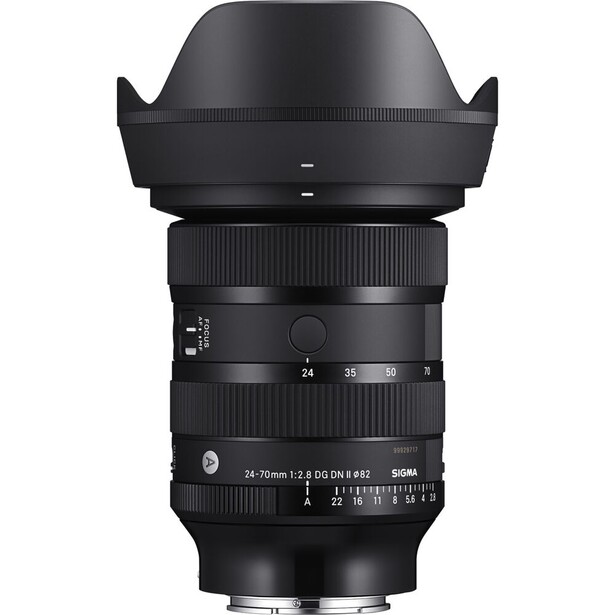
- Type: full frame standard zoom, 24-70mm
- Aperture: constant f/2.8, 11 rounded blades, de-clickable aperture ring with a lock switch
- Focus: HLA linear motor, minimum focus 17 cm wide and 34 cm long, focus breathing suppressed by design
- Filter thread: 82mm
- Build: dust- and splash-resistant construction
- Weight: 745 g in L-mount, 735 g in Sony E
- Works with: L-mount and Sony E full frame bodies
- Price: $1,308 (B&H)
Photographers moving into video reach for their fastest prime and then wonder why every shot looks slightly wrong. A 35mm f/1.4 wide open on a moving subject is a focus-puller's nightmare, and video gives you no second frame. The job needs one zoom that covers the interview, the cutaway, and the establishing shot without a lens change. The Sigma 24-70mm f/2.8 DG DN II Art is that lens with video features designed in rather than bolted on.
Three specifications carry it. Sigma engineered the optics to minimize focus breathing, the zoom-like shift in framing that happens when a lens racks focus and the most distracting artifact in amateur video. The aperture ring de-clicks, so you can ride exposure through a shot without an audible tick landing in your audio track. The HLA linear motor is quiet enough that an on-camera mic does not hear it working.
It is still not a light lens. At 745 g, it plus a 740 g body eats most of a compact gimbal's payload, so a smaller f/4 zoom is the better companion for the RS 4 Mini below. The bigger limitation is mounts: Sigma builds this in L-mount and Sony E only. Nikon owners should look at the Tamron 28-75mm f/2.8 Di III VXD G2 in Z-mount, and Canon owners are stuck with first-party glass, since Canon's third-party licensing still covers APS-C RF lenses only, and the Canon RF 24-105mm f/2.8 L IS USM Z costs considerably more. Check the current price of the Sigma 24-70mm f/2.8 DG DN II Art at B&H.
Read our full review of the Sigma 24-70mm f/2.8 DG DN II Art.
What We Like
- Focus breathing suppressed by optical design, not software
- De-clickable aperture ring with a lock switch
- Quiet HLA focus motor that on-camera mics do not pick up
What Could Be Better
- L-mount and Sony E only, so no Canon RF or Nikon Z
- 745 g is heavy for a compact gimbal
- 82mm filters are expensive to feed with a variable ND
Best Microphone: DJI Mic 3
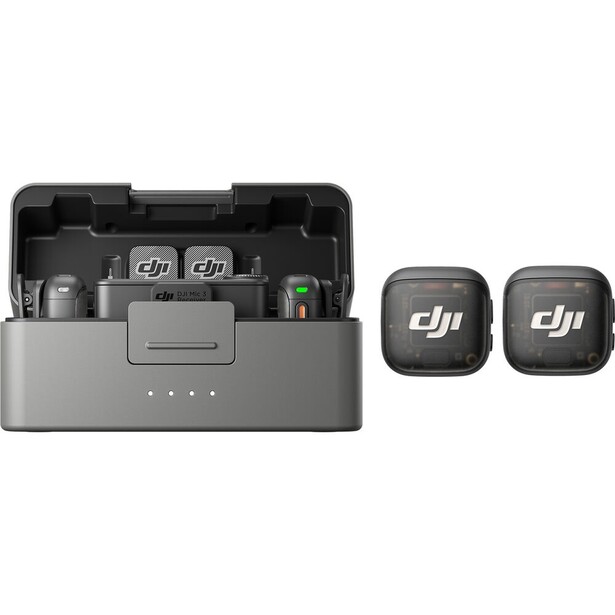
- Type: 2.4 GHz and 5 GHz wireless system, two transmitters and one receiver
- Recording: 32-bit float or 24-bit at 48 kHz, with 32 GB of onboard storage per transmitter
- Range: 400 m line of sight, 80 m in heavy interference
- Battery: 8 hours per transmitter, 10 hours for the receiver, with about 2.4 further charges from the case
- Weight: 16 g per transmitter with its magnet
- Works with: any camera with a 3.5mm input, plus USB-C phones and computers, timecode over USB-C
- Price: $219 (B&H)
Buy this first. Not second, not after the gimbal. An audience will forgive a slightly soft shot and will never forgive audio that sounds like it was recorded in a bathroom, which is exactly what the microphone built into your mirrorless body sounds like. Clipping a wireless transmitter to a subject's collar is the largest single quality jump available to a photographer starting video work, and the DJI Mic 3 is the version of that jump with the fewest ways to fail.
The headline feature is 32-bit float recording, and it is not marketing. A 32-bit float file has so much headroom that an unexpected shout does not clip and a whisper can be pulled up in the edit without dragging the noise floor with it. For a photographer used to a raw file that tolerates three stops of recovery, it is the same sensation applied to sound. The transmitters also record internally to 32 GB of onboard storage while they transmit, so a dropout on the link does not cost you the take. At 16 g with the magnet, a transmitter disappears under a lapel, and DJI rates the link at 400 m in the open and 80 m in a crowded RF environment, the second figure being the one that matters in a hotel ballroom.
The catch is the ecosystem. DJI's connectors, adapters, and app work beautifully together and less beautifully with anything else, so an existing Rode or Sennheiser kit means a second set of cables and habits. When we reviewed the Mic 3, the sharper limitation turned out to be the transmitters themselves: there is no 3.5mm input on them, so you cannot clip on your own lavalier capsule the way you could on earlier DJI kits, and there is no USB-C port on a transmitter either, which means all charging runs through the case. Our reviewer also found that pairing over Bluetooth costs you wireless live audio monitoring. Check the current price of the DJI Mic 3 at B&H. Also consider the DJI Mic Mini if you want the same workflow for less money and can live without 32-bit float and without onboard backup recording. Our wireless microphones guide goes deeper on the Rode, Hollyland, and Saramonic alternatives.
Read our full review: DJI Mic 3 Review: Compact Wireless Audio for Creators
What We Like
- 32-bit float means a blown take is recoverable
- Onboard recording in each transmitter backs up the wireless link
- 16 g transmitters that genuinely hide under clothing
What Could Be Better
- Locks you into DJI's cable and app ecosystem
- No 3.5mm input on the transmitters, so you cannot add your own lavalier capsule
- Transmitters have no USB-C port of their own, so charging runs through the case
- No wireless live audio monitoring when paired over Bluetooth
Best Light: amaran Halo 100x
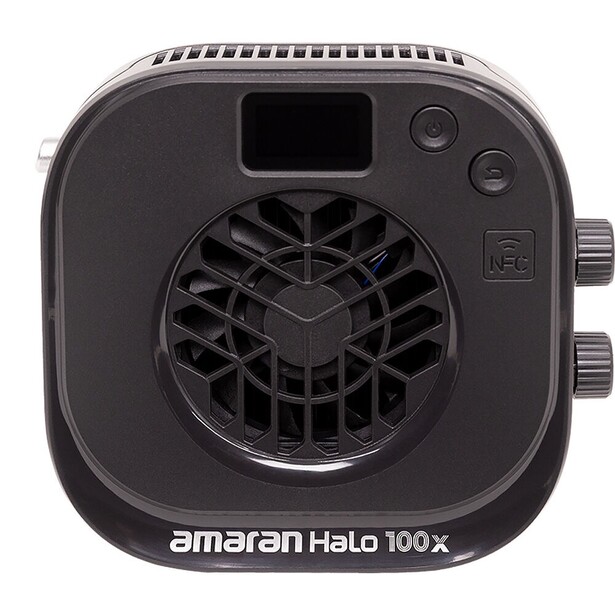
- Type: bi-color COB LED monolight with a Bowens mount
- Output: 100 W draw, 84 W output, 4,890 lux at 1 m bare on an 85-degree beam
- Color: 2,700 to 6,500 K, CRI 96+, TLCI 97+
- Power: USB-C PD 3.0 or 12 to 24 V DC, AC adapter included
- Noise: 28 dBA maximum, with a 20 W silent mode
- Size: 5.2 x 4.7 x 2.2 inches
- Works with: any Bowens modifier, plus app, NFC, and DMX control over USB-C
- Price: $169 (B&H)
Here is the part that catches photographers out: your strobes are useless. Video needs light that stays on, and a strobe that fires for a thousandth of a second cannot help. Your modifiers are fine, because the Bowens mount on a video COB light is the same Bowens mount on your Godox strobe. The amaran Halo 100x is the cheapest sensible way to plug the softboxes you already own into a continuous workflow.
Amaran launched the Halo series in March 2026 as a smaller, brighter replacement for its older COB x S line, and the 100x is the size that suits a one-light interview. It draws 100 W, puts out 84 W, and delivers 4,890 lux at a meter bare on an 85-degree beam, which amaran puts at 34% brighter than the 100x S it replaces in roughly a third of the size. CRI 96 and TLCI 97 mean skin tones land where you expect, and the 2,700 to 6,500 K range matches a tungsten practical or a window without gels. USB-C power delivery is what changes how you work: a 100 W light that runs from a laptop power bank can go on a stand in a corridor with no outlet, which is where corporate video actually gets shot. Fan noise tops out at 28 dBA, and a silent mode caps the fixture at 20 W to shut the fan up entirely.
It is bi-color only. No RGB, no green and magenta correction, no gel emulation, so an office lit by aging fluorescents will cost you time in the grade. Bare output is modest, too. Move the light from one meter to two and the inverse square law takes three quarters of it away, then a softbox costs you another stop and a half or two. One of these lights a face, not a room. For full color control, the amaran 150c is the RGBWW alternative with more punch and a wider 2,500 to 7,500 K range. For a first video light that fits your existing modifiers, check the current price of the amaran Halo 100x at B&H.
What We Like
- Bowens mount accepts the softboxes you already own
- CRI 96 and TLCI 97 for reliable skin tones
- USB-C power delivery input lets it run away from an outlet
What Could Be Better
- Bi-color only, with no green and magenta adjustment
- Bare output is modest once a softbox is attached
- No battery plate, so working away from an outlet means a 100 W USB-C PD source
- IP20, so it wants to stay indoors and dry
Best Tripod and Fluid Head: Manfrotto Befree Live Aluminum Lever-Lock Tripod Kit
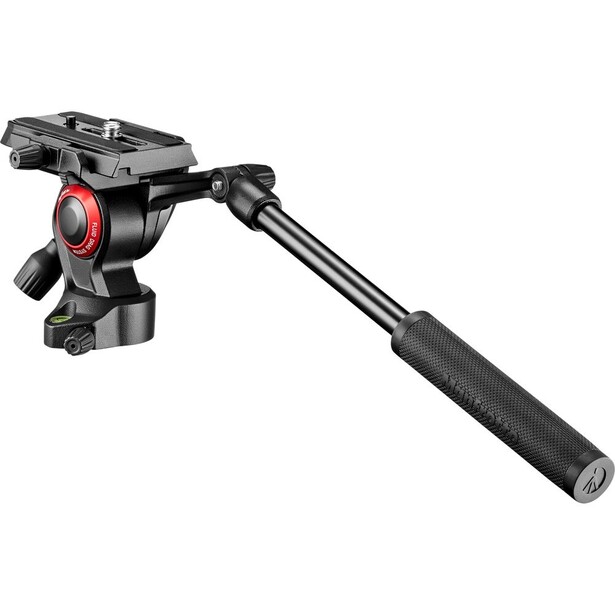
- Type: four-section aluminum travel tripod with a fluid video head
- Payload: 4 kg
- Max height: 151 cm
- Folded length: 40 cm
- Head: fluid drag on pan and tilt, separate pan and tilt locks, sliding video plate
- Weight: 1.75 kg
- Works with: mirrorless and DSLR bodies up to 4 kg, carry case included
- Price: $203.05 (B&H)
Your carbon fiber ball head is the enemy here. A ball head locks a camera in one position and holds it, so the moment you pan with one it either sticks and jerks or swings loose. Video wants the opposite, a controlled resistance that lets a movement start and stop smoothly. The Manfrotto Befree Live is the cheapest one worth owning.
It is a travel tripod first, which is the entire reason it gets used rather than left in the car. It folds to 40 cm, weighs 1.75 kg, and slides into the same bag pocket as the stills tripod it replaces. The head takes a sliding plate, so you can balance the camera front to back over the tilt axis, and separate on and off knobs let you lock the tilt and pan freely, the setup for almost every move you will actually make.
Respect the payload. Four kilograms sounds generous until you stack a body, a 24-70mm f/2.8, a monitor, a receiver, and a cage, at which point the head droops after you set a tilt. The deeper weakness is fixed fluid drag and no counterbalance spring, so slow tilts with a heavy lens show a small lurch at the start of the move that you cannot dial out. Every fluid head at this price shares that flaw. Check the current price of the Manfrotto Befree Live Aluminum Lever-Lock Tripod Kit at B&H. Also consider the SmallRig AD-01 Heavy-Duty Tripod with Fluid Head if you work in a studio rather than on the road, since it carries 8 kg on a 75mm bowl. Our tripods guide covers the stills side of the same question.
What We Like
- A real fluid head at a travel tripod's size and price
- Separate pan and tilt locks
- Sliding plate lets you balance the camera properly
What Could Be Better
- Fixed drag and no counterbalance, so slow tilts can lurch
- 4 kg payload rules out a built-up rig
- Aluminum, so heavier than a carbon equivalent
Best Gimbal: DJI RS 4 Mini
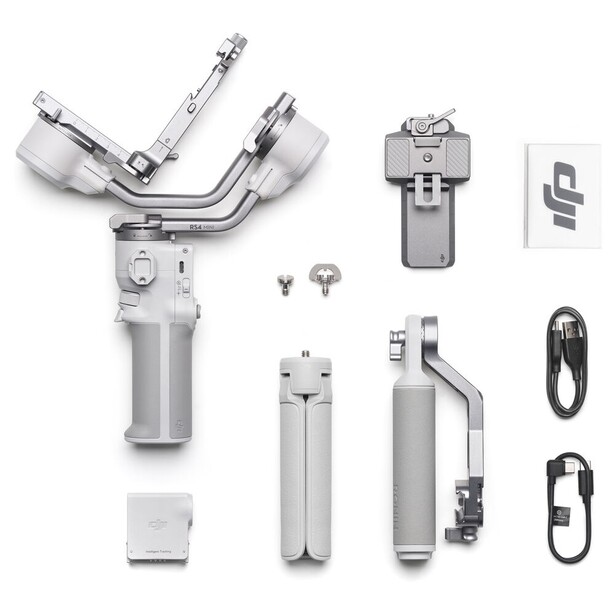
- Type: three-axis motorized gimbal stabilizer
- Payload: 0.4 to 2 kg tested
- Battery: up to 13 hours stationary, about 1 hour 50 minutes to charge at 30 W
- Features: automated axis locks, native vertical shooting, optional Intelligent Tracking Module
- Weight: 890 g including the quick-release plate, excluding the tripod
- Works with: mirrorless bodies within payload, USB-C camera control, NATO and 1/4"-20 mounts
- Price: $369 (B&H)
A gimbal is the most fun and the least necessary item here, which is worth saying before you spend. Most of the video a photographer gets paid for is a person talking, on a tripod. But when a client asks for a walking shot through a space, in-body stabilization stops being enough. The DJI RS 4 Mini is the smallest gimbal that will still carry a full frame camera with a real lens on it.
Payload is the reason to pick this one. DJI rates it at 2 kg, enough for a mirrorless body and a mid-size zoom, and it manages that while weighing 890 g itself. Bigger gimbals carry more and punish your forearm for an hour; phone gimbals carry nothing useful. The automated axis locks are what gets it out of the bag, because the arms fold and lock themselves rather than demanding a ritual with three thumbscrews. Native vertical shooting needs no bracket, and the optional Intelligent Tracking Module clips on magnetically so the gimbal follows you while you present to the lens.
Balancing is the part nobody warns you about. Every lens change means rebalancing, and a 745 g zoom on a 740 g body sits close enough to the 2 kg ceiling that a heavier lens strains the motors into a drift the footage shows. Plan a light lens for gimbal days. It is also one more thing to charge, carry, and set up, which is the real reason to buy it last. Check the current price of the DJI RS 4 Mini at B&H. Also consider the DJI RS 5 if you expect to hang a monitor and a matte box off the rig, since it carries 3 kg.
What We Like
- 2 kg payload in an 890 g body
- Automated axis locks make setup fast enough to bother with
- Native vertical mode without a bracket
What Could Be Better
- Rebalancing after every lens change is tedious
- A pro zoom on a full frame body sits near the payload limit
- The tracking module costs extra
Best Monitor: Atomos Shinobi II
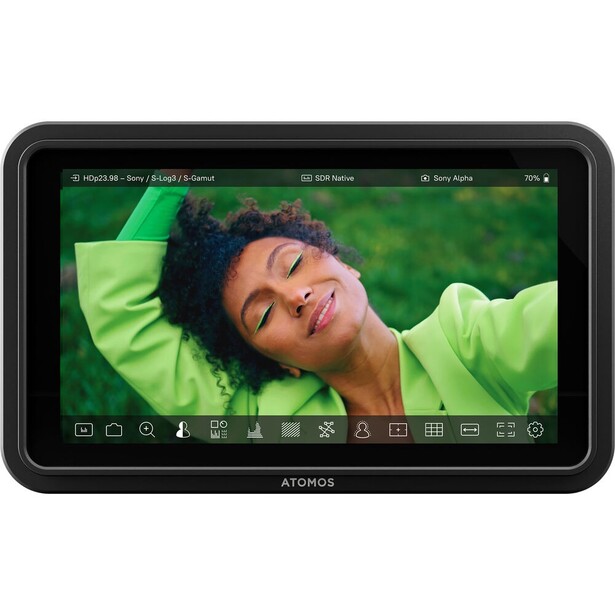
- Screen: 5.2-inch 1920 x 1080 touchscreen, 10-bit
- Brightness: 1,500 nits
- Inputs: HDMI 1.4 in, up to DCI or UHD 4K at 30 fps and 1080p at 60 fps
- Tools: waveform, false color, focus peaking, LUT preview, USB-C camera control on supported bodies
- Power: NP-F battery, DC input, or 10 W USB-C power delivery
- Weight: 7.4 oz
- Works with: Canon, Panasonic, Sony, and Z CAM bodies for camera control over USB-C
- Price: $375 (B&H)
Photographers underrate this one, because the camera already has a perfectly good screen on the back. It does, until you are shooting an interview in a sunlit conference room and cannot tell whether the subject's eye is sharp, or judging a log profile that looks washed out on a display never designed to show it. The Atomos Shinobi II exists to make both problems go away.
Brightness is the first half of the answer. At 1,500 nits it is roughly 50% brighter than the original Shinobi and usable in direct sun without a hood, which is the difference between checking focus and guessing. The toolset is the second half. False color paints exposure in flat colored bands so you can see at a glance whether skin tones sit where you want them, and LUT preview lets you monitor a graded image while recording flat log footage, so a client watching over your shoulder sees something like the final film. It weighs 7.4 oz and runs on NP-F batteries or USB-C power delivery at 10 W.
The limitation is the HDMI standard. This is HDMI 1.4, not 2.0, so 4K input tops out at 30 fps and you cannot monitor 4K/60p at all. Interviews and b-roll at 24 or 30 fps never meet that wall. Shoot a lot of 60p for slow motion and you meet it on day one, at which point you want a 7-inch panel with HDMI 2.0. It is also a monitor, not a recorder, so there is no ProRes fallback when a camera's internal codec disappoints. Check the current price of the Atomos Shinobi II at B&H. Also consider the Viltrox DC-A1 if you want a 7-inch panel that hits 2,800 nits and accepts 4K/60p for less money, at the cost of Atomos' software polish.
What We Like
- 1,500 nits is usable in direct sun
- False color and waveform make exposure a measurement, not a guess
- LUT preview shows clients a graded image on set
What Could Be Better
- HDMI 1.4 caps 4K input at 30 fps
- Monitor only, with no recording fallback
- 5.2 inches is small for pulling focus manually
Best Variable ND Filter: PolarPro Peter McKinnon Signature Edition II Variable ND Filter
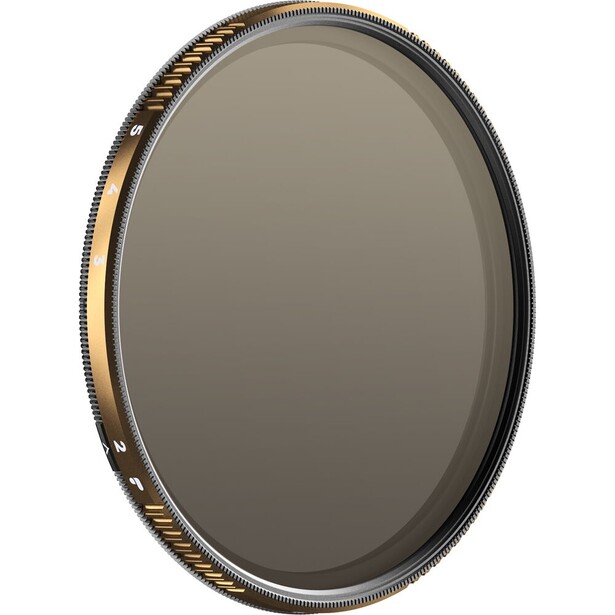
- Type: threaded variable neutral density filter
- Density: 2 to 5 stops or 6 to 9 stops, with a Black Mist version of each
- Thread sizes: 49mm, 67mm, 77mm, 82mm, and 95mm
- Construction: Cinema Series glass rated to resolve 8K, with haptic hard stops at each end of the range
- Frame: slim design rated for no vignetting down to 16mm
- Works with: any lens with a matching thread, Defender 360 case included
- Price: $149.99 (49mm) to $249.99 (67mm to 95mm) (PolarPro)
Most photographers do not know they need this, and it is the item that makes footage stop looking like video. Video has a rule stills does not: your shutter speed should sit at roughly double your frame rate, so 1/50 second at 24 fps. That produces natural motion blur, and it takes shutter speed away from you as an exposure control. Outdoors at f/2.8 in daylight, the only way to hold 1/50 second is to put glass in front of the lens, and the PolarPro Peter McKinnon Signature Edition II Variable ND Filter is the glass to use.
A variable ND is two polarizers rotating against each other, and its failure mode is famous: turn the ring too far and you get cross-polarization, a dark X smeared diagonally across the frame that no grade can rescue. PolarPro's answer is a haptic stop locking system that physically prevents the ring from leaving the usable range, so you feel the stop instead of checking the corners. The company also splits the range into a 2 to 5 stop version and a 6 to 9 stop version rather than pretending one filter can cover both. The Black Mist variants add 1/8 diffusion, the cheapest way to soften digital highlights in camera rather than in a plugin.
The cost is real, and it multiplies. You need one filter per thread size you shoot, or a set of step-up rings and the patience they demand, and the Sigma zoom above takes an 82mm filter. It cannot be stacked with a separate polarizer either, so killing a reflection on water while holding 1/50 second means buying the PolarPro Peter McKinnon Chroma Variable ND & Polarizer Filter instead, which puts both elements in one frame. Check the current price of the PolarPro Peter McKinnon Signature Edition II Variable ND Filter at B&H.
What We Like
- Hard stops make cross-polarization physically impossible
- Split into 2 to 5 and 6 to 9 stop versions rather than one compromised range
- Slim frame clears vignetting down to 16mm
What Could Be Better
- Expensive, and you need one per thread size
- Cannot be stacked with a separate polarizer
- Two filters are needed to cover the full density range
Best Cards and Storage: Lexar ARMOR GOLD SDXC UHS-II
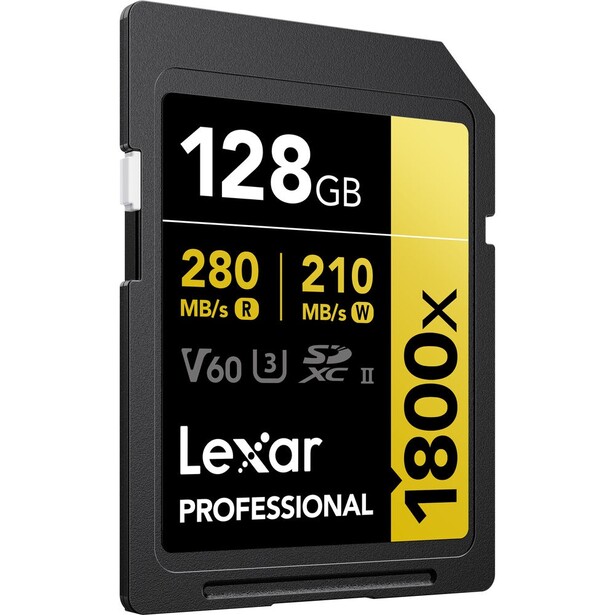
- Type: SDXC UHS-II, V60 video speed class
- Capacities: 128 GB, 256 GB, 512 GB, and 1 TB
- Speed: up to 280 MB/s read, up to 205 MB/s write (210 MB/s on the 128 GB card)
- Durability: IP68, rated to a 5 m drop and 1,500 G shock, stainless steel housing
- Warranty: limited lifetime, with a recovery tool included
- Works with: any UHS-II SD camera, and UHS-I bodies at reduced speed
- Price: $129.99 (128 GB) to $599.99 (1 TB) (B&H)
Stills photographers get away with slow cards because a burst empties into a buffer that drains between shots. Video has no buffer. The camera writes continuously for the length of the take, and a card that cannot sustain the bitrate does not slow down, it stops recording, usually 40 seconds into the answer you needed. The V rating governs this, and it is the only number on the card that should influence you. The Lexar ARMOR GOLD SDXC UHS-II is a V60 card, which guarantees a minimum sustained write of 60 MB/s.
Do the arithmetic and V60 turns out to be a sweet spot rather than a compromise. A 200 Mbps 10-bit 4K stream, the highest common setting on most hybrid cameras, needs 25 MB/s sustained, and even a 400 Mbps mode needs only 50 MB/s. You step up to V90 only for the heaviest ALL-Intra codecs, which run to 600 or 800 Mbps and which most people shooting corporate work never touch. The ARMOR GOLD is also built like a tool rather than a consumable: stainless steel housing, IP68 rating, a 5 m drop rating, and a limited lifetime warranty.
Two honest caveats. The 205 MB/s write ceiling is modest next to the fastest V90 cards, so long stills bursts clear slowly, and if your camera's flagship codec is ALL-Intra, this card will not let you use it. Then plan for what comes next, because an hour of 200 Mbps 4K is about 90 GB and a two-camera interview day hands you 300 GB before you edit a frame. A fast portable drive like the Samsung Portable SSD T9, which holds its speed through a full-drive transfer where cheaper SSDs collapse once their cache fills, is the other half of this slot, and a 4K timeline cuts directly off it. Our memory cards guide breaks the speed classes down further. Check the current price of the Lexar ARMOR GOLD SDXC UHS-II at B&H. Also consider the Lexar Professional 2000x SDXC UHS-II GOLD Series if your camera shoots ALL-Intra and you need the V90 rating.
What We Like
- V60 sustained write covers every common video bitrate
- Steel housing, IP68, and a 5 m drop rating
- Limited lifetime warranty with a recovery tool included
What Could Be Better
- Not fast enough for ALL-Intra codecs that require V90
- 205 MB/s write is modest for long stills bursts
- UHS-II speeds need a UHS-II reader to matter
How to Choose a Video Kit
Buy in the order of what breaks. Sound fails first, every time, and it fails invisibly, because you do not hear the room tone and the air conditioning until you are at a computer with headphones on. Exposure discipline fails second, which is why the variable ND and the monitor sit high in this list and the gimbal sits low. A locked-off shot at the correct shutter angle with clean audio and a soft key light reads as professional; a gliding gimbal move through a badly exposed room with hissing audio does not.
The specification photographers overrate is resolution. Almost nothing you deliver will be watched above 1080p, and 4K mostly buys reframing headroom and a cleaner downscale. Care instead about bit depth and chroma subsampling, because 10-bit 4:2:2 footage survives a color grade in a way 8-bit 4:2:0 does not. The underrated spec is recording time: a camera that overheats after 20 minutes cannot be pointed at a wedding ceremony or a panel discussion.
Think in systems rather than items. A 745 g lens that is perfect on a tripod becomes a liability on a 2 kg gimbal. An 82mm filter thread means every variable ND costs more than a 67mm one would. A light that runs on USB-C power delivery shares a battery with a monitor that does the same. These interactions decide whether a kit gets carried.
Finally, accept that your instincts will fight you. Stills photography rewards a fast prime wide open, a high shutter speed, and one keeper out of forty. Video punishes all three. You will shoot at f/4 more than you expect, hold 1/50 second whether you like it or not, and get one take. Fstoppers' Introduction to Video: A Photographer's Guide to Filmmaking was built for this exact jump, and Tips for Shooting Professional Video Interviews covers the format most photographers get hired for first.
What We're Looking For
Picks are weighted by how much of a beginner's failure rate they remove per dollar rather than by spec-sheet supremacy, which is why a wireless microphone outranks a camera body in the buying order. We favored gear that works with what a stills photographer already owns (Bowens modifiers, existing lenses, existing bodies) over gear that demands a parallel kit, and we required every pick to be currently shipping. Every specification above was verified item by item against the manufacturer's current published figures and a current retailer listing at the time of writing, not carried over from a launch announcement. Most picks across our buying guides come from gear our writers have used and reviewed hands-on. Where an entry rests on published specifications instead, we describe what the specification actually promises rather than dressing a spec sheet up as experience.
Frequently Asked Questions
Do I Need a New Camera to Start Shooting Video?
Almost certainly not. Any mirrorless camera from the last five years records 4K good enough for client work, and the gap between an average body and a great one is far smaller than the gap between bad audio and good audio. Spend on a microphone, a light, and a fluid head first, then replace the body once you know which of its limits you are hitting.
What Is the 180-Degree Shutter Rule?
Set your shutter speed to roughly double your frame rate: 1/50 second at 24 fps, 1/60 second at 30 fps. That produces the motion blur an audience reads as natural. A faster shutter makes movement look stuttery, which is why daylight footage shot at 1/500 second looks wrong even when it is perfectly exposed, and why a variable ND filter is essential outdoors.
Is 32-Bit Float Audio Worth Paying For?
Yes, for anyone recording people who cannot be asked to repeat themselves. A 32-bit float file carries so much dynamic range that a take which clips or comes in far too quiet can be corrected afterwards without introducing noise. It removes the one mistake in video audio that used to be unrecoverable.
What Memory Card Speed Do I Need for 4K Video?
A V60 card covers nearly everything. A 200 Mbps 4K stream needs a sustained 25 MB/s and V60 guarantees 60 MB/s, so it holds a 400 Mbps mode comfortably. Step up to V90 only if your camera offers ALL-Intra codecs in the 600 to 800 Mbps range. The V rating is the number to check, not the read speed printed on the label.
Should I Buy a Gimbal or a Fluid Head First?
The fluid head, without hesitation. Most paid video work is a locked-off or gently panned shot of a person talking, and a tripod with a fluid head is what produces it. A gimbal solves a problem you do not have yet, needs rebalancing after every lens change, and is the piece of gear most likely to stay in the bag. Buy one when a client asks for movement.
Fstoppers may earn a commission from purchases made through links in this article. Our picks are made independently by our editorial team.