

Digital media files have grown enormously, driven by high-resolution sensors, uncompressed raw data, and the demand for high dynamic range. Every frame now carries extensive metadata and integrated data, often reaching tens or hundreds of megabytes. With rising resolutions and accelerating frame rates, the real question isn’t which camera to buy — it’s how we manage storage after the fact.
NAS systems have been the backbone for professional photography workflow, but today they are starting to look like transitional tech. Cloud-native file systems, first-party storage gateways, and hybrid caches are blurring the lines between local and remote storage. Instead of maintaining RAID arrays and constantly swapping failed disks, creators can now mount petabyte-scale cloud storage directly onto their desktop. It’s not science fiction. It’s quietly becoming the norm.
Local SSDs, a big NAS at home, and cloud backup are safe and reliable but not durable. This stack is starting to show cracks in the fast and mobile world.
The New Cloud-Native workflow
Looking beyond NAS boxes, cloud-mounted file systems and high-performance storage gateway solutions let you work on assets that live primarily off your machine — sometimes even off your studio network.
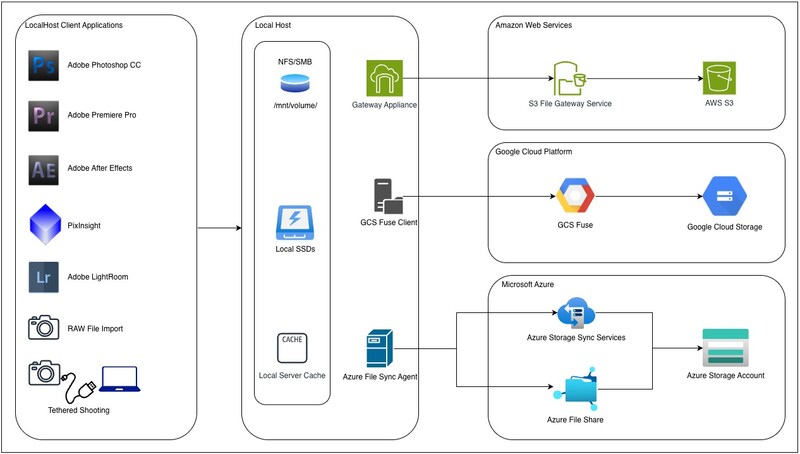
AWS Storage Gateway
AWS File Gateway is a strong hybrid solution that exposes Amazon S3 as an on-premises SMB/NFS share. Adobe applications treat it like any other network share. It works well as an archive tier, but it is not good for a primary creative workspace.
Works Well for:
- Storing raw files, Lightroom catalogs, or exported assets
- Lightroom Classic archives
- Photoshop PSB/PSD files
- Illustrator files
- Photo libraries that are not actively edited by multiple users
Not Ideal for:
- Premiere Pro or After Effects real-time editing
- Scratch disks
- Large PSB files (> 10 GB) opened repeatedly, which adds latency
Storage Gateway has ~20–40 ms latency plus cloud round trips. High-demand, random-access applications like Premiere Pro or After Effects need sub-millisecond I/O for smooth playback and scrubbing.
Azure File Share / Azure File Sync
These are supported as network drives. They are fully compatible with Adobe I/O operations, but performance depends heavily on local cache configuration. Azure File Sync adds a local Windows Server cache, which gives much better performance than an SMB-only network drive.
Works Well for:
- Lightroom catalogs
- Photoshop documents
- Premiere projects that can read media, though scrubbing is not smooth unless it is locally cached
This is the most mature first-party option if you want something close to “NAS in Cloud.”
Google Cloud Storage (GCS) Fuse
Google’s Cloud Storage FUSE (often referred to as GCS FUSE) is better in its 2024 and later releases. Cloud Storage FUSE now mounts Google Cloud Storage buckets as POSIX file systems, making it useful for ingest, archiving, and backup workflows. It delivers faster metadata performance and far better caching. However, it is still not fast enough for active Adobe editing—random access on large project files remains an issue, and apps like Premiere Pro and After Effects can drop frames or struggle with seek times.
Works Well for:
- Lightroom photo storage (not catalog)
- Photoshop file storage
- Raw archive
- Syncing output files to the cloud
Think of Cloud Storage FUSE as a cold-tier storage that can act like a file system — not a workspace for heavy editing.
There is growing technology that bridges Adobe tools and cloud object storage via gateway-like mechanisms. The Wasabi–Adobe integration is probably the most production-ready for creatives right now. For more ambitious workflows (especially hybrid teams or very large media), LucidLink and CentreStack are very promising. And in the research space, Objcache hints at what future storage-gateway architectures could look like. (LucidLink)
Of course, the tech is always evolving:
- Amazon S3 Express One Zone + Mountpoint for Amazon S3: S3 Express One Zone is no longer just cold storage. With Mountpoint for Amazon S3, you can mount buckets like a local drive and open raws with surprisingly low latency. This is great for sequential reads, but not ready for giant PSB files or heavy video scratch.
- Google Cloud Storage — Cloud Storage FUSE v2: Google’s rewritten Cloud Storage FUSE dramatically cuts metadata lag and round-trip overhead. Browsing large folders feels faster, and partial-file reads are smarter. It is still not built for intensive editing, but it is improving quickly.
- Azure Elastic SAN + Premium File Shares: Microsoft is pushing for true cloud-native NAS behavior through SMB Direct, RDMA, and high-performance file shares. This is the closest thing to a cloud-native file system that Adobe applications can actually edit from without falling apart, though it is still slower than local NVMe.
NAS still has a place in a professional workflow, but its limitations are becoming impossible to ignore — you can’t use it as a true scratch disk for Adobe apps, and performance caps haven’t moved in years. The more realistic future isn’t bigger RAID arrays, but Adobe eventually partnering with cloud providers to remove these bottlenecks instead of pouring all its energy into AI features nobody asked for.
At some point, the trade-offs won’t matter. Cloud-native storage already offers near-eleven-nines durability and geo-redundancy, which means you no longer need a second NAS sitting in a friend’s basement as disaster insurance. We’re not fully there yet, but the direction is obvious: local storage is becoming temporary, and the cloud is quietly becoming the real solution.
The next time you’re about to expand your NAS, ask yourself: Is this still a sustainable strategy, or just a habit we haven’t questioned yet?




Join the Fstoppers community for free
-
Post comments and join in the discussions
-
Browse the site ad-free
-
Share your work and get featured in the community
-
Compete in the photo contests for fun and prizes
50 Comments
I used to use idrive.com, but now I just back everything up via Backblaze and call it a day. Set it and forget it - well test the restore process a couple times a year and forget it.
Work space on SSD, archive on RAID, backup on cloud that's accessible anywhere. Works for this high-volume stills-only event pro.
There are good arguments on the text. But the lack of a cost comparison between local and cloud makes all included points worthless. In the long (3+ years) run, storing data in the cloud costs at least 5 times more!
20TB drives cost $500 these days. Backblaze costs $100/year. If I shoot 20TB of keepers in less than 5 years, I come out ahead with Backblaze. Plus, it's offsite, so if my house burns down my images don't go with it. And, I can access my images from anywhere there's internet. I moved my third local backup to Backblaze a few years back, about when I bought my latest 20TB HDD.
You both make fair points, but the cost comparison often misses the most expensive component: Egress fees. Many cloud providers offer cheap entry points to park data, but charge heavy premiums the moment you need to read or download it. This applies even more strictly to archive storage.
Storing a 100GB video might cost pennies per month, but if you need to pull that file down to edit/stream, the egress fees can quickly skyrocket.
However, there are architectural workarounds - using egress-free buckets like Cloudflare R2 changes the math entirely. I’ll be covering how to build a cost-effective Digital Asset Management (DAM) solution for portfolio, workflows and storage that avoids these traps in my next article. Stay tuned!
Cloudflare is not for Photographers.
Know your audience.
It’s definitely not a plug‑and‑play gallery. But the reason Cloudflare is becoming relevant for photographers is that it works as a high‑end media engine, not just a CDN.
Cloudflare actually has a few features that are genuinely useful for photographers:
On‑Demand Resizing: You store one high‑res master in R2, and Cloudflare generates every thumbnail or web‑optimized version on the fly. No more exporting a dozen variants for web, social, and mobile and it saves a ton of local disk space.
Video Streaming: Cloudflare Stream gives you smooth, Netflix‑style playback for client previews, behind‑the‑scenes clips, or portfolio videos without having to manage your own transcoding or hosting.
Resizing images? Video Streaming? What slop are you pushing, because it's not relevant.
I use a local RAID 6 setup for editing which backs up to a NAS that does a frequent encrypted backup to the cloud. The local NAS is way faster for local and remote access plus the encrypted version of everything in cloud cannot be read by the hosting company...
For a thriving Photography business the expense of Cloud storage may be justifiable.
What I don't like is certain operating system providers trying to force all users onto their expensive Cloud storage, by default settings or sneaky scare tactics.
Then again if photo editing software suppliers hadn't forced (by default settings) all users to store photographs in their Cloud storage, those same software suppliers wouldn’t have had all those pictures to train their AI algorithms with.
It could be ironic, editing your photographs and storing them in someone else's cloud then being left with the feeling that you not only volunteered to have your photographs used royalty free to train AI, but actually paid for the privilge..
Of course the more you've paid and the more you stored in the Cloud the bigger your contribution has been to your AI replacement.
Who needs the years you put in learning how to edit photographs, you supplied AI with the training..
$100/year for unlimited storage is easily justifiable for shooters who have archives of 20TB or more.
I know photographers who are trapped into $100/month for less than 20TB of storage.
Who are you using for $100/year unlimited storage, please share.
I just saw your Backblaze recommendation on another of your replies. The pricing on the Backblaze website quotes $6/month per TB or $120/month for 20TB, $1,440/year. That's for archival storage. It’s $15/month per TB for live storage or $300/month for 20TB, $3,600/year.
May be you got an earlybird deal, if so treasure it.
However, please try to quote latest currently available prices shown on suppliers websites.
Malcolm, he is doing so. for a solo operator, the 'personal backup' option with Backblaze costs only US $99 per year with no data limits and free egress. I have used it for three years and it is fantastic. Link below
https://www.backblaze.com/cloud-backup/pricing
T & C below
Computer Backup
Backblaze Cloud Backup backs up PC and Mac desktop computers including external USB hard drives. The personal backup product is encrypted and the data in the backup is accessible only by the account owner.
The online backup service includes software to automatically manage the backups of a Mac or Windows computer. The Backblaze Cloud Backup software creates a mirror copy of the data that is on the licensed computer, except for data that is explicitly excluded, with a running file revision history.
Backblaze introduced extended version history. Version history allows you to recover previous versions of your data. For more information about extended version history, click here.
Backblaze Cloud Backup is not designed to be used as offsite data archival or offsite storage for data that will not be retained on the licensed computer.
Thanks for that clarification.
I now get it.
As the terms make clear, It’s just a back up service for only one specific computing device, per back up account.
This is different to the very expensive cloud storage, where all devices owned have access and share cloud data, that Apple, Google, Microsoft, Samsung and others attempt to lock users into by default.
Some of the equipment manufacturers/operating system providers even go so far as to have products with so little on device storage, that external storage becomes a must. Then they set that device to default to their expensive cloud.
Yes, but for a solo operator, this is all one needs. On one account, I nominate 4 drives (computer hard drive, my entire RAID array, and two portable SSDs, that I take 'on tour' with me) and they all automatically back up. You can have only one nominated computer, but multiple drives, per account
The first back up (for me, it was at the time 17TB) took weeks, but after that daily updates are generally not a big deal. And, it is smart enough that when I am away, and back up, say, 200 GB from a trip from my portable SSD, that when I get home and transfer those files onto an array, it does not upload them again, it recognises that the same files have been moved across to another drive linked to the account. It takes a while to run that check but not nearly as long as the initial upload. For me, at about $100 USD per year, this seems to be an outstanding arrangement. I keep all my working files stored on a RAID at home, and have the whole shooting match back up to the cloud, quickly, automatically and at an affordable price
I just can't see cloud as anything more than a cold backup for key files. The cost, latency, and inability to work easily with files in a "native" setup (Explorer, Lightroom, etc) are just too much to overcome. Especially when NAS products have gotten so good: 10GbE is easily setup, while even an all-NVMe NAS or DAS is relatively attainable for a typical photographer's catalog. Meanwhile, for video or studio needs, ZFS-capable RAID arrays have reduced the disk space lost to parity while increasing file-safety at rest and in transit.
I still have some of my key images backed up to Dropbox in a "everything is gone" scenario, but I see it as insurance, not storage.
While I mainly use cloud backup as insurance, I also value the access it gives me to my entire archive from anywhere. If I'm on vacation and a client needs a photo from last year's event, I can easily download whatever files I need to make him/her happy right away.
I totally agree Alex. Before cloud becomes relevant for mainline storage the network technologies will probably have todo another couple of iterations ie. nextgen wifi7/5G/FTTH etc.
Never liked the way Adobe implemented their LR catalog system which involves all that syncing and not being possible to run on a NAS. Thats why I went with Capture-One + Photoshop where everything is storable and reachable on a NAS based system.
You mention the cost, and I agree .... cloud storage is preposterously high in price. I dropped a bunch of things I really liked, like Netflix, just because the cost was so high I could not come anywhere near being able to afford them anymore. To pay that much just to have someone else store photos, which I can easily do myself, is ridiculous. It's not like we have extra money that we don't really need, to just buy nice things with. Every dollar is really essential just to survive.
Netflix is not cloud storage in the sense that's under discussion here. As for cost, at $99/year for unlimited storage, Backblaze is price-competitive with a 20TB HDD under my desk, and it has additional benefits. For an archive of more than 20TB, Backblaze starts to look cheap.
Jacques wrote:
"Netflix is not cloud storage in the sense that's under discussion here."
Huh?
I mentioned Netflix as an example of something I could not afford to keep, just to show how strained I am financially. The same way people often mention they are eating a lot of ramen noodle meals, to show that they are struggling financially. Never did I imply that I think of Netflix as a form of storage; that would be an asinine thing for anyone to think. However, Netflix, ramen noodles, and thrift store clothes are all revenant to any discussion that involves people not being able to afford something.
Got it. I guess I was reading too quickly.
Totally fair! And for many photographers, cloud is just insurance. Local setups with NVMe is hard to beat for native editing and speed. But workflows are evolving, and some creators need more flexibility.
There’s no perfect solution yet. But someday, someone will nail it!
If you are european like me, and not a techbro fan: check a cloudservice seated in Europe like Infomaniak 👍
Any system that requires that a bill be paid on a periodic basis, either monthly or annually, seems like a system that is set up for failure. Why? Because people with diverse lives are not always going to be around to pay the bill when it comes due, and auto renewal only works in those rare instances when you can maintain the same credit/debit card number for years on end.
Cards get hacked and need to be replaced with new cards quite regularly.
People head out into the middle of nowhere where they may not have an internet connection for months, hence being unable to log in and pay a bill.
People get caught for stuff and end up in jail and may not be able to get out for a couple months, so they are unable to get online to log in and pay their bill.
People simply run out of money and empty their accounts and there isn't enough in the account to pay the bill.
There are probably more ways that paying a regular, recurring cloud storage bill gets effed up, but these are the main ones I can think of off the top of my head.
Why would anyone risk losing all of their files just because a bill couldn't be paid? If you are backing your work up to a few actual physical drives and keeping them in different locations, then there is no suck risk.
Cloud based systems = another subscription . Ill keep using my own on site storage , thank you
Who is the target user for this article? Cloud will never replace onsite storage. EVER.
A Cloud centric workflows is 100% dependent on someone having 1gbps (or better) fiber based internet, with the upload/download capacity to move lots of data around. This isn't for someone on cable internet or Starlink. Have a whole creative team in house, you're already investing in local NAS capacity that may be backed by a cloud storage platform, but that doesn't replace it.
Cloud is based on paying your (increasing) bill every single month. Miss that monthly charge & you're cut off from your data with a countdown until being permanently deleted. At any time cloud providers can increase their pricing & decide that your use case is their next revenue increase. Consumers aren't the only ones being hit with increased drive prices.
Understand that 'cloud' storage prices hide a number of things, like there are multiple copies of the data across different data centers & storage arrays. So your 1TB of data is actually taking up 4-6TB of space online. With the overhead of power, cooling, computing, network, and staff to make sure the platform is working, and spitting off a profit for the company.
Cloud does play into everyones overall data flow - it's awesome for backup & sharing. Online Enterprise DAMs are a business necessity for certain industries. But unless you start out with better selector as to what types of creators this is for, you'll find a bunch of olds like myself writing off any concept you may deem relevant.
You also assume readers are as technically savvy as yourself. None of these options are average user applicable.
I hear you, the subscription trap is a real concern for anyone who values total ownership. This article is for anyone who works with digital assets, but you’re right - it’s not written for the average user. Still, understanding how the tech landscape is shifting helps people make better decisions, even if they stick with their current setup.
A lot of creators today work remotely, travel often, or collaborate across locations. They aren't carrying their NAS with them, so cloud‑based workflows become an option not a replacement, just another path that fits their lifestyle.
Local NAS systems are great for speed and control, but they’re still a single point of failure. One hardware issue, power problem, or accidental deletion can take everything down unless you’ve built your own redundancy. Cloud platforms aren’t perfect either, but they do offer built‑in replication that smaller teams usually can’t match.
Your points about cost, lock‑in, and long‑term pricing are all valid. Those risks don’t disappear, but they can be managed depending on the provider and how much redundancy you actually need. Geo‑redundancy is often on by default, but most platforms let you dial it back if you don’t need multi‑region copies.
For what it’s worth, my own website runs on AWS using a serverless setup, and it costs me about $2 a month. So I’m not anti‑cloud. I just think cloud and local storage each have their place. My goal isn’t to replace NAS systems, but to outline alternatives for different types of creators and workflows. Appreciate the perspective from the trenches!
This reply doesn't reflect any of the content in the article. In fact it looks like ChatGPT slop.
Check out the LucidLink link above...
Alex Cooke should we expect slop like this on FStoppers?
For creatives, reliable storage of work product is more important than the tools that capture it.
Anyone who uses chat GPT to help write comments here on Fstoppers should be smacked in the head .... we should not need help expressing our thoughts via the written word
Primary SSD for data, another SSD for backup, and Backblaze for cloud backup. If I lose all three at the same time, so be it.
I wanted to open a can of 'these are the reasons this is bad' but at the end of the day, it doesn't matter.
Active storage, local archive, local offline & cloud backup.
Speaking of storage ......
I am actually looking for SSD storage at the moment, as my computer with its wonderful 12TB internal drive died, and I had to replace it with a model that only has 0.5TB internal storage because I couldn't afford what I wanted/needed. So, now I need an extra backup home for all of my files.
I have been searching on B&H Deal Zone, Facebook Marketplace, and all of Craigslist within a 200 mile radius. But all of the 4 to 8 TB SSD external drives I have found are way too expensive.
Does anyone have any sources for truly affordable SSD storage? Like 4 or 5 TB for $120 or thereabouts?
I keep reading that "storage is cheap" ..... but I guess that's relative because I have not found anything that is even close to cheap for me.
If it's for backup, why SSD instead of HDD? Or, is it actually for work space? In which case, why so big?
I know there are some people that keep EVERYTHING they shoot. I can't imagine that, but that is a thing. They also keep EVERY iteration including the TIFF or DNG exports out to other apps and the resulting imports back into their main editor as well as the jpeg of the final edit. Again, I can't imagine it, but I am not a pro.
What does this have to do with what I wrote above?
Yeah, I don't know what the hell I was thinking when I wrote that. I would edit or delete it if I could. Sorry Jacques... a whole jabber fest with no point. Good grief! Thanks for not being unkind about it. :- /
for backup .... but the spinning drives I have are so so so so slow that I do not like using them anymore ..... I want / need to back up my entire collection of photos, all the digital photos I have taken in my life that are good enough to have been picked out as "keepers", so that is why I need about 4-5 TB ... 8 TB would be better because then I would don't only be abe to back up what I already have, but I would also be able to add another year or two's worth or photos to it
typically on a day of wildlife photography I will shoot 400 to 700 photos, but only pick out about 150-200 of them as "keepers" .... but with 20 years of such photography, the amount of keepers is substantial, hence the need for several TB of storage
If it is for backup, take a look at HDDs.
https://www.bhphotovideo.com/c/search?q=Hdd%205tb&sts=ma
oh I have already searched B&H over and over again, and get on their site to see the Deal Zone every day ... so I am extremely familiar with every backup drive they have ..... I'm sorry, but I am not inclined to look up the link you shared because I already go there all the time, and even have 2 windows open to B&H external hard drive searches ..... are you sure that what you are suggesting is not something that I already know all about? As I said, these B&H prices are prohibitively expensive ..... I pretty much need some B&H Deal Zone deal that will offer a 5 to 8 TB SSD for $150 or less, otherwise it is either not what I want or it is way too much money
I already have external drives that are not SSD and I do not like using them, even for backup .... so that is why I specify SSD ...... my feelings about spinning drives are "been there over and over, done that over and over, don't really like it"
EDIT: I did end up clicking on the link you provided, out of curiosity, and ironically the 2nd result is a drive that I already have - the Lacie Rugged 5TB drive ... it is not really acceptable to me when compared to the smaller SSD drive that I have ..... way way way too slow to upload tens of thousands of images to
With the current state of data privacy I am even less willing to store my photos (or any personal data) on third party servers. I like being able to access my data over LAN and not having to worry about an internet outage.
I also can easily access my NAS while away from home with Tailscale, which also protects my IP from being exposed to public networks. I don't have an offsite backup at the moment but I will probably use Backblaze since they do encryption.
I also use my NAS for hosting apps, so the benefits of having are only increasing.
Will it save you if your house burns down or gets burgled?
No, which is why I plan on setting up an off site backup sometime, just haven't gotten around to it yet.
Yeah, I kept never getting around to it, as there was no place nearby where I could stash a backup HDD and access it regularly to keep it up-to-date. I finally gave up and went with Backblaze. Now, my offsite backup is always up-to-date and accessible.
I will probably use backblaze too. It's miles better than trusting google or microsoft with my data. The encryption is also a big plus.
no of course not, but that is why most of us also keep a huge external hard drive with ALL of our image files in our car, at a family member's house, and in our storage unit .... if my house burns up, my parent's house gets burgled, my car drowns in the river, and my storage unit gets robbed, all at once, then there will be much more to worry about than having lost my image archives
I have found Backblaze to be both more convenient and cost-competitive. And, as my archive grows, the cost of a larger offsite HDD goes up but my Backblaze subscription doesn't.
thanks for the info .... but I have a very weak internet connection where I live, due to it being a very rural, remote area, with very few people, no internet company has invested much in the system ... hence I worry that anything that is off-site may take for freaking ever to upload a couple TBs of images. Like literally DAYS of time waiting for my images to be uploaded. Perhaps Blackblaze is best for those who live in big towns or cities or other places that are served by mainstream internet providers?
EDIT:
I just went to the Blackblaze website. Looks like the cost is prohibitive, like double what I am able to pay.
As a an advanced amateur, non pro photographer, it is a non-issue. I work off of 2tb SSD drives, backup physically to my local network with raw & jpegs and back up final edits to Google Photos that is included in all of my other home and family photo backups. Again, probably not the target of this conversation.
However, my behavior is what I would think is similar to a pro 1) cost and 2)ownership of and access to my images. I think everyone is fine with "push it all to the cloud" except for those days where you do not have access due to bandwidth etc., or something occurs on the server side where where you cannot access your images. Those days are fewer and fewer, but they do still occur.
Interesting thought process and learning quite a bit from the conversation in the discussion.