

Your primary camera body fails during a paid shoot. Maybe the shutter mechanism seizes, the sensor starts showing hot pixels, or the battery door won't close properly. In that moment, your backup camera becomes the difference between delivering the work you promised and refunding thousands of dollars while explaining to a disappointed client why you couldn't finish the job. Yet most photographers approach backup camera selection with a strategy that ranges from expensive overkill to dangerously inadequate, missing the sweet spot where smart preparation meets practical economics.
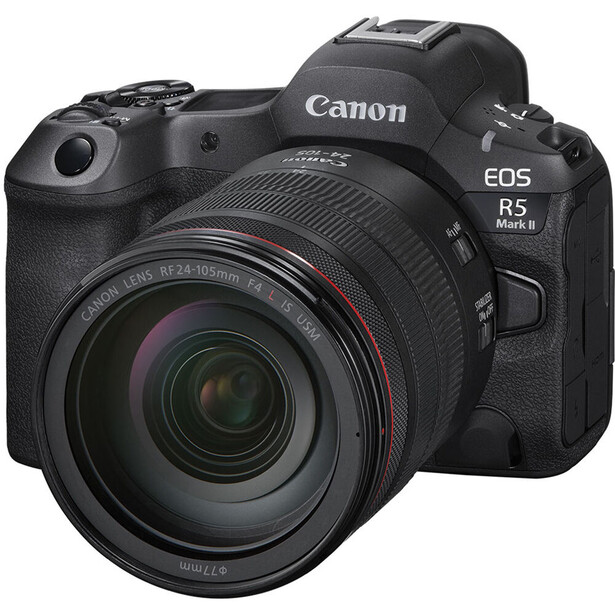
The two most common mistakes are polar opposites, and both are costly in different ways. The first group buys an identical body to their primary camera, convinced that seamless workflow and matching image output justify the expense. A photographer shooting with a Canon EOS R5 at $3,900 will purchase a second R5 as backup, spending nearly $8,000 on camera bodies alone before adding a single lens. The logic seems sound until you realize you're paying flagship prices for a camera that sits in your bag unused 95% of the time, depreciating at the same rate as your primary body. When both cameras age together, you face replacing both simultaneously, doubling your upgrade costs and timing.
The second group swings to the opposite extreme, grabbing whatever cheap body shares their lens mount and calling it prepared. They'll pair a $6,000 Sony a1 with a $600 used Sony a7 II from 2014, creating a backup with such different autofocus capabilities, menu systems, and ergonomics that using it mid-shoot feels like switching to an entirely different camera system. The sensor gap alone means you're delivering wildly different images to the client. This approach creates real problems when you need the backup to actually perform.
The smart strategy sits between these extremes, built on a simple principle: your backup camera needs to save the shoot, not replicate your primary body's specifications. That's a crucial distinction that changes everything about how you evaluate options and allocate budget. A backup that delivers 90% of your primary camera's performance at 40% of the cost is a better investment than spending twice as much for that final 10% of capability you'll rarely need from a backup body. The question isn't whether your backup can match your primary in a controlled comparison, it's whether it can finish the job when your primary fails at the worst possible moment.
The Non-Negotiables: What Your Backup Must Share
Before considering any backup camera, establish the absolute requirements that aren't negotiable. The first and most critical is battery compatibility. Your backup camera should use the same battery as your primary body. When your primary camera fails mid-shoot, you don't have time to hunt for different chargers or worry about whether you packed the right batteries. You need to pull the battery from the dead camera, drop it into your backup, and continue shooting within 30 seconds. Backup cameras requiring different batteries add complexity and failure points that work against the purpose of having redundancy in the first place.
Memory card format is nearly as critical, though there's slightly more flexibility here depending on your workflow. Ideally, your backup uses the same card format as your primary body so you can swap cards freely and maintain a consistent workflow. If your primary shoots CFexpress Type B, your backup should too. However, this is where you might make compromises based on cost and availability. A backup body using SD UHS-II cards instead of CFexpress won't match your primary's write speeds, but it's workable if you adjust your shooting pace and manage buffer clearing deliberately. The key is understanding the practical implications rather than dismissing any deviation from your primary's specs.
Beyond these hardware essentials, consider menu familiarity and control layout. While you can technically operate any camera given enough time, you don't have that luxury when switching mid-shoot. Your backup should have similar enough menu structure and button placement that you can find critical settings without stopping to think. This doesn't mean identical placement, but it means staying within the same manufacturer's design language. A Canon shooter will adapt to a different Canon model faster than to any Sony or Nikon body, regardless of which has better specifications on paper.
The Performance Tiers: Matching Capability to Need
Understanding where you can compromise on specifications requires honest assessment of what your backup actually needs to deliver. Start by analyzing your typical shooting scenarios and identifying the absolute minimum performance that would let you complete the job. This isn't about what's ideal, it's about what's acceptable when your first choice isn't available. For most professional work, the floor is higher than you might think, but it's still well below flagship territory.
Autofocus capability is where many photographers assume they need to match their primary body exactly, but the reality is more nuanced. If you shoot fast-moving sports or wildlife where subject tracking at 20 frames per second makes the difference between success and failure, yes, your backup needs similar autofocus prowess. Missing the winning touchdown or the eagle's dive because your backup camera couldn't track properly would be catastrophic. But if you're primarily shooting portraits, weddings, or commercial work where subjects move predictably or pose on command, you can absolutely use a backup with less sophisticated autofocus and compensate with technique. A slightly older AF system that lacks the newest subject detection algorithms can still nail focus on a bride walking down the aisle or a product on a table.
Burst rate and buffer depth follow similar logic. Action photographers need their backup to maintain similar continuous shooting capabilities, but many other genres can work around slower performance. Wedding photographers typically shoot 3–5 frame bursts for decisive moments rather than holding the shutter for sustained sequences. A backup that shoots 8 frames per second instead of 12 fps is perfectly adequate for capturing bouquet tosses or first dances. The buffer matters more than peak burst rate in many real-world situations. A backup that can handle 50 raw files before slowing down covers most non-sports shooting scenarios, even if your primary can manage 200 frames in a single burst.
Resolution differences are less critical than most photographers assume, particularly once you're above 20 megapixels. A 24-megapixel backup supporting a 45-megapixel primary body delivers files that crop adequately, print at standard sizes without visible difference, and satisfy client expectations for everything except large-scale commercial reproduction. The instances where you absolutely need maximum resolution are rarer than anxiety about megapixel counts suggests. Most images end up on screens where 2,000 pixels on the long edge is standard, or in prints where 20 megapixels is more than sufficient for anything under 16×20 inches. Unless your contract specifically requires ultra-high resolution files, a moderate resolution backup handles the job.
The Price-Performance Sweet Spot
The backup camera that makes the most financial sense is typically a previous-generation model from the same manufacturer, purchased used or refurbished. These cameras hit a pricing sweet spot where they've depreciated 50–60% from original MSRP but retain 85–90% of practical performance for professional work. A body that cost $3,500 at launch three years ago might sell for $1,400 used today, delivering current-generation sensor quality, mature autofocus systems proven over years of professional use, and complete compatibility with your existing lens ecosystem and accessories.
Consider real examples from current markets. A Canon EOS R5 Mark II at $4,300 could be backed up with a used EOS R5 at around $2,000, giving you identical performance across both bodies but requiring $6,300 total investment. Alternatively, a used Canon EOS R6 Mark II provides the same 24-megapixel files that would satisfy most backup scenarios, shares the same battery and RF mount, and reduces your total investment to $6,100 with money left over for additional lenses or lighting. The R6 Mark II isn't as capable as the R5 Mark II in absolute terms, but it's capable enough when your primary body fails and you need to finish the shoot. I personally use an EOS R as a backup to my EOS R5, and it performs perfectly adequately.

Nikon Z9 photographers following similar logic might pair it with a used Nikon Z7 II instead of buying a second Z9. The Z7 II lacks the stacked sensor and insane buffer depth, but it shares the Nikon Z mount, batteries, and basic ergonomics while costing roughly $1,600 used versus $5,500 new for another Z9. The $3,900 saved buys significant flexibility in how you build your complete system, and the Z7 II remains more than capable for the majority of professional work that doesn't involve fast action.
The key insight is understanding that backup cameras depreciate at the same rate as primary bodies but get used far less frequently. Buying a new flagship as backup means losing thousands of dollars to depreciation on a camera that might only save five shoots over its entire lifespan in your bag. Buying a previous generation model used means someone else already absorbed most of that depreciation, and you're paying closer to the camera's actual utility value as a backup rather than its aspirational value as a primary body.
Strategic Considerations Beyond Specifications
The best backup camera isn't necessarily the one with the best specifications, it's the one you'll actually bring to every shoot. A backup that stays home because it's too heavy, too expensive to risk losing, or too awkward to pack has failed at its primary purpose before the shoot even begins. This practical consideration should influence your choice as much as any technical specification.
Weight and size matter more for backup bodies than primary cameras because you're carrying them in addition to everything else in your kit. A compact backup that fits easily in your bag without forcing you to remove other essential gear is more valuable than a larger body with marginally better specifications that you'll be tempted to leave behind. This is one area where crop sensor cameras like a Canon EOS R7 or smaller full frame bodies can shine as backup options, even for photographers who prefer larger cameras as their primary choice. The R7 weighs significantly less than an R5 while sharing similar ergonomics and full RF mount compatibility, making it a psychologically easier backup to pack for every job.
Consider also how your backup camera affects your insurance considerations and risk profile. Professional camera insurance typically covers all equipment up to a total value, with premiums based on that declared value. Two flagship bodies push your total gear value higher, increasing premiums proportionally. A less expensive backup keeps your insurable value lower while maintaining equivalent practical protection against shoot failures. The difference might be $100–200 annually in insurance costs, which compounds over the typical three-year period between camera upgrades. Over a decade of professional shooting, choosing more cost-effective backup bodies could save enough in insurance premiums to fund an entire camera upgrade.
There's also value in diversification when your backup serves complementary rather than redundant purposes. Some photographers deliberately choose backups with different strengths than their primary bodies, creating a two-camera system where each body excels at different tasks rather than simply duplicating capabilities. A high-resolution primary body for detail-critical work paired with a lower resolution but faster backup for action coverage gives you tool options rather than simple redundancy. This approach works particularly well for wedding photographers who might shoot portraits and details with a 45-megapixel body but prefer a faster 24-megapixel body with better autofocus for ceremony and reception coverage.
When Identical Bodies Make Sense
Despite arguments for diversification and cost savings, identical backup bodies do make sense for certain photographers in specific situations. If your shooting style relies heavily on muscle memory and split-second decision making, having identical controls and handling characteristics might be worth the premium. Sports photographers switching cameras multiple times per game benefit from not having to mentally adjust to different button layouts or menu structures when the action is continuous and timing is everything.
High-volume shooters who regularly use both bodies simultaneously rather than keeping one as pure backup also justify matching pairs. Wedding photographers who shoot with two bodies throughout the event, one with a wide lens and one with a portrait lens, need equivalent performance and handling from both cameras since they're both primary bodies during active shooting. In this case, you're not really buying a backup, you're buying two primary bodies that provide backup for each other, which changes the calculation entirely.
Rental and insurance situations can also favor identical bodies. If your primary body fails and requires warranty service or insurance claim processing, having an identical backup means you can continue working without any workflow disruption while the damaged body is being replaced. Some insurance policies replace damaged equipment with identical current models, so having two of the same camera might simplify claims and ensure you receive equivalent replacement value rather than fighting with adjusters about whether a different model provides comparable capability.
The bottom line is that backup camera strategy isn't one-size-fits-all, but it should be deliberate rather than default. Buying two of the same camera without considering alternatives is different from buying two of the same camera because your specific shooting style and business needs justify the expense. Know which category you're in before spending thousands of dollars on redundancy.
Making the Decision
Start by honestly assessing your actual risk exposure and shooting requirements rather than speculating about worst-case scenarios that might never materialize. How often do camera bodies actually fail in ways that prevent completing a shoot? For most photographers, the answer is rarely, perhaps once every few years if that. Catastrophic failures happen, but they're statistically uncommon with well-maintained professional equipment. This doesn't mean you shouldn't prepare for failure, it means you should prepare proportionally to actual risk rather than imagined catastrophe.
Calculate the cost of failure for your specific business model. If you shoot $500 portrait sessions, a backup camera preventing one failed session every two years has a value of roughly $250 annually. A $1,500 backup body takes six years to justify itself purely on failure prevention, ignoring depreciation and opportunity cost of that capital. If you shoot $5,000 weddings, the same backup camera justifies itself if it prevents one failure every three years, making it a more compelling investment. Higher-value work justifies more expensive backup solutions because the cost of failure is proportionally larger.
Consider also whether rental might serve as your backup strategy rather than ownership. In many markets, you can rent professional camera bodies for $100–200 per day or weekend. If you have a local rental house with same-day pickup, renting backup coverage for critical shoots might be more cost-effective than buying and maintaining backup equipment that sits unused most of the time. This works particularly well for photographers who only take high-stakes jobs occasionally rather than weekly, making backup ownership harder to justify economically.
The backup camera you'll actually use beats the backup camera you wish you could afford. A $1,000 backup body that you pack for every shoot provides infinitely more protection than a $3,000 backup body that stays home because it's too expensive to risk on routine jobs or too heavy to carry comfortably. Perfect is the enemy of good enough when good enough still saves the shoot and keeps your clients happy.
Your backup camera is insurance, and like all insurance, the goal is to pay the minimum premium necessary to cover realistic risks without over-insuring against scenarios that probably won't happen. Choose a backup that shares your primary camera's critical compatibility requirements, delivers adequate performance for finishing shoots if your primary fails, and costs proportionally to your actual business risk rather than your anxiety about worst-case scenarios. The right backup camera isn't the best camera you can afford, it's the best camera you'll actually bring to every job.




Join the Fstoppers community for free
-
Post comments and join in the discussions
-
Browse the site ad-free
-
Share your work and get featured in the community
-
Compete in the photo contests for fun and prizes
2 Comments
I do not consider battery or card compatibility to be important at all. I have had many, many camera failures mid-shoot over the past 19 years, and never had any issues picking up my backup and continuing on, despite the fact that my backup cameras have almost never shared a battery with my main body and never shared a card format with my body.
My camera bag, which is nearby at all times, always has a few fully charged batteries for both my main camera and my backup camera, as well as a charger for each, and card wallets that are full of cards for both cameras. So everything I need for either camera is right there at my fingertips, and going from one camera to the other doesn't cause any mental confusion or anything because I use both bodies regularly and there is a lot of experience switching from one body to the other.
When I spent 8 days in Alaska both of my cameras failed. My buddy who was with me handed me his backup and I put my lens on it and just continued to shoot with it, despite the fact that I had never used a Canon 1DX before. It worked pretty much the same as my older Canon bodies, so I didn't need to take any time to figure anything out. They all work pretty much the same and the settings are all pretty much in the same places on the menus and dials and whatnot, so you can just pick up a camera you've never used before and just start shooting, and actually get everything right, without wasting time. It's nice when the guys you're on a trip with use the same brand (lens mount) as you.
For most of us, out backup camera is the camera that used to be our main body, that we upgraded. For example, I used a Canon 1D Mark 4 for years as my main camera. When I upgraded to a Canon 5D Mark 4, then the 1D Mark 4 became my backup. So I already was very familiar with it and already had all the batteries and charger and cards for it. This is how most of us do backups, by just not getting rid of our old camera when we finally upgrade. So the backup decision it doesn't really require all of this thinking and strategizing .... it really isn't a decision at all, it's just following the path of least resistance, which usually works pretty great for most things in life.
Camera value depreciation should be a negligible concern compared to potential lost revenue. It is better to have two cameras which are both used with regularity to ensure function and familiarity. Depending on a camera that sits unused in your bag for a year is like getting a flat tire on your car and discovering your spare is flat too.