
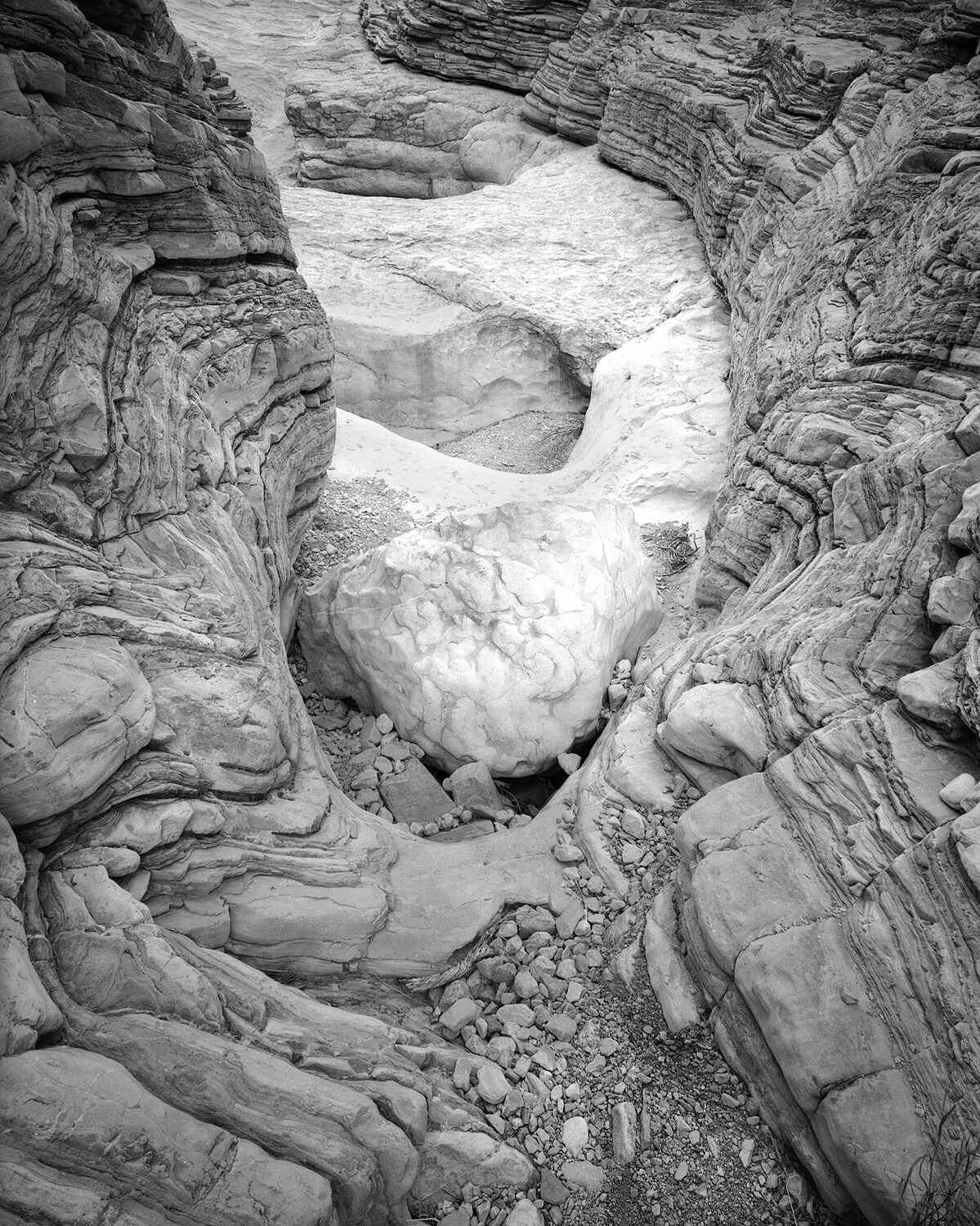
Ventricular Cavity
I was leading a workshop group in Big Bend National Park, right on the Mexican Border, a hundred yards or so further south and I would be in Old Mexico, and BTW, we would go across the border each day to LaJitas, Mexico for lunch. My group had hiked to a location I had photographed many times before and I had walked back down drainage to talk and teach some participants who had questions. As I spoke with them I glanced back up drainage and this image just popped into my head. All I had to do was to make the photograph. The backstory is that I had spent some time imprisoned in a hospital bed the year before and this just looked like a heart to me. I used a Toyo 45A camera, 135 Nikkor with a #61 Dark Green filter and Kodak T-Max 100 film.
This place is so hot that it's literally dangerous. This image was done in late February. I had been there over Presidents day to scout new locations and on Presidents day that year it was 95 degrees.



8 Comments
A very good photograph, I like it! The ground is more bright than the sides of the canyon. So you made a very clear separation of your object from the rest. A heart I can see too, the hole in the ground. I see a laying sleeping dog, the head towards the camera, the legs up in the frame.
It really does look like a heart. Nice work, Nathan. Love the contrast in the greys as well as in the textures!
Another good one from you, Nathan! I enjoy the flowing forms, & the contrast in shades between your "heart" and I guess the mediastinum!
Why do you favour the green filter as much as you do for these rock images?
Another wonderful image that is full of form and asks questions of the eye.
You have a great eye for these irregularities of formations Nathan.
Thank you.
Patrick. The reply button on your comment isn't working, so thank you for the nice comment and the question. When using black and white film we can increase or decrease tonal separation in objects or forms by using colored filters. I carry several in my backpack, and they are identified by a number system called Wratten numbers. I don't know who Wratten was, but he is now famous! Okay, filters work by allowing colors that are analogous to them to pass through unchanged in their tonal relationship to the rest of the scene while hindering, and sometimes completely blocking, colors that are complementary to them. Think of a color wheel and what colors lie next to green, for instance. Pure green is made by combining equal portions of Cyan and Yellow, so colors on the color wheel that are near green are known a analogous colors, so a green filter, in this case, will block or hinder portions of the spectrum that are in the red, magenta, orange range. Many of these areas have either reddish sandstone, or in this case limestone with a reddish tint to them. So using a green #61 filter, as I do, will increase image contrast in the areas that have a red or pinkish color balance. Incidentally, yellow is a color that is common to both green and red so those filters will have less effect on yellow than they do on colors that are directly complementary. In the desert I use a #61 Dark Green filter a lot. In the mountains a #21 or 25 red are used more commonly, and sometimes a #8 or 15 yellow.
Incidentally the Wratten numbers always refer to a very specific color balance and density for that filter. So a 25 or 29 red is a frequency used by almost all major filter manufacturers.
I have experimented using these filters with my digital cameras and they work, though not as effectively as with film. I suspect that digital camera sensors are designed to try to seek a "normal" color balance, while black and white films have no color bias.
Hi Nathan. I understand about colour filters in general, and was wondering about your choice of green in particular. Now I understand why you do, so thanks for that.
Rather than use filters with digital when my aim is a mono final image, I use the RGB channels selectively after exposure in post. For landscapes with sky I want to render in mono, I will deliberately let the blue channel overexpose a bit, and mainly use the red channel. (Not doing so sometimes leaves too much noise in the red channel e.g. in skies, where it's obvious.)
One benefit of creating mono images from colour digital sensors, that can't be done with film, is in addition to the above to selectively increase or decrease the level of specific colours in the original scene, e.g. brightening some trees that are a bit too dark in the red-channel image. The flexibility is impressive and useful.
Interesting. I have been going to layers>saturation>desaturate and then making individual colors lighter or darker using the brightness slider. It does seem to closely approximate what I do when using color filters with film. There has been an observable issue when using the blue or cyan slider to darken the sky there often is, more always is, undesirable noise in the blue areas and I have not been able to overcome that, all the other colors are fine, but not the blue, and the issue only shows up when I have large areas of blue or cyan.