
Rejoice, all Nikon ZR users. Today, I’ll give you the inside scoop on a low-cost app that might just be the answer to your prayers.
As a person who often reviews cameras and gear, I get a large number of emails on a weekly basis from folks asking me to review this piece of kit or feature that one. Sometimes I’ll take them up on the offer, but only if it’s a product that complements my own specific workflow or is something that genuinely intrigues me. Every now and then, I come upon a product out in the wild purely out of happenstance and get so excited about it that I just want to tell you about it. That’s what I’ll be talking about today.
For those of you, like me, who own the Nikon ZR, I’m guessing you are enjoying it, but one or two things about it are driving you crazy. Most likely, those things include missing items like a lack of false color, anamorphic support, or a number of other tools you’ve likely become accustomed to when working with professional cinema cameras. For me personally, I’ll add RED’s patented traffic light system to that list. The traffic light system for nailing exposure on my Komodo is one of the rare things that I will admit to being a legitimate “game changer” in a world where that phrase is thrown around all too often.
In addition to the traffic lights, the other true game changer about RED cameras has always been the RED Control app. True, Nikon has SnapBridge. But those who have ever used the RED Control app with their cinema cameras can attest that the RED app is on an entirely different level. Unfortunately, the RED Control app, at least as of yet, doesn’t work with the Nikon ZR.
If only there were a better app solution that could solve all these problems. Well, now there is. It’s called Parallax Monitor.
Built by a former Marvel systems engineer named Mike Aguado, Parallax Monitor strives to offer RED Control app-level skills to the ZR. The app isn’t affiliated with Nikon, but the design of the app is fully integrated with the needs of filmmakers at the forefront.
Speaking of filmmakers, it was at Cine Gear Expo a few weeks ago that I happened to strike up a conversation with a random stranger outside the RED booth. I was carrying my Nikon ZR at the time to cover the event, and it caught the attention of the man standing next to me. As it turned out, that man just happened to be Mike Aguado. At the time, I wasn’t aware that the man I was talking to had created Parallax Monitor (formerly known as ZR Ctl). I’d already been testing that product in beta for a few weeks prior, and when I realized that this was the man responsible for personally creating the app, let’s just say that I had a few questions.
For instance, with me being an artist in a technical field but not at all a technical person by nature, the very idea of being able to create your own app for a camera boggles my mind. Where does one even begin?
The little story all started when Mike, like so many others, found himself a casualty of the AI wave. Laid off from his position with Marvel, he suddenly discovered himself with a massive amount of time on his hands. To keep himself busy, he started tooling around with one of his newest toys: the Nikon ZR.
He’d heard the user gripes about things like the lack of a capable control app and some of the camera’s inherent monitoring limitations, and he figured he’d put his newfound free time to use. Being a systems engineer by trade, he started trying to reverse engineer the current Nikon tools on the market to see how they work. And then, when Nikon released its software development kit for third-party developers, Mike was off to the races.
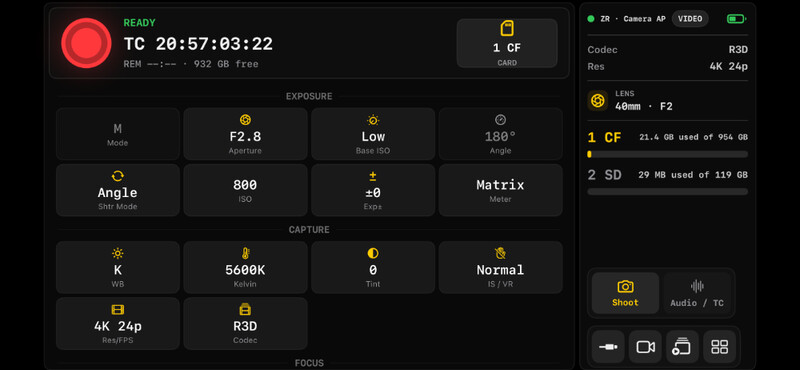
The result is an app that brings remote control and monitoring to the Nikon ZR in a portable and affordable solution. The way it works is simple. There are a number of ways to connect your camera and the app:
- Wi-Fi
- AP mode
- Cell phone hotspot
- Hardwired via USB
You can see a list of connection instructions here. The instructions for each connection setup are helpfully included in the app itself, which is really helpful if you’re someone like me who is easily confused by the smallest of such details.
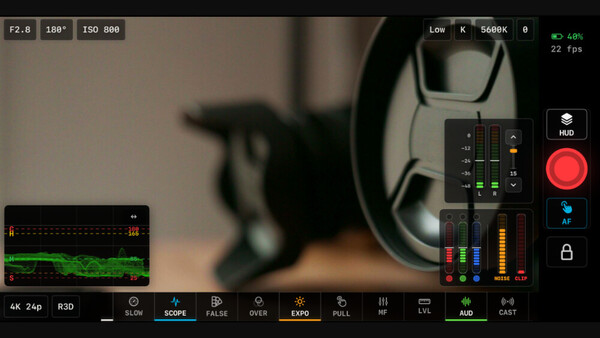
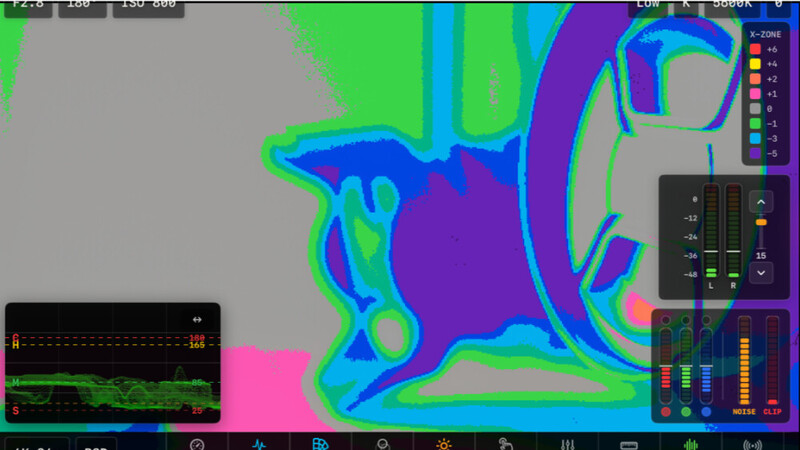
Once connected, you will suddenly find your Nikon ZR now has all of those aforementioned tools previously reserved for higher-end cameras. False color and anamorphic support are just a click away. And while those legendary traffic lights are proprietary to RED cameras, Mike has created his own variant called X-Lights that brings similar functionality to the ZR and is available right there on your phone or tablet. This is incredibly important because, as many users will have by now discovered, exposing R3D and exposing for N-RAW are two different animals. This app is carefully dialed in for either codec included inside the ZR, so it is easy to nail exposure regardless of which you choose.
This is probably a good time to point out that control via Parallax Monitor is not limited to the ZR. I connected my Z9 to the app as well, and voilà: X-Lights, false color, and a new false color variant called X-Zone were suddenly available for my Z9 as well.
This is a control app, meaning that you do have, well, control. So, you can change things like your camera settings, recording format, and view options right there from your device. You can do run/stop for remote cameras. Focus peaking is present for all codecs. You can add viewing LUTs directly into the app for more accurate monitoring. As for anamorphic support, the app supports all the most popular desqueeze factors and also offers you the opportunity to set custom desqueeze values, both horizontally and vertically.
Mike tells me that more features are on the horizon to further integrate things like multicam support, jam sync timecode, and better tethering options that incorporate more of the camera’s photography capabilities.
If you want to get more out of the video tools you already own, our Introduction to Video: A Photographer’s Guide to Filmmaking tutorial is a good place to start.
Parallax Monitor is now available on iOS, and an Android version is available on Google Play under the ZR Ctl name. At $19.99, there is no easier investment than picking up your copy of the app and taking greater control over the Nikon ZR’s unlimited possibilities.






Join the Fstoppers community for free
-
Post comments and join in the discussions
-
Browse the site ad-free
-
Share your work and get featured in the community
-
Compete in the photo contests for fun and prizes