Editing can make or break a portrait, yet most people focus on the wrong details when trying to improve their work. The difference between amateur and professional-looking portraits often comes down to a handful of specific techniques that direct the viewer's attention exactly where you want it.
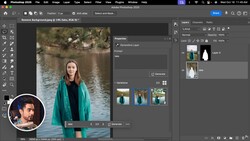
Coming to you from Unmesh Dinda of PiXimperfect, this practical video walks through five essential portrait editing techniques that you can apply immediately to transform your images. The first technique focuses on creating attention by strategically brightening your subject while darkening the background using Camera Raw's new masking features. This approach leverages how human eyes naturally gravitate toward brighter areas of an image. The video demonstrates how to use subject masking to isolate and enhance your model, then create a separate background mask to darken surrounding areas. Adding subtle vignetting further enhances this effect by drawing the eye inward toward your subject.
The second major technique addresses a common but often overlooked problem in portrait work. Many portraits suffer from subtle color shifts, particularly greenish tints that appear in certain lighting conditions or on specific areas of skin. These color casts can make even well-composed portraits look unprofessional and unflattering. The video shows how to use the updated hue/saturation adjustment layer to target these specific color ranges without affecting the entire image. The key lies in understanding how to adjust the range sliders to isolate problematic colors while maintaining smooth transitions. This technique alone can dramatically improve the overall quality of your portrait work.
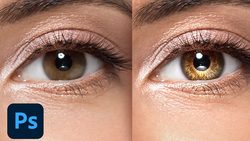
The video also covers eye enhancement and hair dimension techniques that add polish to your final images. Eye work focuses on understanding catch light placement and how to create depth on the opposite side of existing highlights. Hair enhancement involves strategic use of curves adjustments combined with blend modes to add natural-looking shine and dimension. These techniques work because they enhance what's already present in your image rather than creating artificial effects that look obviously edited. That's just the start, so check out the video above for the full rundown from Dinda.
If you would like to continue learning about the art of portraiture, be sure to check out our range of tutorials on the subject in the Fstoppers store.



Join the Fstoppers community for free
-
Post comments and join in the discussions
-
Browse the site ad-free
-
Share your work and get featured in the community
-
Compete in the photo contests for fun and prizes
No comments yet