If you shoot Fujifilm and you care about getting a finished look straight out of camera, the difference between film simulations and recipes changes how you set up every shoot. Get it wrong and you either lock yourself into a look you did not mean to commit to, or you spend time “fixing” files that never needed fixing.
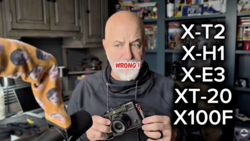
Coming to you from pal2tech, this practical video breaks down what Fujifilm film simulations actually are and why they are not the same thing as the “recipes” people trade online. The video frames simulations as built-in color profiles meant to echo Fujifilm’s film stocks, not downloadable add-ons you can install later. He uses an example tied to black-and-white film, then jumps to the modern reality where you pick the look in-camera instead of loading a roll. The part that lands is the hardware reality: older bodies may have classics like Provia and Velvia, but they cannot simply “get” newer looks through firmware because the processing demands are higher. If you still carry an older body like the Fujifilm X-T2, this explains why certain menu options never show up no matter how much you update.
The video also draws a clean line between what happens to JPEGs and what happens to raw files once you pick a simulation. If you are shooting JPEG, that look is baked into the file that hits the SD card, along with the rest of your capture choices. If you shoot raw, the camera is not “printing” the look into the data the same way, and your software can interpret that choice later when you import. The video names common workflows like Capture One and Adobe, which matters if you bounce between in-camera JPEGs for speed and raw files for flexibility. The trap is assuming you can treat both file types the same in post, then wondering why your edits start from two completely different baselines.
Where the video gets more interesting is the explanation of recipes as layered settings built on top of a simulation. It points to the specific in-camera controls people tweak, including grain, highlight and shadow tone, color, sharpness, clarity, noise reduction, and white balance. The ice cream analogy is simple, but the takeaway is sharper than the joke: the simulation is the base, and the recipe is the set of knobs that push that base toward a mood. He walks through choices like Classic Chrome and then pivots to a newer look like Nostalgic Negative to show how easy it is to go too far. If you have ever copied a popular recipe, tried it in the wrong light, and hated the results, you will recognize what he is warning about. Check out the video above for the full rundown.



Join the Fstoppers community for free
-
Post comments and join in the discussions
-
Browse the site ad-free
-
Share your work and get featured in the community
-
Compete in the photo contests for fun and prizes
No comments yet