
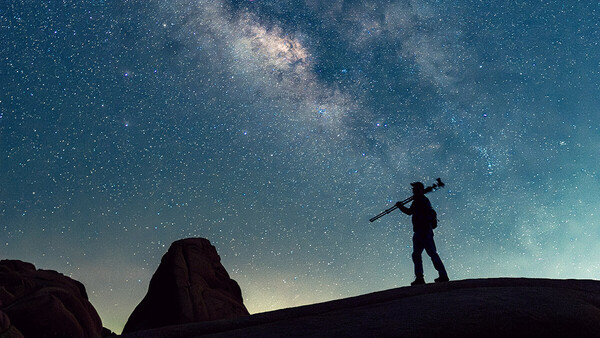
Here are several easy tips so you can use your tripod like a pro. You'll get the most from your tripod this way, with lessons drawn from professional night photographers who use tripods in genuinely challenging conditions.
First… Get a Quality Tripod
Pros use quality tripods. They know better.
If you are bothering to set your camera up on a tripod, you clearly want sharp photos. You also want your tripod to not vibrate. You want stability. You want it to set up smoothly and easily.
And you certainly don't want your camera and lens to topple over.
For these reasons and more, it's worth it to get a good tripod.
It makes little sense to want all these things and then look for a cheap tripod. Besides, your camera and lens are likely worth a lot to you. I love my gear and don't want to perch thousands of dollars of equipment on a flimsy tripod. I've had the same good-quality tripods since 2013. However, I've changed my lenses and cameras several times since then. Try to buy a tripod once.
Now that we've gotten that out of the way, let's discuss how to use a tripod like a pro.
Creating the Most Solid Base Possible
Lock down your tripod securely. Check it twice. Do the same for your ball head.
Then gently push your tripod down into the ground a little, assuming the ground is stable and the tripod feet have a secure footing. This does two things. First, it helps seat the feet in the sand or dirt so they are less likely to settle later. Second, it helps verify that your tripod is locked securely. Avoid applying excessive force, particularly on uneven or slippery surfaces.
Go Wide
Spread the tripod legs out a little wider, if your tripod allows it. You don't have to go nuts with this. But remember, you're creating a pyramid. And a fat pyramid is generally more stable than a skinny one, provided all three feet are securely planted.
Stay Low
Don't deploy your tripod higher than you need it to be. Generally speaking, the lower to the ground it is, the less likely it is to topple. Keeping it lower also reduces the potential for vibration from wind, rumbling trucks, footsteps, or anything else. Of course, even a low tripod can topple in sufficiently strong winds or on unstable ground, so use your judgment.
Say No to Center Columns
Whenever possible, try not to raise your tripod's center column. This generally reduces stability and increases the chances for vibration. Not good, right? It's usually better to extend your tripod's legs than to deploy your center column, assuming you can do so securely. None of my tripods that I use in the field have center columns for this reason.
Use an L-Bracket for Portraits
If you wish to photograph in portrait mode, consider using an L-bracket. You can purchase one specially made for your camera. Why? Because this keeps your camera centered over your tripod, and flopping it to the side can introduce imbalance and instability. This is especially true for those of you who have a heavy camera or lens. Make sure the bracket is compatible with your camera and securely attached. As a bonus, using an L-bracket is often quicker than flopping your camera to the side and then attempting to level it.
Maximizing Stability Using Your Center Hook
Your tripod may have a center hook. You may increase stability by attaching a sandbag or camera bag, provided your tripod is designed to support the additional load. One method I've found effective is having the weighted item resting on the ground, then attaching it to the center hook using a bungee cord, rope, or tie line. Ideally, the connection should be secure and gently tensioned without pulling the tripod off balance.
This can be considerably more stable than hanging an item directly from the hook. I've actually found that during strong winds, it's worse to have something hanging from the hook than to have no weight at all. Regardless, keeping the weight on the ground and attaching it to the center hook can reduce vibrations and improve stability. It's one of the most effective methods I've found, although its effectiveness depends on the terrain, wind conditions, and tripod setup.
Shorten the Uphill Leg
If you are shooting on a hill, you may need to shorten the uphill leg to keep your tripod level. When practical, positioning one leg downhill and the other two uphill can provide a more stable footprint than having two legs downhill. However, the best arrangement depends on the slope, terrain, and tripod design. The important thing is to keep the camera's center of gravity comfortably within the tripod's footprint and make sure all three feet have secure footing. Again, as mentioned before, gently push the tripod toward the ground, if safe to do so, to verify that the legs are locked securely and the tripod is unlikely to settle. Be particularly careful on steep slopes, loose soil, and slippery rocks.
Use a Remote Shutter Release or Self-Timer
Try not to touch your camera when pressing the shutter button. Why? It can introduce vibration. Even the lightest touch can cause enough movement to soften an otherwise sharp image. The fix is simple, thankfully. Simply use a remote shutter release. This lets you trigger the shutter without touching the camera at all. You can get a cheap wired remote shutter release for not much more than the price of a meal at Taco Bell.
No remote? No problem. Use your camera's built-in self-timer. A two-second delay is usually enough for any vibration from your touch to dissipate before the shutter opens. Most cameras have this option buried somewhere in the menu, and it takes about thirty seconds to set up.
Many of us night photographers typically use an intervalometer, which solves this problem entirely while also allowing you to automate multiple exposures for stacking or star trails.
Extend the Right Leg Sections First
Most photographers grab their tripod and extend whatever leg section is most convenient. Pros do it differently. When extending your tripod legs, generally start with the thicker upper sections first and work your way down to the thinner lower sections. Only extend the thinner bottom sections as far as you actually need. That said, if I am in sandy places, such as the desert or the beach, I will sometimes extend the thin lower sections of the legs high enough to minimize the chances of sand, dirt, salt water, and other debris from gumming up the legs. Just make sure this doesn't compromise the stability of your setup.
We tend to extend the thicker part of the legs almost intuitively. Why? The thicker sections are inherently more rigid and stable than the thinner ones at the bottom. The more of your tripod's height that comes from the upper sections, the more stable your setup will generally be. The thin lower sections tend to flex more and transmit vibration more readily, so the less you rely on them, the better.
Make Your Tripod Visible in the Dark
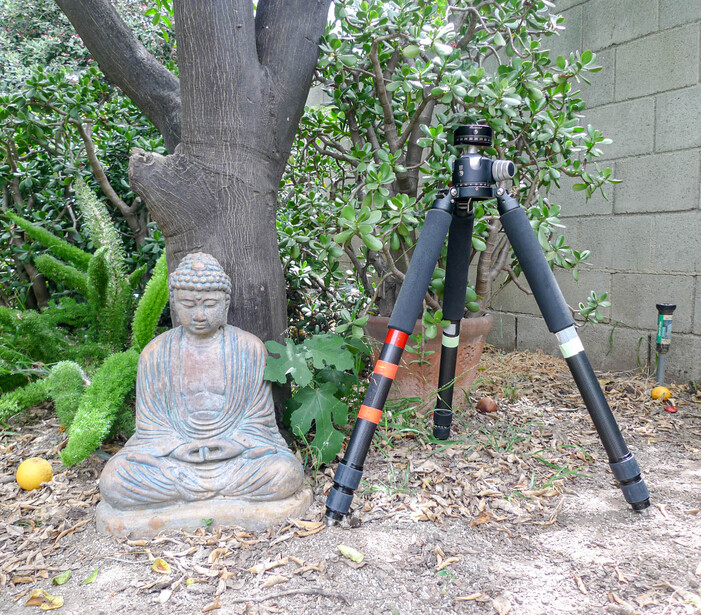
Use reflective tape and glow-in-the-dark tape to make your tripod visible. This is especially crucial at night for several reasons. If it is really dark, making your tripod visible reduces the chances of you kicking it over. You can also see where your camera is when you are light painting. And obviously, this makes your tripod easier to find. Just avoid placing tape where it might interfere with moving parts or locking mechanisms.
Some people also put a small blinking light either on the hot shoe of their camera or hanging from the center hook below. If you do this, make sure it's securely attached and won't swing enough to affect stability.
Conclusion
Proper use of a tripod is crucial in all situations. This is especially true for night photography, star trails, stacking, HDR, macro, focus stacking, composites, and panoramas. Hopefully, you can consider these tips as you choose and use your tripod, no matter what kind of photography you do. After all, it's usually not a bad idea to take a few tips from a pro.

Join the Fstoppers community for free
-
Post comments and join in the discussions
-
Browse the site ad-free
-
Share your work and get featured in the community
-
Compete in the photo contests for fun and prizes