
Four days ago I put out a very nerdy video about the variable aperture lens in the new iPhone 18 Pro, and it has since become the most watched thing I have made all year. I did not see that coming. What I really did not see coming was the comment section.
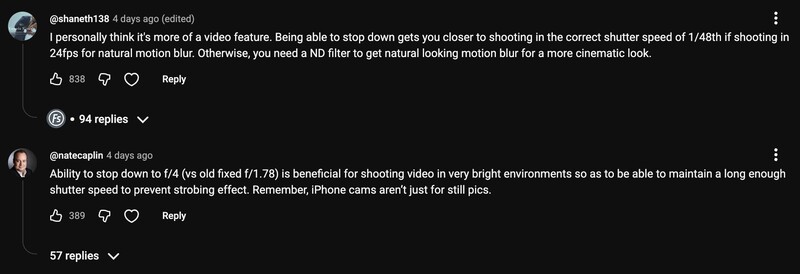
A lot of you disagreed with me, at length, and told me I had missed the point entirely. So I went back through every one of those arguments. I still think you are wrong, and this time I went outside and measured it.
The short version of that first piece is that phone sensors are tiny and permanently starved for light, so stopping down is the last thing you want to do, and depth of field on a phone is already so deep that Apple has spent years writing software to fake the blur a real lens would give you. Every other phone that has shipped a variable aperture uses it wide open in the dark, accepts that wide open is soft, and stops down the rest of the time. Once you have built a mechanism that moves at all, you may as well let it run to f/4.
Your iPhone Does Not Have a 24mm Lens
Start with the equation, because most of the arguments in that comment section fall apart on it. The f-number is the focal length divided by the diameter of the entrance pupil.

You have probably seen the main camera described as a 24mm. Run the math backwards with that number and at f/1.48 the entrance pupil would have to be roughly 17 millimeters across, which is wider than the entire camera module sitting on the back of the phone. Obviously not.
The iPhone does not have a 24mm lens. It has a 24mm equivalent field of view, meaning that if you put a 24mm lens on a full frame body you would frame up roughly the same shot. The actual focal length is about 7 millimeters. Do the division properly and the entrance pupil wide open is about 4.7 millimeters. That is the real hole the light goes through.
Same Numbers, Same Exposure, Different Look
This is the part people keep tripping over. Shutter speed, ISO and f-stop are universal. Dial the same three into an iPhone and into a professional camera and you should get the same exposure, because those numbers describe light per unit of sensor area. Pick any equivalent patch out of either sensor and the same amount of light is landing on it.
What changes is everything downstream. A full frame sensor has roughly 12 times the area, so it needs 12 times the total light for the same exposure, which demands a far wider entrance pupil, and a wider entrance pupil is precisely what produces shallow depth of field. The exposure numbers transfer between cameras. The look does not.
Here is that translation in one place, every aperture the new phone can reach next to the full frame f-stop that would blur the background by the same amount.
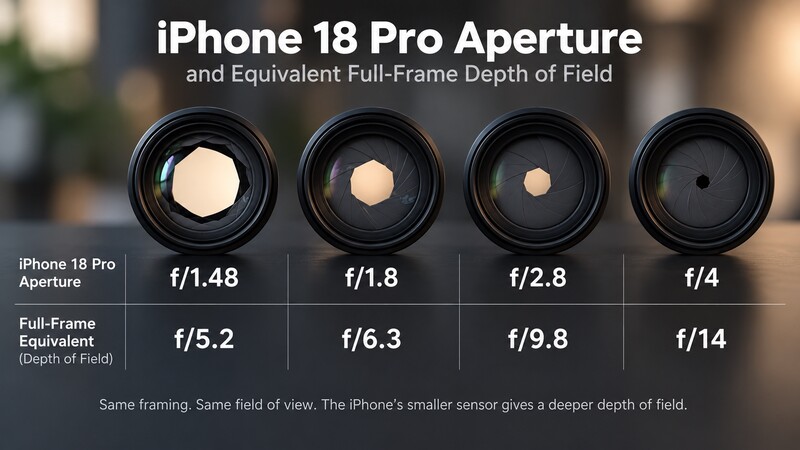
Wide open at f/1.48, the phone is giving you roughly what f/5.2 looks like on a full frame body. Stop it down to f/4 and you are somewhere around f/14. That is the entire reason a phone photo looks like a phone photo, and it is why no amount of variable aperture is going to hand you background blur.
Diffraction Is Why Apple Stopped at f/4
Here is the detail I left out last time, and it answers a question several of you asked. If f-stops really are universal, why does the iPhone stop at f/4 instead of running all the way to f/22 like a proper lens?
Diffraction. Every lens has it, variable aperture or not. As the entrance pupil gets smaller, light bends around the edge of the opening and images start going soft, which is why no lens is at its sharpest at its smallest aperture. It bites phones much harder than it bites professional cameras, and not because phone sensors are small. It is because their photosites are.
The Sony a7S III I shoot myself on is a full frame camera with 12 megapixels, so each individual pixel is enormous. The iPhone crams 48 megapixels onto a sensor a small fraction of that size. Apple could not offer you f/11 or f/22 even if they wanted to. The files would come back visibly blurry.
The Argument Everyone Actually Had
The single most upvoted complaint, across several comments with hundreds of thumbs up each, was some version of this: you are missing the point, this was never a photo feature, Apple built it for videographers. Being able to stop down to f/4 finally lets you hold a 180 degree shutter at 1/48 of a second and get natural motion blur, which has always been the hard part of shooting video on a phone.
If that means nothing to you: photographers can shoot at almost any shutter speed, because a still image is a still image. Videographers want a little blur baked into every frame. Shake your hand in front of a camera running at 1/48 and freeze it, and the hand smears slightly, which is what your eye reads as natural motion. Use a much faster shutter and the footage goes jittery and strange. Nearly every movie and TV show you have ever watched was shot this way, and it is one of the first things we cover in Introduction to Video.
It is a reasonable theory. It is also the easiest claim here to test.
I Went Outside and Measured It
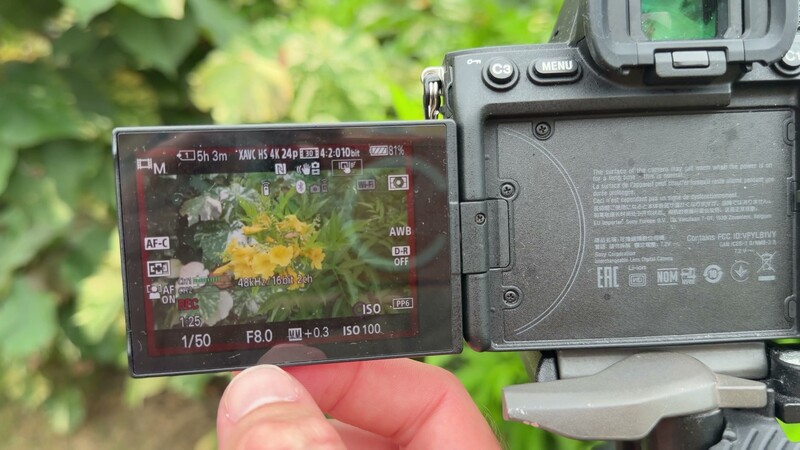
The day I shot this was overcast with a storm cloud parked in front of the sun, which is about as dark as daylight gets. Best case scenario for the argument. My camera was at ISO 100, the lowest native setting on both my camera and the iPhone, and 1/50 of a second, which is the shutter speed everyone in those comments is chasing.
To get a correct exposure I had to be at f/8.
Open that up to f/4, the widest the iPhone can go while still being stopped down, and the same shot is two stops overexposed. The zebras take over the frame.
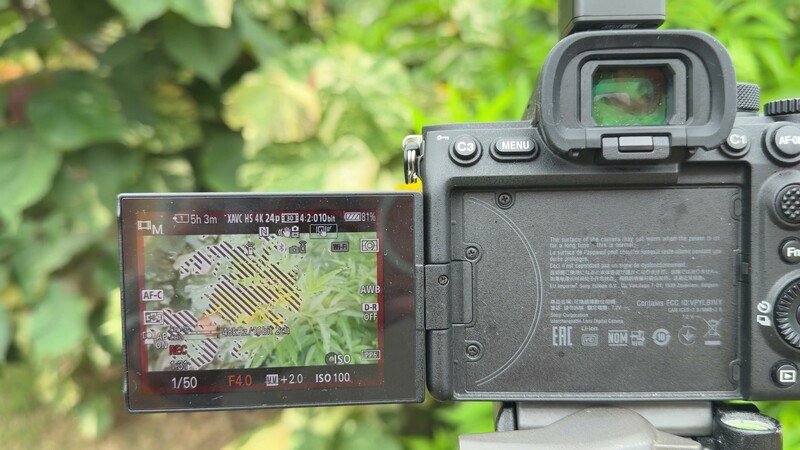
You can argue that the iPhone drops to ISO 50, so I tested that too. Still overexposed. And remember the storm cloud. Shoot in direct sunlight and you are another three or four stops brighter than the day I was standing in.
So if you were hoping to buy this phone, stop down to f/4 and shoot at 1/48 all day outdoors, I am sorry. On a professional lens you could keep going to f/11 or f/22 and eventually land on it. The iPhone stops at f/4, so outside you are still reaching for a neutral density filter, which is basically sunglasses for your camera.
It Is Still a Nice Feature
Normally I would laugh at the whole exercise and tell you it is an iPhone, the shutter speed does not have to be perfect, the footage will look fine straight out of the camera. But Apple has built a real set of manual controls into the camera app this year, and I can genuinely imagine reaching for them now.
So the variable aperture is a cool feature and I am going to enjoy using it. Just do not let anyone convince you it is about to transform your photography or your video work. It is another small step forward, and not much more than that. My full review goes up once the phone actually lands.
One Last Thing
Unrelated to any of the above: I have been building a Mac app called Better Dock for years, and the beta is finally open. It replaces the dock at the bottom of macOS with something you can actually configure, and if you run several monitors like I do, you can put a dock on every screen and see exactly what is open where. It is free to try at betterdockapp.com, and there will always be a free version.

Join the Fstoppers community for free
-
Post comments and join in the discussions
-
Browse the site ad-free
-
Share your work and get featured in the community
-
Compete in the photo contests for fun and prizes