
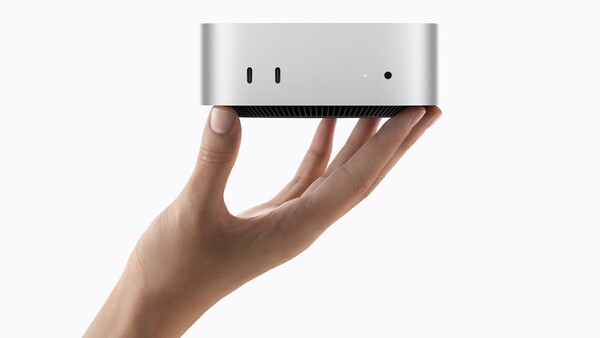
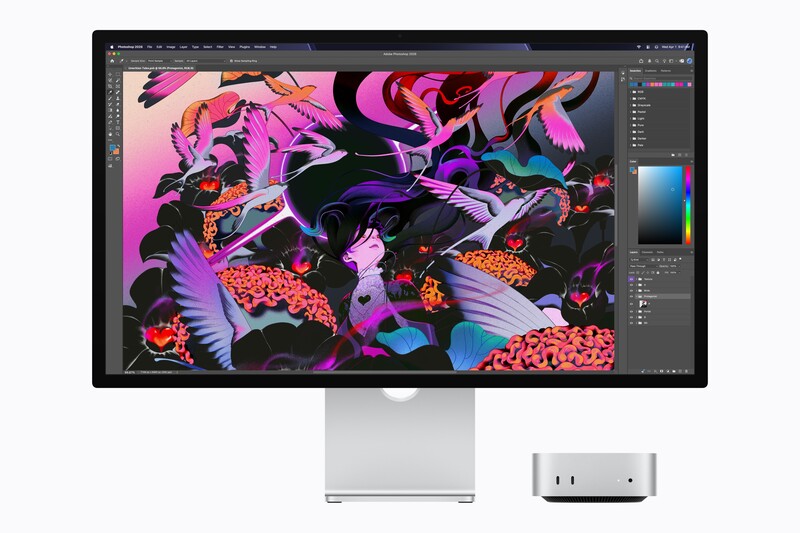
The Mac mini with M5 Pro chews through 4K footage and reads from its SSD in an instant, from a silver box 5 inches square that never once became audible on my desk. It is the fastest small desktop Apple has built, and for photo and video work, it is the best value in the entire Mac lineup.
Apple sent me the following configuration: an 18-core CPU with a 20-core GPU, 48 GB of unified memory, and a 1 TB SSD. I spent a week running the work photographers and filmmakers actually do on it, including raw batches, 4K transcodes, a Resolve project, and hours of pinned all-core load.
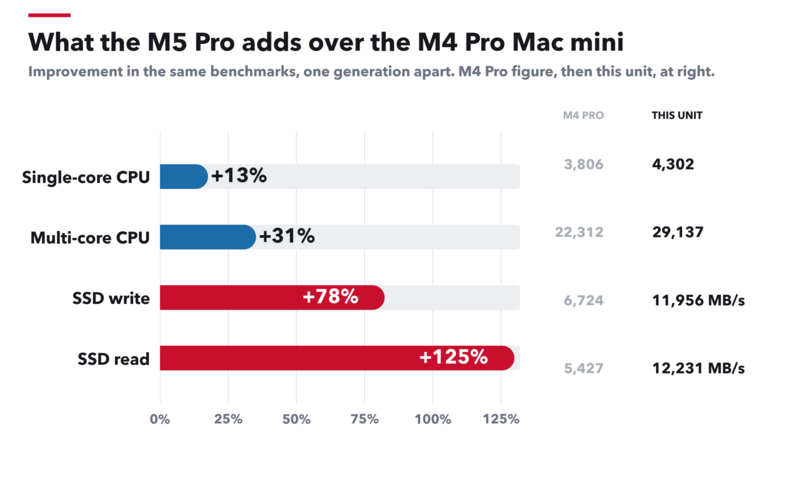
Multi-core performance is up 30.6% over the M4 Pro Mac mini, single-core is up 13.0%, and storage has more than doubled.
Specifications and Configuration
The review unit is marked below in parentheses. Every other line covers what you can order.
- Model: Mac mini, silver, announced August 25, 2026, available September 22, 2026
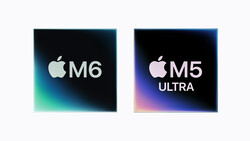
- Chips: M6 with a 12-core CPU and 12-core GPU, or M5 Pro with a 15-core CPU and 16-core GPU, configurable to an 18-core CPU and 20-core GPU (as tested: M5 Pro, 18-core CPU with 6 super cores and 12 performance cores, 20-core GPU)
- Neural hardware: Neural Accelerators in every GPU core, plus a 16-core Neural Engine on M5 Pro and a dual 16-core Neural Engine on M6
- Memory: M6 takes 16 GB, 24 GB, or 32 GB at up to 170 GB/s. M5 Pro takes 24 GB, 32 GB, 48 GB, or 64 GB at 307 GB/s (as tested: 48 GB)
- Storage: 256 GB to 2 TB on M6, and 512 GB to 8 TB on M5 Pro (as tested: 1 TB)
- Media engine: hardware-accelerated H.264, HEVC, ProRes, and ProRes RAW, with one video decode engine, one video encode engine, one ProRes encode and decode engine, and AV1 decode
- Rear ports: three Thunderbolt 5 ports at up to 120 Gb/s with DisplayPort 2.1 on M5 Pro, or three Thunderbolt 4 ports at up to 40 Gb/s on M6, plus HDMI and 2.5 Gb Ethernet configurable to 10 Gb
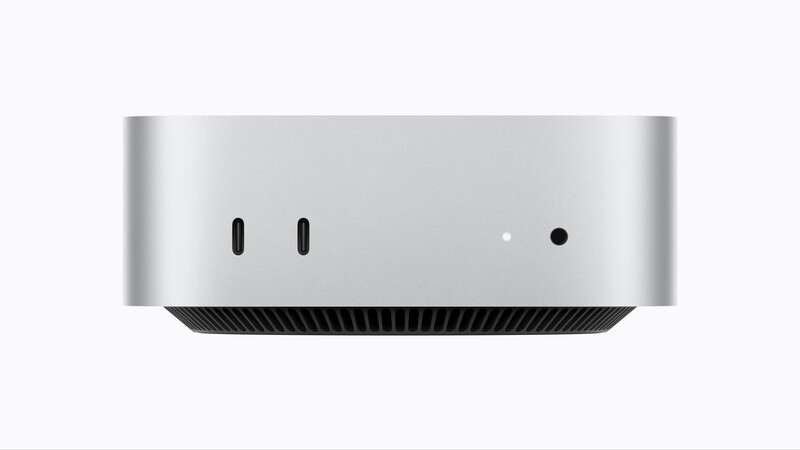
- Front ports: two USB-C ports at USB 3 speeds, up to 10 Gb/s, and a 3.5 mm headphone jack with high-impedance support
- Displays on M5 Pro: three at 6K 60 Hz or 4K 165 Hz, or two at 8K 60 Hz, 5K 120 Hz, or 4K 240 Hz, and up to three displays from a single Thunderbolt port
- Wireless: Apple N1 chip, Wi-Fi 7, Bluetooth 6, and Thread
- Genlock: supported over USB-C on M5 Pro only, for synchronizing a display with cameras that take an external clock, including iPhone 18 Pro and cinema cameras
- Size and weight: 2.0 by 5.0 by 5.0 inches, 1.5 pounds on M6 and 1.6 pounds on M5 Pro
- Power and noise: 155 W maximum continuous, with Apple rating idle noise at 5 dBA
- Price: M6 from $899, M5 Pro from $1,699 with 24 GB and 512 GB, and $3,199 for the 18-core, 20-core GPU build with 64 GB and 1 TB
- Software as tested: macOS 27.0, Geekbench 6.4.0 and 7.1.0, ffmpeg 7.1.1 arm64, darktable 5.6.1, DaVinci Resolve 21.1, and Blackmagic Disk Speed Test
Design and Connectivity
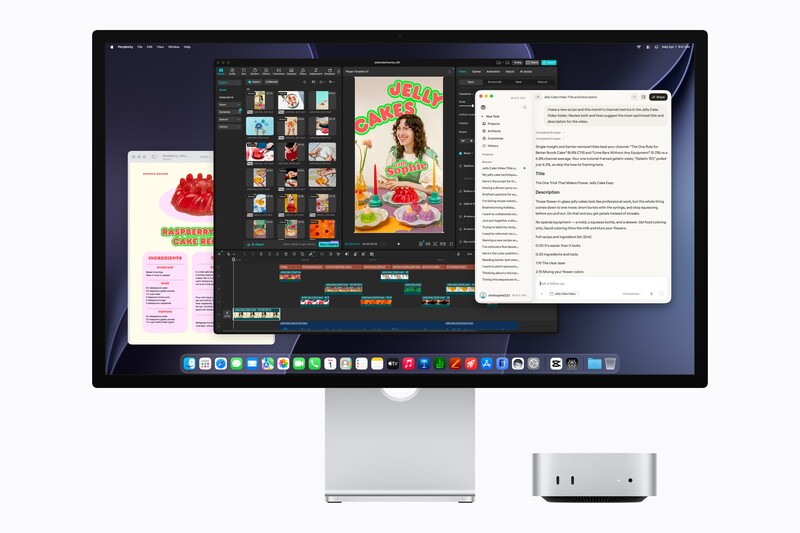
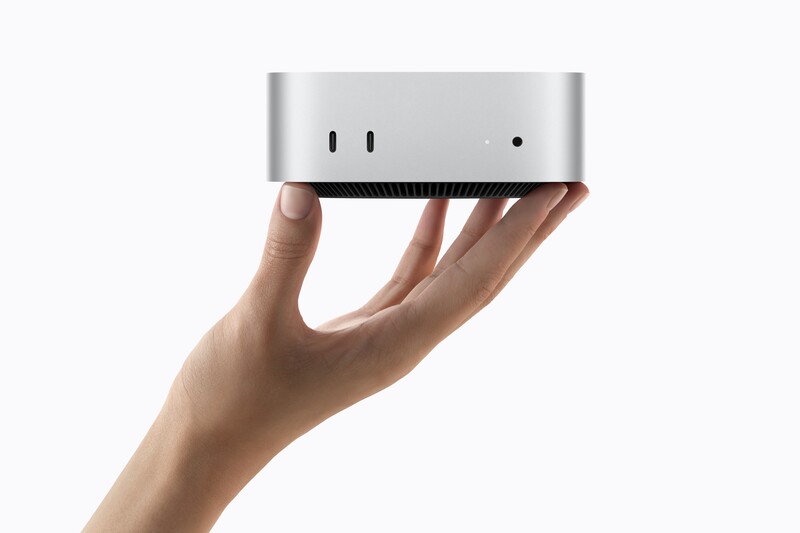
The chassis carries over unchanged, which is the right call. It is 5 inches square and 2 inches tall, it weighs 1.6 pounds, and it vanishes behind a display or under a monitor arm. The three Thunderbolt 5 ports run at up to 120 Gb/s, three times the bandwidth of the Thunderbolt 4 ports on the M6 model, and they carry DisplayPort 2.1. That is enough for three 6K displays at 60 Hz and enough headroom that an external Thunderbolt 5 array will be limited by the array rather than the port.
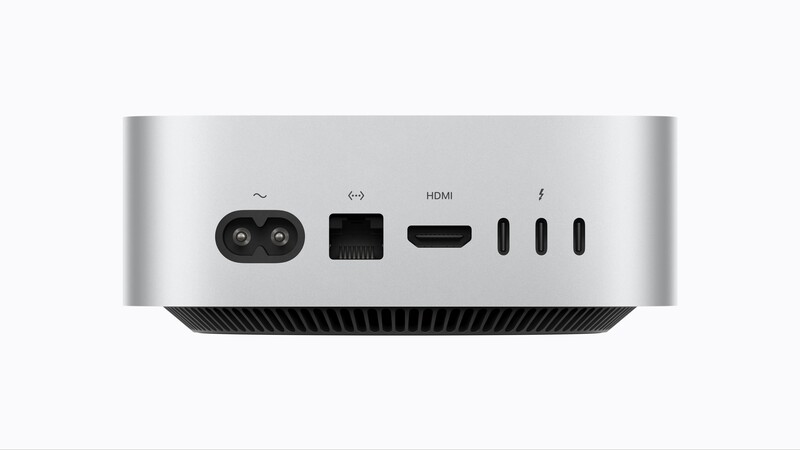
Ethernet is 2.5 Gb as standard now, with 10 Gb available as a configure-to-order option. If there is a NAS in your room, that is the upgrade I would buy first, ahead of extra internal storage, because it changes how a shared library feels every single day.
The two front ports stay at USB 3 speeds, up to 10 Gb/s. For card offloads, that is still the port to reach for, since a CFexpress reader will run out of speed before the port does. The headphone jack drives high-impedance headphones directly and doubles as a line out for powered speakers, which removes a reason to keep a small interface on the desk.
Genlock over USB-C is new, and it belongs to the M5 Pro model alone. It synchronizes a display with cameras that accept an external clock, which Apple lists as the iPhone 17 Pro, 18 Pro, and cinema cameras. For a studio cutting several cameras together, or anyone putting an iPhone alongside a cinema body, it removes a sync problem that used to require outboard hardware.

Generational Performance
I ran Geekbench 6 four times rather than once. Single-core came in at 4,296, 4,308, 4,304, and 4,300, a median of 4,302 across a 0.28% spread. Multi-core landed at 29,042, 29,136, 29,138, and 29,194, a median of 29,137 across a 0.52% spread. Against the published Geekbench 6 figures for the M4 Pro Mac mini, that is 13.0% faster in single-core work and 30.6% faster in multi-core work. That's an impressive generational jump, particularly considering we're now several generations into M Series chips. And SSD performance is wildly faster, more than double the M4 Pro for read speeds.
One warning about cross-version comparisons. Geekbench 7 on this same machine scored 3,727 single and 33,992 multi, which is 13.5% lower and 16.7% higher than its own Geekbench 6 results, respectively. Geekbench recalibrated its baseline between versions. I chose Geekbench 6 to make comparison with previous generations more accurate.
What 18 Cores Actually Buy You
Geekbench 6 splits into 16 subtests, and 8 of them are imaging workloads, which makes the breakdown more useful to a photographer than the headline number. Measured on this machine in a single session, the speedup from one core to all 18 ranged from 13.5x on Ray Tracer down to 1.3x on Text Processing.
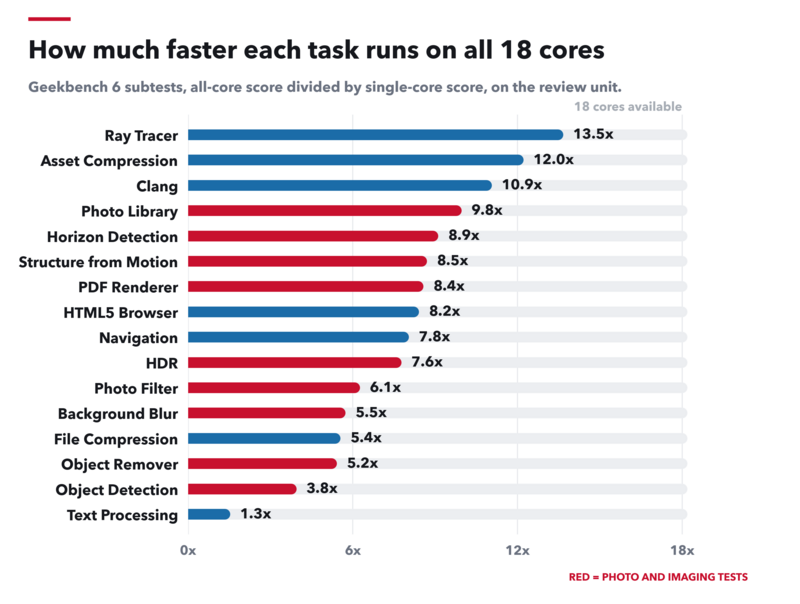
Across the eight imaging subtests, the median is 7.6x. What that essentially means is an 8x increase in photo performance while leaving more than half the performance available for other tasks. That's a lot of available overhead.
AI Work Is Where the Core Count Story Gets Interesting
Almost every application a photographer touches now leans on machine learning somewhere. Lightroom has AI Denoise, Select Subject, and masking. Photoshop has generative fill and object removal. Topaz upscales, Resolve has Magic Mask and Neural Engine processing, and plenty of people are now running local language models on the same machine they edit on. Apple built this generation around exactly that shift, putting Neural Accelerators inside every GPU core and pairing them with a 16-core Neural Engine. If you've known the frustrating of waiting on powerful but resource-intensive AI upscaling and editing features, you'll appreciate this machine.
The subtest data says something specific about how that hardware behaves. Object Detection posted the highest single-core score of any subtest on this machine, 6,402. That is the shape of dedicated neural hardware making its presence known.
In practice, that maps neatly onto how these tools get used. Masking a subject, running Denoise on the frame you are actually working on, generating a fill, or upscaling a hero image all land on the fast path, and they feel close to instant. Selecting four hundred files and running Denoise across the batch is the other case, and there the machine will not simply multiply by 18. If your workflow is one-at-a-time AI on images you are editing, this chip is superb. If your workflow is overnight AI batches, buy memory rather than cores.
Local models are the other half of this. Apple claims up to 4x faster LLM prompt processing in LM Studio than the M4 Pro Mac mini, and the more relevant number for anyone running models at home is the memory. With 48 GB of unified memory in the review unit, and 64 GB available, models that will not fit on a 16 GB graphics card fit here, and they run against 307 GB/s of bandwidth. A discrete card at this price does not offer that. Thunderbolt 5 also lets you cluster several minis together to run a model larger than any one of them holds, which is a genuinely new option at this size and price. For anyone concerned about privacy with cloud AI models, who wants to build custom models on their own materials, or who appreciates AI they don't have to pay for, there's strong performance here.
Photo Workflow
I ran two raw libraries through Apple's built-in Core Image pipeline: 60 Fuji files at 26 MP and 60 Sony files at 42 MP. Single-threaded, full-resolution JPEG exports ran at 121 images per minute for the Fuji files and 75 for the Sony files, so the larger files cost about 60% more time, unsurprisingly. What's interesting is that run in parallel, that gap closes almost completely: at 18 concurrent jobs, the two libraries hit 302 and 287 images per minute, within 5% of each other. If you batch-export, file size matters far less than it feels like it should.
Apple's pipeline is lightweight, doing far less to each file than a full converter does, which is why it takes concurrency to fill the machine. A properly threaded converter does not. To check that directly, I ran the same 42 MP Sony files through darktable-cli, which threads its pipeline internally. A single process converted 24 raws in 12.1 seconds, which is 119 images per minute with a full demosaic and processing pipeline, and it consumed 119 seconds of CPU time in those 12 seconds of wall time. That is 9.9 of the 18 cores busy from one job.
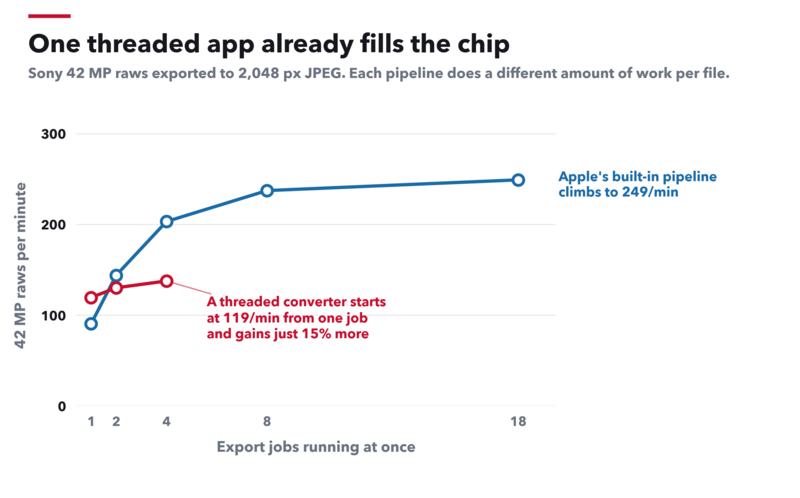
Running four of those processes at once moved throughput from 119 images per minute to 138, a gain of 15%, which is the good news rather than the bad. One export is already spreading itself across the chip and leaving very little on the table, so there is almost nothing left for a second or third job to claim. For anyone batching raws in Lightroom Classic or Capture One, that means the machine is working at full stretch on a single export, with no queue management, no splitting libraries in half, and no tricks required to get your money's worth out of 18 cores, and it's doing so an impressively fast speeds.
Lightroom Classic and Capture One thread their exports the same way, so expect the same shape from them even though the height will differ. Each converter does a different amount of work per file, between previews, sharpening, noise handling, and color, so its line sits higher or lower than darktable's. The slope is what carries over: one export already spreads itself across the cores, and a second instance running alongside it claims very little that the first one left behind. In plain language, exports are fast, with no fancy tricks necessary.
Apple's own pipeline is worth knowing about separately, because a lot of software runs on it. Photos, Preview, and Quick Look all decode raw files through it, as does every Finder thumbnail and every batch action you build in Shortcuts or Automator. RAW Power is built directly on Apple's raw engine, which is where its Aperture-style Boost and Black Point controls come from. If that is where your work happens, the concurrency numbers are the ones to use: 600 Sony raws converted to 2,048 px JPEGs at 249 images per minute takes about two and a half minutes, and you get there by letting a Shortcut or a script run eight conversions at once instead of one at a time. If you weren't aware of this alternate pipeline, the graph above should convince you to at least give it a look.
Video: ProRes Transcodes Fly, Batch Exports Queue
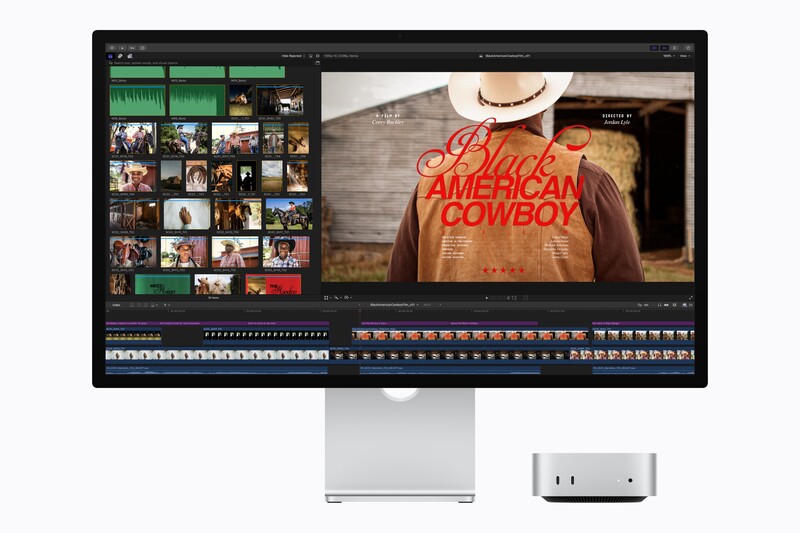
My source clip was 4K H.264 from a DJI drone, 3,840 by 2,160 at 29.97 fps, 60 Mb/s, running 2 minutes and 52 seconds. Everything ran through ffmpeg 7.1.1 with VideoToolbox, so the media engine did the work.
Transcoding that clip to ProRes 422 HQ took 21.7 seconds, or 8.0x realtime. That is the number that changes a working day, because proxies and dailies come back faster than you can pour a coffee. H.265 took 73.5 seconds and H.264 took 70.7 seconds, both around 2.4x realtime. Software x265 across all 18 cores took 172.3 seconds, roughly realtime, which really shows just how much the media engine contributes.
Then I ran four encodes at once. One stream ran at 2.35x realtime, two at 2.29x aggregate, and four at 2.27x aggregate, so four exports finished in about the time four sequential exports would take. Decoding behaves the opposite way: one stream decodes at 9.13x realtime, and four decode at 24.42x aggregate, a real 2.7x gain.
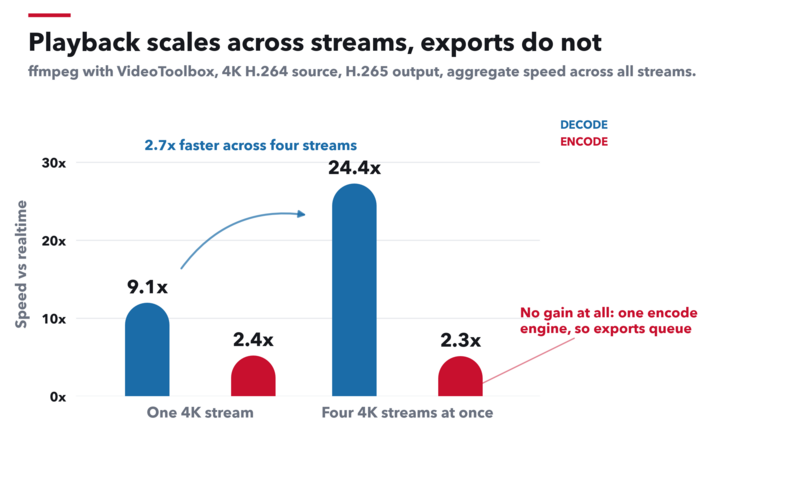
The hardware explains it. Apple's specifications list one video encode engine for M5 Pro, against two for the M5 Max in the MacBook Pro. Decoders are not the constraint, so multicam playback, scrubbing, and proxy-free timeline work all benefit from having several streams in flight. Exports do not. If your day ends with a queue of deliverables in different formats, that queue is serial, and the Mac Studio with an M5 Max or Ultra chip is where the second and fourth encode engines live. That being said, it's the smart tradeoff, as you'll be relying on decode performance 95% of the time versus encode.
DaVinci Resolve
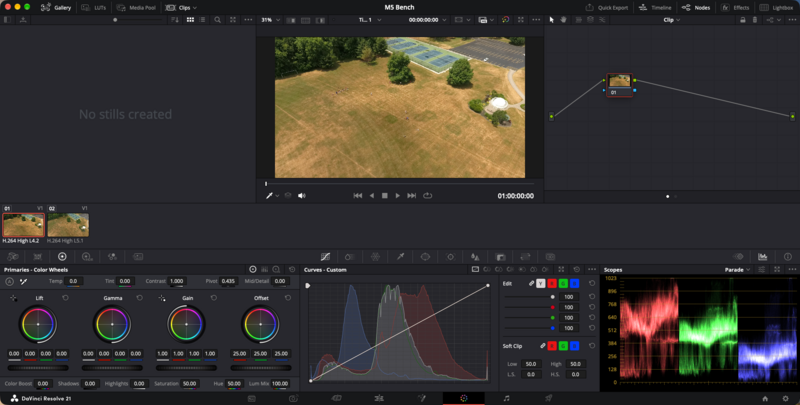
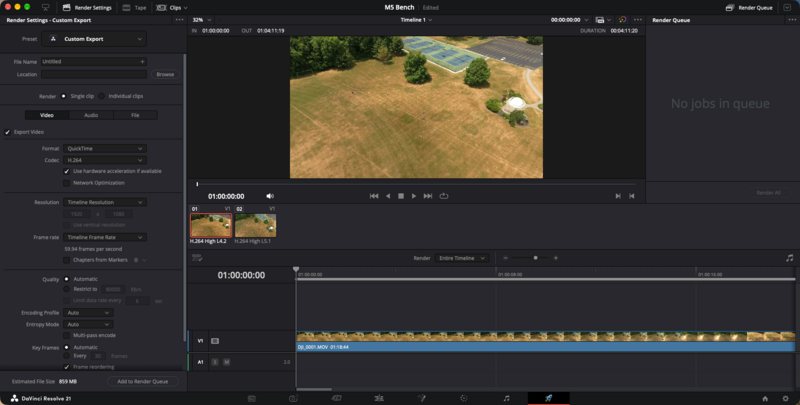
I built a Resolve 21.1 project with the drone footage to see how the machine behaves under a real application. Driving a Studio Display, Resolve read the 48 GB of unified memory and allotted itself 36 GB, with 27 GB for the Fusion cache, and it reported the GPU as an Apple M5 Pro with 37.4 GB available, running Metal.
That last figure is the practical argument for unified memory on a small desktop. A discrete card in this price class ships with 8 GB or 16 GB of dedicated video memory, and here Resolve sees 37.4 GB because the pool is shared. For heavy Fusion comps, large caches, and noise reduction on long timelines, that headroom is the difference between working and waiting.
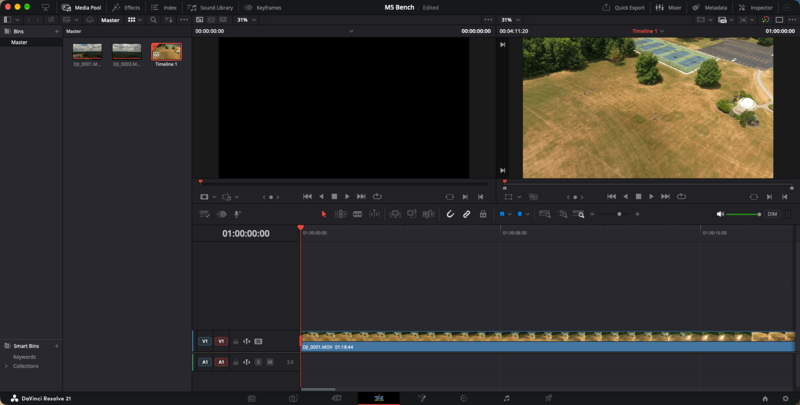
Moving between pages is instant, and the machine never made me wait on an interface. The Fusion page sat at 1,838 MB with an idle single-node comp, about 4% of the machine's memory, and the Deliver page arrives with hardware acceleration already switched on, which is the correct default given what the media engine can do with ProRes.
Storage
Blackmagic Disk Speed Test on the internal 1 TB SSD returned 11,956 MB/s write and 12,231 MB/s read. The M4 Pro Mac mini measured 6,724 write and 5,427 read in our testing last year on a 2 TB drive, which is normally the quicker tier because it has more NAND dies to stripe across. This is roughly double the write speed and 2.3 times the read speed, on the smaller drive, which clears the 2x faster storage Apple claims for this generation.
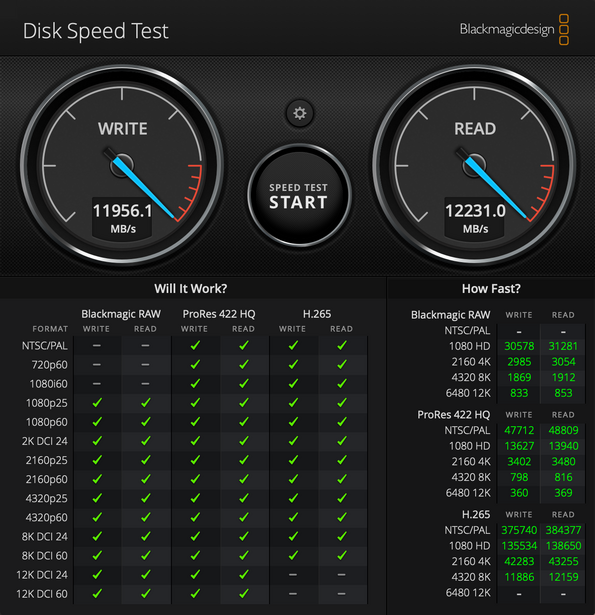
The sustained-format panel translates that into working terms. Blackmagic RAW at 4K sustains 2,985 frames per second of write headroom, ProRes 422 HQ at 4K sustains 3,402, and both pass every format up through 8K DCI 60. A single ProRes 422 HQ 4K stream needs about 30 frames per second sustained, so the drive carries roughly 113 times the headroom one stream requires. Those are insane numbers.
Random 4K reads at queue depth 1 measured 12,298 to 12,826 IOPS at 78 to 81 microseconds of latency. Apple's controller trades queue-depth-1 latency for sequential bandwidth, and for media work, that is the right trade.
Thermals and Noise
Apple routes air through the machine in stages and exhausts it through the foot. I ran 12 consecutive all-core x265 encodes, about five and a half minutes of pinned CPU. Pass 1 took 25.8 seconds and pass 12 took 26.7 seconds, a 3.5% drift that sits inside run-to-run noise. Querying pmset for thermal history recorded zero thermal warnings and zero performance warnings across the entire session. In other words, sustained performance is not a problem.
The fourth Geekbench run is the better proof. It scored 4,300 single-core after the machine had been under load all afternoon, against 4,296 on the first run of the day. This chassis does not throttle under editing work.
It is also silent. I sat next to it through every one of those encodes, and at no point did I hear the fan. Apple rates the mini at 5 dBA at idle, and under an hour of sustained load, the loudest thing on my desk was still the room. That's a big deal if you're doing any sort of live audio work, podcasting, narrating videos, etc.
Materials and Packaging
Apple always gets this part right. The mini is built from 50% recycled material by weight. The enclosure is 100% recycled aluminum, the thermal module uses 100% recycled copper in several components, and every magnet in the machine uses 100% recycled rare earth elements. Apple forges that enclosure in a process it says uses 85% less aluminum than the 2023 Mac mini, which is a reduction in what gets mined rather than an offset bought after the fact.
The rest follows the same pattern. All of the electricity used to manufacture the mini comes from renewable sources across Apple's supply chain. The box is 100% fiber, so there is no plastic to pull out and throw away. Pair that with a desktop that draws at most 155 W flat out, sits at 5 dBA when idle, and stays silent under sustained load, and the whole package is about as light a footprint as a machine this fast can have.
Summary
What I Liked
- Storage speed that more than doubled in a generation: 11,956 MB/s write and 12,231 MB/s read, on the smaller 1 TB tier
- ProRes transcoding at 8.0x realtime, which turns proxies and dailies into a background task
- Multi-core performance up 30.6% and single-core up 13.0% over the M4 Pro Mac mini
- Zero thermal or performance warnings across 12 consecutive all-core encodes
- Silent through every test, including sustained all-core work
- 37.4 GB of 48 GB of unified memory exposed to the GPU in Resolve, which no discrete card near this price approaches
- Very fast one-at-a-time AI operations, which is how masking, Denoise, and generative tools are actually used
- Three Thunderbolt 5 ports at 120 Gb/s with DisplayPort 2.1, and up to three displays from one port
- 2.5 Gb Ethernet as standard, with a 10 Gb option worth taking if you run a NAS
- Genlock over USB-C for syncing an iPhone 17 Pro or 18 Pro into a multicamera setup
- Still 5 inches square and 1.6 pounds
- 50% recycled materials by weight, a 100% recycled aluminum enclosure, recycled rare earth magnets, and plastic-free packaging
What I Didn't Like
- No AV1 encode
For creatives, this is an easy recommendation, and the configuration matters more than the badge. The imaging ceiling you will hit first is software, not silicon, so the 15-core M5 Pro with more memory will serve a stills workflow better than the 18-core chip with less. For hybrid shooters and editors, the ProRes performance and high GPU-accessible memory make this the most capable small desktop Apple has built. If your day is frequently a huge queue of video exports, that is the one job where the single encode engine sets a wall, and the Mac Studio is the answer. Everyone else is buying a silent, unthrottled, 12 GB/s desktop that hides behind a monitor, and there is nothing else on the market quite like it.
Ordering
Primary
Also Available
Lead image by Apple.



Join the Fstoppers community for free
-
Post comments and join in the discussions
-
Browse the site ad-free
-
Share your work and get featured in the community
-
Compete in the photo contests for fun and prizes