
Recently I got to go hands-on with the all-new Canon C50 for a couple of projects, and ultimately I wanted to see if this could be the right compact cinema video camera, delivering high-quality video up to 7K that would work not only for content creation and brand videos but also for some indie filmmaking projects.
I had this out for a couple of different shoots in which I wanted to test the different features of this camera. The specs initially intrigued me and got me wondering if Canon was back on top of the video game. They reigned supreme when they released the Canon 5D Mark II, which allowed for HD video and was often used as a crash cam, security cam, and as an additional camera on Hollywood sets.
I also was wondering if the Canon C50 would function the same way in today's modern age, as I've seen its closest competitor, the Sony FX3, used in the same context on a number of different sets that I've worked on. I've seen it used as a crash cam, as a FaceTime phone recording rig, and in a bunch of other setups.
7K Open Gate in a Compact Body
After getting my hands on this camera, I really wanted to see if it would be right for me, and ultimately who in general it would be right for. The Canon C50 offers up to 7K internal recording at open gate, which people are saying is a big deal. Open gate is something that previously you would only find in high-end cinema cameras often used on film and television sets, so this was a term I was not unfamiliar with. However, it is interesting to see it in such a compact form factor. The benefit of open gate is that it gives you more latitude in post-production, and in the day and age of short-form content being mostly vertical, it allows you to get a 16:9 frame but also have extra height to crop into a vertical frame, making it easy to record both essentially at the same time in an ultra-high resolution.
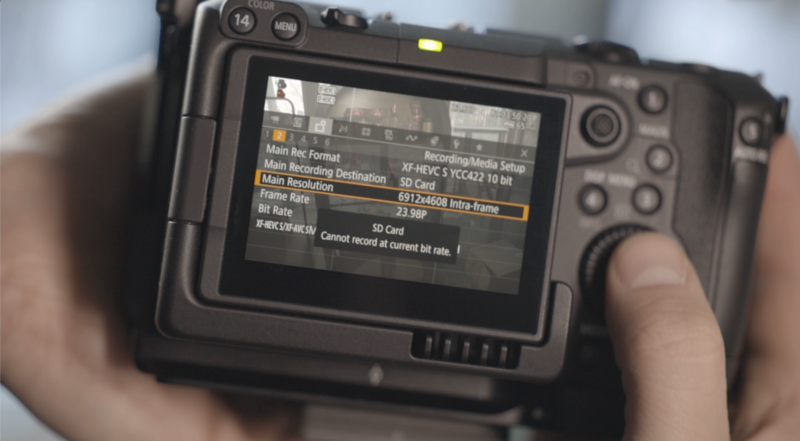
In fact, the Canon C50 makes this even easier because, with its dual card slots—one SD and one CFexpress—you are able to record in the full 7K resolution horizontally to one card and also record at the same time vertically to the other card.
Even if you don't record both, you still have the option of vertical frame lines, so you can frame your subject vertically within the horizontal frame and cut for both formats. This is something that I did for the shoot that I had this camera out on, as I was planning to use both formats for the edit. There would be a longer-form horizontal video and then a few shorter-form vertical videos cut out of the footage for these projects filmed on the C50.
Build, Ergonomics, and Heat
Initially, the body is surprisingly light for a camera of this nature. I've definitely had cameras of a similar build that feel significantly heavier than the C50 does. Additionally, it does come in at a slightly larger body size due to the fact that it has multiple fans to hopefully quell the previous overheating issues that Canon encountered when pushing the video limits of its other recent camera releases. And I can say, after shooting for a few hours with 7K open gate internal 10-bit 4:2:2, this did not overheat on me once.
That is very relieving to see, especially given the controversy that Canon encountered with its overheating issues. So this is definitely a step in the right direction.
If you kit this out with a cage and some additional accessories, you can turn the C50 easily into a larger cinema-style rig powered off a larger battery, throw a matte box on there, and you would be good to go. Maybe even add a follow focus.
The included top handle isn't just an added grip for this camera; it actually turns it into a smaller version of some of the other Canon Cinema Line cameras, with two XLR inputs and audio channel mixing available on the handle as well. Ergonomically, this camera feels really good in the hands, even for someone who has a larger hand size. For reference, I am 6'5", so that gives you some kind of an idea. I never got uncomfortable holding this camera. Even with a larger lens on it going handheld, I don't find it to be too heavy.
It's actually a nice weight balance—heavy enough to not get a lot of handheld shake and motion jitter, while also light enough that my arms aren't totally destroyed by the end of a long shoot day.
Battery Life
One thing worth noting is that, partially due to the fans in the camera, the high bit rate when recording, and the screen always being on, this camera chews through batteries. Thankfully, you do have the option to display how long you have left in the battery's life before it dies on you. But I'm finding that on an average newer-type Canon LP-E6 battery, I'm getting about 45 minutes out of a full charge. Meaning, if you are using this camera run-and-gun without an additional power supply, expect to be swapping batteries quite often. If you are using this for larger shoots, I definitely would recommend powering it off a V-mount or a gold-mount battery, as that would give you a lot more time without having to constantly power off and change the battery.
The IBIS Debate
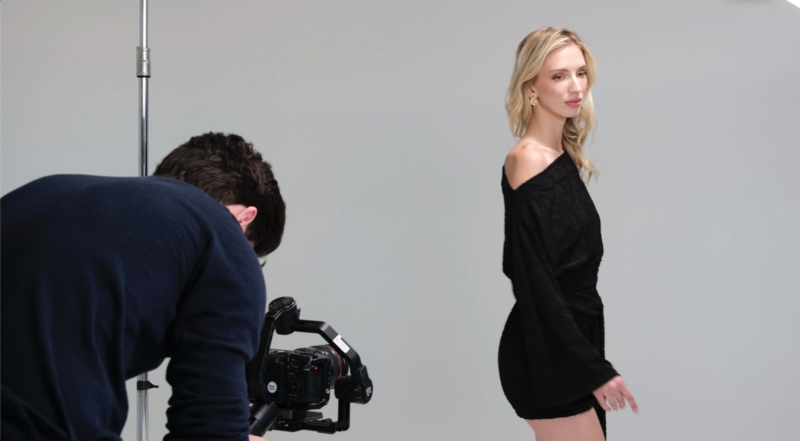
A lot of people have been complaining that this camera does not have IBIS. I would actually disagree with those people, and there are a couple of particular reasons why. IBIS is something that is great for hybrid photo-video cameras. Now, yes, it is worth noting that this can take 30-plus megapixel stills in Raw, which makes it a formidable stills camera as well, even though it doesn't have an electronic viewfinder. If I needed to pick off a couple of stills while using this camera, I knew confidently that I could do it and have them come out at a very high quality. And in fact, I did do just that.
Beyond that, IBIS is handy if you are doing a lot of content creation, if you're not putting the camera on a gimbal, or if you are using the camera outside of larger professional sets.
It can also be handy for stills to reduce shake at lower shutter speeds. However, in a camera that would be used as an additional camera for high-end film and TV sets, I understand why it doesn't have IBIS, because it could, were it to engage, throw off the image and otherwise make a shot unusable.

If you're throwing the camera on a gimbal and you forget to turn off IBIS, it could slow you down or wreck a shot by competing with the gimbal or just not giving you the look that you're after. A lot of these productions use the exact right tool for the job. If they're looking for stabilized motion, they will lean towards that and have a large rig to accomplish it. But if they don't want it, they're not going to want to have it come on when they're looking for something else. Ergo, if you're doing a handheld shot and you're supposed to get some handheld shake in there, IBIS is not something that would help. You could argue you could just switch it off, but having worked on a lot of sets, if people aren't as familiar with this camera and they bring it in for a few days and forget to switch it off, it could ruin a few shots and then make it so that camera is no longer brought out. I don't just see this as a camera that will be used by content creators and indie filmmakers; I see it as something that can be used on even larger sets, like I said, as a crash cam. I think Canon is really making a play at that market here. The body even has a dedicated timecode input, which means it's targeted to replace the FX3 on a lot of these sets.
Final Thoughts
That said, this could be a fantastic run-and-gun documentary or indie filmmaking camera based on the flexibility that it has, as well as the options for file format and recording in full Canon Raw. Ultimately, is this a camera that I would consider buying?
I would consider it. I have not yet pulled the trigger, as I've been testing it out. I would definitely rent it out for the right jobs, and I do intend to put it to the test against the Canon R6 Mark III to really see in which case you would want to use either one. But I think if you're more towards the filmmaking side than the photographic side, then this would be more up your alley.
That's just my initial speculation, but I'll have to get my hands on both side by side to really say. For me, this camera is great, and it's really exciting to see Canon making a big play and getting back into the video and cinema market. The Canon C50 has been a pleasure to use, even if it is burning through batteries the entire day.
If you're looking to sharpen the filmmaking skills you'd bring to a camera like this, Introduction to Video: A Photographer's Guide to Filmmaking is a solid starting point.



Join the Fstoppers community for free
-
Post comments and join in the discussions
-
Browse the site ad-free
-
Share your work and get featured in the community
-
Compete in the photo contests for fun and prizes
No comments yet