
You must overcome two fundamental challenges before you can produce a work of art. First, you need a vision of what you want to create. Next, you must have the skill to manipulate the tools necessary for the manifestation of that vision. If your vision involves using retouching software like Photoshop, it has long been understood that you will spend hours studying tutorials to master the program.
Chances are, no matter how much time you spend studying, you will only master a fraction of the program’s capabilities. Adobe understands how difficult it has been to learn the intricacies of its Creative Cloud software and is making it as easy to use as possible. Today’s announcement of a deep integration of Adobe software into ChatGPT furthers that goal.
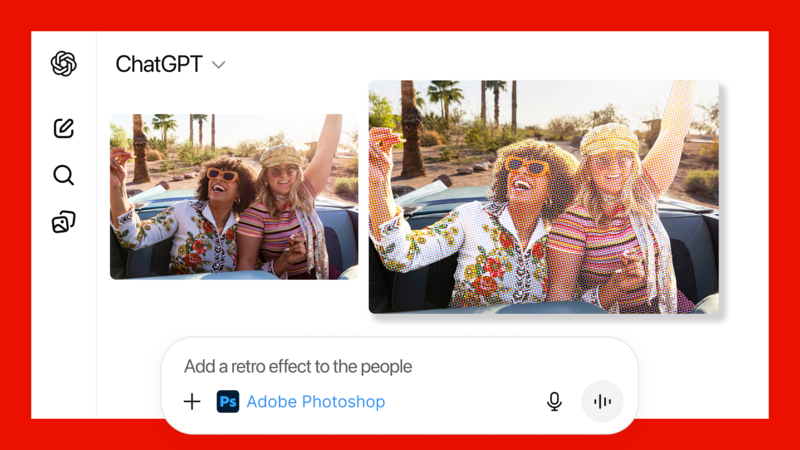
ChatGPT is the most popular AI-based program, so integrating Adobe software into this platform is logical. Connecting Creative Cloud to ChatGPT lets you import a photograph into ChatGPT and make adjustments using natural language, such as “make this photograph brighter using Adobe Photoshop” or “add some effects to this image.” You don’t need to specify what effects to add or what program to use to utilize Adobe software. ChatGPT will respond to this prompt by returning several variations of the image. You can select one of the variants and move on to your other tasks. Or, you can click the top right of the image and use sliders that allow for broad or subtle adjustments.
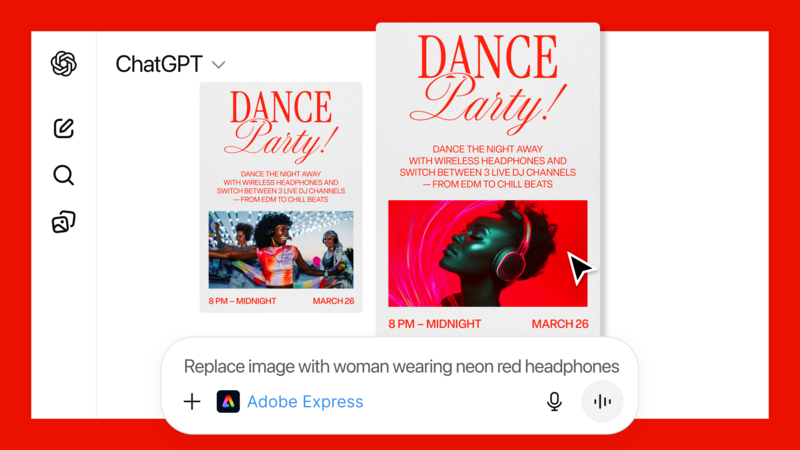
In a demo provided to me by Adobe, the presenter showed how to create a birthday party invitation using a prompt like “Use Adobe Express to create a retro-styled birthday invitation for a 25-year-old woman.” ChatGPT will create an invitation that you can edit by opening the design in Express. In Express, you can change the text information and adjust the font, background color, and any other design elements you chose. You can also stay in ChatGPT and prompt the program to “Change the date to October 31” or “Make the background color blue.” I believe most people will prefer using natural language to communicate rather than opening a program and using a trackpad to click options in a layered document. In the demo, the presenter used the type of language your colleague might use if they were standing over your shoulder as you assisted them in designing a flyer in Express. One prompt queried, “Can you animate the design with a popping animation?”
I can imagine a time in the near future when professionals such as myself will marvel at the designs and manipulations performed by casual users who do not have mastery of the software in the traditional sense. Old-school users who spent hours studying tutorials will seem like a grandfather telling tales of walking 20 miles in the snow to get to school.




Join the Fstoppers community for free
-
Post comments and join in the discussions
-
Browse the site ad-free
-
Share your work and get featured in the community
-
Compete in the photo contests for fun and prizes
No comments yet