
Getting fast, high-capacity storage has become a bottleneck in modern workflows. Codecs keep getting heavier, and a well-specced internal SSD can feel cramped quickly. Upgrades can be difficult or unreasonably expensive; enter the Express 4M2, a four-drive enclosure that addresses all these issues.
Over the last few weeks, I’ve been using this enclosure as my primary working drive, and it’s proven to be a thoughtfully designed solution for creators who want serious NVMe performance without locking themselves into a fixed configuration.
Build, Design, and Setup
The OWC Express 4M2 feels suitably solid, drawing from OWC and Apple’s related industrial design approaches, and continuing OWC’s tradition of smart use of aluminum for storage products.
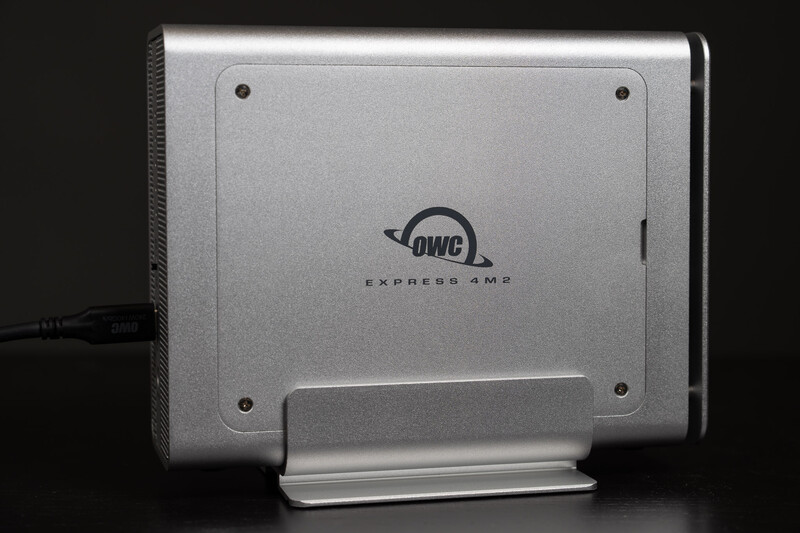
It looks great on a desk with a modern vertical stand, but it can also be run lying down (per OWC, make sure the drive side is facing up, if it's laid down), with a “flow-through” design making positioning relatively easy. The whole design prioritizes thermal stability and long-term reliability over being ultra-portable or waterproof, which I think is a reasonable choice for a studio-focused piece of gear.
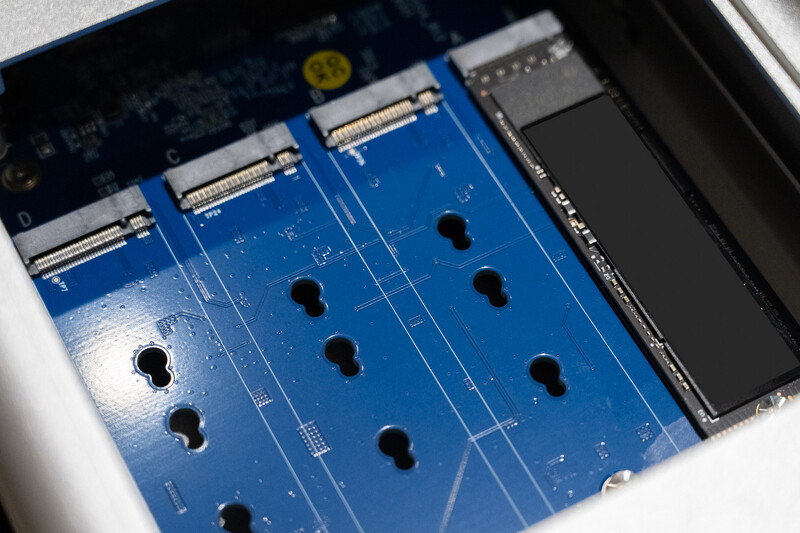
Accessing the drives is straightforward. You remove a side panel with a standard Phillips screwdriver, revealing four NVMe slots that accept common M.2 sizes (2230, 2242, or 2280). It’s not toolless, but it’s simple, secure, and easy to load or swap drives when necessary.
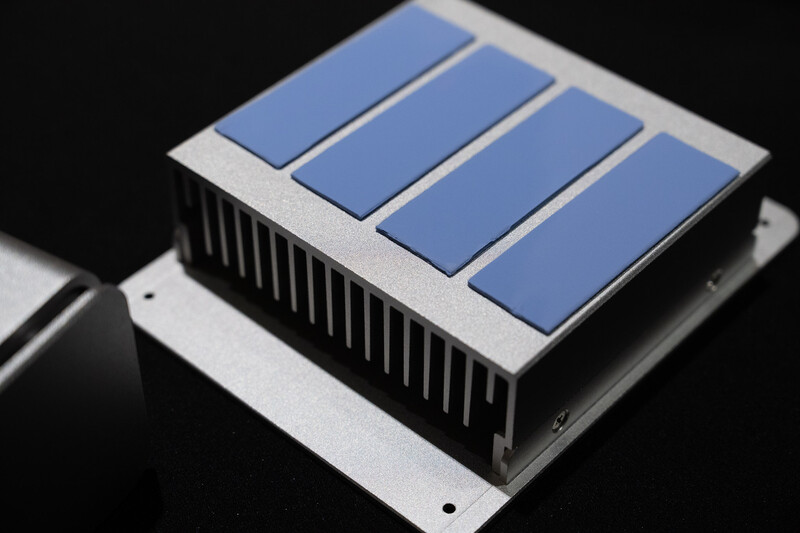
Cooling is where this enclosure really distinguishes itself. Internally, a large metal heatsink makes direct contact with all four drives, while the enclosure itself acts as an additional heat spreader. Two small PWM fans handle active cooling when needed, and they’re thankfully tuned conservatively. In day-to-day editing, imports, and timeline scrubbing, I never heard them at all.
Performance in Real Workflows
In use, the Express 4M2 behaves exactly like you’d expect a high-end external NVMe array would. With multiple drives configured as a RAID, I consistently saw transfer speeds that hit the limit of USB4: around the 3,000 MB/s range. That’s fast enough to comfortably handle multi-stream 4K and 6K video editing, large Lightroom catalogs, and heavy Photoshop scratch usage without feeling like storage is holding anything back.
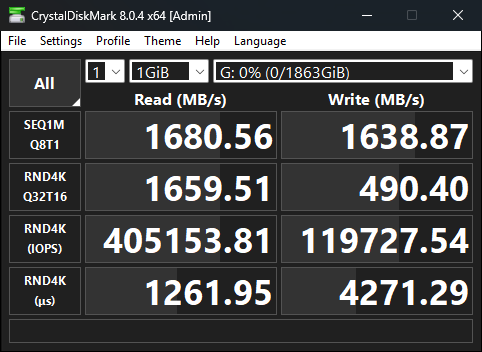
Single-drive performance is more modest, and that’s an important distinction to understand. Each NVMe slot is limited to a single lane of PCIe Gen 4, which caps individual drive speeds around 1,600 MB/s. In practice, that means this enclosure really shines when you’re using two or more drives in a RAID configuration, where you can instead see speeds of 3,200 MB/s (the USB4 or Thunderbolt cable/protocol limit).
With multiple drives combined, the available bandwidth is used far more effectively, and that lets even cheap NVMe SSDs deliver excellent real-world results. If I was configuring a 4M2 for daily use, I’d start with a minimum of two midrange 4 TB 2280 NVMe drives from a reputable brand like OWC, Western Digital, Samsung, or Crucial. While that’s unfortunately gotten quite expensive over the last few months, it gives you the best performance now and keeps your upgrade path clear for the future. Do note that you won’t want your drives to have any additional heatsinks to ensure proper fit.
Noise and Thermal Behavior
One of my biggest concerns with multi-drive NVMe enclosures is fan noise. Small fans can be surprisingly intrusive, especially in quiet editing environments. The Express 4M2 has been a pleasant surprise in this regard. Sitting on my desk throughout the review period, it was effectively silent during normal use. Even under sustained synthetic benchmarks designed to push the drives hard, the fans ramped up gently and stayed barely audible.
The combination of direct-contact heatsinking and active airflow means the drives never throttled or hit unreasonable temps, even during long transfers. That matters for long-term reliability, especially if you’re talking about large RAID volumes that may stay powered on for extended periods.
Connectivity and Compatibility
USB4 support is one of the biggest practical advantages of this enclosure. It works seamlessly across a wide range of modern Macs and PCs, and it also plays nicely with Thunderbolt systems. In my testing, the setup was plug-and-play, with no driver headaches or weird compatibility quirks.
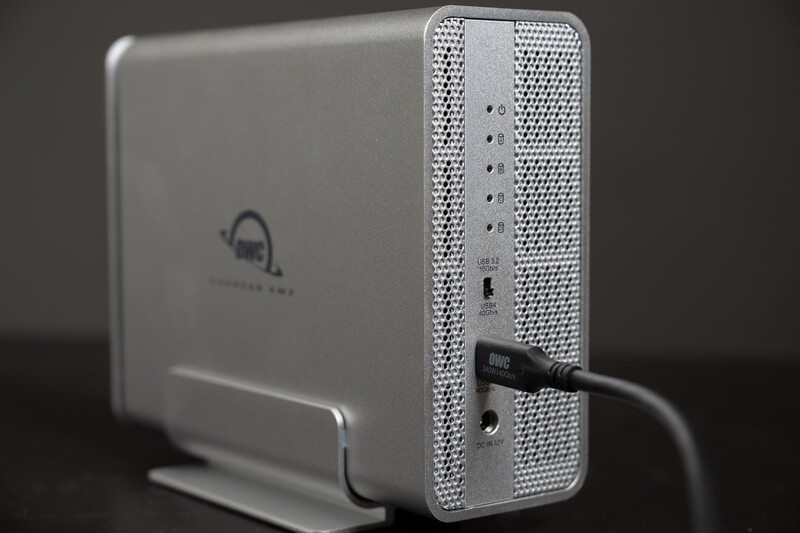
The enclosure includes a physical switch to toggle between high-speed USB4 operation and a more broadly compatible USB 3.2 10 Gb/s mode, which is useful if you’re moving between newer and older machines. It’s not bus-powered, so you do need the included power adapter, but that’s an expected tradeoff given the number of drives and the performance on tap.
Software RAID and Flexibility
This enclosure shines when using software RAID, which gives you flexibility in how you configure and manage your storage. Depending on the package you choose, it may include a license for OWC SoftRAID, which is a solid option for managing arrays and monitoring drive health. That said, you’re not locked into any single tool, with the enclosure exposing each drive to the OS individually.
What I really like about the 4M2 is the scalability. You don’t have to populate all four slots on day one. You can start with two drives (or even one, if you don’t need full speeds), then add more as your storage needs grow. That’s a big advantage over sealed solutions or Mac SSDs, where capacity decisions are permanent.
Who This Is For
The Express 4M2 makes the most sense for photographers and videographers who want fast, flexible storage without paying a premium for preconfigured proprietary solutions. It’s ideal for studio environments, editing desks, and situations where you want near-internal-SSD performance in an external form factor. It’s also easily portable to move between locations, though I’d still call it more “transportable” than something you’ll toss in a backpack daily.
It’s also a great option if you already have multiple NVMe SSDs and would like to consolidate them into one enclosure, as the JBOD style lets you easily bring together multiple drive models without detriment.
If you only ever plan to run a single NVMe drive externally, this enclosure is probably overkill, and you should look to the smaller OWC Express 1M2 instead. The 4M2’s real value shows up when you take advantage of multiple drives and RAID configurations.
Value and Final Thoughts
From a value perspective, the Express 4M2 hits a sweet spot. The enclosure itself is reasonably priced for its build quality and performance, and using off-the-shelf NVMe drives gives you control over both cost and capacity. Even with NVMe prices rising, it remains one of the most practical ways to build up to 32 TB of fast flash storage.
After spending real time with it, I see the Express 4M2 as a mature, well-engineered piece of gear. It’s quiet, thermally competent, and genuinely supports creators’ needs. Whether you’re processing large photo catalogs, editing high-resolution video, or just tired of juggling multiple smaller external drives, it’s a compelling option that balances performance, expandability, and long-term usefulness.
The Express 4M2 is available now as just the enclosure, or as a combo of the enclosure and a three-year license for SoftRAID.





Join the Fstoppers community for free
-
Post comments and join in the discussions
-
Browse the site ad-free
-
Share your work and get featured in the community
-
Compete in the photo contests for fun and prizes
No comments yet