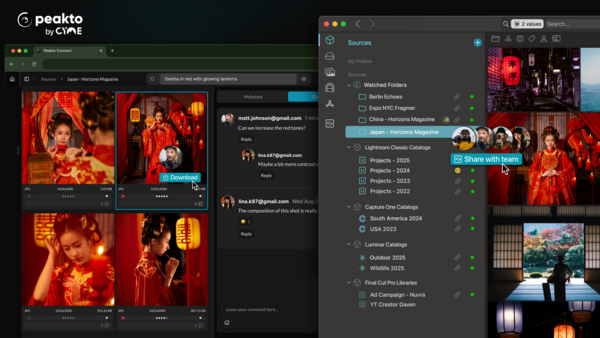
Peakto is releasing a 2.5 update to its excellent media management tool that frees it from the cloud while allowing robust search of all your media assets and enabling team sharing.
What's in the Update?
With new server and web features, the Peakto Mac application enables teams and creators to collaborate, search with local AI, and share media libraries—without sending files to the cloud.
Here's what the company says about this new version:
Traditionally, creatives faced a dilemma: choose the cloud to enable remote collaboration—at the cost of rising storage fees and loss of control over their data (which may be used by generative AI). Or rely on local storage to preserve the confidentiality of their work, but give up flexibility and teamwork. Peakto puts an end to this compromise.
By turning a Mac into a secure server, Peakto makes locally hosted content accessible remotely through an encrypted internet connection.
With Peakto’s online version—and without uploading any files to the cloud—all collaborators can search the media library and preview every photo and video (a new feature in version 2.5, which now includes video proxies in the web version). They can annotate, download the original file, and share a selection with clients (also new in version 2.5, which introduces the ability to invite external users via a web link). Peakto transforms stored content into assets that everyone can use.
According to Claudia Zimmer, CEO & co-founder at CYME:
Creative professionals no longer have to choose between privacy and collaboration,” . “Peakto provides the security of local storage with the flexibility of the cloud, but without the risks, fees, or data exposure.
Here are more of the features:
-
Collaborative teams can query a shared database of locally hosted photos and videos, enhanced by AI search. Data privacy is guaranteed since nothing leaves local storage.
-
Agencies can selectively share parts of their media libraries with clients. From a simple browser, clients can preview, comment, and download content—without cloud dependencies.
-
Solo creators gain remote access to their media libraries while traveling. With AI-powered analysis performed locally, they can describe what they need and instantly retrieve it—securely.
With a redesigned interface, this new version makes it easier than ever for creative teams and clients to collaborate. Peakto introduces a new way to share locally stored files—no cloud required. Finally, privacy, collaboration, and AI come together in one powerful tool.
I haven’t had a chance to try this new version yet, but I’m eager to give it a go. Version 2.4 has been very useful for finding images across my large catalog of many thousands of photos. This new version, 2.5, looks to be even more powerful.
Pricing and Availability
Peakto is available as a subscription:
-
Standard: Includes Mac-compatible software and individual web access. Starts at $10 per month.
-
Pro: Adds multi-user web access, collaborative features, and guest access. Starts at $25 per month per user.
A perpetual license is also available for the Standard version, including one year of updates. There are more details on the Peakto website.






Join the Fstoppers community for free
-
Post comments and join in the discussions
-
Browse the site ad-free
-
Share your work and get featured in the community
-
Compete in the photo contests for fun and prizes
No comments yet