Camera Raw 18.4 just shipped with three masking features that Lightroom still doesn't have, and one of them has been on photographers' wish lists for over a decade.
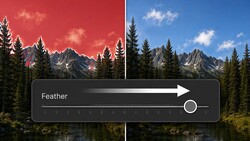
Coming to you from Matt Kloskowski, this practical video walks through the new features in Adobe Camera Raw 18.4 and shows exactly what they do in real editing situations. The headline addition is bidirectional gradients for the linear gradient tool. The name is a mouthful, but the concept is straightforward: instead of a gradient that fades effect in one direction, you can now have the effect concentrated in the middle and fade toward both edges, or inverted so the middle is protected and the edges get the treatment. Kloskowski demonstrates both approaches on landscape photos, using the tool to skim light across the center of a frame or add color warmth through a specific band of the image. The changes he makes are subtle, which he's direct about, and that subtlety is actually the point. Masking, in his view, is about precision and restraint, not heavy-handed adjustments.
The bidirectional gradient gives you independent control over each handle. You can move the top and bottom transition points separately to tighten or widen the affected zone, or hold Option on Mac (Alt on PC) to move both simultaneously. The shift key constrains rotation so you don't accidentally skew the gradient while adjusting it. Kloskowski also makes a point worth hearing: almost any result you can get with a bidirectional gradient, you could also get with a brush or a radial gradient. The tool isn't a replacement for anything; it's a faster path to a specific shape. If you've been manually stacking gradients or painting masks to get a centered light effect, this collapses that into a single step.
The other two updates covered are the improved Select Subject mask and a new vectorscope display in the histogram panel. Kloskowski is candid that the vectorscope isn't something he plans to use personally. It's a visualization tool that shows color distribution and saturation, not an editing control, and he walks through what it displays without overselling it. The Select Subject improvement, though, is meaningful. Kloskowski had already covered it in a Lightroom context and says the upgrade is more significant than he expected. It landed in both Lightroom and Camera Raw, and if you use subject-based masking regularly, the difference is noticeable. This is also the third masking feature Camera Raw has received that Lightroom doesn't yet have, and Kloskowski doesn't speculate beyond saying past patterns suggest Lightroom will eventually catch up.
One thing worth knowing before you update: these features are in Camera Raw 18.4 specifically, so check your Adobe updater to confirm you're on the right version. Check out the video above for the full breakdown from Kloskowski, including the live demonstrations on both features and how he'd actually apply them in a real edit.



Join the Fstoppers community for free
-
Post comments and join in the discussions
-
Browse the site ad-free
-
Share your work and get featured in the community
-
Compete in the photo contests for fun and prizes
1 Comment
Do not think it is the first