Photoshop's latest update quietly added two masking features to Adobe Camera Raw that most people haven't noticed yet. If you shoot anything with a complex edge, like trees against a bright sky, these tools change how you handle exposure and color adjustments.
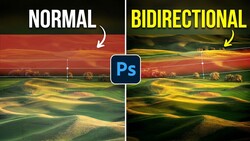
Coming to you from Matt Kloskowski, this practical video walks through a real-world scenario: a landscape shot where the sky is properly exposed but the foreground trees are too dark. Kloskowski shows how to use the Select Sky tool in Adobe Camera Raw, invert the selection to isolate the foreground, and then push the exposure up. The problem, which anyone who has done this knows well, is that the edge along the treeline gets ugly fast, with muddy halos and hard transitions that look nothing like a natural blend. The new Feather and Edge controls at the top of the masking panel are built exactly for this.
The Feather setting softens the edge of your mask by blurring it, while the Edge control pushes the mask boundary inward or outward from its original position. Kloskowski is clear that you need both working together, because neither one alone gets you to a clean result. Feathering without the edge adjustment leaves a halo; adjusting the edge without feathering leaves a hard line. The combination handles the kind of irregular, wind-blurred, pixel-level imprecision that makes tree edges so difficult to mask cleanly. It's worth noting this doesn't apply to every mask type: linear and radial gradients already have built-in feathering, so you won't see these controls appear for those.
The second feature is color grading inside a mask, which sounds simple but fills a gap that's been there for a while. Previously, color grading in Camera Raw was a global panel adjustment. If you wanted to add warmth to the highlights in your foreground, you'd also be warming the highlight edges of clouds, since there's no way to contain a global adjustment to one part of the frame. Now that color grading lives inside the masking panel, you can apply it selectively. Kloskowski uses the foreground mask he already built to warm only the highlights in that area, leaving the sky untouched. He's honest that he doesn't use color grading heavily in his own landscape and wildlife work, but acknowledges it's something color grading users have been asking for. The video also briefly covers an update to the Remove tool in Photoshop proper, including on-device versus cloud-based generative AI processing, which is useful if you're working without internet access or want faster results with supported hardware.
One important caveat Kloskowski raises: both masking features are currently only in Camera Raw and haven't made it to Lightroom yet. If you're a Lightroom-first shooter, you may be waiting. Check out the video above for the full breakdown from Kloskowski.


Join the Fstoppers community for free
-
Post comments and join in the discussions
-
Browse the site ad-free
-
Share your work and get featured in the community
-
Compete in the photo contests for fun and prizes
2 Comments
Always great to see new tricks for editing, BRAVO to Programmers!!!! We would still be using film if not for them!!!
Another highly usable new feature for actual photographers not ai. Yay Adobe! Keep it up.