

Your camera has image stabilization. Your lens might, too. You also have a shutter speed dial that goes up to 1/8,000 of a second. Both of these tools fight blur, but they fight different kinds of blur, and mixing them up is one of the most common mistakes beginners make.
Here is the distinction in one sentence: image stabilization compensates for your hands shaking. A fast shutter speed freezes your subject moving. They are solving two completely separate problems, and understanding which one you need in a given moment will immediately make your hit rate go up.
Two Kinds of Blur
Every blurry photo you have ever taken falls into one of two categories (or both at once, which is the worst-case scenario):
- Camera shake happens when the camera itself moves during the exposure. You press the shutter button, your hands shift slightly, and the entire frame smears. Everything in the image is blurry: the subject, the background, the edges, all of it. It tends to produce a specific kind of blur, directional streaks that follow the path your hands traveled during the exposure. You see this most often in low light when your shutter speed drops below what your hands can hold steady.
- Subject motion happens when something in the frame moves while the shutter is open. Your camera is perfectly still, maybe even on a tripod, but the person you are photographing turns their head or the dog bolts across the yard. The background will be sharp, but the moving subject will be blurred. The blur follows the path the subject traveled, and it only affects the parts of the frame that were in motion.
These look different, they have different causes, and they require different solutions.
What Image Stabilization Actually Does
Image stabilization (called IS by Canon, VR by Nikon, OSS by Sony, and OIS by others) uses either a floating lens element or a moving sensor to counteract the small, involuntary movements your hands make while holding the camera. Gyroscopic sensors inside the camera or lens detect motion and physically shift glass or silicon in the opposite direction to keep the image steady on the sensor during the exposure.
The result is that you can handhold the camera at slower shutter speeds than you otherwise could. A lens rated for five stops of stabilization, for example, means that if you would normally need 1/250 to get a sharp handheld shot, you can now get away with something around 1/8. That is a massive difference in the amount of light you are gathering, and it can be the difference between a usable photo and a completely dark frame in dim conditions.
But here is the critical part: stabilization is only moving the optics or sensor to match your body's motion. It has no idea what is happening in the scene in front of you. If your subject is standing still and you are the only thing moving, stabilization is exactly the tool you need. If your subject is a child running across a field, stabilization will keep the background sharp while the child turns into a smeared streak across the frame. The system did its job perfectly; it held the camera steady. The problem was never the camera.
What a Fast Shutter Speed Actually Does
A fast shutter speed solves the subject motion problem by reducing the window of time during which light hits the sensor. At 1/2,000 of a second, a person sprinting across the frame barely moves a fraction of a millimeter during the exposure. The result is a frozen subject with no motion blur at all.

A fast shutter speed also eliminates camera shake as a side effect, because your hands cannot move enough in 1/2,000 of a second to register as blur. This is why fast shutter speeds feel like a universal solution; they fix both problems at once. The trade-off is light. A fast shutter speed lets in far less light than a slow one, so you need either a wider aperture, a higher ISO, or more ambient/artificial light to compensate. There is no free lunch.
When You Need Which
- Use image stabilization when your subject is stationary and light is low. You are shooting a landscape handheld at dusk. You are photographing a building interior. You are taking a portrait of someone sitting still in a dimly lit room. In all of these cases, the only source of blur is your own body. Stabilization lets you drop your shutter speed to gather more light without a tripod, and your still subject stays sharp.
- Use a fast shutter speed when your subject is moving. A dog running, a dancer mid-leap, a car passing through the frame, a speaker gesturing on stage, a child doing anything at all. Stabilization will not help you here. You need a shutter speed fast enough that the subject's motion is frozen within the exposure window. For walking, 1/250 is usually sufficient. For running or fast sports, you want 1/1,000 or faster. For birds in flight, many photographers start at 1/2,000 and go up from there.

- Use both when your subject is moving and light is limited. This is the scenario where you might push your shutter speed to 1/500 to freeze moderate action but keep stabilization engaged to ensure that any camera shake at that borderline speed does not add to the problem. The stabilization is not helping with the subject; it is helping with you.
- Use neither (or a tripod instead) when conditions allow it. If you are on a tripod shooting a still scene, stabilization can actually work against you. Some older stabilization systems will hunt for motion that is not there and introduce small vibrations of their own. Modern systems are generally better about detecting tripod use, but the safest practice is still to turn it off when the camera is locked down.
The Practical Test
If you want to see this distinction in action, try the following with any camera that has stabilization:
Set your camera on a table or tripod. Turn stabilization off. Set your shutter speed to something slow, 1/15 or 1/10. Have someone walk through the frame at a normal pace and take the photo. The background will be sharp (because the camera is not moving), but the walking person will be blurred. Now turn stabilization on and repeat the exact same shot. The result will be identical. The walking person will still be blurred. Stabilization changed nothing because the camera was never the problem.
Now pick up the camera and handhold it. Turn stabilization off. Shoot a stationary object at 1/15. It will probably be blurry from camera shake. Turn stabilization on and shoot the same stationary object at the same shutter speed. It will likely be sharp. That is the entire scope of what stabilization does.
Common Mistakes This Clears Up
- "I have stabilization, so I can shoot sports handheld in low light." No. Stabilization does not freeze action. You still need a fast shutter speed for moving subjects, which means you need enough light (or high enough ISO) to support that speed. Stabilization lets you drop your shutter speed for static scenes, which is a different problem entirely.
- "My photos are blurry even with stabilization on." If your subject is moving, this is expected. Stabilization is working correctly; it is your shutter speed that needs to come up. If your subject is stationary and photos are still blurry, your shutter speed may be so slow that it exceeds the stabilization system's rated compensation range, or you may have a different issue like missed focus.
- "I don't need stabilization because I always shoot at 1/1,000." If you always shoot at 1/1,000, you are correct that camera shake is not a factor. But you are also leaving three or four stops of light on the table that stabilization could give you. In bright daylight, this does not matter. In any other condition, stabilization gives you the option to drop to a lower shutter speed when your subject allows it, which means lower ISO, less noise, and cleaner files.
- "Stabilization adds sharpness to my photos." It does not add sharpness. It prevents a specific type of softness. A photo taken at 1/1,000 without stabilization and a photo taken at 1/1,000 with stabilization will look identical, because at that speed, camera shake was never going to be visible in the first place.
The Bottom Line
Image stabilization and shutter speed are both anti-blur tools, but they target different sources of blur. Stabilization handles camera shake: the involuntary motion of your hands. Shutter speed handles subject motion: the intentional or incidental movement of things in the scene. Neither one substitutes for the other. Once that distinction clicks, you stop guessing which setting to change when a photo comes out soft, and you start knowing.
If you are still building your foundation with camera settings and exposure control, the Fstoppers Photography 101 tutorial walks through these fundamentals in depth and gives you the framework to make these decisions instinctively. And if you are ready to see how these principles play out differently across genres, from landscapes to portraits to architecture, The Well-Rounded Photographer covers eight disciplines with eight instructors, each with their own approach to managing motion, light, and sharpness.





Join the Fstoppers community for free
-
Post comments and join in the discussions
-
Browse the site ad-free
-
Share your work and get featured in the community
-
Compete in the photo contests for fun and prizes
2 Comments
Thank you, Alex Cooke! These insightful posts of yours are my absolute favorite. I’m an old hand in the photography world—my very first camera back in my teens was an analog film Ricoh KR (can't remember the exact model), followed by a Minolta X-500 and X-700, which were gifts from my beloved father-in-law along with his amazing lens kit. Back in the old-school film days, I learned quite a few rules that carried over perfectly into the digital era. What you just wrote about is something I’ve always felt intuitively, but I’ve never seen it put into such precise, professional terms. A thousand thanks to you, cheers!
Great article. I wonder if anyone has an answer to this related question…
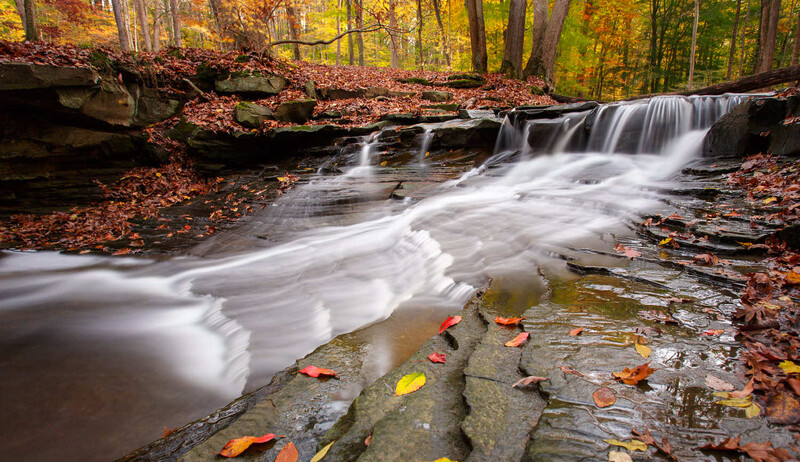
Recently in New Zealand I was shooting waterfalls handheld and relied heavily on IBIS - Canon R5/RF
15-35mm on one particular occasion. The image stabilisation worked really well in the centre of the image but I noticed some blur on the outer edges. Would this be normal depending on how slow the shutter speed was?
I’m thinking that it’s easier to correct the closer to the centre of the frame?
cheers