
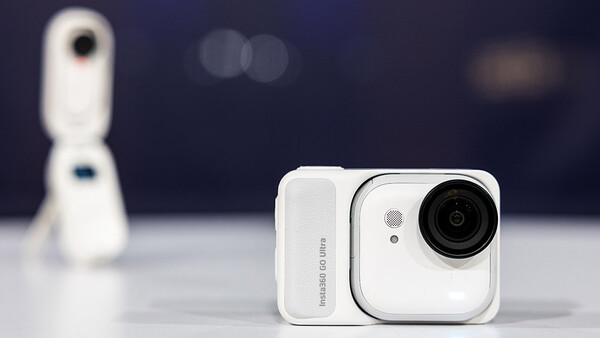
Action cameras are a tough sell these days. They’re in a category that’s being squeezed from above by 360 cameras that largely duplicate their functions, and smartphones that perform similar functions and are always with you. So where does that leave the Insta360 GO Ultra?
The camera is the latest high-end offering from Insta360 in the action camera space. That's not a bad spot to be in, depending on what your goals are.
A Long History
When the original GO came out in 2019, its unique thumb-sized and shaped appearance made it one of the more diminutive options in the action camera space. The magnets at the back made for interesting and different mounting options compared to traditional cameras. It was a compelling package, but it was a bit before its time—especially on the software side. Initially, the camera could only record 1080p videos for a maximum of 60 seconds, later extended to five minutes with a software update, but it became abundantly clear why that mode wasn’t in the initial release—the camera would get very hot to the point where it had to cool down before it could be used again.
But that camera set the template for further entries in the GO lineup: tiny cameras, internal memory, creative mounting options, and small charging cases. The cases themselves gained more functionality with each release until the GO 3 added a screen to actually view what was being filmed. Eventually, the lineup moved up to 2.7K video and then 4K video in the GO 3S.
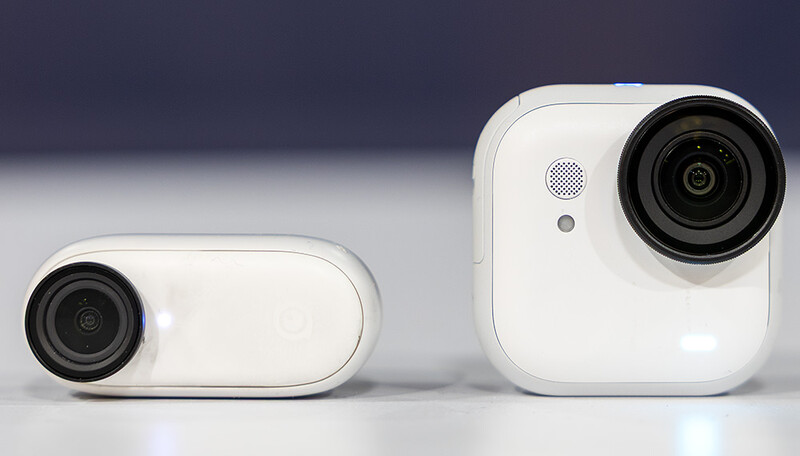
The GO Ultra represents either a departure from or a maturing of this vision, depending on your perspective. Video is still 4K in this version but at a higher 60 fps frame rate. It’s still a tiny sensor at 1/1.28”, but bigger than the 3S’s 1/2.3” sensor. It has a bigger battery for longer run times and, for the first time in the series, features removable storage on a microSD card. I didn’t even know I wanted that.
If you need more horsepower than that, Insta360 has the Ace Pro 2, which it bills as an “8K AI-Powered Action Cam,” but after about a month with the GO Ultra, I can’t see why I’d need more unless I needed 8K. That said, both are in about the same price range ($449.99 for the GO Ultra and $399.99 for the Ace).
How Does It Handle?
Insta360 provided me with a review unit of the camera, and in some of the literature they sent with it, it showed the camera sitting in its new charge case (the “Action Pod,” it’s called), looking like a pseudo–street photography camera, not unlike a Canon G7 X or Ricoh GR III. This appealed to the photographer in me, and while it felt decent in hand with the enlarged grip and dedicated shutter button, it’s clear from looking at the images that, not unlike its predecessors, this is not the GO Ultra’s strength. There’s no real way to fine-tune the focus, and in anything but the best light, images become a muddy mess—like any small-sensor camera (and I’m including the iPhone in that pile). It was entertaining to use, for sure, but the image quality issues remain whether you’re shooting JPG or DNG files that the camera allows for.
In broad daylight, it’s simply OK:

But as soon as the light drops, the images take on that smartphone-like painterly quality:

No, where this camera shines is where this series always has: video.
In addition to the plethora of options its predecessors offered, this camera adds Active HDR mode as well as “PureVideo” mode—something that outputs video similar to what you’d see from the log output of a higher-end camera. There’s also “Toddler Titan” mode, which is designed to make your toddler look like, well, a titan by mounting the camera on a hat brim. It’s not an effect I’d use much, not having toddlers anymore, but it’s there if you want it. You can adjust the view in most of these modes from wide to narrow angles in various steps, with varying amounts of distortion in each shot.
Whether it’s “TimeShift” shooting (as the camera calls it), timelapses, regular footage, or night footage, all of it is very sharp and detailed with excellent color and smooth-looking motion. I had my doubts about why I’d use this over, say, an iPhone, but between the good image quality and the superior audio quality from the Insta360 GO Ultra compared to a phone, there’s a really compelling reason to use a dedicated device like this one. I’d probably even go with standard video over PureVideo mode—it gets it looking right about how I’d color grade it anyway. Check out some samples and my thoughts in this video:
https://www.youtube.com/watch?v=cMsZFSuMUvo
I was surprised at just how good the audio on the Insta360 GO Ultra was compared to a phone. It was a windy day on the water, and so I didn’t go easy on the camera here. Vloggers will appreciate that if they’re without a quality microphone on the scene, the GO Ultra can get them most of the way there, at least as far as audio is concerned.
The stabilization on the camera is also superb, and while it makes the movement of the camera seem a bit robotic at times, it’s certainly better than the alternative. You can see an example of using the camera as a sort of body camera to capture footage during a “No Kings” protest in the video above.
Even out of the charging case, the camera’s battery lasts a long time. It’s rated for 70 minutes out of the Action Pod (200 minutes in it), but depending on what you’re using it for, it could go for longer. I used it for an entire day with a mixture of timelapses, time shifts, photos, and video. Between stints in and out of the charge case depending on the situation, it never ran out of battery. Neither did it during most of the very long protest. This is a huge difference from previous generations, where battery life in similar shoots left me without charge in short order. If the size has to increase a little bit, this is a huge benefit from that.
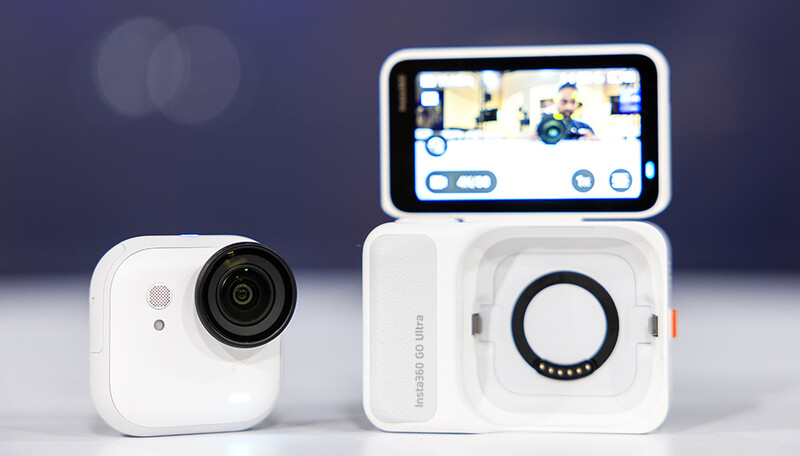
Which brings me to some of the changes to the body itself—some that work and some that don’t. Obviously, the new form factor and Action Pod preclude the use of previous-generation accessories, though Insta360 seems to have thought of almost everything for this camera, judging by the extensive list of accessories available to mount it.
One of the welcome changes is that in addition to magnets holding the camera in place, there are also a series of clips that physically attach the camera to its cradle and accessories. This came in handy for situations that might have been precarious or impossible for magnets alone. My favorite use case for this came in the form of sticky tabs that I could stick in places without too much worry of damaging the surface. Here’s an excellent example of where it came in handy:
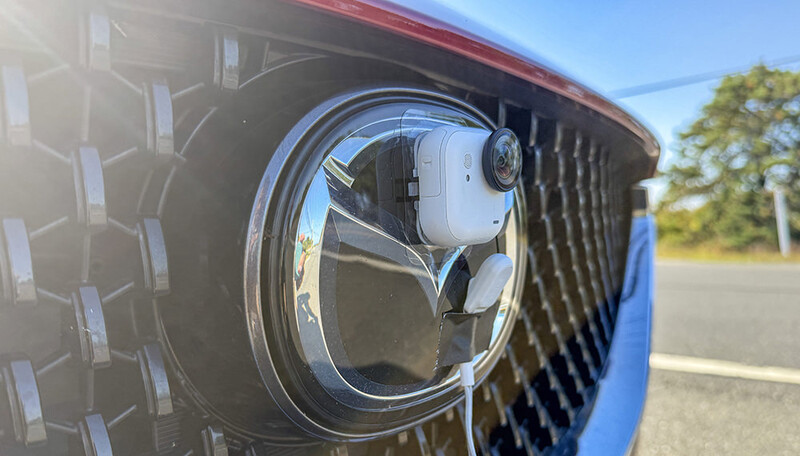
I was able to mount the camera to the grill of my car and drive without fear of the magnets not holding on to the camera. This opens up many more creative possibilities compared to the previous generation. It was nice to be able to easily connect to the camera with the Action Pod to see what it was doing without having to use my phone.
Something I did miss on the new model is an included 1/4” tripod mount. The GO 2 included one on the charge case so when the camera was used in it, it was easy to attach to a tripod or other mount using the standard thread. This new camera has cases that can use an action camera mount but arguably, that’s less useful than a 1/4” mount. It seems like there should have been room for one at the bottom of the camera, but alas, this is not the case. It’s a minor inconvenience that seems like it would have been easy to include at the bottom of the camera. That said, Insta360 does have a tripod/selfie stick designed for the camera (the Mini 2-in-1 Tripod 2.0) that won’t break the bank at $55, but it would have been nice to use tripods I already have.
Conclusion
If you own one of the earlier non-4K versions of this camera and you liked what they have to offer, this one’s a no-brainer. It takes the best of those models and improves upon them in every way. If you don’t own an action camera already and are in the market for one, I would argue this is a better choice than a more traditional form factor action camera because of the flexibility of the mount that uses both magnets and clips. If you own a GO 3S, you can probably sit this one out, as while the image quality is slightly better (not that I was complaining with my GO 2), you won’t gain as much here when it comes to functionality. If you own a 360 camera, the GO Ultra won’t be able to match the viewing angles, of course, but it will be a lot more portable and harder to damage—which are virtues in and of themselves. Different use cases.
The GO Ultra is really the ultimate expression of what this line has been about: a capable, tiny, and flexible camera that can be used virtually anywhere.
What I Liked
- New form factor with clips adds to mounting options
- Great battery life
- Removable storage
- Video footage looks great and stabilization works
- Action Pod makes the camera incredibly fast and easy to use compared to older models
What I Didn’t Like
- Still image quality in the GO series is still poor
- Needs standard tripod mount built into the Acton Pod or camera itself
Purchase
You can purchase the Insta360 GO Ultra using this link.





Join the Fstoppers community for free
-
Post comments and join in the discussions
-
Browse the site ad-free
-
Share your work and get featured in the community
-
Compete in the photo contests for fun and prizes
No comments yet