
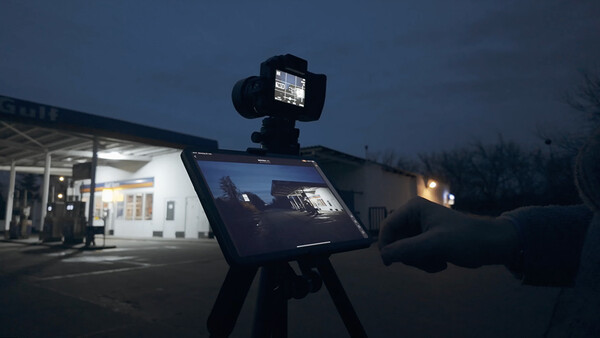
In professional photography, every detail matters. Being able to view an image large and live while shooting, and adjust immediately, is a real game changer. Traditionally, tethering meant long cables, bulky monitors, and staying locked to one spot. Now, it’s far easier: wireless tethering.
Why Tethering at All?
Tethering is much more than a luxury feature. It gives me the ability to check shots instantly on a large screen and fine-tune them on the spot. Instead of relying on the small rear display, I can see every detail live and step in immediately if something is off.
The benefits are clear:
- Greater control over composition, exposure, and focus.
- Instant feedback—mistakes show up right away.
- Remote triggering—shoot from up to 40 meters away without touching the camera.
For complex scenes, long exposures, or anything where precision matters, this kind of live oversight is invaluable. Subtle tripod shifts, distracting background elements, or small exposure adjustments are all easy to catch and correct in real time.
My Tethering Setup
For wireless tethering to really deliver, the gear combination has to be right. Here’s my kit:
- Hasselblad X2D 100C: 100 megapixels of detail, perfect for live preview.
- iPad Pro 11" M1: an ideal balance of size, performance, and battery life.
- Hasselblad Phocus Mobile 2: the app that connects and controls everything.
- Gitzo Traveler Series 2 tripod: lightweight and stable for mobile work.
The camera’s built-in Wi-Fi links directly to the iPad. No extra dongles or accessories are required—just set the X2D to WLAN mode, select the network in Phocus Mobile 2, and within seconds, the live feed appears on the tablet.
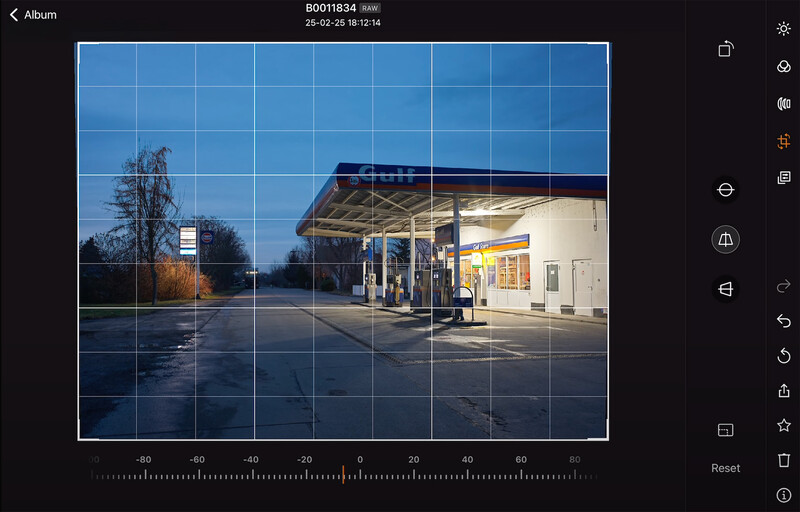
From there, the iPad becomes my command center. I can overlay grid lines to balance my composition, check whether subjects overlap or distract, and keep horizons razor straight. This level of live control is especially critical for architecture or fine art projects, where precision is everything.
A word of caution: the iPad’s display can look brighter than the actual exposure. For night or high-contrast scenes, I cross-check with the camera’s exposure compensation to avoid surprises later. Focus is set through the app as well, with the option to zoom to 100% for pixel-level confirmation. Depth of field preview is also available, making it easy to evaluate how focus shifts—vital when shooting wide open or on long exposures.
And perhaps the best part: triggering the shutter directly from the iPad. By eliminating physical contact with the camera, even the slightest vibrations disappear. This pays off in long exposures, bracketed shots, and fine art setups where precision is non-negotiable.
Final Thoughts
Wireless tethering isn’t flawless. The iPad will drop the connection when it locks (though reconnection is fast). The 40-meter range isn’t infinite, and the live preview resolution isn’t enough for critical focus checks without pulling down the full raw.
Even so, the benefits heavily outweigh the quirks. For me, tethering wirelessly with the Hasselblad X2D 100C and Phocus Mobile 2 has become a near-constant in my shoots. The combination gives me greater control, more precision, and the freedom to shoot without being tied down.
Other systems like Canon, Leica, and Fujifilm offer their own wireless tethering solutions, but the seamless way Hasselblad has integrated this into the X2D makes it especially practical. If you’re shooting Hasselblad or simply looking to add large-screen live view to your workflow, it’s worth trying.

Join the Fstoppers community for free
-
Post comments and join in the discussions
-
Browse the site ad-free
-
Share your work and get featured in the community
-
Compete in the photo contests for fun and prizes
3 Comments
Thank you for bringing up the important topic of workflow integration. In the end, once cameras are technically excellent, what really matters is how smooth the process feels. Hasselblad and Leica both raise the level of comfort and speed, though my own path was a bit different. I found Phocus too complex, while Leica app and the native DNG format proved to be the right fit. I use both cable tethering and Wi-Fi depending on the setup, but in both cases, the integration stays seamless and reliable. Japanese brands still have much to learn here.
Hi Alvin, thank you for your comment. Especially in a professional setup the efficiency of a system is key. I think Hasselblad really delivered with their Phocus Mobile 2 App integrating remote camera control and a solid image editing suite.
Absolutely agree, it’s a significant advantage.