
Adobe has announced Photoshop Elements 2027, with tools designed to make photo editing easier without requiring users to learn a complicated interface. As you might expect, the new additions are AI-powered and designed to speed up your workflow and help you organize your archive.
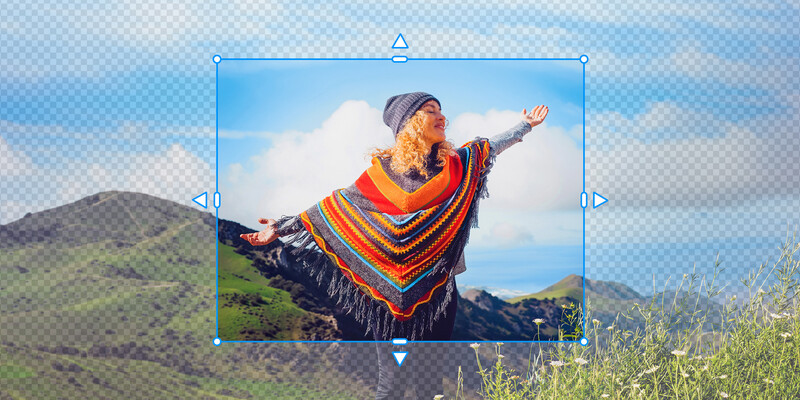
Generative Expand will be familiar to Adobe Creative Cloud users. The feature allows you to expand the scene beyond what you captured in camera. This is especially useful when you are trying to crop a horizontal image to vertical or vice versa. The feature can also be used to replace undesirable elements in a photograph. If you photographed a model on seamless paper and the lights were visible on both sides of the image, you could crop the lights out of the image and then use Generative Expand to create an alternate background.

Generative Upscale can increase the perception of detail in low-resolution images and increase the sharpness in blurry photos. The feature is especially useful for old photographs or pictures of photographs that you want to enlarge and print.
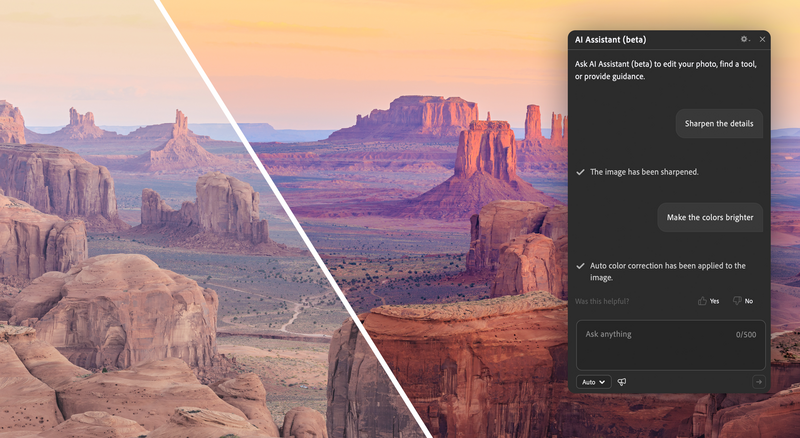
Photoshop Elements 2027 also introduces an AI Assistant that allows you to communicate with the program using everyday language. If you wanted to brighten an image, you might type, “Make this photograph brighter,” rather than search for an Exposure slider. This feature is useful if you find the standard editing interface overwhelming when faced with a variety of menus or options like Exposure, Levels, and Curves to select from to brighten an image. The AI Assistant should provide clear instructions for how to complete the editing task you desire.

New Creative Filters, including Embroidery, Oil Painting, and Duotone, have also been added. Most photographers will be familiar with these filters since they are built into smartphones and social media platforms. You can control these effects using sliders to adjust elements such as intensity, texture, and color.
AI-powered tools can be accessed from a new AI Tools Hub.
Pretty much anyone who takes photographs today has a library of thousands of images, even if their primary camera is a phone. Locating a specific image can be a nightmare. The updated Elements Organizer is designed to help you navigate through these images to find the one you are looking for. A Semantic Search feature allows you to use natural language to find photographs and videos. The terms you use in your search do not need to match keywords or tags you may have already added to your images.
Photoshop Elements can be purchased for $99 for a three-year license that will not automatically renew when the license expires. It is unfortunate that this isn’t the norm for most software purchases. The updates described in this article, along with other new additions, including the ability to find duplicate images and a Share to Phone feature, are available now at Adobe Elements.






Join the Fstoppers community for free
-
Post comments and join in the discussions
-
Browse the site ad-free
-
Share your work and get featured in the community
-
Compete in the photo contests for fun and prizes
2 Comments
What the heck is up with the 3 hands in the banner pic?!
Wow, that is totally my error and you as a reader, deserve an apology for having such a bad AI generated photo appear in a news article.
It takes me about an hour to write an article like this. That is longer than you might think it takes to just rewrite a press release. But I share this with you to make you aware that I care about what I write on Fstoppers. When it comes time to creating a thumbnail for a press release summary however, I've never given it much thought. I just go to Firefly and ask it to create a shot of a woman working on a laptop. I then post the first thing it creates. Most of the time, I barely look at it the photo.
I will do a better job of examining the AI photos I use for press releases like this in the future. You, Adobe, and Fstoppers deserve better.