
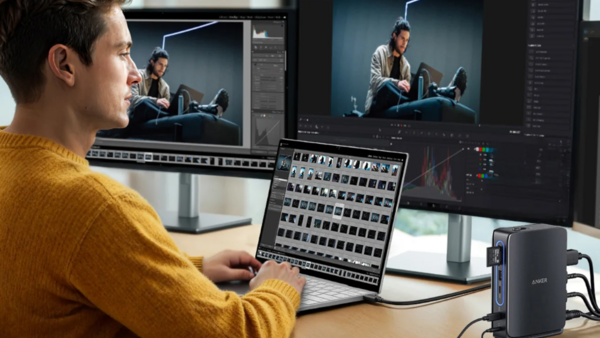
If you're like me, you've accumulated a small graveyard of USB-C hubs and docking stations over the years. There's the one that lives on your desk, the compact one you throw in your bag for travel, maybe a spare floating around somewhere because you forgot you already had one. It's an annoying reality of modern laptop life: the hub you need at home isn't the hub you want to carry, and vice versa. Anker's new Anker Nano Docking Station takes a genuinely clever swing at solving this problem, and after a week of daily use, I think they've nailed it.
The Big Idea: A Dock That Comes With You
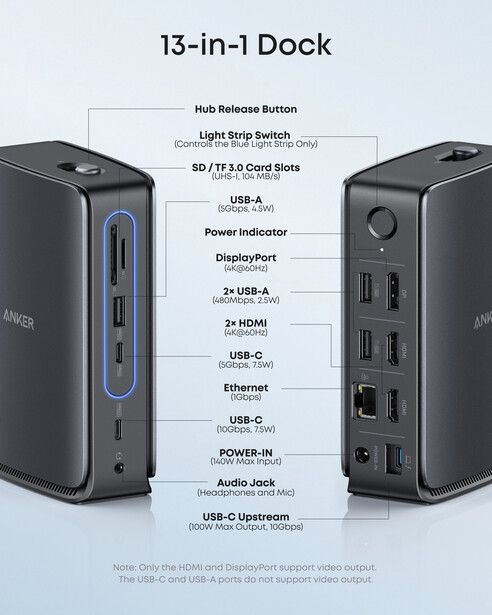
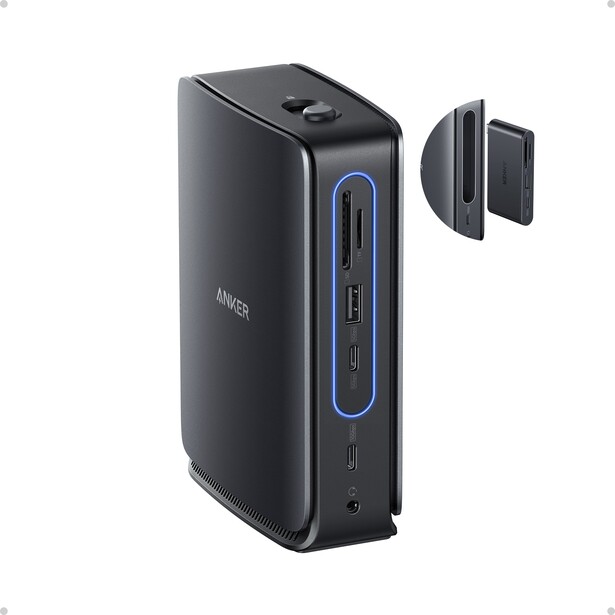
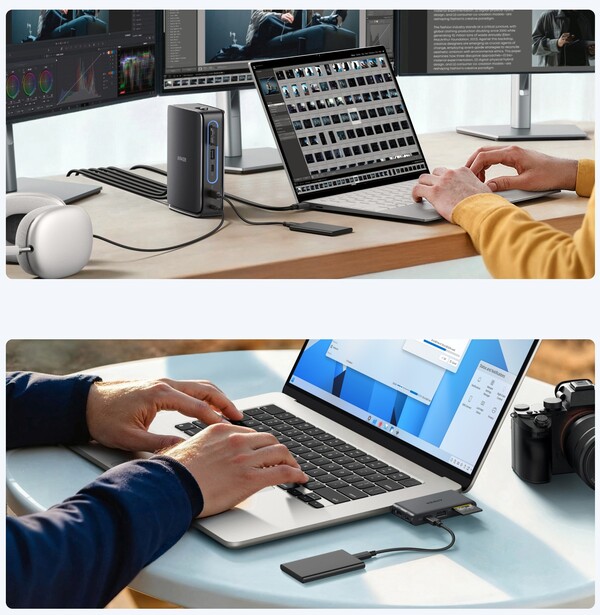
The headline feature of the Anker Nano Docking Station is the detachable hub. The main unit is a vertical docking station that handles triple display output, 100 W laptop charging, and Gigabit Ethernet, while the detachable hub adds card readers and additional USB ports. But the magic is that the 6-in-1 hub built into the top can pop out with the press of a button and go in your bag.
It's legitimately one of the most clever designs I've seen in a dock, and I've seen a lot of docks. Press the release button, and the hub slides out cleanly with a satisfying click. Snap it back in, and a blue indicator light confirms the connection. The detachment mechanism is crisp and precise; there's no fumbling, no ambiguity about whether it's properly seated. It's the kind of thoughtful engineering that makes you wonder why more manufacturers haven't tried this approach.
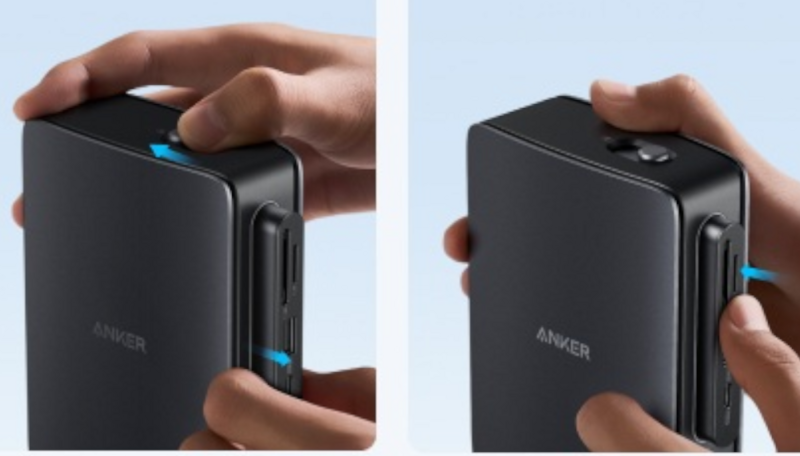
This is particularly convenient if you're someone who takes a laptop out during the day and then docks it at home. Instead of maintaining two separate ecosystems (a travel hub and a desk dock), you just have one system that adapts to where you are. It's a small thing, but small things add up when you're managing gear.
Specifications
Main Dock (With Hub Docked, 13-in-1)
- 2x HDMI (4K at 60 Hz)
- 1x DisplayPort (4K at 60 Hz)
- 1x USB-C upstream (to host, 10 Gbps, 100 W max input)
- 1x USB-C downstream (5 Gbps, 7.5 W) — on hub
- 1x USB-A (5 Gbps, 4.5 W) — on hub
- 2x USB-A (480 Mbps, 2.5 W)
- 1x SD card slot (UHS-I, 104 MB/s) — on hub
- 1x microSD card slot (UHS-I, 104 MB/s) — on hub
- 1x Gigabit Ethernet
- 1x 3.5mm audio jack (headphones and mic supported)
- 140 W max power input
- Dimensions: 5.61 x 1.77 x 3.74 inches
- Weight: 14.36 oz
Detachable Hub (6-in-1)
- 1x USB-C upstream (to host, up to 85 W charging)
- 1x HDMI (4K at 60 Hz)
- 1x USB-C downstream (5 Gbps, 7.5 W)
- 1x USB-A (5 Gbps, 4.5 W)
- 1x SD card slot (UHS-I, 104 MB/s)
- 1x microSD card slot (UHS-I, 104 MB/s)
- Dimensions: 3.15 x 1.65 inches
- Weight: 1.27 oz
Note: Hub downstream ports operate at 5 Gbps. When docked, the main unit's upstream connection to your laptop runs at 10 Gbps.
Compatibility
- Windows 10/11: Full support including extended displays
- macOS 13.5+: Single extended display only (additional monitors mirror)
- Not compatible with Linux
- Requires USB-C port with DP Alt Mode and Power Delivery
Desktop Performance
I've been testing the dock for about a week with both a MacBook Pro and a Windows laptop, using it for everything I do at a computer: photo editing, writing, research, the usual creative workflow stuff.
On the Mac side, I'm running a single external monitor along with keyboards, mice, and external drives, the standard workstation setup that most of us end up with. Everything works exactly as expected. Connection is immediate when I plug in, and I never experienced any of the recognition delays or dropped connections that plague cheaper hubs. On the Windows side, dual monitors had no issues there either.
The card readers on the hub handled media ingestion without drama. I wouldn't call them blazing fast (more on that in a moment), but they're perfectly adequate for pulling files off cards at the end of a shoot.
Build quality feels premium throughout. The main dock has a solid heft to it, and the vertical design keeps the footprint minimal on your desk. The detachable hub, despite being lightweight enough to disappear in a bag pocket, doesn't feel flimsy. This isn't a plasticky hub that's going to fall apart in six months.
The Detachable Hub in Practice
I want to spend a bit more time on the hub itself, because it's really the star of the show here. At 3.15 x 1.65 inches and just 1.27 ounces, it's smaller than a credit card and genuinely disappears into a bag. But unlike most hubs in this size class, it doesn't force you to make painful compromises.
The 85 W passthrough charging is key. A lot of compact hubs either don't support charging at all or cap out at wattages too low to be useful for modern laptops. This one delivers enough power to keep most laptops happy while you're working. The single HDMI port pushes 4K at 60 Hz, so you can drive a proper external display without being stuck at 30 Hz like it's 2015. The hub's USB-C and USB-A ports run at 5 Gbps, which is plenty for most peripherals and storage devices.
One thing to note: depending on your laptop, the hub might block adjacent ports when connected directly. This happened with my setup, but it wasn't a dealbreaker because I could still pass through charging via the hub's USB-C port. Your mileage may vary depending on your specific laptop's port layout, so it's worth checking the dimensions (the hub body is about 2.61 inches long and 0.21 inches thick) against your machine before buying.
Display Configuration: Know Your Limits
This is where things get a bit technical, so bear with me. The dock supports up to triple external displays, but your actual experience depends heavily on your laptop's DisplayPort version.
If your laptop has DP 1.4 (most modern machines do), you can run a single monitor at full 4K/60 Hz, dual monitors at 2,560 x 1,440/60 Hz each, or triple monitors at 1,920 x 1,080/60 Hz each. If you're stuck with DP 1.2, those numbers drop: single monitor at 4K/30 Hz, dual monitors at 1080p/60 Hz, or triple monitors at 1,600 x 900/60 Hz.
For most photographers and creatives running one or two displays, this won't be a limiting factor. But if you're dreaming of a triple-4K setup, you'll need to look at Thunderbolt docks instead.
One important macOS note: on macOS without Thunderbolt or DisplayLink, you typically get one extended display; additional monitors will mirror the first. This affects most USB-C docks, so don't blame Anker if you were hoping for extended desktop across multiple screens on your MacBook.
Why Photographers Should Care
If you work at a desk but also need to be mobile, this dock eliminates the redundancy of owning separate solutions for each scenario.
At home or in the studio, you get a full docking station with triple display support, Gigabit Ethernet for fast file transfers or tethering to network storage, plenty of USB ports for peripherals, and enough charging power to keep your laptop running during heavy exports. When you need to head out, whether for a shoot, a client meeting, or just working from somewhere else, you pop out the hub and suddenly you have a compact travel solution with card readers, display output, and charging passthrough.
It's not going to revolutionize your workflow, but it does simplify the gear equation. One less thing to buy, one less thing to remember to pack, one less thing cluttering up your bag. The clutter reduction is great for me. I have about 30 computer accessories on my desk at a time, and it's a nice way to push toward making thing tidier.
Pricing and Value
The Anker Nano Docking Station lists at $149.99, with a current promotion dropping it to $109.99. At either price point, it sits comfortably in premium hub territory alongside competitors from CalDigit, Satechi, and others.
The included power adapter is reasonably compact at 2.72 x 2.72 x 1.42 inches and 12.29 oz, not pocket-sized, but smaller than the brick you'd get with many competing docks.
What I Liked
- The detachable hub concept is genuinely useful and brilliantly executed
- Crisp, precise detachment mechanism that inspires confidence in long-term durability
- 100 W charging (dock) / 85 W charging (hub) keeps laptops powered during intensive work
- Compact vertical design saves desk space
- No stability, heat, or recognition issues during extended daily use
- Competitive pricing, especially at the $109.99 promotional rate
- Solid build quality throughout both the dock and hub
What I Didn't Like
- No high-wattage USB-C port on the front for convenient phone/device charging
- Card readers limited to UHS-I speeds (104 MB/s); UHS-II support would be welcome for faster media ingestion
- Would love to see a version with Thunderbolt support for true multi-display on Mac
The Bottom Line
The Anker Nano Docking Station solves a real problem in a genuinely clever way. Instead of forcing you to choose between a full-featured desk dock and a portable travel hub, it gives you both in a single, well-engineered package.
After a week of daily use, I found myself appreciating the little things: the satisfying click of the hub detaching, the reliability of connections, the fact that I didn't have to think about which hub to grab when heading out. It's the kind of thoughtful product design that makes you wonder why this wasn't the standard approach all along.
If you're tired of maintaining separate dock and travel hub setups, or you just want a clean, well-built docking solution that adapts to how you actually work, the Anker Nano Docking Station earns a recommendation. It's not flashy, it's not revolutionary; it's just smart, practical design executed well.




Join the Fstoppers community for free
-
Post comments and join in the discussions
-
Browse the site ad-free
-
Share your work and get featured in the community
-
Compete in the photo contests for fun and prizes
No comments yet