Shooting green screen in a small, unventilated garage in 90-degree heat is not the ideal setup. But the results you can pull off with basic gear, some problem-solving, and a willingness to look ridiculous in front of a camera might surprise you.
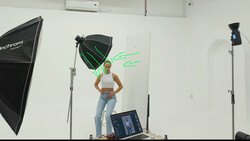
Coming to you from YCImaging, this detailed behind-the-scenes video follows the entire process of building a green screen music visual from scratch, including lighting setup, camera settings, and a deep post-production breakdown. The key light is an Amaran RC 660C mounted on a boom arm with an Amaran Light Dome 90, and a separate Amaran Ray 200X dedicated solely to lighting the green screen itself. The camera is a Sony a7C II paired with a Sony 20mm f/1.8 for a wider frame, monitored on a SmallHD 502 Bright, and powered by a SmallRig VB99 SE battery. One of the more practical tips early on: when shooting green screen, push your shutter speed higher than the standard double-your-frame-rate rule. Motion blur makes keying harder, and if you plan to slow footage down with optical flow, a higher shutter speed helps the algorithm generate clean in-between frames.
The post-production section is where things get genuinely interesting. Keying the green screen was a struggle from the start, largely because of spill from shooting in a tight space without enough physical separation from the backdrop. The fix was layering a magnetic mask first, then applying the green screen keyer on top, which cleaned up the halo effect that the mask alone left behind. Going black and white also solved a lot of the remaining spill issues. Most of the clips were shot at 120 fps and then slowed beyond the standard 120-to-24 conversion, with optical flow filling in the extra frames. The result looks smooth enough that you wouldn't know it was pushed past the recommended limit.
The effects work throughout the video leans on simple tools used creatively. Duplicated clips of the same subject are layered at different scales, with Gaussian blurs added to background versions to fake depth of field. A spinning stool creates motion in otherwise static shots. For a shot meant to evoke flowers growing from the side of a face, stock footage was masked, exposure-matched to the scene lighting, and tracked to head movement frame by frame. AI generation was attempted for two separate shots and failed both times, which pushed toward manual compositing solutions that ended up working better anyway. The final gun-flash sequence, complete with simulated muzzle flare built entirely from keyframed color wheels and a screened-in smoke clip, is the kind of thing that sounds absurd to describe and looks genuinely polished on screen.
Check out the video above for the full post-production breakdown, including the exact keying workflow, the optical flow slow-motion technique, and how the flower composite was tracked and blended into the scene.

Join the Fstoppers community for free
-
Post comments and join in the discussions
-
Browse the site ad-free
-
Share your work and get featured in the community
-
Compete in the photo contests for fun and prizes
No comments yet