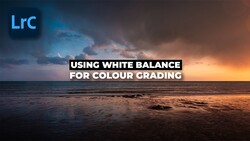
A single sunset photo, edited three different ways in the same frame, is the kind of thing that changes how you think about white balance. The trick lies in treating the sky and the water as separate zones instead of pushing one warm slider across the whole image.
The full walkthrough comes from Park Cameras, where Gareth Evans opens a coastal sunset shot in Lightroom Classic and starts building it up layer by layer. Evans begins with the basics you'd expect, nudging contrast and exposure, dropping the black level slightly, and lifting clarity, texture, and vibrance just a touch. The photo starts out cool and blue, and he shows how a single move of the temperature slider warms the entire thing into something that reads as a sunset. Then he undoes it. The point he's making is that a global white balance change flattens the image, and the colors already sitting in the frame deserve more attention than that.
From there Evans reaches for masks. A linear gradient across the sea cools the water down and pushes more blue into it, with small tone curve adjustments in the blue and red channels to shift the shadows toward teal and pull red into the highlights. He's clear that none of these moves are dramatic on their own, and he keeps toggling the eye icon to show how little each one does in isolation. Stacked together, though, they add up. A radial gradient over the middle of the sky then goes the opposite direction, warming that band with magenta and saturation while the tone curves drop the blue highlights into yellow and the reds get pushed further into reds. The result is a split-tone effect with three distinct color layers: blue water at the bottom, warm sunset through the middle, and a cooler blue reintroduced at the top of the sky with a final gradient and a bit of dehaze.
This zone-by-zone approach connects to a broader shift in how people edit landscapes now. For years, presets and one-click filters trained everyone to think about a photo as a single object with one look applied over the top. Masking tools have quietly pulled editing back toward something closer to old darkroom dodging and burning, where different parts of the print got different treatment. The tone curve work Evans does inside each mask is the part worth studying, because adjusting individual color channels within a masked region gives control that a global temperature slider can't touch. If you want to try this on your own images, start by identifying two or three areas of your frame that carry different light, then treat each one as its own small edit. The principle holds whether you shoot sunsets, interiors, or portraits under mixed lighting.
Evans is honest that his final image is a stylized, heavily saturated interpretation rather than a neutral one. He explains that this is how the scene actually felt to him while he stood by the sea photographing people against the color, and that amplifying it in the edit brings that feeling back. He invites disagreement too, asking whether you'd have gone more subtle or stuck with a single warm white balance across the whole shot. That question is a fair one, since color grading is subjective and there's no single correct version of a sunset. Watching someone commit to a bold choice and explain the reasoning behind each slider is more useful than a recipe you copy verbatim.
The techniques carry over to other editing programs, so you're not locked into Lightroom Classic to use any of this. Linear and radial gradients exist in most modern editors, and the idea of layering small, targeted adjustments applies regardless of the software you open. The tone curve channel edits are the part most people skip, and they're the reason his water stays cold and blue while the sky glows warm in the same photo.
Watch the full edit in the video above to see exactly how Evans stacks each mask and shapes the curves for all three color zones.

Join the Fstoppers community for free
-
Post comments and join in the discussions
-
Browse the site ad-free
-
Share your work and get featured in the community
-
Compete in the photo contests for fun and prizes