
Apple Reference Image is a camera mode on the iPhone 18 Pro and iPhone 18 Pro Max that signs the captured pixel data inside the sensor, then turns that signed data into a second, cryptographically signed copy of your photo that anyone can verify as authentic and not revoked. You keep shooting the normal photo. The reference image sits beside it in the Photos app as proof of what the sensor actually saw, and a viewer can compare that reference against the version you publish to see where the two differ.
It costs you one toggle in the Camera app and a trip through Apple's servers, and it applies to the main 48-megapixel camera only. In return, you get two signed timestamps that bracket the moment of capture, a signature designed to hold up against a future quantum computer capable of breaking today's public-key cryptography, and a way to prove a photo is real without attaching your name to it. Apple argues that no other commercially available photographic provenance system meets the requirements it set, and that it is uniquely positioned to solve the problem at the sensor rather than in software.
What Apple Reference Image Actually Does
Every modern camera photo is the output of a long processing pipeline. The sensor records raw values, and software then demosaics them, maps the tones, sharpens, denoises, and compresses the result into the JPEG or HEIF you look at. Any system that wants to prove a photo is real has to vouch for that whole chain, not just the first link. Apple's answer is to split the job in two: sign the raw data inside the sensor itself, then do the processing somewhere that can be independently checked.
Apple announced the feature on September 9 alongside the iPhone 18 Pro, and its security team published the full technical description on September 15 on the Apple Security Research blog. The short version: you switch the camera into Reference mode, you take the picture, and the phone stores a normal photo plus what Apple calls a secure digital negative. When you choose to develop that negative, the phone uploads it to Private Cloud Compute, Apple's auditable server environment, which checks every signature and renders the final reference image. That image is signed again and lands in your library next to the original.
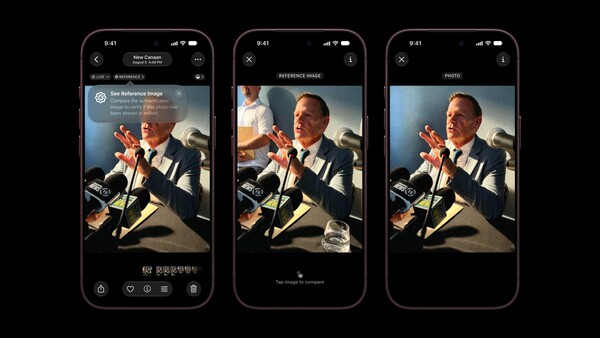
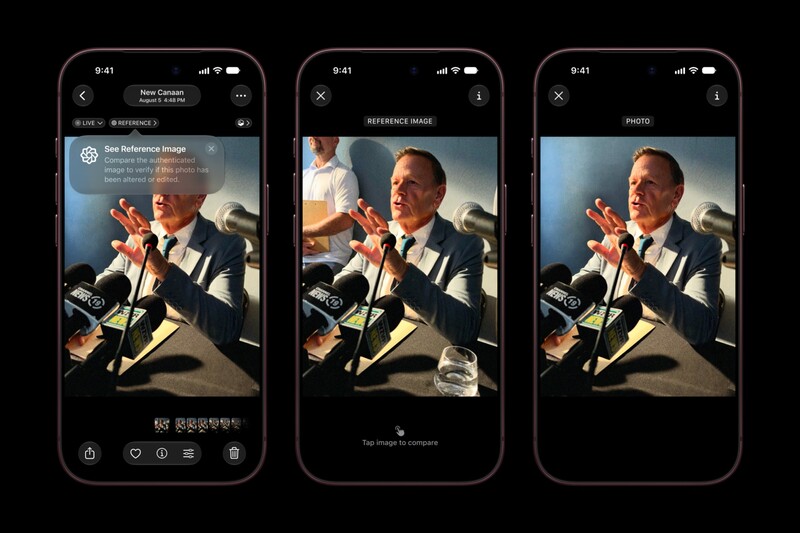
In Photos, a Reference badge appears on the original. Tap it and you can flip between the photo and the reference image, with the on-screen prompt "Tap image to compare." Apple's own demo makes the point plainly. The delivered photo shows a man at a press conference. The reference image shows the same frame before cropping, with a second person standing at the left edge and a water glass on the table that were cut out of the version meant for publication. Nothing about the photo is fake, but now you can see exactly what was removed.
Why Signing the Sensor Is Different From Content Credentials
Content Credentials is the industry's existing answer. It implements the C2PA standard, written by a coalition Adobe co-founded with Arm, the BBC, Intel, Microsoft, and Truepic, and promoted through the Adobe-led Content Authenticity Initiative. A camera that supports it, such as the Leica M11-P, which shipped with it in October 2023, signs a record of the capture, and compatible software then appends a record of each edit. Google put it into the Pixel 10 in 2025 for every photo the Pixel Camera takes, and Sony and Nikon have built it into selected bodies through firmware, though switching it on depends on a manufacturer certificate or license, and Sony has so far limited access to news organizations. The result is a provenance trail: a viewer can see that a file came from a particular camera and what was done to it afterward.
Apple's engineers name two gaps in that approach, and the whole design follows from them. The first is where the signature happens. If the camera signs a finished JPEG, you are trusting every piece of software that touched the image before the signature, including the operating system. Apple moves the signature into the sensor's own silicon, before the data reaches the phone's software at all, which is designed so that a compromised iPhone cannot forge the raw capture. That is a genuinely new place to draw the line, and it is only possible because Apple uses custom-designed sensors, its own security chip, and its own cloud.
The second gap is identity. In Apple's words, "Other industry solutions require a photographer or institution to vouch for an image using their own credentials," and the post argues that "it should not be necessary to forgo anonymity in order to prove image authenticity." The C2PA standard itself allows a credential to belong to a device rather than a person, and Google built the Pixel 10 so its credentials cannot be traced back to an individual, so the contrast is sharpest with the newsroom workflows where a signature has been tied to an organization. Apple's version proves a real iPhone sensor captured the scene inside a specific time window. It does not say whose iPhone, and the published reference image provides no public path back to the photographer.
Neither system replaces the other. Content Credentials can document edits, which Apple Reference Image does not attempt; Apple's version gives you an untouched baseline to compare against instead. Apple has also said support for Google's SynthID watermark standard is coming to help flag AI-generated images, which is a third, separate layer.
How a Reference Image Gets Made, Step by Step
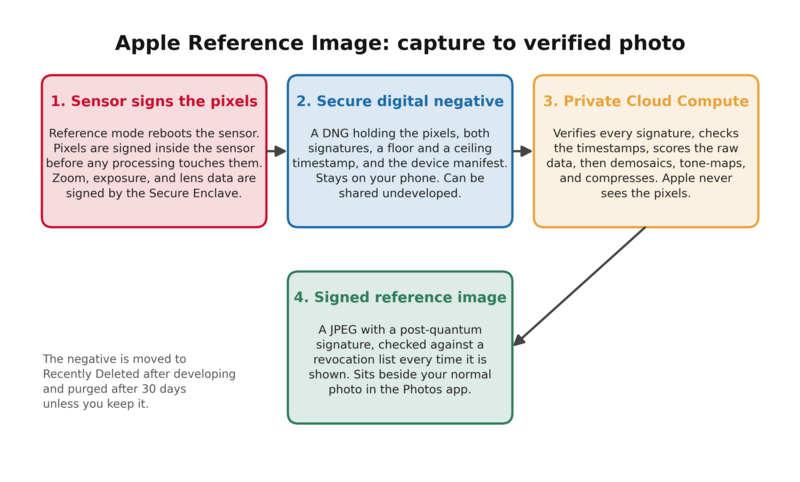
The pipeline runs in two stages, one on your phone and one in Apple's cloud, and the boundary between them is the negative.
On the phone:
- The sensor reboots into Reference mode. Switching modes triggers a secure boot of the image sensor into a special capture state that signs pixel data immediately and blocks the sensor's own firmware from altering it. The operating system hands the sensor exactly one input, a digest of the most recent secure timestamp and the phone's device and boot manifests, which gets stamped into the frame's metadata.
- The sensor signs the frame. Light hits the sensor, the analog signal is digitized, and the frame plus that embedded digest are signed inside the sensor with a private key the sensor generated at the factory and has never released.
- The Secure Enclave signs the rest. Digital zoom, exposure, and lens parameters come from the phone's software, not the sensor, so a second chip, the Secure Enclave Processor, signs those separately. Apple notes this off-sensor metadata cannot change the pixel values themselves.
- The negative is written. The pixels, both signatures, the timestamps, the metadata, and the manifests are saved as a DNG file that stays attached to the ordinary photo the normal pipeline produced. It sits on your phone until you decide what to do with it.
In the cloud, once you choose to develop it:
- Private Cloud Compute verifies everything. It recomputes the digest, checks the sensor signature and its certificate chain back to Apple's factory authority, checks the Secure Enclave signature, and checks the device manifest that binds the two keys to the same phone.
- It checks the timestamps. More on those below.
- It scores the raw data. A neural network with hidden weights judges whether the frame has the physical characteristics of genuine output from Apple's sensors, producing a confidence score.
- It develops and signs the image. Demosaicing, tone mapping, and related corrections run on the negative, the result is compressed to a JPEG and hashed, and Apple's signing service signs that hash with a hybrid signature that combines the post-quantum ML-DSA-87 algorithm with RSA-3072 using PSS padding and SHA-512.
- The negative goes to Recently Deleted. After a successful development, the DNG is moved to the deleted folder and purged after 30 days unless you recover it.
Every time the reference image is displayed, the phone verifies the final signature and checks that the photo's ID is not on Apple's revocation list before showing it.
What the Timestamps Prove and What They Don't
Most provenance systems stamp a photo with the time from the device's clock, which anyone can change in Settings. Apple treats that as unacceptable and instead brackets the capture with two signed times from its own timestamp service.
- The floor. Your phone continuously receives signed timestamp tokens from Apple, delivered piggyback on the push-notification heartbeat it already runs. The most recent one is folded into the digest the sensor signs, so the photo provably could not have been taken before that moment.
- The ceiling. Right after capture, the phone sends a fingerprint of the signed frame to Apple's timestamp service and gets back a signed token, which establishes that the photo was already in existence by that time.
- Offline shooting. If you have no connection, the floor is still there because the token was cached, but the ceiling is missing. A background process keeps trying and inserts it once you are back online. The gap between floor and ceiling is simply wider.
Two fallbacks are worth knowing. If the floor timestamp fails verification when the negative is developed, Private Cloud Compute substitutes March 31, 2026, the earliest date the feature existed, so no reference image can claim to predate it. If the ceiling is missing or fails, it substitutes the time of development. A reference image therefore never claims a precise instant. It claims a window, and the window is as tight as your connectivity allowed.
Who Can See Your Photo, and Who Can't
The negative is uploaded to Apple's servers, so the obvious question is what Apple sees. The answer in the post is not the picture. Apple's companion services do receive a photo identifier, a hash of the raw data, the confidence score, and the sensor's ID, which is how revocation can work later, but the pixels themselves are processed on nodes Apple says it cannot reach. Private Cloud Compute is the same infrastructure Apple uses for Apple Intelligence requests, built so that image data is processed on nodes that Apple itself cannot access, and the software running on those nodes is published for outside researchers to inspect. Apple's statement is that "merely capturing a reference image should never expose the actual pixels to Apple or anyone else."
The identity protection goes a layer deeper than that. The timestamp requests travel over Oblivious HTTP, a relay scheme that hides your IP address from the timestamp service. The revocation and signing services are called from inside Private Cloud Compute rather than from your phone. And the reference image carries no photographer credential, only proof that an Apple sensor of a certain model made it. Apple points to conflict-zone photographers as an example of why tying proof to a person's identity can be dangerous, and it is easy to see why. Under Content Credentials, the strongest form of proof has been a signature tied to a person or a newsroom. Here, the proof is tied to the hardware.

What Happens When Something Goes Wrong
Apple's post spends more space on attacks than on features, which is the right instinct for a system whose whole value is that it cannot be gamed, and the defenses explain some of the design's less obvious choices.
- A hacked phone. Because the sensor signs the pixels before the operating system ever sees them, a compromised iOS cannot inject fake pixel data into a reference image. It also cannot fake the timestamps, since those are signed by Apple's service, not the phone.
- A sensor pulled out of the phone. Each sensor generates its own key at the factory and that key is bound in a signed manifest to the specific Secure Enclave in the same iPhone. A sensor wired into other hardware fails the manifest check.
- A future quantum computer. Existing photo-signing schemes use classical algorithms. Apple's reasoning is that a reference image is meant to be checked years from now, possibly decades, so the final signature pairs a post-quantum algorithm with a classical one, designed so that breaking either alone is not enough. Apple says that, to its knowledge, Reference Image is the only such system that provides quantum-secure defenses.
- A fake that slips through. If the confidence score is low, or if fraud is discovered after the fact, Apple can revoke a single photo or every photo a particular sensor ever produced. The revocation list is checked at development time and again every time an image is displayed.
The revocation system is the part to keep in mind. It means a reference image is not permanent proof in the way a notarized document is. Its trusted status is subject to Apple's ongoing revocation mechanism, which is the tradeoff you accept for a system that can also un-vouch for a sensor that turns out to be compromised, and it is the honest choice for a company that expects the system to be attacked.
A Worked Example: One Press Conference, One Crop
Take the scene in Apple's demo. You are covering a press conference with an iPhone 18 Pro, you have Reference mode on, and you shoot the speaker at the microphones with the 48-megapixel main camera. Here is what you have and what each party can do with it.
- At capture, you have the normal photo, processed the usual way, and a DNG negative signed by the sensor with a floor timestamp from whenever your phone last heard from Apple's timestamp service, typically within the preceding heartbeat interval, which Apple says averages about 15 minutes globally. The ceiling token is requested right after the shot, so how tight your capture window ends up being depends on network conditions.
- Before you file, you crop out the aide standing at the edge of the frame and the water glass, because the composition is stronger without them. That is a normal editorial decision, and the photo you send is the cropped one.
- You develop the reference image. The negative goes to Private Cloud Compute, comes back as a signed JPEG of the full frame, and the DNG moves to Recently Deleted. If you want the negative for your archive, recover it within 30 days. If you do not, it is gone.
- Your editor opens the photo in the Photos app or in any third-party app that uses the new viewing API in iOS, iPadOS, and macOS 27, taps Reference, and sees the uncropped frame. The aide and the glass are there. The crop is visible as a crop, not as a mystery.
- A year later, someone claims the speaker's expression was altered or a face was swapped. The reference image still verifies, the timestamp window still says it existed by a certain minute on a certain day, and the signature is built to keep holding even if the algorithms that protect ordinary signatures have been broken by then. What it cannot settle is whether the scene itself was genuine; a reference image of a staged event is a perfectly authentic picture of a staged event.
What the example also shows is the one workflow that changes. If you shoot raw for a living, the signed DNG is a new kind of file: a negative that can be shared before it is developed, so a wire service could receive the negative and run the development itself. Apple describes this as a workflow professional photographers may want, though no agency has announced support yet.
What It Won't Do
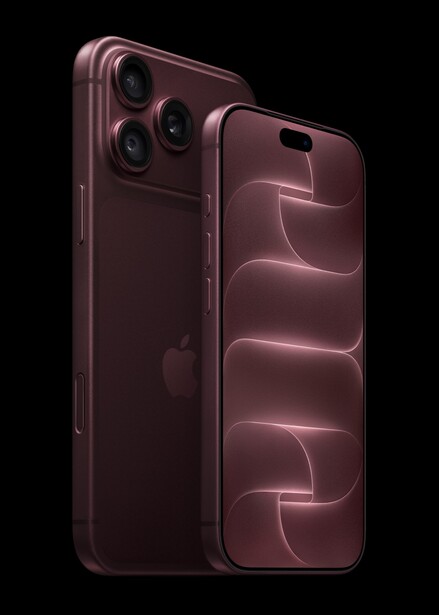
- Only the main camera. The telephoto and ultra wide are not covered. Reference mode is tied to the custom sensor behind the 48-megapixel Fusion Main camera.
- Only two phones. The signing sensor is in the iPhone 18 Pro and the iPhone 18 Pro Max. No older iPhone can add it with a software update, because the sensor is the point.
- Only stills. Apple has announced Reference Image for still photography only, and neither announcement describes video support.
- Only with your say-so. It is opt-in per capture mode, and developing the negative is a separate deliberate step that needs a connection to Apple's servers.
- It does not certify your edits. A reference image proves what the sensor saw. It says nothing about whether the edits you made afterward were reasonable. That judgment still belongs to whoever compares the two.
Should You Turn It On?

If you are a news, documentary, or evidentiary photographer with an iPhone 18 Pro, the answer is yes for anything you might later have to defend, and the habit costs almost nothing. For everyone else, it is the first authenticity feature that asks nothing of you beyond a toggle and gives you a real, checkable answer in return, and it is worth turning on for anything that matters.
- Turn on Reference mode for any capture you might need to prove: news, incidents, property, insurance, anything with a legal or editorial afterlife.
- Get the phone online soon after capture. The ceiling timestamp is requested the moment you shoot and keeps retrying until you have a connection, so the sooner that happens, the tighter your window. Develop the negative when convenient, then decide within 30 days whether to keep the DNG.
- Keep the negative if you shoot raw and want the option of handing an undeveloped, signed file to a client or agency.
- Do not stop using Content Credentials on your Leica, Sony, or Nikon. They document edits; this documents the sensor. They stack.
- Remember what it proves. A real sensor, a real time window, an untouched frame. Not who took it, no authenticated location as currently described, and not whether your crop was fair.
Lead image by Apple, from the iPhone 18 Pro press materials. Source.





Join the Fstoppers community for free
-
Post comments and join in the discussions
-
Browse the site ad-free
-
Share your work and get featured in the community
-
Compete in the photo contests for fun and prizes