On June 25, 2026, Adobe announced it was buying Topaz Labs, the company whose upscaling and denoising apps thousands of photographers bought precisely so they would not have to rent them from Adobe. The deal closed on September 23. That is the shape of this decision now. Leaving Adobe is no longer about finding a cheaper Lightroom clone, because the good tools keep getting absorbed, prices keep moving in one direction, and the software you own outright is the only software nobody can reprice on you at renewal.
The honest news is that the alternatives got genuinely good. Capture One's raw engine has been better than Adobe Camera Raw at certain things for a decade. DxO's denoising still sets the benchmark that everyone else chases. Affinity, the most credible Photoshop replacement on the market, became completely free in late 2025 after Canva bought it. GIMP added non-destructive link and vector layers this spring. darktable added AI object masking. None of that existed in this form two years ago.
The dishonest version of this article would stop there. Here is the other half: you do lose things, and this guide names them in every entry. You lose Lightroom's cloud sync across phone, tablet, and desktop. You lose Photoshop's generative fill and the library of actions, brushes, and plugins built for it. You lose the fastest raw support for brand-new cameras. And you lose the assumption, still true in commercial work, that whoever you hand a layered file to can open it. Picks below span free, one-time purchase, and subscription. Apart from DxO PhotoLab 10, none of them has been through an Fstoppers hands-on review at its current version, so rather than imply a testing history we do not have, every entry below is written from the vendor's current documentation, verified version-by-version release notes, and each tool's documented design.
At a Glance
- Best Lightroom Alternative: Capture One Pro
- Best Photoshop Alternative: Affinity
- Best All-in-One: ON1 Photo RAW 2026
- Best One-Time Purchase: DxO PhotoLab 10 Elite
- Best Free: darktable
- Best Free Layer-Based Editor: GIMP 3.2
- Best Browser-Based Editor: Photopea
- Best for Beginners: Luminar Neo
- Best for High-Volume Professionals: Photo Mechanic
Best Lightroom Alternative: Capture One Pro
- Platforms: macOS, Windows, plus iPhone and iPad through Capture One Mobile
- License: subscription (Pro, All in One, Studio) or a one-time perpetual license
- Raw processing: yes, with camera-specific color profiles and raw support for more than 600 camera models
- Layers and compositing: layer-based local adjustments, AI masking, healing and cloning; no full compositing
- Cataloging: yes, catalogs and sessions, with Lightroom catalog import
- Standout tools: Color Editor, wired and wireless tethering for Canon, Nikon, Sony, Fujifilm, Leica, Sigma, and Phase One bodies, Styles, combined masks, Enhanced Denoise
- Price: See vendor pricing
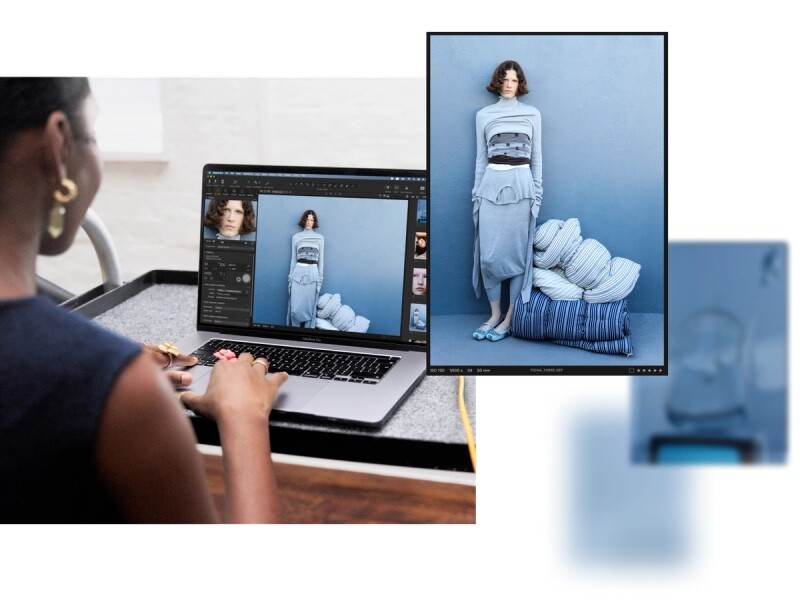
If you want the thing that actually replaces Lightroom Classic for a working photographer, it is Capture One Pro, and it has been for years. The raw conversion is the reason. Capture One builds its profiles per camera model rather than applying a generic interpretation, and the difference shows up first in skin tones and saturated reds, the two places Adobe's rendering has always needed rescuing. The Color Editor, which lets you grab a single hue range and shift it without touching its neighbors, is the tool most switchers say they cannot go back from.
Development has been steady rather than showy. The October 2025 update let you combine masks inside a single layer, so gradients, luma ranges, and AI selections can be added, subtracted, and intersected while all of them stay editable. Version 16.8, released on May 28, 2026, brought Enhanced Denoise for high-ISO files (Capture One says it does its best work from ISO 3,200 up), a second generation of wireless tethering built with Canon that delivers an editable raw preview in under a second, and a beta Assisted Review feature that flags closed eyes, missed focus, and black frames before you start culling. Read the wireless claim carefully, because that second-generation mode currently works with two Canon bodies, the EOS R5 Mark II and the EOS R1, and everything else still tethers the old way. A June service release added multi-user sessions in beta, and July 2026 added native support for Hasselblad's .3FR raw files. Tethered studio work is where Capture One is not merely an alternative but the default. The Fstoppers tutorial The Complete Capture One Editing Guide covers the workflow end to end if you want a structured route in.
The costs are real. This is the most expensive software in this guide, and the company raised prices across its entire product line by 6% on June 2, 2026. The perpetual license still exists, which matters enormously here, but it buys a specific version: you keep it forever, and you do not get the features or new camera support that arrive afterward. The application is demanding on hardware, the interface takes a week to stop feeling hostile, and there is no generative fill anywhere in it. Migration is imperfect too: Capture One will import a Lightroom catalog and carry over ratings, keywords, crops, and basic exposure and white balance settings, but color work does not survive the trip, so plan on re-editing anything you care about. For a photographer who shoots people, shoots tethered, or simply wants better color out of the box, check the current price of Capture One Pro at Capture One.
What We Like
- Camera-specific raw profiles that render skin and reds better than Camera Raw
- The best tethered shooting workflow in the business
- Combined, fully editable masks in a single layer
- A perpetual license is still offered
What Could Be Better
- The most expensive software here, and prices went up 6% in June 2026
- Second-generation wireless tethering is limited to the Canon EOS R5 Mark II and EOS R1
- Perpetual buyers are locked out of later features and new camera support
- No generative fill or expand
- Lightroom catalog import leaves your color edits behind
Best Photoshop Alternative: Affinity
- Platforms: macOS and Windows; the unified app has not shipped on iPad, though the older Affinity 2 iPad apps are still downloadable free
- License: free, with a Canva account required to sign in
- Raw processing: yes, through the Develop studio, which gained object selection, luminosity, hue range, and compound masks plus tone curve method selection in version 3.2
- Layers and compositing: yes, full layer stack, masks, blend modes, live filters, and PSD import and export
- Cataloging: none
- Standout tools: Pixel, Vector, and Layout studios in one app, Tone Brush, Live Tone Blend Group
- Price: Free (AI tools require a paid Canva plan)
The single biggest change in this category happened on October 30, 2025, when Canva folded Affinity Photo, Designer, and Publisher into one application called Affinity and made it free. Not a stripped tier, either: the Pixel, Vector, and Layout studios are all fully unlocked, and Canva has publicly committed to keeping it that way. For a photographer, the Pixel studio is the part that matters, and it does the work Photoshop does: layers, masks, blend modes, live filters, frequency separation, dodging and burning, precise selections, and reading and writing PSD files so you can still hand a layered file to a retoucher.
Canva has kept shipping, which is the thing to watch when a big company buys a beloved small one. Version 3.1 in March 2026 added a Tone Brush for painting brightness, contrast, and color adjustments non-destructively, plus a Live Tone Blend Group that matches color and tonal values across composited images, which is the tedious part of dropping a subject onto a new background. Version 3.2 followed in April 2026 with a Texture Filter for midtone detail, new vector brushes, and a rebuilt raw toolset that brought object selection, luminosity, hue range, and compound masks into the Develop studio. We have not put this build through an Fstoppers review. It is fast and stable, and it opens large layered files faster than Photoshop does.
Now the catches. You need a free Canva account to sign in, which is a real objection if you left Adobe partly to stop your tools phoning home. The generative AI features, background removal and generative fill among them, run through Canva's cloud and require a paid Canva plan, so "free" covers the pro design tools and not the AI. Version 2, the perpetual-license suite many readers already paid for, still runs and its iPad apps are now free to download, but it is no longer actively maintained, and the unified app has yet to arrive on iPad at all. There is no digital asset manager, so this is a Photoshop replacement and not a Lightroom replacement, and it needs pairing with something else on this list. The raw Develop studio is competent rather than class-leading. For everything Photoshop does to a finished file, download Affinity and check the current price of the Canva plan if you want the generative tools on top.
What We Like
- A genuinely professional pixel editor for free
- Reads and writes PSD, so you can still work with clients and retouchers
- Pixel, vector, and layout work in one application
- Active development, with two significant updates already in 2026
What Could Be Better
- A Canva account is mandatory
- AI features need a paid Canva plan
- No cataloging, and the raw engine is only adequate
- Version 2 perpetual owners are on an unmaintained product
- Still no iPad release of the unified app
Best All-in-One: ON1 Photo RAW 2026
- Platforms: macOS 13 or later, Windows 11 (x86 and ARM)
- License: one-time purchase (two computers, or three with MAX), or an optional subscription covering five
- Raw processing: yes, non-destructive, with browse-and-edit in a single application
- Layers and compositing: yes, layers, masks, and effects stacks
- Cataloging: yes, a browser plus optional cataloged folders
- Standout tools: Resize AI, Depth Lighting, one-click subject and background masking, Restore AI in MAX
- Price: See vendor pricing
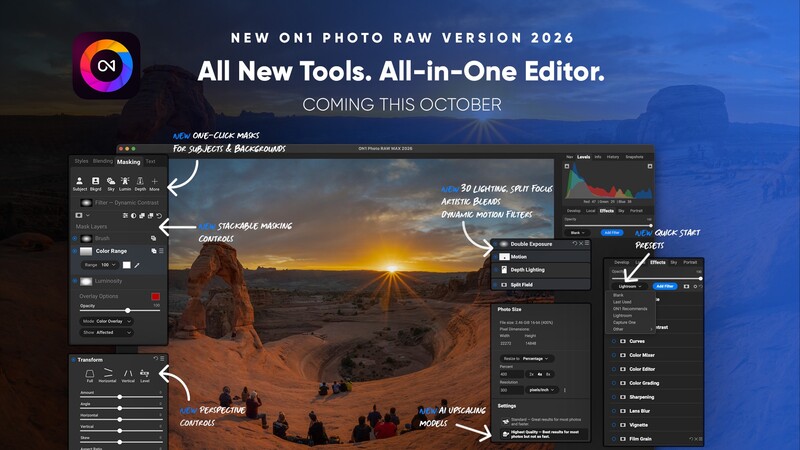
Most people leaving Adobe do not want to assemble a workflow out of four applications. They want one icon that does what Lightroom and Photoshop did together, and that is the pitch ON1 Photo RAW 2026 has made for years with more success than its profile suggests. Browsing, raw development, layers, masks, effects, portrait retouching, sky replacement, and upscaling live in the same window, and none of it costs a monthly fee. The current release is 2026.4.
This year's build leans hard on masking and on depth. One-click subject and background selection is now genuinely reliable, and the Depth Lighting filter uses an AI depth map to relight a scene front to back, which used to mean an hour of luminosity masks in Photoshop. Resize AI 2026 is built in rather than sold as a separate upscaler, and a perspective correction tool fixes leaning buildings without carving black wedges out of your corners. The MAX edition adds Restore AI, installs on three machines instead of two, and works as a plugin inside Photoshop and Lightroom Classic, which matters if you are only partially leaving Adobe.
We have not run this build through an Fstoppers review, and the honest caveats come from ON1's long track record. ON1 has historically traded polish for feature count, and performance on large catalogs and layered files is the first thing to suffer on older hardware. Its raw rendering is good rather than exceptional, and it will not beat DxO on noise or Capture One on color. The licensing deserves a close read: your purchase includes free updates within the 2026 cycle, and next year's major version is a paid upgrade, so "no subscription" means something closer to "you decide each year whether to pay again." That is still better than renting, and this is the closest thing here to a single-app Adobe replacement. Check the current price of ON1 Photo RAW 2026 at ON1.
What We Like
- Cataloging, raw editing, layers, and effects in one application
- Upscaling and retouching included instead of sold separately
- MAX edition runs as a plugin for a partial Adobe exit
- No subscription required
What Could Be Better
- Performance can sag on big catalogs and layered files
- Raw rendering trails DxO and Capture One
- Major upgrades each year are a paid add-on
- The best features are pushed into the pricier MAX edition
Best One-Time Purchase: DxO PhotoLab 10 Elite
- Platforms: macOS and Windows, with the Elite edition licensed for three computers
- License: one-time purchase, with paid major-version upgrades
- Raw processing: yes, with DeepPRIME XD3 denoising and camera and lens optical modules
- Layers and compositing: no layers, but local adjustments with AI masks
- Cataloging: basic, through PhotoLibrary
- Standout tools: DeepPRIME XD3, DxO Optics Modules, ClearView Plus, compressed DNG export
- Price: See vendor pricing
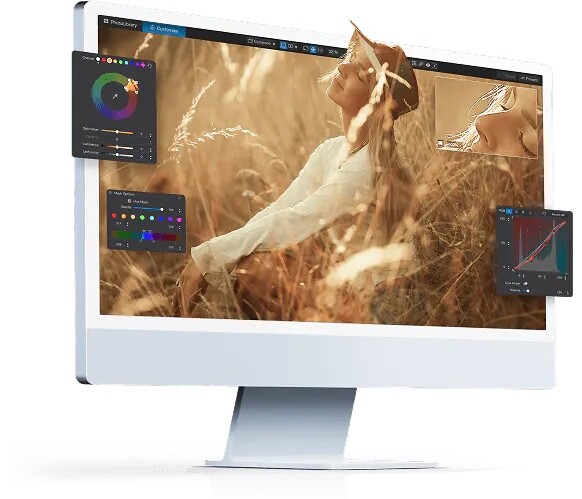
Buy this one if the words that matter to you are "no subscription, ever." DxO PhotoLab 10 Elite is a perpetual license, and the thing it does better than anything else on the market is rescue detail from noisy raw files. DeepPRIME has led the denoising field for several years, and the 9.6 update extended DeepPRIME XD3, previously reserved for X-Trans sensors, to Bayer sensors, which covers Canon, Nikon, Sony, Panasonic, and effectively everything else. If you shoot weddings in dark churches, wildlife at dusk, or concerts at ISO 12,800, this is the software that changes what you can deliver.
The second pillar is optics. DxO measures individual camera and lens combinations in a lab and ships a correction module for each, so instead of a generic profile the software applies a correction built for exactly the body and lens that took the frame. You notice it at the edges of fast wides, where every lens gives up. The 9.6 release, which landed in March 2026, also added a high-fidelity compressed DNG export that produces fully corrected files no larger than the original raw, and diffusion controls that feather AI masks so local adjustments blend instead of announcing themselves. Version 9.7 followed in April with broader Windows ML acceleration, which is what decides whether DeepPRIME takes seconds or minutes per file on a PC. Version 10 arrived in September 2026 with a color grading wheel, Depth Masks that use AI to select by distance from the camera, and AI masks that can now isolate individual people and facial features. Mark Wallace's Fstoppers tutorial Mastering DxO PhotoLab is the fastest way through the learning curve.
What you give up is everything that is not raw processing. There are no layers, no compositing, no tethering, and no generative anything. The PhotoLibrary asset management is thin next to Lightroom or Capture One, so most PhotoLab users pair it with something else, and the interface has the clinical feel of software written by optical engineers, which it is. You also have to download an optics module for each new camera and lens pairing, a small friction that becomes a real one if you rent gear constantly. Fstoppers' Mel Martin used PhotoLab 10 before launch and rated its noise reduction best in class, an edge that rests on the DeepPRIME XD3 engine, now extended across both Bayer and X-Trans sensors. To own your editor outright and get the best noise reduction available while you are at it, check the current price of DxO PhotoLab 10 Elite at DxO. Also consider DxO PureRAW 6, released in March 2026, if you like your current editor and only want DxO's denoising and optical corrections applied before you import.
What We Like
- The best raw noise reduction available, now across Bayer and X-Trans sensors
- Lab-measured optical corrections for specific camera and lens pairs
- A true perpetual license with no subscription pressure
- Compressed DNG export keeps corrected files small
What Could Be Better
- Weak asset management
- No layers, compositing, or tethering
- Optics modules must be downloaded per camera and lens combination
- Major version upgrades are paid
Best Free: darktable
- Platforms: Linux, Windows, and macOS, on both Intel and ARM
- License: free and open source under GPLv3
- Raw processing: yes, non-destructive, with a scene-referred workflow
- Layers and compositing: no layers; parametric, drawn, and AI masks per module
- Cataloging: yes, a full lighttable with tagging, collections, and history
- Standout tools: filmic and sigmoid tone mapping, color calibration, AI object masking
- Price: Free
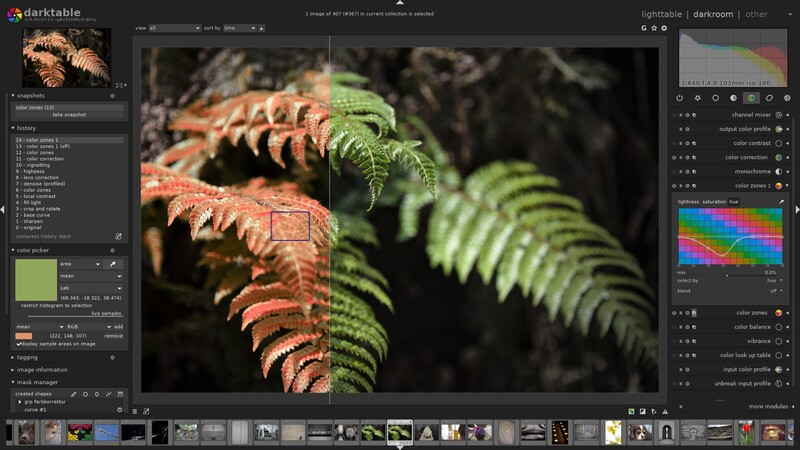
Nothing else in this guide gives you as much for nothing. darktable is a complete raw workflow, catalog and darkroom together, maintained by an unusually serious open-source community, and version 5.6.0 landed on June 21, 2026. It has no upgrade cycle, no account, and no company that can be bought by Adobe next summer. Its processing philosophy is scene-referred, meaning it works on the light the sensor actually recorded before mapping it to a display, and once it clicks it produces highlight roll-off that is hard to match in Lightroom.
The 5.6 release is a striking one for a free project. It adds an optional AI subsystem with SAM2.1-based object masking, so you click on a subject and get a refined mask, plus neural denoising and upscaling. There is also a new color harmonizer, HEIF export, a combined waveform and vectorscope view, and preview rendering at 6K and 8K. The AI features are compiled in as a build option rather than switched on for everyone, so check what your platform's official package includes before you count on them.
The reason darktable is not the top pick despite being free is the learning curve, and pretending otherwise would be dishonest. There are dozens of modules, several of which do overlapping jobs for historical reasons, and the software does very little to steer a newcomer toward the right ones. You will spend a weekend on YouTube before your images look as good as they did on import. There are no layers, so it is not a retoucher, and camera support for brand-new bodies arrives when a contributor gets to it. For a photographer with patience and no budget, or anyone who wants a workflow that cannot be taken away, download the current build of darktable, which costs nothing to try. Also consider RawTherapee, equally free, with finer manual control over demosaicing and detail but a weaker cataloging side.
What We Like
- A complete catalog and raw workflow at zero cost, forever
- Excellent highlight handling from the scene-referred pipeline
- AI object masking and neural denoising arrived in 5.6
- Cross-platform, including Linux and ARM
What Could Be Better
- A genuinely steep learning curve, with too many overlapping modules
- No layers or compositing
- The new AI features depend on how your build was compiled
- Support for new cameras can lag
Best Free Layer-Based Editor: GIMP 3.2
- Platforms: Windows, macOS, and Linux
- License: free and open source
- Raw processing: no; it hands raw files to darktable or RawTherapee
- Layers and compositing: yes, including non-destructive filters, link layers, and vector layers
- Cataloging: none
- Standout tools: non-destructive filters on layers and channels, MyPaint brush engine, GEGL filter browser, scripting
- Price: Free
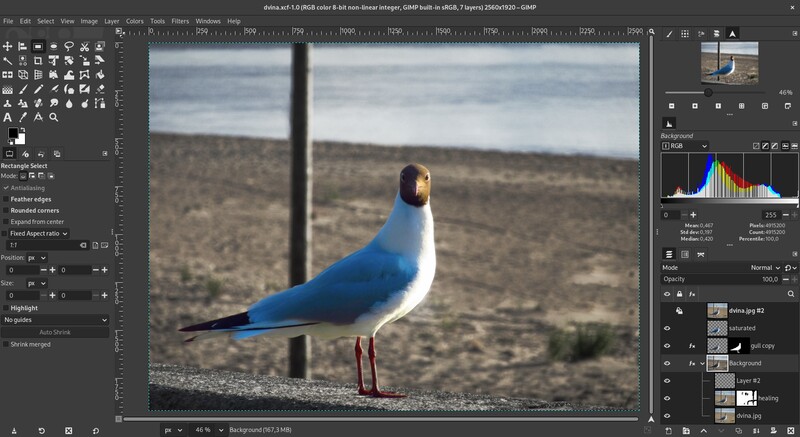
The complaint that killed GIMP for a generation of photographers was that its filters were destructive: apply a blur, and the pixels were gone. GIMP 3.0 ended that in March 2025, when committed GEGL filters started staying live and re-editable on the layer dockable. GIMP 3.2, released on March 14, 2026, is the follow-through, and it is the release that makes the non-destructive story usable rather than promising: filters can now be applied non-destructively to channels as well as layers, and two new layer types carry the idea into compositing.
Those layer types are the reason to update. Link layers let you place an external image inside a composition and scale, rotate, and transform it without degrading it, and the linked content updates when the source file changes, which is Photoshop's linked smart object by another name. The Path tool now produces vector layers with adjustable fill and stroke that redraw whenever you nudge the path. The MyPaint brush engine picked up 20 new brushes and now accounts for canvas zoom and rotation. The CMYK color selector will finally show you a total ink coverage figure, which is the one number a printer will ask you about. GIMP opens PSD files, exports PSB and JPEG 2000, runs a deep plugin and scripting ecosystem, and costs nothing on any operating system you own.
It remains GIMP, though, and you should know what that means. The interface is idiosyncratic in ways that annoy anyone with Photoshop muscle memory, and no amount of theming fixes the underlying vocabulary. Color management and CMYK output for print work are weaker than Affinity's, which matters if you deliver to a press. It does not develop raw files at all, so it needs darktable or RawTherapee in front of it, and PSD fidelity is close rather than perfect, a problem the day a client sends a file full of smart objects and layer styles. There is no generative fill. For a Linux user, a student, or anyone building a zero-cost workflow, download GIMP 3.2 and see how far it goes. Also consider Krita if your work leans toward painting, illustration, and digital art rather than photo retouching.
What We Like
- Non-destructive filters now extend to channels as well as layers
- Link layers and vector layers broaden what it can do
- Free on Windows, macOS, and Linux with a deep plugin ecosystem
- Opens and works with PSD files
What Could Be Better
- The interface still fights Photoshop muscle memory
- No raw development of its own
- CMYK and print color management lag behind Affinity
- PSD compatibility is close but not exact
Best Browser-Based Editor: Photopea
- Platforms: any modern web browser, on any operating system
- License: free and ad-supported, with an optional paid ad-free tier
- Raw processing: basic; it opens raw files including DNG, CR2, CR3, NEF, ARW, RW2, RAF, ORF, and 3FR
- Layers and compositing: yes, layers, masks, blend modes, smart objects, and adjustment layers
- Cataloging: none
- Standout tools: high-fidelity PSD support, plus AI, XD, Figma, Sketch, and PDF import
- Price: Free (optional paid tier removes ads)
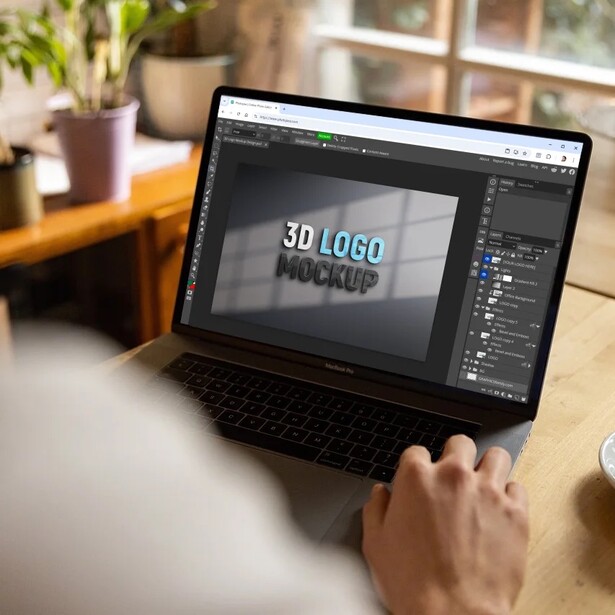
There is a specific emergency this solves. A client sends a layered PSD, you are on a machine with no Adobe software, and you need to change one line of text and export a JPEG in the next ten minutes. Open Photopea in a browser tab and it is done. No install, no account, no download. The interface is an unapologetic copy of Photoshop's, so anyone with Adobe habits is productive within a minute, and the PSD fidelity is the best of any non-Adobe tool we know of: layers, masks, blend modes, smart objects, adjustment layers, and text all come through intact.
What surprises people is how far the free version goes. It reads and writes PSD, and also opens Illustrator, XD, Figma, Sketch, PDF, and a long list of raw formats, which makes it a universal file-opener as much as an editor. It runs on a Chromebook, on a locked-down work laptop, and on a machine at a client's office where you cannot install anything. A paid tier removes the ads and doubles the number of history states, from 30 to 60, which is the free tier's one genuinely limiting ceiling on a long retouch. One developer, Ivan Kutskir, has built and maintained the whole thing for over a decade, which is both charming and a risk worth naming.
Its limits are the limits of a browser. Very large files and long sessions push against memory in ways a native application does not, and you will feel it on a 2 GB layered composite. The raw support is a file-opener rather than a raw workflow, with none of the profiling Capture One or DxO bring, so this is not the tool for developing a shoot. There is no cataloging, and the free tier serves ads next to your canvas, which does not read as professional if a client is looking over your shoulder. As the fallback that lives in a browser tab and asks nothing of you until the day you need it, nothing else comes close, so open Photopea and check what the paid tier costs if the ads bother you.
What We Like
- Outstanding PSD compatibility with no install and no account
- Opens Illustrator, Figma, Sketch, XD, PDF, and raw files too
- Works on any machine with a browser, including locked-down ones
- Nearly every editing feature is available on the free tier
What Could Be Better
- Browser memory limits bite on very large files
- Raw support is rudimentary and there is no cataloging
- Ads on the free tier
- One developer maintains the whole thing
Best for Beginners: Luminar Neo
- Platforms: macOS and Windows, plus iPhone, iPad, Android, Chromebook, and Vision Pro through Luminar Mobile
- License: one-time purchase in Desktop, Cross-Device, and Max tiers, with subscription options; generative tools are included for one year on the perpetual licenses
- Raw processing: yes, non-destructive
- Layers and compositing: yes, layers and AI layer masks
- Cataloging: yes, a catalog with folders and albums
- Standout tools: SkyAI, GenErase, GenSwap, GenExpand, Face AI, NoiselessAI, UpscaleAI
- Price: See vendor pricing
Somebody who has never opened an editor before does not need a scene-referred pipeline. They need their photo to look better in five clicks, and they need the software to not humiliate them in the process. That is the job Luminar Neo is built for, and it does it better than anything else here. The tools are named for outcomes rather than techniques, so the panel says SkyAI and Face AI instead of "luminosity mask" and "frequency separation." Sliders are big, previews are instant, and the presets are a legitimate teaching tool, because a curious beginner can open one and see what it changed.
The AI feature set is genuinely deep now. GenErase removes objects, GenExpand extends a frame beyond its edges, and GenSwap replaces one thing with another, Skylum's answer to Photoshop's generative fill and the closest any non-Adobe app in this guide gets to it. NoiselessAI and UpscaleAI handle the technical rescues, Bokeh AI fakes shallow depth of field, and Studio Light relights a face. Luminar also installs as a plugin for Photoshop, Lightroom Classic, and Apple Photos, and the mobile app syncs its edits back to the desktop, so it can slot into a partial exit rather than demanding a full one. The sync runs one way at present, from phone or tablet to desktop, not the reverse.
Read the licensing carefully, because this is where Skylum has drawn complaints, and where the word perpetual is doing less work than it looks like it is doing. A perpetual license covers a defined set of updates rather than updates forever. The generative tools specifically, GenErase, GenSwap, and GenExpand, are included for one year from the date of purchase, and after that you renew to keep using them, which means the single feature most likely to pull a reader away from Photoshop is the one with an expiration date on it. Extensions and asset packs are sold on top. The AI results also have a house style, a glossy, contrast-heavy look that is easy to overdo and that experienced editors dial back. Performance on older hardware is uneven. We have not put the current release through an Fstoppers review, and if you already know what a curve does you will find this software patronizing. For a beginner, that is precisely the point, so check the current price of Luminar Neo at Skylum.
What We Like
- The gentlest learning curve of anything here
- Generative erase, expand, and swap without an Adobe subscription
- Works standalone or as a plugin inside Photoshop, Lightroom Classic, and Apple Photos
- Catalog and mobile apps across iOS, Android, Chromebook, and Vision Pro
What Could Be Better
- Perpetual licenses include only a limited window of updates, and the generative tools expire after a year
- Cross-device sync only runs from mobile to desktop
- Constant upsell of extensions and asset packs
- AI edits have a heavy-handed default look
- Uneven performance on older machines
Best for High-Volume Professionals: Photo Mechanic
- Platforms: macOS 13 or later (Apple silicon and Intel) and 64-bit Windows 10 or later
- License: one-time perpetual purchase with one year of updates, or monthly and annual subscription; each license covers two computers, Mac or Windows
- Raw processing: no; it reads embedded previews and hands files off to your editor
- Layers and compositing: none
- Cataloging: none; it browses folders as tabbed contact sheets, and the Plus edition that added a catalog is no longer sold
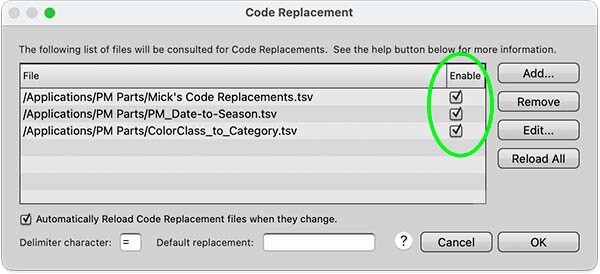
- Standout tools: multi-card ingest to two destinations, instant browsing, metadata templates, variables, code replacements, customizable keyboard shortcuts
- Price: See vendor pricing
Ask a wire photographer, a sports shooter, or a wedding photographer with 3,000 frames from a Saturday what gets them through the take, and a startling number of them will say Photo Mechanic, from Camera Bits. It handles the front end of a professional workflow and leaves raw development to other software, and it exists because Lightroom's library module is slow at the job that eats the most hours: looking at every frame and deciding which ones live. Version 2026.6, released in June 2026, is current and runs natively on Apple silicon. It is also the only edition left: Camera Bits stopped selling Photo Mechanic Plus, which added a searchable catalog, in early 2026, because the unsupported third-party technology behind that catalog was breaking Plus for most users.
The speed comes from a design decision. Photo Mechanic shows the JPEG preview your camera already embedded in the raw file instead of rendering the raw itself, so you move from frame to frame without a render delay and can start to cull a shoot while the cards are still copying. Ingest pulls from several cards at once, copies to two destinations in the same pass, and applies your metadata template, copyright and credit included, during the copy. Variables pull EXIF data such as ISO into captions, and code replacements expand a short code, such as a team abbreviation and jersey number, into a player's correctly spelled name. Fstoppers' Mike Smith tested this workflow in Photo Mechanic Plus for the first part of a 2021 in-depth review. Pointed at a 400 GB library of 37,000 files, it let Smith scroll through all of them after a short indexing pass. Plus was the standard program with a catalog added, so the ingest, tagging, and captioning tools at the center of that review are all in the standard edition.
It is expensive for software that never develops a raw file, so you buy it alongside an editor rather than instead of Adobe. Without a catalog, it browses folders as tabbed contact sheets, so finding an old frame means mounting the drive that holds it. Some Sony mirrorless bodies embed previews of only 1,616 by 1,080 pixels, so checking focus on those files means switching on raw rendering. Every license, subscription or perpetual, needs an internet connection periodically to stay valid. Camera Bits also defines perpetual narrowly: a perpetual license carries one year of updates and support, after which the software keeps working on the last compatible operating system but gets nothing new. The interface is unashamedly utilitarian, and if you shoot a few hundred frames a month, it solves a problem you do not have. If volume rather than editing is your bottleneck, run the free 30-day trial on a real job, then check the current price of Photo Mechanic at Camera Bits.
What We Like
- Frame-to-frame browsing with no render delay, even across thousands of images
- Ingest from several cards at once, to two destinations, with metadata applied during the copy
- Code replacements and variables that fill in names and camera data with a few keystrokes
- Perpetual or subscription licensing, with each license covering two computers on macOS or Windows
What Could Be Better
- Expensive, and it does not develop raw files
- No catalog, so finding older work means mounting the right drive
- The perpetual license only carries one year of updates and support
- Every license needs a periodic internet connection to stay valid
- Overkill for low-volume shooters
How to Choose an Adobe Alternative
Start by separating the two jobs Adobe was doing for you. Lightroom is a library plus a raw developer. Photoshop is a pixel editor. Almost nobody needs a single application that replaces both, and the people who try to find one are the people who end up disappointed. The most common working setup among photographers who have left is a raw developer for the bulk of the work (Capture One, DxO, or darktable) and a pixel editor for the handful of frames that need real retouching (Affinity, or GIMP if the budget is zero). Two applications, one of them possibly free, and no monthly bill. Mac users have a third option worth knowing about, with a caveat attached: Pixelmator Pro, now owned by Apple, is still sold as a one-time purchase on the Mac App Store, but Apple has also folded it into the Apple Creator Studio subscription, and some newer capabilities (the Warp tool among them) sit on the subscription side of that line. Buying it outright still gets you a fast, capable pixel editor, just not necessarily the whole one.
Then decide how you want to pay, because the license model is the actual reason most people are reading this. A perpetual license means you own a version, not a product: DxO, ON1, and Capture One all sell one, and in every case future features and new camera support arrive with a paid upgrade. Budget for that upgrade every year or two and the math still beats a subscription, but do not tell yourself it is free forever. Open source really is free forever, at the cost of your time. Check the fine print on "one-time purchase" claims too. Luminar's perpetual licenses cover a defined update window and include the generative tools for one year. Photo Mechanic's perpetual license carries one year of updates and support. ON1's covers the 2026 cycle and stops there.
Be specific about what you genuinely give up. Cloud sync across desktop, phone, and tablet with a single catalog is Adobe's, and the alternatives here approximate it rather than match it. Generative fill at Photoshop's quality is Adobe's, with Luminar the only serious challenger here. Same-week raw support for a camera announced last month is Adobe's, which is why press photographers with new bodies keep a Creative Cloud seat alive. The plugin and preset ecosystem is Adobe's, so if your business depends on a specific Photoshop panel, check whether it runs anywhere else before you cancel. Industry file interchange is Adobe's too: the retoucher, the printer, and the agency all expect a PSD, and while Affinity and Photopea read and write them well, "well" is not "perfectly" when the file is full of smart objects and layer styles.
Finally, plan the migration rather than performing it. Export your Lightroom edits as full-resolution TIFFs or JPEGs before you cancel anything, because your develop settings live in Adobe's engine and will not survive intact anywhere else. Capture One will import a Lightroom catalog and preserve ratings, keywords, crops, and basic tone settings, and ON1 offers a migration path too, but color work does not transfer between engines. Run the new software alongside Adobe for one full job before you cancel. AI denoising and upscaling are also the most hardware-hungry things you will ask of any of these applications, so if DeepPRIME crawls on your machine, the bottleneck is the machine, and our computers for photo editing guide is the next thing to read.
What We're Looking For
We weighed raw conversion quality, how much of the Adobe workflow each tool actually replaces, license terms and whether "no subscription" survives contact with the fine print, the depth of masking and retouching tools, and whether the software is under active development by an organization likely to still be here in five years. Every version number, release date, license structure, and platform claim was verified against the vendor's current pages at the time of writing, and prices should be checked on the vendor's site, because software pricing moves with sales far more often than hardware pricing does. On testing, we are being straight with you: apart from DxO PhotoLab 10, none of these applications has come through Fstoppers for a hands-on review at its current version, and we say so plainly rather than implying a testing history we do not have. Where the text describes behavior, it comes from vendor documentation and each tool's documented design. Most picks across our buying guides come from gear our writers have used and reviewed hands-on. Where we have not, as here, we say so. Our wider photo editing software guide covers the Adobe applications themselves alongside these challengers.
Frequently Asked Questions
What Is the Best Free Alternative to Photoshop?
Affinity is the best free Photoshop alternative for most photographers, because it became free in late 2025 after Canva bought it and it offers a full professional layer stack with PSD support. GIMP 3.2 is the best fully open-source option, with non-destructive filters and, as of March 2026, non-destructive link and vector layers. Photopea is the fastest way to open a PSD with nothing installed.
Can I Really Replace Lightroom Completely?
Yes, for most photographers. Capture One replaces the catalog, the raw development, and the tethering, and it does the last two better than Lightroom does. What you cannot fully replace is Adobe's cloud sync across desktop, phone, and tablet, and immediate raw support for cameras announced in the last month. Export your finished images before you cancel, since your develop settings will not transfer.
Is a Perpetual License Actually Cheaper Than a Subscription?
Usually, but not as dramatically as the marketing implies. Perpetual licenses from DxO, ON1, and Capture One buy you a version, and new features plus new camera support come with a paid upgrade every year or two. If you upgrade every cycle, the savings against a subscription narrow. If you happily run the same version for four years, you save a lot.
What Does Adobe Buying Topaz Labs Mean for Photographers?
Topaz's apps will keep being sold as standalone products while Adobe integrates the technology into Photoshop and Lightroom, and the deal closed on September 23, 2026. The practical warning is that the tools people buy to stay outside the subscription can be acquired by the subscription. Open-source software is the only category immune to that.
Which Adobe Alternative Has the Best Noise Reduction?
DxO, and it is not especially close. DeepPRIME XD3 now covers both Bayer and X-Trans sensors after the 9.6 update, and it recovers usable detail at high ISO values where other tools smear it. You can buy it inside DxO PhotoLab 10 as a full editor, or in DxO PureRAW 6 if you want to keep using the editor you already have.
Fstoppers may earn a commission from purchases made through links in this article. Our picks are made independently by our editorial team.