
You've got $1,000 saved. You're on B&H, late at night, your credit card within arm's reach. Your cart has that shiny new f/1.4 prime lens sitting in it. You know the one. You've watched 10 YouTube reviews. You've pixel-peeped the sample images. You can already imagine the creamy bokeh, the low-light performance, the look it will give your photos. That characteristic rendering everyone talks about in the forums. You are one click away from that hit of dopamine, that feeling of a fresh start, the promise that this piece of glass will finally unlock your creative potential.
Stop. Close the tab for a second. Ask yourself one genuinely hard question: Will this really make your work better? Or will it just make it different for a week before it becomes just another lens in your bag, while the same fundamental problems that plague your photography remain completely unsolved?
This is a tough love guide to spending your money like a professional, not a hobbyist. The relentless pursuit of shiny new gear is a trap that keeps you spending money on things that don't actually move the needle. Your next $1,000 shouldn't go to another lens. It should go to the boring professional infrastructure that actually improves your final product, protects your business, and solves the real problems you face every single day. The stuff that makes you groan when you think about buying it. That's the stuff that matters.
The Seductive Lie of the Exciting Upgrade
We all know about Gear Acquisition Syndrome. It's become such a recognized problem that photographers joke about it constantly. But understanding why we fall into this trap is important. We buy new lenses because we think they are a creative silver bullet. We're chasing a feeling, a new style, or a look we saw someone else achieve. We convince ourselves that if we just had that one piece of gear, everything would click into place. Our work would suddenly look professional. Clients would start calling. Our Instagram engagement would skyrocket.
Here's the hard truth that nobody wants to hear: A new f/1.4 lens won't fix bad color. It won't fix blurry long exposures caused by a wobbly tripod. It won't fix a cheap filter that creates flares and color casts across your landscape work. And it definitely won't save you when a client's entire wedding gallery is lost on a failed hard drive. The boring stuff will fix these problems. The boring stuff always fixes the real problems.
The reason we chase exciting new gear instead of solving these foundational issues is simple: It's way more fun to imagine the creative possibilities of a new lens than it is to spend an evening setting up a proper backup system. One feels like you're investing in your art. The other feels like homework. But which one actually protects your business and guarantees consistent, professional results?
The 5 Boring Upgrades That Are 10x More Valuable
Let me walk you through five common problems that photographers try to solve with exciting new gear when the real solution is something far more boring and far more effective.
The Problem: "My Colors Look Weird and My Prints Are Too Dark."
The appealing fix you're tempted by: "I need a new Canon for its color science" or "I should switch to Fujifilm for those film simulations."
The boring professional solution: A monitor calibrator.
Here's why this boring box matters more than a new camera body: You are flying completely blind right now. You cannot trust your colors if your monitor is glowing bright blue like a nuclear reactor. You're spending hours in Lightroom or Capture One adjusting colors and exposure, getting everything perfect on your screen, and then your client opens the files on their properly calibrated office monitor and everything looks wrong. Or worse, you send files to a print lab and they come back two stops darker than what you saw on your screen.
The Problem: "My Landscape Shots Are a Little Soft."
The appealing fix: "I need that new $2,000 lens with edge-to-edge sharpness" or "I should upgrade to a camera with more megapixels."
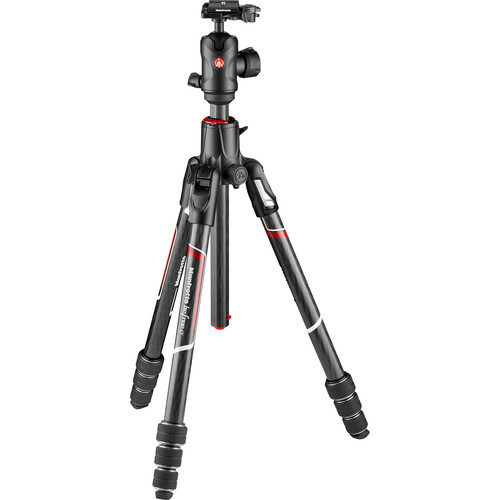
The boring professional solution: A genuinely sturdy tripod.
You cannot buy sharpness with a new lens if your $80 Amazon tripod is vibrating in a light breeze. A new lens with in-body image stabilization won't help your 30-second long exposure if the tripod legs are flexing. You know those incredibly sharp landscape photos you see from professionals? The ones where you can zoom in and see individual pine needles rendered perfectly? Those weren't shot handheld with a fast lens. They were shot on a rock-solid tripod at f/8 or f/11.
A real tripod, and I mean a proper model with a solid ball head from Really Right Stuff, Gitzo, or Peak Design, is a buy-it-for-life tool that unlocks entire genres of photography. Long exposure seascapes. Astrophotography. Focus-stacking for macro work. HDR brackets that actually align perfectly. All of these techniques are completely impossible without a tripod that doesn't move a single millimeter. Yes, it's going to cost you $400 to $600 for a professional setup. Yes, it's going to be heavy to carry. No, it's not exciting or glamorous. But it will still be working perfectly 20 years from now, and every single sharp image you create in that time will be possible because of this boring purchase.
The lens you're lusting after will be replaced by a newer model in three years. The tripod will outlive your career.
The Problem: "My Skies Are Always Blown Out or My Reflections Are Distracting."
The appealing fix: "I need a new camera with 15+ stops of dynamic range" or "I should shoot medium format."
The boring professional solution: Professional-grade CPL and GND filters.
A high-quality circular polarizer is the one effect you genuinely cannot replicate in post-production. Not with AI. Not with Photoshop. Not with any plugin. It manages reflections on water and glass. It cuts through atmospheric haze. It makes blue skies richer without touching anything else in the frame. And most importantly, it does all of this optically, before the light even hits your sensor, which means you're not degrading your image quality trying to recover this in post.
The same goes for neutral density filters. A good set of ND filters (including graduated) lets you control light at the source. Want to shoot that waterfall at f/8 with a two-second exposure in the middle of the day? You need an ND filter. Want to use your f/1.4 lens wide open in bright sunlight without overexposing? You need an ND filter. Want to create that smooth, dreamy motion blur in clouds during golden hour? You need an ND filter.
But here's the critical part: Stop putting a $20 piece of color-casting glass from Amazon in front of your $2,000 lens and wondering why your images look cheap. Professional filters from Lee Filters, Breakthrough Photography, or PolarPro actually maintain image quality. They don't introduce color casts. They don't create strange flares. They're multi-coated to resist water and fingerprints. Yes, a good CPL and a set of quality ND filters will cost you $300 to $500. That's less than most lenses you're considering. And unlike a new camera body that might give you one more stop of dynamic range, these filters solve problems that no amount of sensor technology can fix.
The Problem: "My Hard Drive Is Getting Full."
The appealing fix: "I'll just buy another 4 TB external USB drive from Best Buy. Maybe two. Or maybe I'll get one of those big 10 TB desktop drives."
The boring professional solution: A rock-solid backup system with NAS/RAID and cloud storage.
A new lens won't save you when that one external drive fails, and it will fail, and you lose a client's entire wedding. Let me be blunt about this: If you are a professional photographer and you don't have a proper backup system, you are one hardware failure away from a lawsuit and/or the complete destruction of your reputation. It's not a matter of if that drive fails. It's a matter of when.
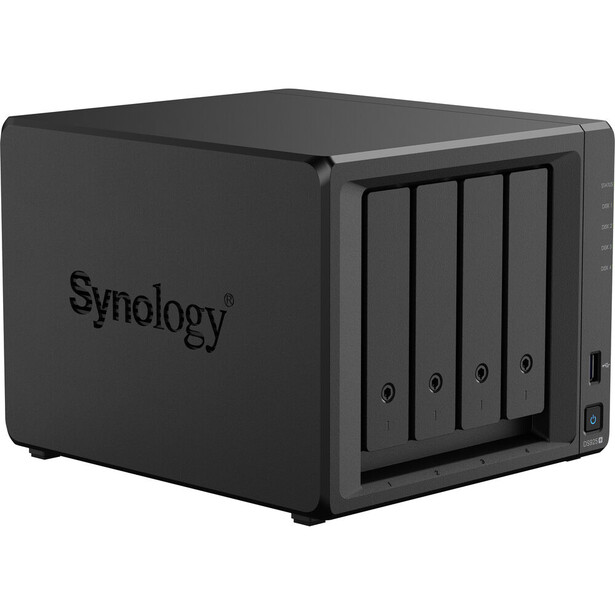
Is this exciting? Absolutely not. Will it cost you $500 to $1,000 to set up properly? Yes. But it's what lets you sleep at night. It's what lets you tell a bride that yes, her photos are safe even though your office flooded. It's the difference between being a professional with a business and being a hobbyist with really expensive equipment. Every working photographer I know has a story about the time their backup system saved them, myself included. Every one of them considers it money well spent.
The Problem: "I Need to Protect My New Gear."
The appealing fix: "A new $400 tactical-cool camera backpack with webbing and military-grade materials."
The boring professional solution: Business insurance.
A backpack protects your $3,000 camera from a short drop. Business insurance protects your $300,000 house from a catastrophic lawsuit. Let's talk about real scenarios that happen to real photographers. A client trips over your light stand at a wedding and breaks their ankle. They come after you for their hospital expenses and the paychecks they missed during recovery. That's $50,000 you now owe. Someone breaks into your car at a shoot and steals your entire camera bag with $15,000 worth of gear. That policy covering your house? It won't pay a cent for gear you use commercially. You're out $15,000. A storm blows over your backdrop at an outdoor shoot and it hits someone's parked car, causing $8,000 in damage. You're liable.
Business insurance, specifically general liability insurance and equipment coverage, costs roughly $500 to $1,000 per year for most photographers. It's literally part of the definition of being a professional. It's what separates someone running a legitimate business from someone with an expensive hobby. Most venues won't even let you shoot without proof of liability insurance. Many clients won't hire you without it if they're sophisticated enough to ask.
This is the upgrade that turns your hobby into a real, protected business. It's the least exciting $500 you'll ever spend. It's also the most important. That camera backpack might prevent a scratched camera. Insurance prevents bankruptcy.
Buy Assets, Not Toys
A shiny new lens is often a toy. It's fun. It's exciting. It gives you a temporary creative high. You'll use it constantly for two weeks, then it will sit in your bag as just another option, and six months later you'll be eyeing the next new release. The boring upgrades are assets. They build the permanent, stable foundation of a professional career. They solve real problems. They protect your business. They improve the consistency and quality of every single image you deliver.
Here's the challenge: Look at that $1,000 cart on B&H. Is that lens going to solve a real, foundational problem in your workflow? Will it fix the issues that are actually holding your photography back? Or are you just chasing a feeling? Are you trying to buy creativity instead of building the professional infrastructure that makes great work possible?
Invest in the boring stuff first. Get your monitor calibrated. Buy a tripod that doesn't wobble. Get real filters. Set up a proper backup system. Get insured. These are the real professional upgrades. The lens can wait. Your gear lust will always be there, trust me. But your business needs these foundations now. That's the difference between a hobbyist with expensive toys and a professional with a sustainable career.

Join the Fstoppers community for free
-
Post comments and join in the discussions
-
Browse the site ad-free
-
Share your work and get featured in the community
-
Compete in the photo contests for fun and prizes
3 Comments
Yes to the first get a Monitor Calibrator, I have used one from the beginning. Monitors yes come calibrated but years ago we had only monitors great for gaming everyone of them But only in the past year has a monitor for photography come out along with High Pixel counts like those wanting a camera with more pixels but with a monitor of old like how many are editing on laptop with yesterdays monitor. like using the datacolor Spyder x2 ultra BUT do not forget the Datacolor Spyder Cube where you capture with it and then after editing that capture you copy in Lrc or whatever editor to get exposure, shadows and colors using the cubes bottom hole and grey side using the white as exposure along with the little ball on top. Yes in the field a little time consuming but getting a start and then adding your artist take. I got the new ProArt Studiobook come calibrated but still used Datacolor Spyder x2 Ultra to calibrate and use the Cube and always in by bag with a selfie stick, mainly to get exposure correct even at night. The cube was used in many caves in Thailand where religious places but a photographer used in lit but many different color lights so to get colors and exposures etc. the cube helped to document, saw the video on how to use.
The tripod is a forever tool a reason I have a closet full over the years. But one point I forgot a mounting plate once and found my A7RM2 could bracket 3 at +/- 2EV hand held while others were doing long exposures. Also the A7RM5 will do hand held bracketing 5 at +/- 2EV I found doing blue hour sunsets over shrimp boats and Pixel Shift 240MP a reason to get a new camera but I do have my tripod handy just remember to turn off IBIS. One add is a panorama rig today about a $100 on Amazon the reason is it will have a degree stopper stopping you at next degree point. You can do a Milky Way Arch panorama in less than 90s with NR on and moving to next point during NR blackout time.
As for the filter thing test your cameras jpeg color settings and then in Lrc look at the 4 boxes in the upper right of the main section and scroll over to get your camara color, Yes you are doing RAW but this is the starting point if you picked it for a jpeg capture, do the two RAW and jpeg for each color space selection and see the differences but using the Lrc selection you get a start without a filter. But get a good CP filter if you want to see the bottom of water or getting rid of glare off a window but Lrc also as a option for that now.
Yes double or triple save your photos and never save all in Lrc for the catalog changes and then a new computer needed every three years or so. The fun is going back to years past and reediting images with newer SW.
Protect your gear even as a hobbyist many companies to use. If on a trip always take out SD cards and put in a safe place an image can not be redone but gear yes. List all you have and cost and keep on paper in a safe as well on a SD card computers drives fail also. for images also I burn DVD's with them when I have enough to fill just an idea!
1. using the Datacolor Spyder Cube
2. Bracketing 3 at +/- 2EV hand held and with the FE 12-24mm f/4 G 2017 getting more in a frame than others.
3. you never know till you try Bracketing 5 at +/- 2EV in blue hour also not the reason for the A7RV but nice to find out.
4. Milky Way Arch's using the rear LCD and thirds scale is a bear in the dark or even having to stop and use a light to see the little degree marks on your tripod head, panorama head you will totally enjoy a night out and a run and capture with the extra time. but find and write down the degree setting for what lens mm using, I put on a 10mm and forgot to change from 14mm and PTGui had me busy for some days linking each image with one further away! A note Lrc will now blend pano images.
eflections in this piece deeply relevant to my own practice.
I completely agree with the author’s assertion that investing in the fundamentals of a photographic business often yields far greater long‑term impact than chasing the thrill of a new lens. In my studio sessions with softbox‑based flash lighting, consistency in skin tones and accurate color rendering matter deeply: without a properly calibrated monitor, subtle shifts in color or exposure can go unnoticed until printing or client review — that kind of mismatch undermines the trust built with parents who expect delicate and faithful portraits.
Over the years I learned that what truly safeguards my work is not simply sharper glass, but a reliable workflow: backed‑up files that survive a hard‑drive failure, a controlled lighting and retouching environment, clearly defined client agreements — in short, structural tools that transform passion into a sustainable profession. I remember one particular session with a premature baby: the parents entrusted me with their most precious memories. If that shoot had been lost because of an unreliable backup system, no lens (however dreamy) would have compensated for that failure.
Choosing to invest first in what protects the integrity of my art and reliability for my clients has allowed me to deliver consistent results over time. For me, that’s what truly distinguishes a photographer who treats her work as art and business rather than a hobby.
Strongly agree with your five points above, and happy to find that I've implemented all but the last (Business Insurance) since these days I'm more hobbyist than semi-pro.
I have a full set of CPL and GND filters (including Cokin sets), BUT ...
I recall seeing an opinion somewhere that the less glass between subject and sensor, the better. As post-processing software improves, along with sensor dynamic range, the need for ND/GND filters diminishes somewhat. Just wondering what people think of that approach??