

Somewhere on your camera, there is a button or dial marked with a plus sign, a minus sign, and a zero. It might be a physical dial on the top plate, a button near the shutter, or a virtual slider in the quick menu. You have probably noticed it. You have probably never touched it. And that single untouched control is the reason a surprising number of your photos come back too dark or too bright even though you are shooting in a semi-automatic mode that is supposed to handle exposure for you.
Exposure compensation is the override button for your camera's brain. It tells the meter, "I know what you think the correct brightness should be, and you are wrong. Make it brighter (or darker) by this much." That is all it does. No mystery, no complexity, no hidden consequences. But understanding when and why the meter gets it wrong transforms it from a button you ignore into the single most useful control on your camera outside of aperture and shutter speed.
Why Your Camera's Meter Gets It Wrong
Your camera's light meter does not measure "correct" exposure. It measures reflected light and attempts to render the scene as a medium tone, roughly equivalent to what photographers call 18% gray. (This is the tone a gray card is calibrated to, which is why studio photographers use them for metering and white balance.) When the scene is a mix of light and dark elements (a person standing in a park, a street with buildings and sky), the average brightness of the scene lands close to that medium tone, and the meter nails it.
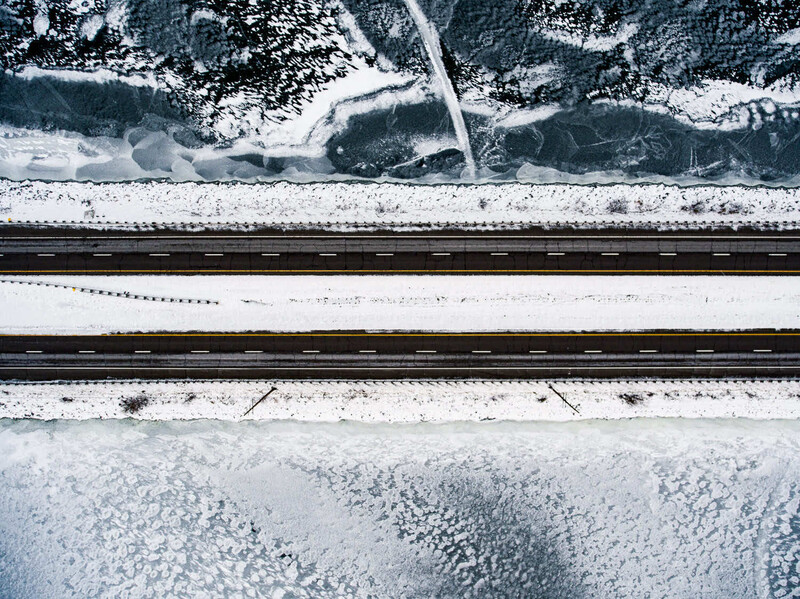
The problems start when the scene is not average. When the frame is dominated by tones that are significantly brighter or darker than middle gray, the meter does not know the difference between "this scene is supposed to be bright" and "this scene is overexposed." It treats both the same way: it pulls the exposure toward the middle. Snow becomes gray. A black cat becomes gray. A sunset sky gets muted. A white wedding dress loses its glow. The meter is doing exactly what it was designed to do. It is just doing it in a situation where the "correct" exposure is not the middle.
Exposure compensation is how you correct for this. Positive compensation (+EV) makes the image brighter. Negative compensation (-EV) makes it darker. Each full stop of compensation doubles or halves the amount of light. Most cameras allow adjustments in one-third stop increments, giving you fine control.
How It Works in Each Mode
Exposure compensation functions in Program, Aperture Priority, and Shutter Priority modes. It does not work in full Manual mode (because in Manual, you already control everything directly) with one exception: if you are using Manual mode with Auto ISO, exposure compensation adjusts the ISO, which is a way a lot of pros prefer to work.
Here is what changes when you dial in compensation:
Aperture Priority (A/Av): You have locked in your aperture. The camera adjusts shutter speed to change the brightness. Dialing +1 EV makes the camera select a shutter speed that is one stop slower (more light). Dialing -1 EV selects a shutter speed one stop faster (less light). Your aperture and depth of field stay exactly where you set them.
Shutter Priority (S/Tv): You have locked in your shutter speed. The camera adjusts aperture. Dialing +1 EV opens the aperture one stop wider. Dialing -1 EV closes it one stop. Your shutter speed stays fixed.
Program (P): The camera adjusts the aperture/shutter speed combination. Exactly which one changes depends on the camera's programming, but the brightness shifts by the amount you specified.
In every case, the result is the same: the image gets brighter or darker by the amount you dialed in. The camera handles which variable moves. You just tell it how much to move.
Five Scenes Where You Will Need It (and How Much to Dial In)
Once you understand that the meter wants everything to be middle gray, you can predict exactly when it will fail. Here are the five most common situations, along with starting-point corrections you can refine based on your results.
1. Snow, White Sand, or Bright Fog
The problem: The meter sees all that brightness and assumes the scene is overexposed. It pulls the exposure down, rendering the snow as dingy gray instead of clean white.
The fix: Dial in +1 to +2 EV. The exact amount depends on how much of the frame is occupied by the bright surface. If snow fills 80% of the frame, start at +1.7. If it is a landscape with some foreground and sky, +1 is usually enough. Check the histogram after your first frame: the data should be pushed toward the right side without clipping the highlights. (If you are not yet comfortable reading histograms, Mastering Adobe Lightroom walks through histogram analysis as part of its editing workflow.)
2. Backlit Subjects (Person Against a Bright Window or Sky)
The problem: The meter reads the bright background and exposes for it, turning your subject into a silhouette. The sky looks great. The face is a shadow.
The fix: Dial in +1 to +2 EV to brighten the subject's face. Yes, this will blow out the background, but in most portrait and family photography situations, the face matters more than the sky. If you want both, you need fill flash or HDR blending, but exposure compensation alone will save the subject. For a deeper look at how light interacts with faces and how to control it in portrait situations, Illuminating the Face: Lighting for Headshots and Portraits covers the subject extensively.
3. Dark Backgrounds (Stage Performances, Concerts, Spotlit Subjects)

The problem: The meter sees all that darkness surrounding the subject and assumes the scene is underexposed. It opens up the exposure, washing out the spotlight and making the dark background look muddy gray instead of black.
The fix: Dial in -1 to -2 EV. You want the darkness to stay dark. The spotlight on the performer should be the brightest element, and the background should fall to near-black. This is one of the most common situations where beginners wonder why their concert photos look washed out: the meter is trying to rescue shadow detail that was supposed to stay in shadow.
4. White Products on White Backgrounds (or Any High-Key Scene)
The problem: Same principle as snow. The meter sees a bright scene and darkens it. Your white product on a white seamless background turns grayish and flat.
The fix: Dial in +1 to +1.7 EV. Product photographers shooting high-key setups on a white seamless background learn this correction immediately. Without it, every image requires brightness adjustments in post that could have been avoided at capture. If you are getting into product photography, The Hero Shot: How to Light and Composite Product Photography covers the full lighting and editing workflow for exactly these kinds of setups.
5. Dark Subjects Against Dark Backgrounds (Black Cat on a Dark Couch, Car at Night)
The problem: The meter sees all that darkness and brightens the image, trying to push it toward middle gray. Your moody, dramatic scene becomes an overexposed, noisy mess where the black looks charcoal and the shadows are lifted unnaturally.
The fix: Dial in -1 to -2 EV. Let the dark tones stay dark. The meter is not wrong about the math; it is wrong about the intent. You wanted a dark scene. Tell the camera.
The One Mistake Everyone Makes
Exposure compensation does not reset when you turn off the camera. On most bodies, if you dialed in +1.7 EV for a snow scene on Saturday, it will still be at +1.7 EV when you pick up the camera on Tuesday to photograph your kid's birthday party indoors. Every frame will be overexposed, and you will not realize why until you check the settings.
Build a habit: before every shooting session, glance at the exposure compensation indicator. On most cameras, it is visible in the viewfinder or on the top LCD. If it is not at zero, either reset it or confirm that you want it where it is. This three-second check will save you more ruined photos than any other habit you develop.
When to Skip Compensation and Switch to Manual
Exposure compensation is powerful in semi-automatic modes, but it has limits. If the light is not changing and you need the same exposure on every frame (studio work, product photography on a controlled set, panorama stitching), switch to Manual and set the exposure directly. Compensation is a correction applied to the meter's reading, which means the meter can still shift between frames if the composition changes. Manual mode removes the meter from the equation entirely.
Similarly, if you find yourself dialing in +2 or +3 EV to fight the meter on every single frame, that is the meter telling you it is outmatched by the scene. Night photography, extreme backlight, and high-contrast interiors often exceed what compensation can cleanly handle. In those situations, Manual mode with histogram checking is more reliable.
For a deeper walkthrough of how aperture, shutter speed, ISO, and metering all connect, including the semi-automatic modes where exposure compensation lives, our exposure triangle guide covers the fundamentals. And if you want to build from there through composition, editing, and post-processing in Photoshop, Photography 101 picks up the full journey. Exposure compensation is one dial. But it is the dial that separates photographers who accept what the camera gives them from photographers who tell the camera what they want.






Join the Fstoppers community for free
-
Post comments and join in the discussions
-
Browse the site ad-free
-
Share your work and get featured in the community
-
Compete in the photo contests for fun and prizes
1 Comment
A few days ago I discovered another way to use exposure compensation. During a shooting inside with not enough light I needed some speed for action shots. I use Manual mode with auto ISO up to ISO12800 on my Nikon Z6ii geared with Nikkor Z24-200 f4-6.3. Without exposure compensation I had to lower my speed under 1/100s to avoid high ISO with my slow lens. By setting exposure compensation to -1 ev, I could raise my speed from 1/125s to 1/200s without exceeding ISO5000. The rest was done in post-processing by raising exposure in my RAWs in Affinity Photo 2 and brightening the shadows while reducing the highlights.