A sunset frame that looked luminous through the viewfinder often opens in Lightroom dark, a little noisy, and short on the warmth you remember. Getting that glow back is mostly a matter of the order you work in and how much room you leave yourself before you start masking.
Christian Möhrle starts with cleanup on a sunset shot of a castle above a forested hill. He turns on Denoise first and drops it from the default of 50 to about 30, since the stronger setting can leave odd patterns in smooth areas. A slight crop from the bottom removes one distracting object, and Lightroom's Remove tool, with generative AI switched on, takes out a bush in the foreground after a rough pass of the brush. In the Basic panel, he leaves the profile alone and raises exposure, shadows, and blacks to pull detail out of a dark base file. He then lifts the whites to around 55, which fills the empty right side of the histogram and adds contrast. A warmer temperature, a touch more magenta in the tint, more vibrance and saturation, and small increases to texture, clarity, and dehaze finish the global pass.
Möhrle keeps those global moves moderate on purpose. The masks that follow brighten parts of the frame again, and a file pushed hard in the Basic panel runs into clipping once the local work starts. On the sky, he stacks two linear gradients on the right side, away from the light, and pulls exposure down in each, so the darkest corner gets both adjustments. The second gradient tinted that corner slightly green, which he corrects by cooling the temperature and nudging the tint. On the left, a very large radial gradient overlapping the castle raises exposure and warmth where the sun comes in, and a smaller radial inside it lifts the whites and lowers dehaze to add a soft glow. Because he left room in the histogram earlier, none of those brightening masks clip.
Warm highlights against cool shadows is one of the oldest moves in landscape grading, and it works because of how the two temperatures read. Warm tones tend to come forward while cool ones fall back, so splitting them by brightness gives a flat frame more sense of depth. Lightroom's Color Grading panel, which replaced Split Toning in 2020, gives you separate wheels for shadows, midtones, highlights, and the whole image, and the global wheel is the one to handle most carefully, since it tints everything at once. The headroom logic Möhrle follows in the Basic panel applies here too, because grading changes how bright saturated colors look, especially oranges. Lowering dehaze inside a small mask, the move Möhrle uses near the sun, is a common way to fake atmospheric glow, because it softens local contrast and adds back the haze the slider normally removes.
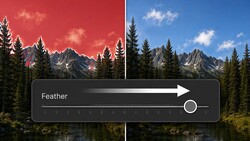
The castle gets its own object mask, drawn with the rectangle selection, where Möhrle adds texture and a little contrast while pulling back saturation and highlights on the bright walls. For the hill, he starts from Lightroom's landscape mask set to mountains, adds a brush to cover a missed area, then subtracts linear gradients from the shaded right side and the bottom, so only the sunlit slope is affected. Raising exposure, highlights, and whites there left a hard white line along the mask edge. He removes it by subtracting another gradient and brushing along the edge with the feather set all the way up, then warms the forest with temperature and tint. A second mountains mask goes to Point Color, where he samples a bright orange in the trees, raises its luminance, shifts the hue slightly, and uses the variance slider to keep the result more neutral.
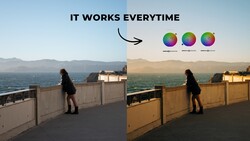
In the Color Mixer, Möhrle pulls the yellow hue toward orange, since he wants more orange in the scene, and raises the aqua hue, which mostly affects the sky and the distant hills. A small push on the blue hue tips the sky slightly toward purple, which sets off the sunset colors. He then lowers orange and blue saturation and accepts that the frame looks a little muted for a moment. Color Grading brings the warmth back with an orange tone in the highlights, a gentle warm push on the global wheel, and cooler tones in the midtones and shadows.
The Calibration panel adjustment Möhrle makes on almost every image is in the video above.


Join the Fstoppers community for free
-
Post comments and join in the discussions
-
Browse the site ad-free
-
Share your work and get featured in the community
-
Compete in the photo contests for fun and prizes
No comments yet