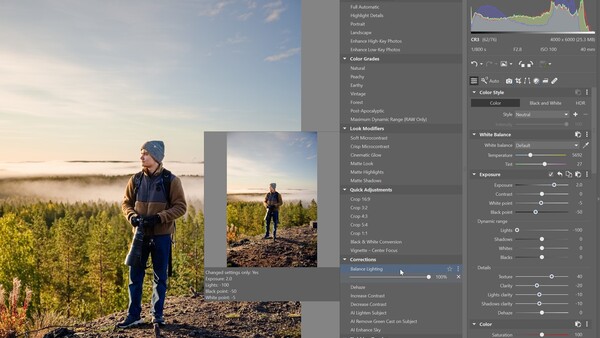
Zoner Studio's Fall Update replaces most of the editor's presets with 37 new ones built to be layered. You pick a color grade, add a texture or glow look on top, fix the light, and finish with sharpening or grain, and each step adds to the one before it instead of overwriting it. The update, free for subscribers, also brings an experimental AI Lab with generative tools and finer control over masking, tone curves, and split toning.
The new presets in Zoner Studio sit in six groups: Color Grades, Look Modifiers, Corrections, Creative Effects, Finishing Touches, and Quick Adjustments. In Zoner's own walkthrough, a backlit outdoor portrait starts with the Peachy color grade, picks up Soft Microcontrast and Cinematic Glow from Look Modifiers, and then gets Balance Lighting from Corrections, which lifts the darker face while keeping the contrast natural. Several presets build AI masks for you. AI Lighten Subject brightens only the person, AI Remove Green Cast on Subject takes out the color that foliage reflects onto skin, and AI Enhance Sky is there for landscapes. Creative Effects work on selected parts of the frame, with options such as AI Subject Pop and AI Subject Rim Light for separating a subject from the background. Each preset has its own intensity slider, and you can open the masks it creates and refine them.
You can also display which parameters a preset changes, which makes the set a way to learn how Zoner's tools interact as well as a shortcut. Any stack can be saved as your own preset, duplicated to try a variation, or filed into folders, and presets you don't use can be hidden. For a series of portraits or a batch of travel photos, you build the look on one frame, save it, apply it to the rest, and adjust only what differs from shot to shot. The Auto-Enhancement group stays, but the old color and black-and-white presets are gone from the default set, and Zoner still offers them as a download at zoner.com/presets. Layering looks isn't new elsewhere, since Capture One has let you stack styles for years and Lightroom's adaptive presets have applied AI masks to subjects and skies since 2022, but this is the first time Zoner Studio's presets have been designed as a step-by-step system.
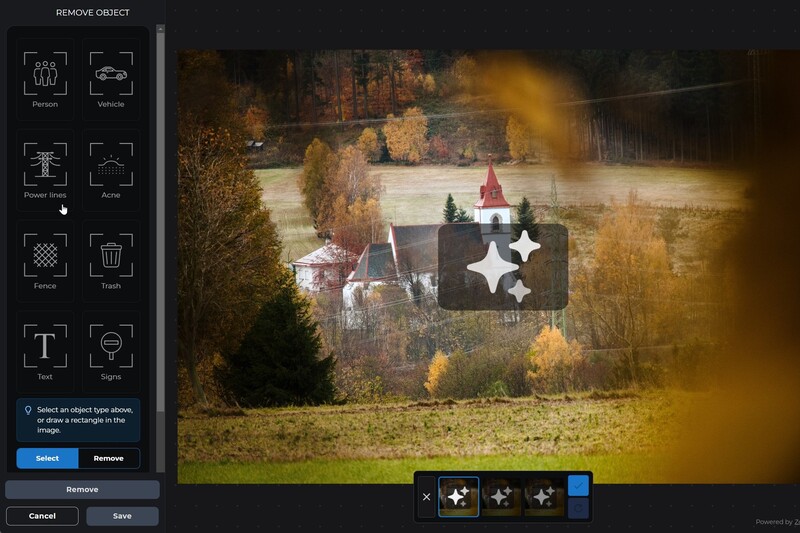
AI Lab brings tools from Zoner AI, the company's separate AI service, into Zoner Studio. Zoner says it includes 19 tools, among them Noise Removal, Remove Object, Generative Extend, and Generative Rotation, which straightens or rotates a photo and generates the missing areas. Zoner keeps it apart from the main editor on purpose, as a place for features that aren't yet good enough to build into Zoner Studio itself. The tools run online, process one photo at a time, and return a JPEG of up to 4K with no metadata, so Zoner recommends finishing your raw edit, exporting it, and using AI Lab as the last step. "AI is opening up a world of new possibilities for photographers. Our priority is to develop tools that genuinely make sense when working with real photographs," said Michal Prouza, head of the software division at Zoner. He added that tools may appear, change, or be removed from AI Lab over time, and that the ones that earn their place could later move into the main editor.
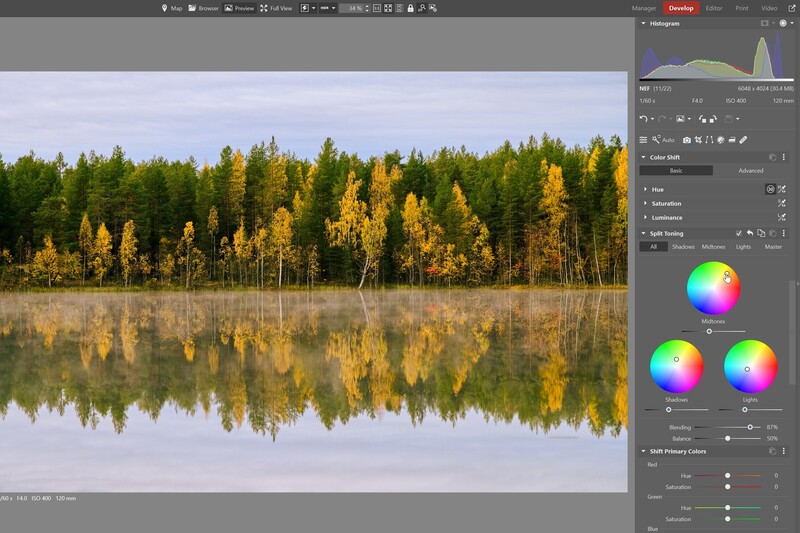
The color and tone changes are smaller but useful. Luminance Range masks are now built on the Blacks, Shadows, Midtones, Lights, and Whites ranges from the dynamic range controls, with a preset for each, and Zoner says the resulting masks are smoother and look more natural. The old brightness-value selection is still available from the tool's gear menu. Saturation Correction, which sets how much a contrast change on the tone curve affects color saturation, now works on the luma curve as well as the RGB curve, starting from a default of 50. Split Toning adds a midtones wheel alongside shadows and lights, a lightness slider under the wheels, and a Blending control that sets how much the three tonal ranges overlap.
Search can now filter by stacks, video projects get animated text, and Zoni, Zoner's AI assistant for questions about the software, now works inside the app.
The Fall Update is available now at no extra cost to Zoner Studio subscribers. A subscription costs $59 per year, or $98 per year for a family plan that gives everyone in a household their own account, and there's a free seven-day trial. Zoner Studio runs on 64-bit Windows 10 (version 1903 or newer) and Windows 11.





Join the Fstoppers community for free
-
Post comments and join in the discussions
-
Browse the site ad-free
-
Share your work and get featured in the community
-
Compete in the photo contests for fun and prizes