
Peakto has been around for several years. As a Mac-only media manager, it was one of the first to use AI for finding photographs. I've reviewed earlier versions and found it reliable and powerful.
Now the company has released version 3.0 with a barrel of new features. It's designed to manage libraries of more than 3 million media assets, and Peakto delivers significantly faster AI search, advanced video preparation tools, and real-time collaboration, all while original media remains stored locally. With new MCP support, AI agents can now operate Peakto to streamline creative workflows.
The new features include:
A new data architecture built to manage libraries of more than 3 million photos and videos. The application launches in seconds, while a redesigned grid keeps browsing fluid across collections of 10,000 files or several million.
Its 100% on-device AI, now up to three times faster, lets users find media through natural language queries, face recognition, visual similarity, metadata, and video transcripts. A new query engine powered by the latest visual AI models delivers faster, more relevant results.

Peakto brings together media from NAS devices, external drives, and Mac folders, alongside libraries from Lightroom Classic, Capture One, Apple Photos, and Adobe Premiere Pro—without moving or duplicating original files. A new control panel lets users speed up indexing and schedule updates while optimizing resource usage based on the Mac's available memory.
Video Search
Version 3.0 also includes video searches:
A new video player and multitrack bin editor let filmmakers assemble clips from different sources into rough cuts, establishing a story's structure before continuing in Adobe Premiere Pro, DaVinci Resolve, or Final Cut Pro.
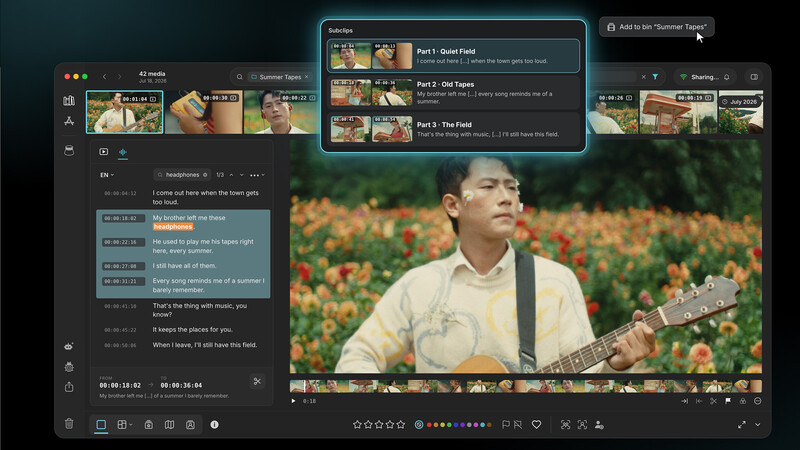
Selecting a sentence in a transcript turns the corresponding footage into a subclip. Video segments surfaced by search can also become subclips, while the new player provides an at-a-glance view of all subclips created for a video. Editors can move directly from finding a shot or interview excerpt to building an initial narrative sequence.
Collaboration Without the Cloud
The Peakto web client now provides most macOS features, enabling creative teams to search, review, and edit via browsers. Administrators manage projects and synchronization, while real-time notifications align collaborators. Original files remain locally stored, supporting remote collaboration.
AI Agents for Media Management
New Model Context Protocol (MCP) support connects Peakto to AI agents such as Claude and Codex, allowing them to search media, add annotations, and create albums on a user's behalf.
Creators can describe a task in natural language and delegate its execution to an agent. By making its capabilities accessible to external agents, Peakto enables custom automations that reduce repetitive library management work and support creative workflows.
More Precise Search and Easier Navigation
- A new configurable search mode that groups results by category.
- More polished thumbnails and improved face clustering for face annotation.
- A refreshed interface and redesigned navigation panel that make subfolders easier to browse.
As I mentioned, Peakto has been an impressive app. I use version 2 on my home Mac Studio to manage many thousands of photos, and its AI features make finding photos easy with a text description. Version 3 seems light-years more advanced, and I'm anxious to give it a try and see if it fits my workflow. I hope to have a full review soon.

Pricing and Availability
Peakto 3.0 requires macOS 14 Sonoma or later and an Apple Silicon Mac (M1 or newer).
The Standard plan starts at $10/month and includes the Mac app and individual web access.
Pro starts at $25/month per user, adding multi-user access, collaboration, and guest access.
A perpetual Standard license is also available as a one-time purchase with one year of updates.






Join the Fstoppers community for free
-
Post comments and join in the discussions
-
Browse the site ad-free
-
Share your work and get featured in the community
-
Compete in the photo contests for fun and prizes