

That new camera smell is intoxicating. The temptation to rush outside and start shooting is overwhelming. But hold on. Before you chase golden hour or book your first client, there are essential steps that separate prepared photographers from those who learn hard lessons in the field. Here is your complete checklist for getting your new gear truly ready.
1. Update the Firmware First
Your camera likely spent months sitting in a warehouse before it reached your doorstep, which means it probably shipped with outdated software. Firmware updates squash bugs, refine autofocus performance, and occasionally unlock entirely new capabilities. Fujifilm updates have been legendary for adding features, and Sony has patched in breathing compensation on select bodies.
Head to your manufacturer's support page, download the latest firmware to a freshly formatted memory card, and follow the installation instructions. Always update before you start customizing settings, since some firmware installations will reset your menus to factory defaults. There is nothing worse than spending an hour configuring your camera only to watch those changes vanish.
2. Remap Your Buttons
Camera manufacturers configure default controls for a hypothetical average user, and that hypothetical person is almost certainly not you.
Take time to assign Eye-AF to a back button or a convenient function key. Create a shortcut for Silent Mode when you need to stay discreet. Make sure ISO adjustment is accessible without pulling your eye from the viewfinder. Consider mapping a button to toggle between photo and video modes if you shoot both. Portrait photographers might want instant access to Face Registration settings. Wildlife shooters often benefit from a dedicated button that switches between single-point and wide-area autofocus.
The goal is a camera that responds instinctively to your shooting style rather than forcing you to navigate menus under pressure.
3. Build Your Custom Menu
Modern cameras bury useful functions across 40 or more menu pages, yet most photographers only access a handful of those settings regularly. Every major manufacturer offers a customizable "My Menu" section. Stock it with the options you actually need: Format Card, Intervalometer, Subject Detection Type, Silent Shutter, Pixel Shift (if available), and Focus Peaking settings or whatever makes sense for you.
Think about the functions you find yourself hunting for repeatedly. If you shoot timelapses, add interval shooting settings. If you frequently switch between mechanical and electronic shutter, include that toggle. When light is fading fast, those saved seconds matter.
4. Run a High ISO Stress Test
Do not wait until a paid assignment or a once-in-a-lifetime sunset to discover your camera's noise limits.
Find a dark room and photograph the same scene at ISO 1,600, 3,200, 6,400, 12,800, and beyond if your camera allows. Import the files to your computer and examine them at 100% magnification. Pay attention to shadow areas especially, since noise tends to hide there before becoming visible in midtones. Identify exactly where noise becomes unacceptable to your standards. That number is your safety ceiling, and you should avoid crossing it unless circumstances demand otherwise.

5. Configure Your Dual Card Slots
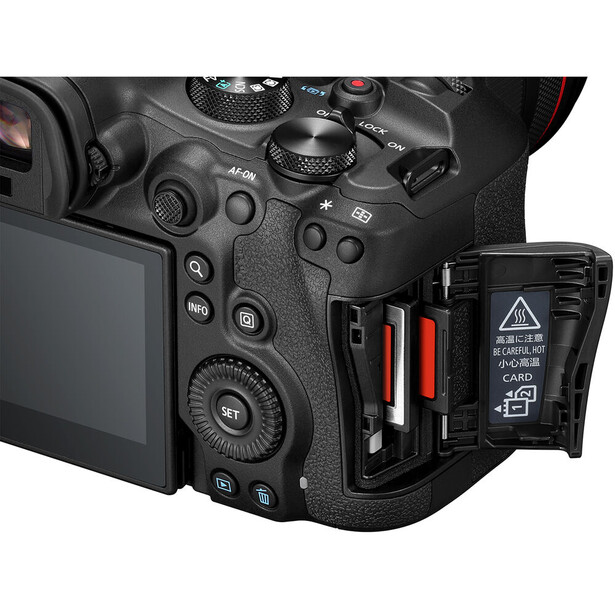
If your camera offers two memory card slots, resist the temptation to use the second as simple overflow storage. Switch the setting to simultaneous backup mode, which writes identical data to both cards at once. Memory cards fail without warning, sometimes catastrophically. Writing to both slots is the cheapest insurance policy in photography.
If your camera uses two different card types (CFexpress and SD, for example), be aware that write speeds will be limited by the slower card when shooting in backup mode. For casual shooting, this rarely matters. For high-speed bursts at sporting events, you may need to weigh redundancy against performance. Some photographers compromise by shooting raw to the fast card and JPEG backups to the slower one.
6. Set the Correct Date and Time
This sounds painfully obvious, yet photographers skip it constantly.
If you ignore this step, your images will carry incorrect timestamps forever, turning your Lightroom catalog into an unsortable mess that takes a lot of effort to fix. Set the date and time the moment you power on the camera so your metadata is accurate from the very first frame. If you travel frequently, learn where your camera stores its time zone setting. Some bodies allow you to save a home and destination time zone, making international trips much easier to manage. Accurate timestamps also matter when you shoot alongside a second photographer and need to merge timelines later.
7. Format Your Memory Cards in Camera
Take any existing memory cards and format them inside your new camera body. Do not simply delete files through your computer. Formatting in camera creates the specific folder structure your camera expects for efficient data writing. This prevents the corruption errors that plague photographers who swap cards between different bodies without reformatting.
Make a habit of formatting your cards before every significant shoot rather than simply deleting images. This keeps the file system clean and reduces the chance of errors accumulating over time. Just be absolutely certain you have backed up everything first.
8. Fill the Buffer With a Burst Test
Understanding your camera's physical limits prevents nasty surprises during critical moments. Hold down the shutter in continuous high-speed mode until the camera stops firing. Then time how long it takes for the buffer to clear. This exercise teaches you exactly how many frames you can capture before the camera needs a breath, which is vital knowledge for sports, wildlife, or any action sequence.
Repeat this test with different memory cards if you own several. A fast CFexpress card will clear the buffer dramatically more quickly than an older SD card, which directly impacts how soon you can resume shooting.
Also test with both raw and compressed raw formats if your camera offers them, since smaller files clear faster and may extend your effective burst depth.
9. Test Autofocus on Your Pet
Pets are chaotic, unpredictable, and rarely cooperative. This makes them perfect subjects for stress-testing autofocus.
If you can consistently nail focus on a dog sprinting across your backyard, you are ready for almost anything in the field. Use this low-pressure environment to experiment with different autofocus area modes and tracking settings. Try shooting your pet running directly toward you, which is the hardest scenario for any autofocus system. Experiment with tracking sensitivity settings (sometimes labeled "subject switching" or similar) to see how your camera handles momentary obstructions. Take notes on which combinations work best so you have a starting point for real wildlife encounters.
10. Customize Your Viewfinder Display
Factory viewfinder configurations are usually cluttered with unnecessary information while missing critical tools. Dive into your display settings and enable the histogram to protect your highlights. Turn on the electronic level (virtual horizon) to keep horizons straight. These two overlays will save you countless hours of exposure correction and cropping during post-processing.
Consider what else might help your specific workflow. Some photographers enable the focus distance indicator for landscape work. Others want a constant battery percentage readout rather than a vague icon.
Many cameras let you create multiple display presets that you can cycle through with a button press, allowing a minimal view for composition and a data-rich view for technical evaluation.
11. Switch to Raw Capture
Even if you have never edited a photo in your life, set your image quality to raw or raw plus JPEG.
A raw file preserves all the data your sensor captures, while JPEG compression discards information permanently to reduce file size. Shooting raw future-proofs every image you take. When you eventually learn to edit, you will have the dynamic range and color depth to transform those early shots into something remarkable.
12. Add the Camera to Your Insurance
This is the step nearly everyone forgets, and it is arguably the most important.
Standard homeowners or renters policies often cap electronics coverage at disappointingly low amounts, and many exclude accidental damage that occurs outside your home, particularly if you're using your gear for work. Contact your insurance agent and specifically list your camera body and lenses as scheduled items. For a modest monthly premium, you gain protection against drops, theft, water damage, and the inevitable moment you leave a bag on a train.
Professional photographers should explore dedicated camera insurance providers like Hill & Usher, which offer policies tailored specifically to working photographers and often include coverage for rented gear. Keep receipts and serial numbers stored somewhere safe (a cloud document works well) to streamline any future claims.
13. Take a Boring Photo Walk
Resist the urge to drive to an epic location for your maiden voyage.
Instead, walk around your neighborhood with zero expectations. Force yourself to practice the new autofocus modes on passing cars, squirrels, joggers, and blowing leaves. Photograph a neighbor's cat. Capture garbage cans with the enthusiasm of a landscape master composing a sunset.
The objective is to fumble with unfamiliar buttons and menus now, in a completely low-stakes setting, so that when you finally stand on that mountain peak or step into that wedding venue, muscle memory takes over and the camera disappears from your thoughts.
Spend at least an hour doing this. Change settings constantly. Make mistakes on purpose. The only way to internalize a new tool is to use it until it feels invisible.
Got your own new-camera rituals I missed? Drop them in the comments.


Join the Fstoppers community for free
-
Post comments and join in the discussions
-
Browse the site ad-free
-
Share your work and get featured in the community
-
Compete in the photo contests for fun and prizes
40 Comments
1. Update the Firmware First
Great idea! But I have no idea how to do that. Would have to pay someone to do it for me because I have trouble understanding any step-by-step instructions that have more than 2 steps.
2. Remap Your Buttons
I have never mapped any buttons. Don't even know if my cameras are capable of that. Even if they are, again, that would require following instructions that have more than 2 consecutive steps, so it would require a degree of focus and concentration and mental "sticktuitivenes" that I just can't do.
3. Build Your Custom Menu
How in the world do people ever figure out how to do that?! Again, that seems like it would require me to focus my brain on a task for more than a minute or two, so it just isn't something that I am capable of.
4. Run a High ISO Stress Test
Yes! Of course! It would suck to shoot at a lower ISO than you need to, just because you assume that higher ISO files would be too grainy. And it sucks even more to shoot at too high of an ISO, only to find out later that you are forced to use some kind of noise reduction process on your images because they are too grainy the way they are straight out of the camera.
5. Configure Your Dual Card Slots
I have had a lot of bodies with dual card slots, but I never used two cards in any of them. I never knew that using two cards require some kind of set up. I thought you would just stick the extra card in and continue shooting, the same way you do with one card.
6. Set the Correct Date and Time
Yes! I can actually do that, because it is not an involved multi-step process. But most of my images still have the wrong date and time because I road trip across time zones so frequently; several dozen times each year. So I keep the camera set to Pacific Standard (not daylight savings) time all the time, so that way I can always just do the calculation for any particular image, and figure out what time I actually took the photo.
7. Format Your Memory Cards in Camera
Well yes, of course! I format the card every time I put it back in the camera after a download. Which is about once ever 3 or 4 days, all year 'round. So I format the memory card approximately 100 times each year.
8. Fill the Buffer With a Burst Test
Good idea! I don't do this because in real life shooting scenarios I simply don't fill the buffer. I mean I have only done it like 3 or 4 times in my whole life, and not once in the last 8 years. So for the way I shoot, it is not important for me to know these limits. But if I got into shooting birds in flight, and got a lens/body combination that were capable of those focusing demands, then my shooting style would probably change, and I would probably run up agains the buffer limits from time to time.
9. Test Autofocus on Your Pet
Great idea! Perfect practice for real-world shooting!
10. Customize Your Viewfinder Display
I wish I knew how to do that. I would love to see my settings in my viewfinder, but the camera was not set up that way when I got it and I think that setting it up that way would require going into the menu and following step-by-step instructions, and I am just not up to that. It's probably just mental laziness, but any time I have to read how to do a step, do it, then look back and read the next step, etc., etc., etc ...... that just fries my brain after about 30 seconds. So I am stuck using a camera that doesn't show me what I need to see in the viewfinder. I wish that technological things would just come to me without me having to force my brain to focus and concentrate. Because I do not have the mental work ethic to concentrate like that, so if it isn't super easy, then it just never gets done.
11. Switch to Raw Capture
Well yes, of course! I do that as soon as I get a camera, and then that setting never gets changed, ever. Only once in the last 18 years have I changed that back to jPeg, and that was on a 3 day trip to California in September of 2010, because I forgot to bring extra memory cards so I had to fit the whole trip on one card so I couldn't shoot RAW because then I wouldn't be able to take enough photos. But other than that one short trip, I have never shot anything other than RAW. So that is truly a "set it and forget it" situation.
12. Add the Camera to Your Insurance
I wish! I can't add it to my homeowners/renters insurance because I sell photos, so I am disqualified for any coverage that isn't a business policy. And I have called and emailed a whole bunch of insurance companies asking for business policy quotes, and the rates are astronomical. Like no way I can afford several hundred dollars every year just for insurance. If they had rates for like fifteen or twenty bucks a month that would cover all my gear against every type of damage or loss, then yeah I would somehow come up with that much money. But any more than that is just not gonna happen because I simply don't have that kind of extra money and have no idea how to easily/conveniently earn that much more than I currently earn.
13. Take a Boring Photo Walk
Hmmmm. Probably not gonna happen. Why not just drive twenty minutes into the national forest and do test shooting there, where there are at least some interesting things to shoot? I'm up in those wild natural areas about 4 times a week anyway, so why not just take the new camera with me when I head up there?
---------- ---------- ----------
EDIT:
I see several down votes to my comment already. Hmmm.
I am not suggesting that others should do the things I have done. I am simply explaining the way I handle each of Alex's recommendations. What is wrong with me telling the community how I do things? Especially with me being super transparent about my limitations of mental focus and concentration, and financial limitations? Why do you disapprove of me explaining how and why I am unable to set up camera menus? Why do you disapprove of me explaining that I can not afford the exorbitant rates for camera insurance? When someone tells you about their own experiences, and is not suggesting that anyone else do likewise - why would you downvote that?
If you are someone who has downvoted my comment, could you at least let me know what part(s) of my comment you disapprove of? There are several of Alex's recommendations that I express agreement with and follow, and several that I express agreement with but am unable to follow due to my limitations, and a couple that I express disagreement with.
So, which thing do you disapprove of me for? Are you unhappy with me because I agree with Alex on some things? Or are you unhappy with me because I disagree with Alex on some things? Or are you unhappy with me because even though I agree with Alex, I am unable to do what he recommends doing, even though I want to?
I'm surprised you bother to read any articles about photography at all. You seem to know best.
Oh, and as an aside, many - many - of us prefer lighter gear for practical, physical, mobility - and cost - reasons. To not appreciate this is a basic failure to understand other people's pleasure in photography.
Oh, nice ducks by the way.
Ansel Spear wrote to me:
"I'm surprised you bother to read any articles about photography at all. You seem to know best."
If you read my responses to #1, #2, #3, and #10, it should be clear that I do not think that I already know best.
Here are those responses:
---------- ---------- ----------
1. Update the Firmware First
Great idea! But I have no idea how to do that. Would have to pay someone to do it for me .....
2. Remap Your Buttons
I have never mapped any buttons. Don't even know if my cameras are capable of that.
3. Build Your Custom Menu
How in the world do people ever figure out how to do that? ......
10. Customize Your Viewfinder Display
I wish I knew how to do that.
----------- ----------- ----------
Do those responses that I wrote really seem like I think I know everything already? Really? Do they sound like something someone would write out of arrogance?
.
It's your arrogance, quite frankly.
Tom is the very last person in the Fstoppers community that I would consider to be arrogant. We often disagree on many issues, but he is always respectful and appreciative of other people's opinions.
Thank you Ed! It is interesting that a certain attitude or mindset can be interpreted as arrogance when it is actually something else. I think we all misinterpret someone's attitude at some point or other.
Could you find the parts of my comment that you thought were arrogant, and quote them, so that I can learn what phrases and sentences are interpreted as being arrogant? In the comment that you downvoted, I do not see anything that I would think of as arrogant. Yet you obviously think that some of the things I wrote were arrogant, so I would like to know what those things are.
Er, this . . .
When someone is building a house, they don't complain that the circular saw is too big to fit in their lunchpail. When someone goes water skiing, they don't complain that the water skis won't fit in their purse. Yet for some bizarre reason, many photographers have whacked mindsets about what the size and weight of their gear should be. . . .
. . Yet, many people complain that LITTLE lenses like the 100-400mm f5.6 or the 70-200mm f2.8 are just too big and heavy for them. I just don't get that mindset. After all, we are out there solely to do photography .... it's not like we are out and about for other things and just want to have a camera in our pocket in case a good photo opportunity pops up.
For serious photographers, the only reason that we are out there, wherever it is that we are, is to do photography, so it stands to reason that we would not mind carrying professional-level gear. High-end photography isn't supposed to be convenient and easy, it is supposed to be productive. To go on a photo shoot and then complain that the lens won't fit into a pocket or handbag ..... is just ludicrous.
The whole idea, Tom, of voting on a comment seems like a pretty bad idea to me. As I've said many times before, I'm not campaigning for public office, so I prefer to have a comment instead of a vote. But for most people in a hurry, having short attention spans, and limited capacity to articulate a thought, I guess that a vote serves some menial purpose. I just don't like it. And I doubt you'll ever get many answers to your questions asking for reasons in support of the vote. It's simply the way people are. The down vote that I'm most surprised by is from Alex. Certainly writing a comprehensive response as you did should stimulate more comments and discussion. And isn't that a good thing for the author of the article? I'm pretty sure they follow activity on their articles, and it seems kind of shortsighted to discourage a community member from making further comments by hitting them with a down vote. That's like telling your client that they're an idiot. Either way, up or down votes do nothing for engagement.
Ed wrote:
"The whole idea, Tom, of voting on a comment seems like a pretty bad idea to me. As I've said many times before, I'm not campaigning for public office, so I prefer to have a comment instead of a vote. But for most people in a hurry, having short attention spans, and limited capacity to articulate a thought, I guess that a vote serves some menial purpose."
But Ed, this is not a binary decision. One can vote on a comment and also reply to that same comment, as I often do. The ability to vote on a comment is not mutually exclusive with the ability to write a reply.
I like the thumbs up or thumbs down voting thing. Why? Because it allows me to acknowledge that I have seen and read a comment, in cases where the comment does not need a reply. For instance, if someone writes a comment and I quote them and ask them to clarify something, and they write another comment clarifying it, I can click the thumbs up, as a way of showing them that I saw their clarification. There are times when it is appropriate to write back, "Thank you for the explanation" ...... but then there are times when even that is not really necessary or appropriate.
So it is nice to have a way to let someone know that I saw their comment without writing another one, showing up in their notifications, etc.
You're okay with an upvote without a corresponding comment or explanation, but a downvote without an explanation annoys the heck out of you. You can't have it both ways.
I realize you can do both, vote and comment, but a vote is mostly used as a convenient substitute for articulating a thought. Looking at numbers of thumbs does absolutely nothing for me. I haven't lived these many years just for someone's label of approval or disapproval. In fact, if it were not for you and a few others who often write a thoughtful comment, I wouldn't be here. Many of the articles related to camera gear and software techniques are of minimal interest to me, but I find the comments written in response to be far more interesting.
"You're okay with an upvote without a corresponding comment or explanation, but a downvote without an explanation annoys the heck out of you. You can't have it both ways."
Why not? I give lots of up votes, both with and without corresponding comments. But I do not give downvotes without explaining why. And when I explain why, I do so in detail. To expect the same decency from others is not preposterous or unreasonable. Maybe it's unrealistic, but certainly not preposterous or unreasonable.
You do it that way, but few people support their down votes with a comment, so maybe your expectations are, perhaps, illogical? I've been watching a lot of Star Trek reruns lately.
"Many of the articles related to camera gear and software techniques are of minimal interest to me, but I find the comments written in response to be far more interesting."
Oh yes we are kindred spirits in this area. I am only here because of the comments and the ability to interact with others via the comments.
Alex, you left out two critical steps! First, after step 6, BACK UP YOUR SETTINGS TO A MEMORY CARD IMMEDIATELY! Save the settings files to multiple media, some of which will reside on a memory card in your camera bag; some to be retained on your computer (and network storage). Second, document your settings in a spreadsheet. This will help you reconstruct or understand which setting(s) need to be modified. For every setting, include the menu and page within menu on which to find the specific setting. Also, segregate the menu items that are saved in the configuration from those that need to be set manually every time. This process has saved my bacon several times. This process includes all custom settings stacks, with every stack identified by purpose, like landscapes, architecture, wildlife, astrophotography and lunar photography, as some examples. Yes, I admit to being OCD about the intimate details of my settings. I also have to remember to update ALL my saved settings files and documentation EVERY time I modify my setups and custom settings stacks.
And for the record, I applaud Tom's openness, but could not disagree more with his premise. Your limitations are only those that you agree to accept, consciously or subconsciously.
I set the camera to RAW, put the white balance to the Kelvin setting and adjust accordingly for each shoot, set the ISO to 1600 and adjust as needed, then set shutter speed and aperture as needed for each shot. I have not needed to back this up to a memory card because it only takes a minute and a half to do all of that.
What are all the complex things that you are doing with your settings that require backing them up?
"And for the record, I applaud Tom's openness, but could not disagree more with his premise."
I am very interested in which premise it is that you disagree with. I wrote a lot of things in that comment and people have shown strong disapproval of my comment, but I have no idea what parts of my comment they disapprove of so much. I am trying to figure out what is causing folks to express strong disapproval of me, but so far no one has told me, even though I have asked them to.
Any details you can discuss about what premise you disagree with would be much appreciated.
Tom, the premise that I most disagree with is that you're incapable of learning how to use technology effectively.
Certain technology I can learn to use, no problem. There are actually some things that come very easily to me.
For instance, Canon DSLRs. When I got my first Canon DSLR in 2007, a 1D Mark 2, I just charged the batter, turned it on, and scrolled through the menu. Everything was very intuitive, and I figured it out in no time with practically zero mental effort. It's like I "just knew" how everything on that camera worked, and never had to read instructions or manuals or anything like that.
Same with my first Apple computer. When I got my first iMac, I just turned it on and, well, it's like I "just knew" how to use that computer. I didn't have to study anything or watch tutorials or read instructions. It was made properly, so everything could be done naturally and intuitively.
So yes, I actually can learn to use technology effectively. But only if the user interface is favorable to the way my brain works. If the way the UI is designed is not in perfect alignment with the way my brain works, then I would have to actually study to be able to learn how to use it. I mean study like the way you have to do in college when they give you quizzes and tests and stuff.
My brain reacts with resistance when I try to force it to study something, when I try to make it concentrate more than it just naturally wants to.
FOR EXAMPLE: Imagine having to do hard physical work, like dig a ditch. Now when you feel great in the morning after a solid night's sleep, you may actually want to dig that ditch. The use of your muscles feels good, and you just feel like doing it, so you get some digging done without actually having to force yourself to do it. But then after 20 or 25 minutes, the digging doesn't feel so good anymore. Your muscles tell you that they would like to stop digging. So you stop digging and don't return to the ditch until the next morning when you feel like digging again.
That is exactly the way my brain is when I have to make it focus and concentrate on something. Except that it only concentrates for about 30 seconds before it doesn't feel good, and tells me to stop making it think so hard, whereas the muscles last for 20 or 25 minutes before they tell me that they don't want to work anymore. The brain doesn't have anywhere near the tolerance for discipline and work than the muscles have.
So, if my brain only feels like thinking hard for 30 seconds at a time, then how in the world can I possible figure out all of those complex setting things? I mean it would be nice to be able to figure out how to use the mirrorless camera that I bought in 2023, but it doesn't work the way my Canon DSLRs do - I can not pick up the camera and "just know" how to set it up. I have tried to figure it out, but I can not get anything figured out before my brain says it doesn't feel like thinking anymore.
How do y'all actually get yourselves to figure these things out? Did you go to college or something, or expose yourself to some other environment where you HAD to train your brain to be disciplined and develop "mental work ethic"? I mean if you never ever force yourself to do anything you don't like doing, then how can you learn all these things that require the brain to think harder than it wants to?
Your last sentence seems to answer your own question. Sometimes you just have to persist when it's frustrating. And persistence is easier to tolerate when a person is motivated to learn something. Unless you really want to learn how camera settings work, the obstacle feels like climbing Mt Everest. If I'm not motivated to learn something because it's not relevant for me, I won't. I can't say much about college because it was so long ago that I barely remember much more than beer, girls and skiing. But I vaguely remember that my grades suffered terribly if I wasn't particularly interested in the subject.
I can speak to more practical things like database design which I used to run my printing business, or income taxes, or troubleshooting hardware problems... none of which were particularly fun. Even learning Photoshop was never something given to mastery in a day. The key is in breaking mammoth size problems into small parts. If your threshold for mental pain is 30 seconds, try and learn one thing in that time frame. Come back again tomorrow for another 30 seconds and apply your mind to one more thing about the subject that you're trying to learn. Forget about whether the manual is written to your liking. Forget for a minute about making self-limiting excuses. Just focus on one problem and keep putting in the time every day. Focus for just a short time on the positive instead of the negative. If it's 30 seconds today, maybe it could be 40 seconds tomorrow. Either way, break it down to one small step at a time. Remember the ancient expression: "Rome was not built in a day." I believe that persistence is rewarded over genius.
I relate to the way you explain things, especially in the second half of the first paragraph.
I went to college straight out of high school, and struggled along for two years before I failed out. Why did I fail out? Because there were so many times when the work required of my caused resistance; simply put, because I didn't feel like doing the work that was required.
A few years after failing out, I started taking a college course here and another there, at several different colleges. I got nothing but "A"s, and didn't experience any resistance at all. I mean that second time around, there was never a time when I had to make myself stick with something. It all came so easily. Zero effort required. Zero discipline required. I "just got it" without having to force myself to do anything I didn't feel like doing.
So what I am looking for is a way to learn this new-to-me mirrorless camera that is like that second time in college - a way to learn it that doesn't require any effort or discipline. A way in which everything just comes to me easily, without me experiencing any resistance along the way.
I wish someone could make tutorials or something that would enable people like me to learn the more complex technological parts of photography.
It still boils down to motivation. Despite not being well suited to academic studies, if I had dropped out of college, I'd have had no better prospects than working in a department store for $1.75 an hour. And worse than schoolwork was my fear of having to punch a time clock, in at 8:00 and out at 5:00. I would have aced Latin to avoid getting stuck working in a cubicle, and having to be there by eight in the morning. My lifestyle growing up in wealthy suburban NYC didn't exactly teach me the skills to live in poverty. Like yourself, I hoped for a good income without having to work too hard. Reality set in though after getting my diploma. I just had to figure out where the enjoyment of what I was doing would provide the incentive to work hard. I was lucky in that regard.
But back to you. I still think that if you change your mindset from expecting the tutorials to be written in a manner that serve your needs, to focusing your energy on step one, step two, step three, etc.; you can accomplish anything that you're motivated to learn. If it's a new camera, day one for a couple minutes would be to find where to insert a battery and memory card, and then the power-on switch. Day two might be where to set a manual shutter speed. By the time you get to eye-tracking auto-focus, you've solved a few hurdles and learned how to isolate just one feature alone and search for YouTube educational videos for that subject by itself. So much of education is learning how to approach the problem. I've made a few household repairs using YouTube that I'd never have made otherwise in a million years just reading a book. Really, there is so much visual content online for learning about anything, that all you need is the desire to learn it. If one video doesn't fit your style or answer your question, find another one. There is no solution for learning something with "no effort." But you can learn anything more effectively by breaking the task down into smaller parts.
Thanks so much, Ed, for your thoughtful, patient suggestions and your insights.
This is interesting:
"And worse than schoolwork was my fear of having to punch a time clock, in at 8:00 and out at 5:00."
I would actually love to get such employment! I mean, as long as whatever they wanted me to do from 8 to 5 didn't cause me to meet up against resistance, it would be so great to actually get paid for 8 hours each day. I would feel wealthy!
I have talked to people about such jobs, and gone to my local state-sponsored Job & Employment Center to try to find such a job in my community, but jobs like that are hard to find, and I have never been able to get anything like that.
But it would have to be moderately decent work. I sure as heck would not want such a job if it entailed cold calling people trying to sell them something. Or cold calling people and asking them to take a survey. That is hard on the brain and the emotions because I would be so stressed over the possibility that the people I call would be annoyed. I need to do something that is conflict free and that doesn't cause my brain to say "I don't want to think hard anymore."
Data entry would be perfect because I could just copy stuff from one document and paste it to another. Or looking things up on maps, or doing research on things. Not detailed research that you need training for, just basic research like,
"Find 12 fun things to do when you're in the Denver, Colorado area"
or
"write about the 12 best pizza places in Manhattan"
I would love to do anything along those lines, as long as someone would hire me to do it. I would GLADLY do that for minimum wage because minimum wage is really high in my state. And the best thing is that I would be working for someone else, so they would be responsible for doing all the businessy stuff that I am unwilling to do.
Even better would be security work, but not where I have to be up on my feet. The security jobs where you sit in a chair with monitors in front of you on a desk would be so great, because then I am only there in case some emergency happens, so I would be free to daydream about all of the things I love to think about, like pretty Colombian women and road tripping to far off places and how to make blinds for duck photography and on and on and on ........
As I said I have actively searched for these types of minimum wage jobs in my community but so far I have not been able to find anything like that. I think people who live in population centers have a much easier time finding cubicle employment. My town is only 2,500 people and the neighboring town is only 4,500 people and we are the biggest community for 100 miles - everything around us is rivers and mountains and sagebrush (which I really love!). I don't think we even have office cubicles in my area, but I wish we did because I would like to work in one and get paid for 40 hours every week.
You may be right... a certain amount of tolerance for one job or lifestyle may very well be built into our genes. For me it's more like blue jeans.
I learned at the ripe old age of 21 that I was not suited for office work. It was my senior year of college and I took a part time job at a bank to pay off the diamond ring I had bought for my fiance. Lord only knows why I took that particular job. It started at 7:00am and entailed opening and sorting stacks of overnight bank-by-mail deposits. Totally mindless work. The biggest challenge was getting there on time, which was nearly impossible after turning off The Twilight Zone at 2:00am.
It took only a couple weeks to get fired for consistently being late, but learned a valuable lesson in that I better not flunk out of school or I'd be back someplace like it working again. There's simply no freedom in an office cubicle with a boss looking over your shoulder. After graduation, I got into a sales job where I could work a day, like in Aspen or Telluride, and ski a day without having to answer to anyone. I did really well at both.
Tom, I had a similar issue with school. Despite acing aptitude tests, I could not get knowledge to penetrate the gray matter. Years later, I discovered the hard way that I'm dyslexic and had to re-learn how to learn. With that new perspective, I went back to school and earned a couple of degrees. Those successes did not negate the fact that I'm still dyslexic and have to work many times harder to learn. I'll quote Henry Ford - “Whether you think you can, or you think you can't - you're right.”
That's a great quote!
But for me it isn't so much about can or can't; it's about work ethic and willingness ..... most people do not realize that work ethic is pretty much fixed in us; it is something that you are born with a certain amount of and that's pretty much what you have for the rest of your life. I have never known of anyone or heard of anyone who habitually avoided anything they didn't like somehow changing their habits and becoming a hard working person. So while some people can "grind thru it" and so forth, others just won't be able to because they are not made that way.
When I was in high school, I scored real high on those tests too. And because of those scores, the local Army recruiter and the local Navy recruiter contacted my parents asking us to meet with them, to try to get me to commit to their respective military branches. In the interviews with them I had questions and concerns about what the daily schedule would be like, what the food would be like, if there were multiple options of what we could choose to eat at each meal, etc. I think they realized pretty quickly that I was not the kind of person they wanted in the military because I was primarily concerned with my comfort and pleasure.
I would literally rather just die and not exist anymore than make myself do things that I don't like doing. I would rather just starve and die than eat things I don't enjoy eating. No point to being alive unless you can have enjoyment almost all the time.
Just buy a book on the camera. Go to online Support Page and check to see if there is an online Help Guide that is all the info on the very small print on the big multi language paper but search able on line.
Today you can buy a book on the camera in a PDF format that can also be on your phone or pad so you can have if on a trip or out in the field.
Oh, there are plenty of resources available that explain how to use the camera and set it up ... but whenever I have tried to use one of those resources, at some point, early in, my brain says, "this is difficult and I don't feel like thinking so hard".
In other words, I encounter resistance when I try to read about the camera or follow along with a video tutorial about the camera. By "resistance" I mean my brain says, "this is hard, please stop making me think ".
If there was a way to learn how to do these things that didn't cause any resistance, that would be wonderful. Like the way a really good teacher can teach you things and get you to learn things in a way that makes you just feel like doing it, and doesn't require you to work ethic your way through resistance. But I haven't found a resource like that yet.
Add on recommendation #8 for those using SD cards: note what speeds your cards are so you don't inadvertently load a slower card if/when you need to take burst pictures.
Great list! I'll add:
14. Enter your name in the copyright information, so it gets added to the metadata of all the photos you take with the camera.
Alex Cooke Random ask.. would you consider writing a tech article on number 2? I could use some creative inspiration remapping buttons.. like what are each of the writers favorite remappings?
That kind of lesson would be best taught in video format, where the videographer could show us the menus and show themselves scrolling thru the options and selecting the correct one. Just like Tony Northrup does in the tutorials he makes for YouTube.
I disagree. Yes for any specific camera you are right.. but just to get some ideas out there.. an article is more than sufficient. Once we have the ideas we can go look up whatever video we need to figure it out for our own camera.
I guess I misunderstood what you were suggesting.
Given the absence of any industry standards regarding user interface (aka menus), even within manufacturers'' product lines, that would be a truly onerous task.
Not really.. functions are functions. Then you can go look up how to do that function on your camera. Sure there will be some misalignment
So ... hmmm ... are you suggesting that the article be about what the different functions are, and what they do, but not how to set those functions up? That's interesting. I assumed that everyone who is into such things already knows what all of the different functions are, but I guess there may be a few folks who actually don't know all that already, and if so, then the article that you seem to be suggesting would be useful to that subset of photographers.
Tom, I know what all the functions are. There are hundreds that can be assigned to 15 or so buttons on my camera. I don’t have other camera friends to chat with and see how they’ve set their customizable buttons up. I could find random youtube videos.. but the staff here seems much more knowledgeable than the randos you find online.
"There are hundreds that can be assigned to 15 or so buttons on my camera."
Hundreds of functions .... wow! I had no idea. I thought there were only white balance and focus settings and ..... well they're actually the only ones I can thing of. Unlike you, I do not know what the functions are. So content like the article you are suggesting would be interesting to me because everything in it would pretty much be completely new info.
Here's my favorite tip. Program a Fn button to Zoom to 100%. It lets me see a subject with a magnified view before I take the photo - like electronic binoculars or to check focus. The photo is taken by pressing the shutter and has an unmagnified view. I program the same button for use on Playback so I can immediately zoom in to 100% and check sharpness or focus on the actual photo made.
Good article. One thing I'd add right at the start is to put your name and contact information in the Copyright and/or Image Comment field. People lose their cameras or leave them in odd places by mistake. If there is no way to identify or contact the owner, the camera is gone forever. A simple solution is to put your name and contact information in the Copyright and Image Comment fields. Yes - it can mean that information is available on the internet in the image metadata. But the alternative is a good Samaritan who finds your camera is unable to return it. Consider using email address, website, or even a phone number - but help people to return your lost gear.