Choosing photo editing software is harder than it used to be. With Lightroom Classic no longer the only serious option, five credible alternatives now compete for your workflow, each with real tradeoffs in power, speed, and learning curve.
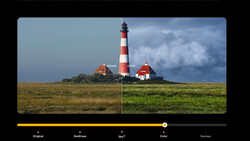
Coming to you from Anthony Morganti, this thorough video walks through editing the exact same image, a landscape shot on a Sony a7R IV at ISO 100, across five applications: Lightroom Classic, Luminar Neo, ON1 Photo RAW 2026, DxO PhotoLab 9, and Radiant Photo 2. Morganti applies the same workflow in every app: noise reduction if needed, crop and straighten if needed, profile selection, white balance, tone adjustments, local masking, and a finishing vignette. Using a consistent workflow across all five makes the differences between the apps impossible to ignore.
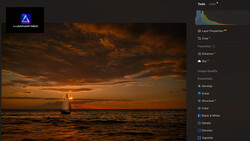
Lightroom Classic serves as the baseline. Morganti walks through tone adjustments using the basic panel sliders, sets white and black points using the Option/Alt key trick to catch clipping before it becomes a problem, then builds separate masks for sky, water, vegetation, and architecture using Lightroom's AI-powered landscape masking. Luminar Neo follows a similar structure but handles raw development separately from masking, which means you work in two distinct phases. Its vignette tool also gives you more placement control than Lightroom's, letting you center the effect on a specific subject rather than just the frame. ON1 Photo RAW 2026 adds a midtone slider you won't find in Lightroom, and its Effects panel lets you apply filters like Dynamic Contrast directly to AI-selected areas such as sky or architecture, which cuts down on extra masking steps.
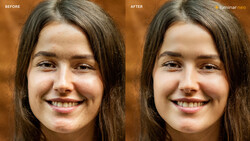
DxO PhotoLab 9 is where things get interesting and more demanding. Morganti is upfront that it has the steepest learning curve of the five and that he's least experienced with it, so his edit there is rougher than the others. That transparency is useful. PhotoLab 9 has tools you won't find anywhere else, including DxO Smart Lighting, ClearView Plus, and demosaicking-level denoising, but the AI masking is newer and less reliable than what you'd get in Lightroom or ON1. If you're already deep in another app's workflow, PhotoLab 9 will take real time to learn. Radiant Photo 2 sits at the opposite end of the spectrum. It reads your image automatically, identifies the scene type, and applies a starting workflow before you touch a single slider. There's no library module, no culling tools, nothing for organizing files. It's purely a session-based editor, but for getting a strong result fast, it's hard to beat. Check out the video above for the full rundown from Morganti.



Join the Fstoppers community for free
-
Post comments and join in the discussions
-
Browse the site ad-free
-
Share your work and get featured in the community
-
Compete in the photo contests for fun and prizes
5 Comments
No Capture One?
Lightroom as a baseline, that’s a joke…
Consider Darktable, it's fantastic and Free (Open Source)
What does winning means?
The digital Software may have been with Adobe for PS in February 19, 1990 and Lr February 19, 2007. Both very expensive even by 2010 when I went Canon T2i when one had to use, for me, Canon's software and the reason I went Sony was the enticement of Capture One for $20, no different from LR but even had ways to work with masks way back then. Several other SW's for a $100 or less came out also like Topaz with many things that was offered on a 5daydeal package, yes many things to play with.
I still have Capture One but seldom use for one big reason it at first made you bring all images in in a file of a date and once edited yes you can export but the edited and unedited remained but in a year/month/day file there was all those images next to the real image and clicking on the C1 image brought you back to C1.
I use a filing system like file cabinet year/month/date on all my images and HD's are by year separated.
I like todays Lrc the most and use for each image to edit and only one image at a time I export the image to another HD in the same way, My Lrc is empty of images.
The one program I use to view all images in my filing system is ON1 Photo RAW all you need to do is select a day of images and all come up in the file and I can look at each and pick and also edit it to see if worth further editing and send to Lrc for some playtime.
I do not know why photographers put all images in Lrc, first comes updates to Lrc where another file system is made then there comes every 3 years you need a new computer for a faster one or a new Windows like going 10 to 11 there will be a 12 and so on. It is like a cell phone we had the mod 4 now with a mod 5 and now the 6 is coming so about every 3rd year we put out almost $5K just stay up to date. but backups of all have to be done BUT if you just keep everything in a file system duplicated or even by 3's having in many different places or you can keep moving a catalog to another new computer and a updated program(s).
this image is from 2015 when noise control was no good and it was with a unchipped lens also the word for MW's to stack 10 images and work that with another program but also i was use to Bracketing but this night I had not studied enough to know in camera NR is turned off when SS is below 1s. the result is a image with mustache horizon no way to correct and not only noise but dead and hot pixels a wasted night but saving to years later Lrc made the LC and for many more unchipped lenses. Next NR got better even great enough to rid Hot and Dead pixels and Lrc got a HDR processing part. All combined you get 3 images put together each edited for noise and LC before then one image all clean and perfect alignment.
How many times do you have to move a catalog and how many computers latter with new operating systems and faster memories and what not, trying to find that image of many many years ago.
It is a bracketed 3 at +/-1EV no longer a wasted night.
Question how many editors have LC's for first unchipped lenses and those new correction that are there at the time you buy the new lens even being chipped? Sometimes you need to plan ahead!
I used the free Nik collection for many years just for the HDR when doing 5 at +/- 3EV to get a big sharp moon at night with a big foreground
This from my T2i days using a Promote Control device.
I use Corel Paintshop Pro. It does everything I need it to with no subscription.