Post-Production

Post-production is where raw files become finished images — and for most photographers, it's where a significant portion of their working time goes. This section covers the full post-production process: from culling and raw processing to retouching, color grading, and the workflow systems that keep a high volume of work manageable without sacrificing quality.

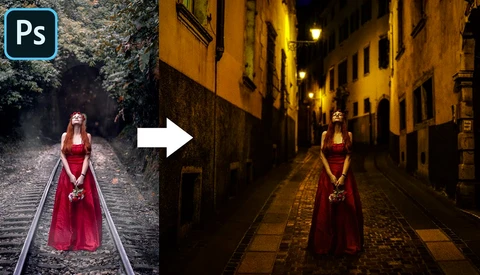
How to Remove People From Your Images

Have you broken up with your partner and would like to keep the photo? Well, come on in and let's see how to boot them out of the shot.

How to Photograph Ink and Paint in Water

One photography technique I've always been interested in learning is how to photograph ink in water. The resulting images are beautiful on their own, but having a library of ink clouds and paint explosions for use in composite work is also super valuable. In this video tutorial, I'll show you some of the best tips and tricks I've learned capturing ink in my own studio.

Try This Software Before You Upgrade Your Camera

Many of us get really excited about new cameras and upgrading our equipment. New, always seems better in the tech world. Unfortunately, it generally comes with quite a hefty price. Upgrading your equipment regularly can be extremely costly and in many situations, it's not really worth it. 

Are You Under-Editing Your Images?

The vast majority of the time, we talk about the dangers of over-editing your images. However, just as much as you can over-edit an image, you can stray too far in the other direction and under-edit them as well. This excellent video discusses five signs that you may be under-editing your landscape photos.

Let Lightroom Organize Your Photos in Less Than 30 Seconds

Most Lightroom users aren't taking advantage of this simple feature that literally organizes your photos for you, and it only takes around 30 seconds to set up in Lightroom Classic. Save time, and keep your library organized by following this tutorial.

How to Make Your Puppy Portraits Pop

Making great portraits isn't only for people, and with our pets being live-in models, we can get a little more practice perfecting our lighting and post-processing even at home.

A Guide to Portrait Editing and Sky Replacement Using Lightroom and Luminar 4

On-location portraits can be a great way to add more visual interest to your images, but unfortunately, the sky does not always cooperate as you had hoped. You can't just cancel your shoots whenever you do not have great weather, though. This great video will show you how to retouch a portrait in Lightroom while replacing the sky using Luminar 4.

How I Fix Underexposed Images

We have all done it. It doesn't matter how long you have been a photographer; at some point, you will take the perfect shot, but the flash will not fire, you will have slipped and moved the shutter speed, or any manner of blunders. Here is how I fix them.

Who Should Calibrate Their Monitors?

As a commercial photographer who shoots predominantly for print, I need a very well-calibrated monitor and camera profile, but does anyone else need this?

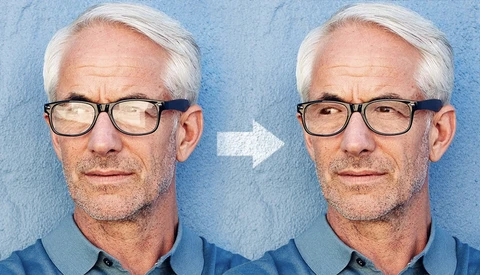
How to Remove Glare From Glasses Using Photoshop

A good studio photographer will know how to prevent glare from being captured in a subject’s spectacles, but it’s not always possible to avoid catching reflections during less controlled shoots. This detailed tutorial from Unmesh Dinda of PiXimperfect gives you a complete explanation of how to remove it.

Three Mistakes That Photographers Should Avoid

The wonderful thing about creativity is that there are no real right or wrong answers. There are plenty of artists that regularly break the rules in order to produce something compelling or beautiful. Nonetheless, there are still certain practices that can be widely disliked and preferably avoided. 

Watch This Free, In-Depth and Advanced Tutorial for Retouching Hair

In my experience, it's been rare for me to watch a tutorial on YouTube and feel completely satisfied with the information being presented. In many instances, the information is either really basic, common knowledge or just a new way of saying something that's already been said. The video linked above is a very welcome change from that. 

A Start to Finish Tutorial on Light Painting a Car

Light painting a car can be tricky to get right and difficult to know exactly what steps to take in camera. This video shows you the complete process, from garage space through to finished (and frankly brilliant) image.

Can You Save a Photo Through Lightroom Editing Alone?

While it's important to get things right at the source, if you've made that age-old mistake of not changing your camera settings before taking the shot, is it possible to recover the photo? Or is it destined for the recycling bin?

Video Editing Plugins That are Worth Buying

Plugins for both photography and video are plentiful nowadays, and the quality of them varies hugely. Here are one cinematographer's favorite video plugins that he is glad he invested in.

Important Editing Tips Every Photographer Needs to Know

Post-processing is, in many ways, deeper and more complex than taking the photograph itself. While that provides greater creative control and room to maneuver, it also creates more pitfalls. Here are some crucial tips for post processing your images.

Watch How This Landscape Photographer Edits a Photo by a Light-Painting Visual Artist

There are a lot of "edit-my-photo" type challenges going around because of restrictions on movement, but this one takes it to another level. Not only are the creators considered leaders in their respective fields, but the Photoshop editing workflow in this video is quite illuminating for anyone looking to learn how to utilize luminosity masks.

Here's Why You Should Always Bracket Your Photos

For many years now, I have religiously bracketed all my landscape images and macro images of flowers. This is why you should give serious consideration to always doing the same. 

Increase the Depth of Your Images With ACDSee Photo Studio Ultimate 2020

Over the last decade, we've had lots of new wide aperture lenses hit the market. Lenses like the Nikon 58mm f/0.95 make producing images with super shallow depth of field relatively easy. Even significantly less expensive lenses like an 85mm f/1.8 can produce beautiful, shallow depth in an image, but what if you want more depth? 

Learn How to Create This Fantastic Portrait Edit

Shooting a great portrait is only half the puzzle, as your post-processing has to back that up to create a complete winning image. This fantastic video will show you the process of editing this portrait for show-stopping results.

Would You Let Software Automatically Edit Wedding Photos for You?

Editing large batches of photos (such as those from a wedding) can be an extremely time-consuming task. What if software could do it for you? Would you use it? This interesting video takes a look at editing a wedding entirely using automatic software and the kind of results you can expect.

Make Your First Time-Lapse Video at Home

Have you ever seen your own plant grow in a time-lapse? You can, and it’s a great exercise to learn something new about your camera and post-processing.

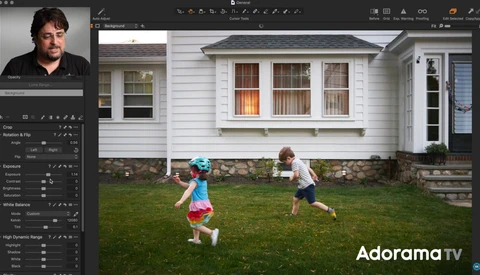
Is the Surface Book 3 a Macbook Pro Killer?

The newly announced Microsoft Surface Book 3 is reportedly their most powerful laptop ever. So could it be good enough to destroy the competition? Namely, the new Apple Macbook Pro 2020. Photographers and creatives alike love Apple products for editing workflows, but could this be the beginning of the end for Apple's domination of the creative market?

5 Great Tips for Making Your Landscape Images Pop in Luminar 4

Luminar 4's AI features have made most of the headlines, but the application is also a fully featured editor that can handle all the most essential adjustments as well as more advanced and creative techniques. This excellent video will show you five ways to make your landscape photos pop using Luminar 4.

A Look at Replacing a Sky in Luminar Versus Photoshop

Replacing a sky used to be a tedious (though still often worthwhile) procedure, but in recent years, advancements in selection technology and even AI sky replacement tools have surfaced, making the job quite a bit easier. This great video will show you how to replace a sky using both Photoshop and Luminar 4.

How to Enhance a Landscape Image Using Luminar 4

Luminar 4 is a great alternative for editing landscape photos and particularly for exploring your creativity. This informative video will show you how you can use the program to enhance a landscape image.

How I Spent My COVID-19 Vacation

Like most of you, I'm cooped up at home other than occasional forage for groceries. As a landscape photographer in Arizona, there's plenty of landscape, but I'm doing my best to abide by the stay at home rules. So basically, the landscapes are in one place, I'm looking at 4 walls.